
Introduction
This manual provides detailed instructions for the assembly, operation, and maintenance of your FUSOU 15 Drawers Vanity Desk with Mirror and 13 LED Lights. Please read this manual thoroughly before assembly and use to ensure proper function and safety. Keep this manual for future reference.

Image: The FUSOU 15 Drawers Vanity Desk, featuring a large mirror with LED lights, multiple drawers, and a matching stool.
Safety Information
- Always follow the assembly instructions carefully. Incorrect assembly can lead to instability and injury.
- Do not overload drawers. Distribute weight evenly to prevent tipping.
- Ensure all electrical connections are secure and comply with local electrical codes. Do not use damaged cords or plugs.
- Keep liquids away from electrical outlets and components to prevent electric shock.
- Place the vanity on a flat, stable surface.
- Keep small parts out of reach of children during assembly to prevent choking hazards.
- The glass top is tempered, but avoid dropping heavy objects on it to prevent breakage.
Package Contents
Your FUSOU Vanity Desk package includes all necessary parts, detailed assembly instructions, and tools. The item typically ships in two separate boxes, which may arrive at different times. Please ensure you have received all packages before beginning assembly.
- Vanity Desk components
- Mirror with LED lights
- Vanity Stool
- Hardware kit (screws, connectors, etc.)
- Assembly tools
- Instruction Manual

Image: Illustration indicating that the product ships in two separate boxes.
Setup and Assembly
Assembly is required for this vanity desk. Please follow the detailed instructions provided in the separate assembly guide included in your package. It is recommended to arrange each part by its number before starting assembly to ensure a smooth process.
- Unpack Components: Carefully remove all parts from the packaging. Verify that all components listed in the assembly guide are present.
- Identify Parts: Match each part to its corresponding number in the instruction manual.
- Follow Step-by-Step Instructions: Assemble the vanity desk and stool according to the sequence provided in the assembly guide.
- Secure Connections: Ensure all screws and fasteners are tightened securely, but do not overtighten.
- Mirror Installation: Carefully attach the mirror to the vanity desk as instructed.
- Electrical Connection: Once the vanity is fully assembled, connect the power cord for the LED lights and power strip to a suitable electrical outlet.

Image: An aerial view of the vanity desk with all 15 drawers pulled out, demonstrating the extensive storage capacity.
Operating Instructions
LED Mirror Lights
The vanity mirror features 13 LED bulbs with adjustable settings to provide optimal lighting for your needs.
- Power On/Off: Press the touch switch on the mirror to turn the lights on or off.
- Color Mode Adjustment: Short press the touch switch to cycle through 3 color modes:
- Warm Light
- Natural Light
- Cold Light
- Brightness Adjustment: Long press the touch switch to dim or brighten the lights continuously. Release when the desired brightness is achieved.

Image: The vanity mirror displaying the three adjustable color lighting modes (cold, natural, warm) and a slider for brightness control.
Built-in Power Outlet & USB Ports
The vanity desk includes a convenient built-in power strip for charging devices and powering styling tools.
- AC Outlets: Two 125V/12A AC outlets are provided for hair dryers, curling irons, or other electrical appliances.
- USB Ports: Two 5V/2A USB ports are available for charging smartphones, tablets, and other USB-powered devices.
- Hair Dryer Holder: A dedicated holder is integrated for convenient storage of your hair dryer.

Image: Close-up of the built-in power strip on the side of the vanity, showing two AC outlets, two USB ports, and a hair dryer holder with a hair dryer in place.
Glass Top Display
The vanity features an embedded tempered glass tabletop, allowing you to view and organize your cosmetics and accessories easily.
- Use the visible glass top to quickly locate items stored in the top drawers.
- Avoid placing extremely hot items directly on the glass surface.

Image: Detailed view of the embedded tempered glass tabletop, showcasing various cosmetics and accessories neatly organized beneath the glass surface.
Maintenance
- Cleaning the Surface: Wipe the engineered wood surfaces with a soft, damp cloth. Avoid abrasive cleaners or harsh chemicals that could damage the finish.
- Cleaning the Mirror and Glass Top: Use a glass cleaner and a lint-free cloth to clean the mirror and tempered glass top. Spray cleaner onto the cloth, not directly onto the mirror or glass, to prevent liquid from seeping into edges.
- Drawer Maintenance: Periodically check drawer slides for smooth operation. If needed, clean any dust or debris and apply a small amount of silicone lubricant.
- Electrical Components: Ensure all electrical cords are free from kinks or damage. Do not attempt to repair electrical components yourself.
Troubleshooting
If you encounter any issues with your vanity desk, please refer to the following common troubleshooting steps:
- Lights Not Working:
- Check if the power cord is securely plugged into both the vanity and the wall outlet.
- Ensure the wall outlet is functional by testing it with another appliance.
- Verify that the touch switch on the mirror is being pressed correctly.
- Power Outlets/USB Ports Not Functioning:
- Confirm the main power cord for the vanity is plugged in.
- Test with different devices to rule out device-specific issues.
- Avoid overloading the outlets; ensure the total current draw does not exceed 12A for AC outlets or 2A for USB ports.
- Drawers Sticking or Not Closing Smoothly:
- Check for any obstructions inside the drawer or on the drawer slides.
- Ensure the drawer slides are properly aligned and secured.
- Verify that the drawer is not overloaded or unevenly weighted.
- Vanity Appears Unstable:
- Re-check all assembly fasteners to ensure they are tight.
- Ensure the vanity is placed on a level surface.
If these steps do not resolve the issue, please contact customer support.
Specifications
| Brand: | FUSOU |
| Model Number: | VD008-WH-2 |
| Product Dimensions: | 15.7"D x 55"W x 55.06"H (40cm D x 140cm W x 140cm H) |
| Item Weight: | 150 pounds (68 kg) |
| Material: | Engineered Wood |
| Color: | White |
| Assembly Required: | Yes |
| LED Lights: | 13 bulbs, 3 color modes (Warm, Natural, Cold), Dimmable |
| Power Outlets: | 2 x 125V/12A AC Outlets |
| USB Ports: | 2 x 5V/2A USB Ports |
| Power Cord Length: | 5.0 Feet |
| Number of Drawers: | 15 |
| Glass Top: | Embedded Tempered Glass |
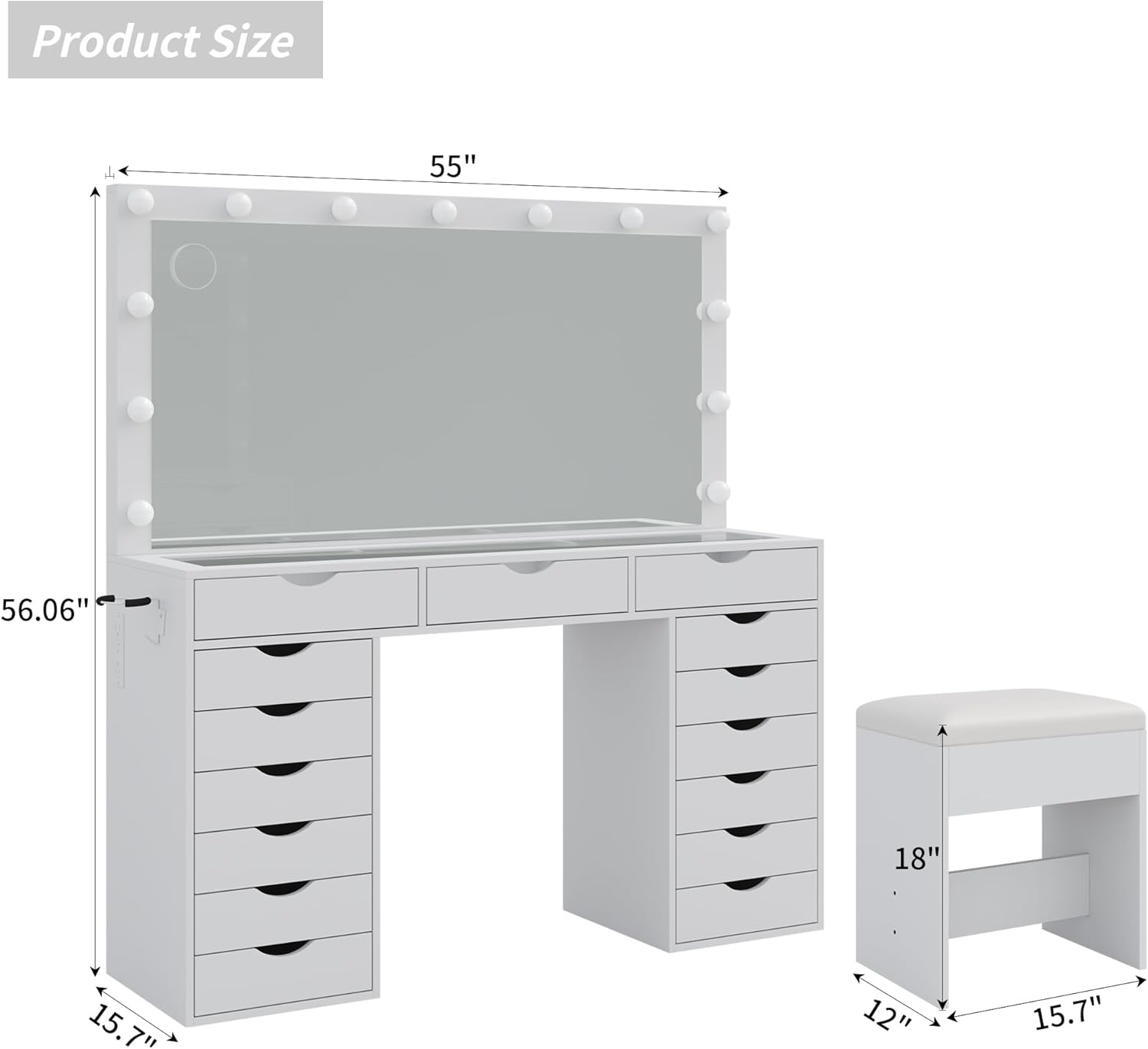
Image: Diagram illustrating the overall dimensions of the FUSOU vanity desk and its accompanying stool.
Warranty and Support
For any assistance, questions, or concerns regarding your FUSOU Vanity Desk, please contact the seller directly. You can typically find a "Contact Seller" option on the platform where you purchased the product. Our support team is available to help with assembly, troubleshooting, or any other product-related inquiries.
Please note that specific warranty details may be provided with your purchase documentation. Keep your proof of purchase for any warranty claims.