
1. Product Overview
The FUSOU VD008 Vanity Desk is designed for organizing cosmetics and accessories, featuring a mirror with adjustable LED lighting, integrated power outlets, and multiple storage drawers. This manual provides essential information for assembly, operation, and maintenance.

Image: The FUSOU VD008 Vanity Desk in pink, featuring a large mirror with LED bulbs, multiple drawers, and a matching stool.
Product Videos
Video: An overview of the FUSOU VD008 Vanity Desk, demonstrating its features and design.
Video: A detailed look at the functionality and storage options of the FUSOU VD008 Vanity Desk.
2. Setup and Assembly
The FUSOU VD008 Vanity Desk requires assembly. All necessary parts, detailed instructions, and tools are included in the package. It is recommended to follow the instructions step-by-step for quick and correct assembly.
- Verify all components against the parts list provided in the assembly manual.
- Ensure you have adequate space for assembly.
- The item is shipped in two separate boxes, which may arrive at different times. Please ensure both packages have arrived before beginning assembly.

Image: Illustration showing the vanity desk packaging, indicating that the item ships in two boxes that may arrive separately.
3. Operating Instructions
3.1 LED Mirror Lighting
The vanity mirror features 13 LED bulbs with adjustable lighting modes and brightness. Use the touch switch on the mirror to control these functions.
- Power On/Off: Tap the touch switch to turn the lights on or off.
- Change Color Mode: Short press the touch switch to cycle through 3 color modes: Warm Light, Natural Light, and Cold Light.
- Adjust Brightness: Long press the touch switch to dim or brighten the lights within the selected color mode. Release when the desired brightness is reached.

Image: Visual representation of the three adjustable color lighting modes (Warm, Natural, Cold) and brightness adjustment feature of the LED mirror.
3.2 Integrated Power Outlet
The vanity desk includes a built-in power strip for convenience, featuring AC outlets and USB ports.
- AC Outlets: Two 125V/12A AC outlets are provided for powering hair dryers, curling irons, or other small appliances.
- USB Ports: Two 5V/2A USB ports are available for charging mobile phones, tablets, or other USB-powered devices.
- A dedicated holder for a hair dryer is also integrated for easy access and storage.
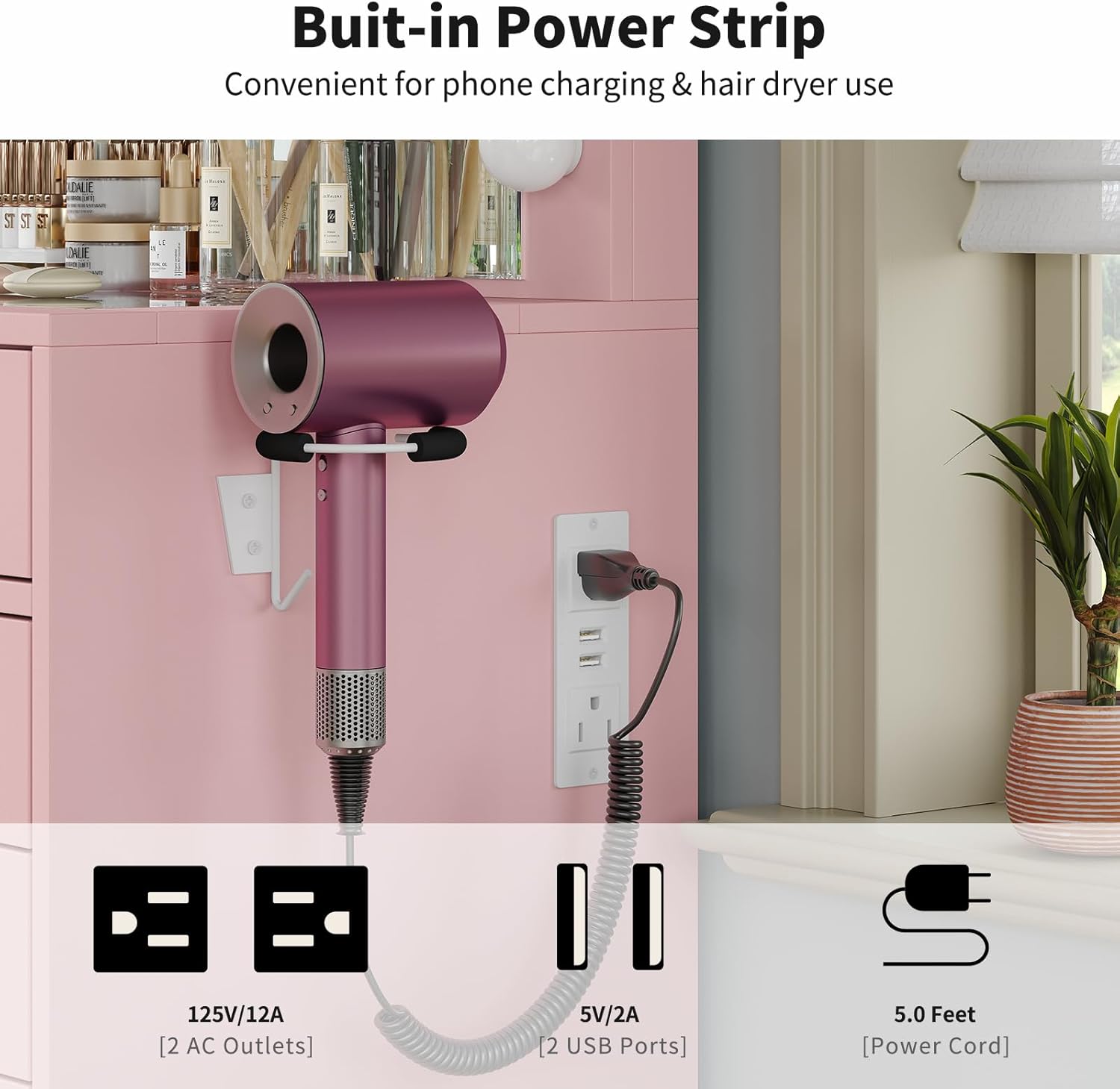
Image: Close-up of the built-in power strip with two AC outlets and two USB ports, along with a hair dryer holder.
3.3 Storage Drawers and Glass Top
The vanity desk features 15 spacious drawers for organizing various items. The central section includes an embedded tempered glass tabletop, allowing for visible storage and easy access to frequently used cosmetics.

Image: Top-down view of the vanity desk with several drawers open, showcasing the storage capacity and the transparent glass tabletop.

Image: Close-up of the embedded tempered glass tabletop, highlighting its visibility feature for organized storage.
3.4 Vanity Stool
The included vanity stool features a thick, cushioned seat for comfort. Its design allows it to be tucked neatly under the desk when not in use.

Image: Close-up of the vanity stool's thick, cushioned seat, emphasizing its comfort.
4. Maintenance
- Cleaning the Desk Surface: Wipe the engineered wood surfaces with a soft, damp cloth. Avoid abrasive cleaners or harsh chemicals that may damage the finish.
- Cleaning the Glass Top: Use a glass cleaner and a microfiber cloth to clean the tempered glass tabletop.
- LED Lights: The LED bulbs are designed for long-term use. If a bulb needs replacement, contact customer support for guidance. Do not attempt to replace bulbs independently unless specified.
- Stool Fabric: Spot clean the stool's flame-retardant fabric with a mild detergent and a damp cloth.
- Drawer Slides: Periodically check drawer slides for smooth operation. If needed, clean any dust or debris and apply a silicone-based lubricant sparingly.
5. Troubleshooting
- LED Lights Not Working:
- Ensure the vanity desk is properly plugged into a functional power outlet.
- Check if the power switch on the mirror is activated.
- Verify all electrical connections are secure.
- Power Outlets/USB Ports Not Functioning:
- Confirm the main power cord for the vanity desk is securely plugged in.
- Test the outlets with a different device to rule out device issues.
- Check for any tripped circuit breakers in your home.
- Drawers Sticking or Not Closing Smoothly:
- Ensure the drawer contents are not obstructing the mechanism.
- Check if the drawer slides are clean and free of debris.
- Verify that the drawer was assembled correctly and is aligned with the slides.
If you encounter issues not listed here or if troubleshooting steps do not resolve the problem, please contact customer support.
6. Specifications
| Model Number | VD008 |
| Manufacturer | FUSOU |
| Product Dimensions (L x W x H) | 15.7 x 55 x 56 inches (15.7"D x 55"W x 56"H) |
| Item Weight | 160 pounds |
| Material | Engineered Wood |
| Color | Pink |
| Assembly Required | Yes |
| LED Lights | 13 bulbs, 3 color modes, dimmable |
| Power Outlets | 2 AC (125V/12A), 2 USB (5V/2A) |

Image: Diagram illustrating the dimensions of the FUSOU VD008 Vanity Desk and its accompanying stool.
7. Warranty and Support
7.1 Returns Policy
This product is eligible for 30-day easy returns from the date of purchase. Please refer to the retailer's return policy for detailed information.
7.2 Protection Plans
Optional protection plans may be available for purchase, such as a 3-Year Protection Plan or a Complete Protect monthly plan. These plans offer extended coverage beyond the standard return period. Please check with your retailer for availability and terms.
7.3 Customer Support
For any questions, assistance with assembly, or troubleshooting, please contact FUSOU customer support. You can typically find a 'Contact Seller' option on the product purchase page or through the retailer's customer service portal. Please have your model number (VD008) and purchase details ready when contacting support.


