
AGXOV D28-128GB-BK
AGXOV D28-128GB-BK MP3 Player User Manual
Model: D28-128GB-BK
1. Introduction
This manual provides comprehensive instructions for the operation and maintenance of your AGXOV D28-128GB-BK MP3 Player. Please read this manual thoroughly before using the device to ensure proper functionality and to maximize your user experience. Keep this manual for future reference.
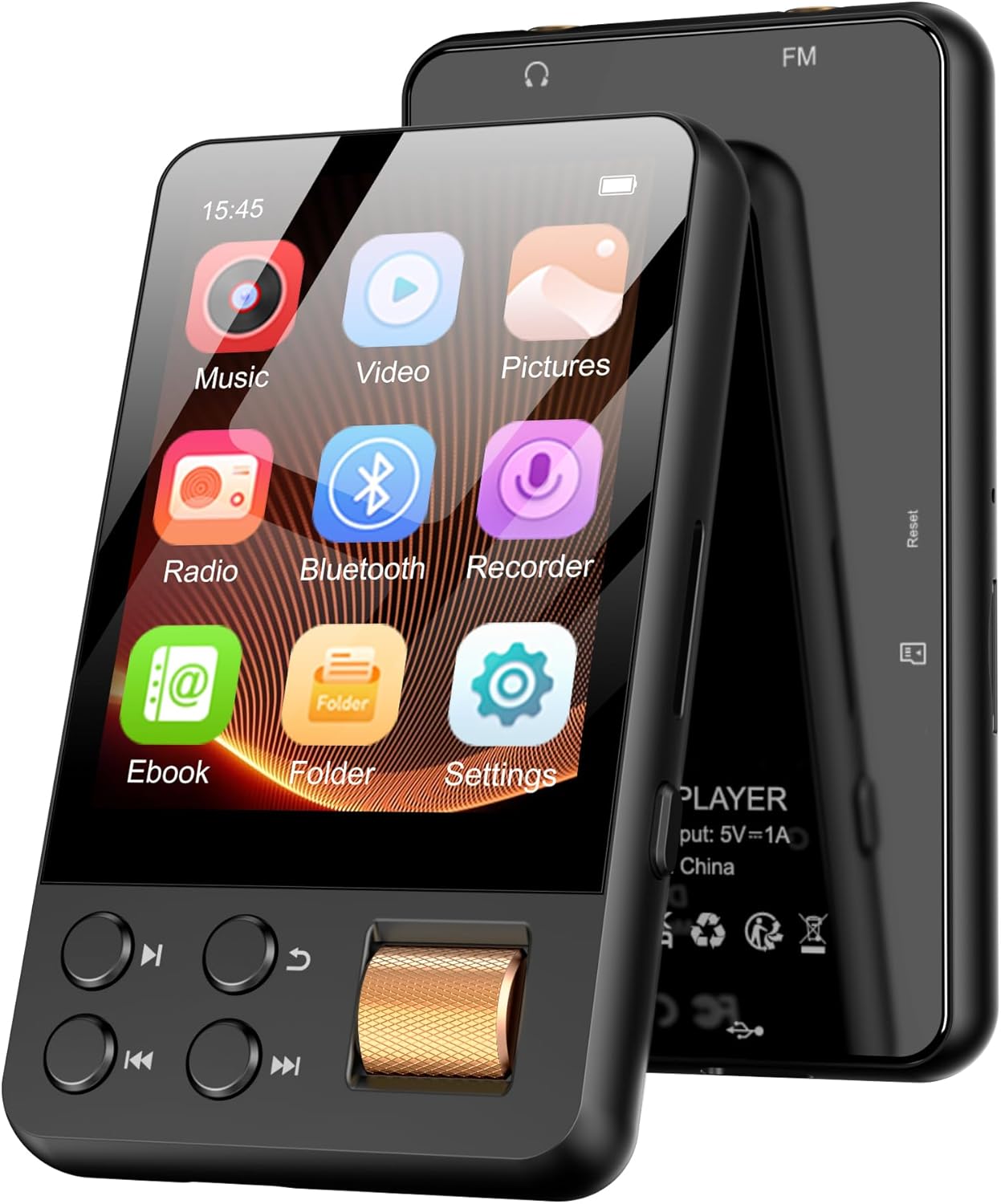
Figure 1: AGXOV D28-128GB-BK MP3 Player. This image displays the front of the MP3 player, highlighting its touchscreen interface with various application icons such as Music, Video, Pictures, Radio, Bluetooth, Recorder, Ebook, Folder, and Settings. Physical control buttons and a volume/scroll knob are visible below the screen.
2. Package Contents
Upon opening the package, verify that all items are present and in good condition:
- 1 x AGXOV D28-128GB-BK MP3 Player
- 1 x USB Charging Cable
- 1 x User Manual (this document)
- (Additional accessories may vary by region or package)
3. Device Overview
Familiarize yourself with the physical components and interface of your MP3 player.

Figure 2: MP3 Player Controls. This image highlights the physical buttons and the volume/scroll knob on the AGXOV D28-128GB-BK MP3 Player. Labels indicate functions for 'Back', 'Play/Pause', 'Previous', 'Next', and 'Volume/Scroll'. The touchscreen is also visible.
- Touchscreen Display: 4.02-inch LCD/TFT display for navigation and content viewing.
- Physical Buttons: Dedicated buttons for Back, Play/Pause, Previous, and Next track control.
- Volume/Scroll Knob: A tactile knob for adjusting volume and navigating menus.
- Headphone Jack: Standard audio output.
- USB-C Port: For charging and data transfer.
- Micro SD Card Slot: For expandable storage up to 512GB.
- Built-in Speaker: For audio playback without headphones.
4. Setup
4.1 Charging the Device
Before first use, fully charge the MP3 player. Connect the provided USB charging cable to the device's USB-C port and to a compatible USB power adapter (not included) or a computer's USB port. The battery indicator on the screen will show charging status. A full charge provides approximately 50 hours of music playback or 6 hours of video playback.
4.2 Powering On/Off
- To Power On: Press and hold the Power button (usually located on the side or top edge) until the screen illuminates.
- To Power Off: Press and hold the Power button until a power-off option appears on the screen, then confirm. Alternatively, a long press may directly power off the device.
4.3 Transferring Files
Connect the MP3 player to your computer using the USB cable. The device will appear as a removable disk drive. You can then drag and drop music, video, picture, and ebook files into the respective folders on the player's internal 128GB storage or an inserted Micro SD card.

Figure 3: Data Transfer and Storage. This image illustrates the AGXOV D28-128GB-BK MP3 Player connected to a USB-C cable, emphasizing its 128GB built-in storage and the capability to expand storage up to 512GB using a Micro SD card.
Supported audio formats include MP3, OGG, FLAC, AAC, WAV, WMA, APE. Ensure your files are in a compatible format for optimal playback.
4.4 Inserting a Micro SD Card
Locate the Micro SD card slot on the device. Gently insert a compatible Micro SD card (up to 512GB) until it clicks into place. To remove, push the card in slightly until it springs out.
5. Operating Instructions
5.1 Navigating the Interface
The AGXOV D28-128GB-BK features both a touchscreen and physical buttons for navigation. Use the touchscreen to tap on icons and swipe through menus. The physical buttons provide quick access to common functions like playback control and returning to the previous screen.

Figure 4: Wide Range of Functions. This image displays the AGXOV D28-128GB-BK MP3 Player's main interface, showcasing icons for Music, Video, Pictures, Radio, Bluetooth, Recorder, Ebook, Folder, and Settings, indicating its versatile capabilities.
5.2 Music Playback
- From the main menu, tap the "Music" icon.
- Browse your music library by Artist, Album, Songs, or Folder.
- Tap on a song to begin playback.
- Use the physical Play/Pause, Previous, and Next buttons, or the on-screen controls, to manage playback.
- Adjust volume using the dedicated volume knob.

Figure 5: Hi-Fi Sound Quality. This image depicts a person wearing over-ear headphones, suggesting an immersive audio experience and highlighting the device's Hi-Res Audio capability.
5.3 Bluetooth Connectivity
The device supports Bluetooth for wireless audio output to headphones or speakers.
- From the main menu, tap the "Bluetooth" icon.
- Turn on Bluetooth. The player will scan for available devices.
- Select your Bluetooth headphones or speaker from the list to pair.
- Once paired, audio will be routed wirelessly.

Figure 6: Bluetooth 5.4 Connectivity. This image shows the AGXOV D28-128GB-BK MP3 Player wirelessly connected to a pair of earbuds, illustrating its Bluetooth 5.4 capability for strong anti-interference and compatibility with various Bluetooth audio devices.
5.4 Other Functions
- Video Playback: Tap the "Video" icon to browse and play compatible video files.
- Picture Viewer: Tap the "Pictures" icon to view image files.
- FM Radio: Tap the "Radio" icon to access the built-in FM radio. Ensure headphones are connected as they often act as the antenna.
- Voice Recorder: Tap the "Recorder" icon to use the voice recording function.
- Ebook Reader: Tap the "Ebook" icon to read compatible text files.
- Settings: Tap the "Settings" icon to customize device preferences, including display, sound, language, and system information.
- Step Counter: The device includes a step counter function, accessible via the main menu or a dedicated app.

Figure 7: Playback Time and Features. This image highlights the AGXOV D28-128GB-BK MP3 Player's battery life (50H Music, 6H Video from a 410mAh battery) and lists various integrated features such as Step Counter, Music Player, Video Player, Stopwatch, FM Radio, and E-Book Reader.
6. Maintenance
- Cleaning: Use a soft, dry cloth to clean the device. Avoid liquid cleaners or abrasive materials.
- Storage: Store the player in a cool, dry place away from direct sunlight and extreme temperatures.
- Battery Care: To prolong battery life, avoid fully discharging the battery frequently. Charge the device regularly, even if not in use for extended periods.
- Software Updates: Periodically check the manufacturer's website for any available firmware updates to ensure optimal performance and new features.
7. Troubleshooting
| Problem | Possible Solution |
|---|---|
| Device does not power on. | Ensure the battery is charged. Connect to a power source and try again. If unresponsive, press and hold the power button for 10-15 seconds to force a restart. |
| Cannot transfer files to the device. | Verify the USB cable is securely connected to both the player and the computer. Ensure the player is in data transfer mode (check device screen for options upon connection). Try a different USB port or cable. |
| Bluetooth device fails to pair. | Ensure the Bluetooth device is in pairing mode and within range. Turn off and on Bluetooth on both devices. Clear previous pairings on the MP3 player if necessary. |
| No sound from headphones/speaker. | Check volume levels on both the player and the connected audio device. Ensure headphones are properly plugged in or Bluetooth is successfully connected. Test with different headphones/speakers. |
| Screen is unresponsive or frozen. | Press and hold the Power button for approximately 10-15 seconds to force a restart. If a reset button is available (often a small pinhole), use a thin object to press it. |
8. Specifications
| Feature | Detail |
|---|---|
| Model | D28-128GB-BK |
| Brand | AGXOV |
| Internal Storage | 128 GB |
| Expandable Storage | Micro SD up to 512 GB |
| Display | 4.02-inch LCD/TFT Touch Screen |
| Battery Life (Music) | Up to 50 hours |
| Battery Life (Video) | Up to 6 hours |
| Battery Type | Lithium Ion (1 A battery included) |
| Connectivity | Bluetooth, USB-C |
| Compatible Audio Formats | MP3, OGG, FLAC, AAC, WAV, WMA, APE |
| Special Features | Built-In Speaker, DAB Radio, Hi-Res Audio, Touch Screen, Voice Recorder, Step Counter |
| Dimensions | 1.2 x 5.03 x 8.6 cm |

Figure 8: Compact Design. This image shows the AGXOV D28-128GB-BK MP3 Player being placed into a pocket, emphasizing its compact and portable design, suitable for various activities including sports.
9. Warranty and Support
For warranty information and technical support, please refer to the warranty card included with your product or visit the official AGXOV website. Keep your purchase receipt as proof of purchase for warranty claims.
For further assistance, please contact AGXOV customer service.
Related documentsD28-128GB-BK


Ask a question about this manual
Ask about setup, troubleshooting, compatibility, parts, safety, or missing instructions. Manuals+ will review the question and use this page’s manual context to help answer it.