
1. Introduction
The PETKIT PUROBOT MAX PRO 2 is an advanced self-cleaning cat litter box designed to provide a hygienic and convenient solution for cat owners. Featuring an integrated AI camera, smart health monitoring, and multi-cat recognition, this device aims to simplify pet care while ensuring the well-being of your feline friends. This manual will guide you through the setup, operation, and maintenance of your new litter box.
Video: General overview of the PETKIT PUROBOT MAX PRO 2 features and operation.
2. Product Components
Please verify that all accessories are complete according to the packing list.
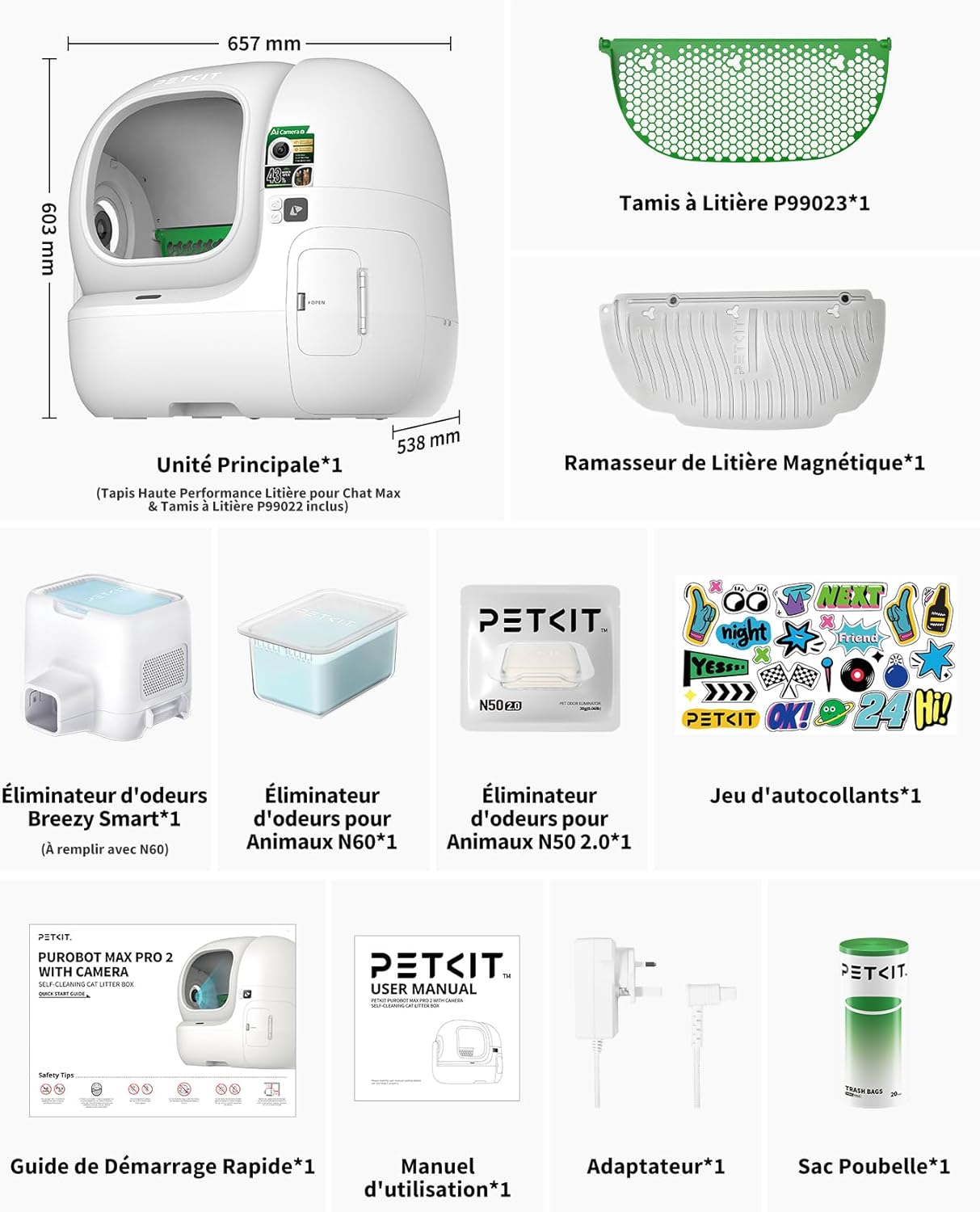
Image: PETKIT PUROBOT MAX PRO 2 components. Includes the main unit, P99023 honeycomb litter sieve, magnetic litter scoop, Breezy Smart odor eliminator, N60 odor eliminator, N50 2.0 odor eliminator, sticker set, quick start guide, user manual, power adapter, and trash bags.
3. Setup and Installation
3.1 Initial Placement
- Place the litter box on a firm, flat surface.
- Maintain a distance of 5-10 cm from any walls to ensure proper operation.

Image: The litter box features an improved, 43% larger entrance (26.7 cm x 27.28 cm) and a reduced entry height (255 mm) for easy access by large, short-legged, and elderly cats.
3.2 Power Connection
Connect the power adapter to the device and then plug it into a wall outlet. Ensure the connection is secure.
3.3 App Setup and Device Pairing
- Download the PETKIT app from your device's app store.
- Open the app and click on the '+' icon to add a new device.
- Select 'PETKIT PUROBOT MAX PRO 2 WITH CAMERA' from the list of nearby devices.
- Enter your valid Wi-Fi password (supports 2.4GHz and 5GHz networks).
- Follow the on-screen instructions to complete the binding process.
- Personalize the device name and review the initial setup instructions within the app.
3.4 Litter Filling
- After initial setup, press the 'OK' button to enter maintenance mode.
- The drum will rotate to an upright position. Pour cat litter into the drum, ensuring it does not exceed the 'MAX' line.
- Press 'OK' again to exit maintenance mode; the device will automatically level the litter.
3.5 Cat Adaptation
During the initial use, you may fill the cylinder with your pet's familiar litter to help it adapt to the new environment.
4. Operating Instructions
4.1 AI Camera & Health Monitoring
The integrated AI camera provides 24/7 real-time surveillance with a 210° ultra-wide angle and infrared night vision. It captures images of your cat's stool and urine clumps, allowing for precise health tracking via the PETKIT app. Receive alerts for anomalies such as color or size changes, enabling prompt action.

Image: AI-powered camera for 24/7 surveillance. Check your pet's litter box usage anytime, anywhere.

Image: AI camera tracking litter box usage. The app shows live feed, traceable health history, and visual events categorized by type, including alerts for abnormal urine pH and stool checks.
4.2 Multi-Cat Recognition
The device uses AI facial recognition to identify multiple cats, preventing data confusion in multi-pet households. Weight sensors track each cat's weight and usage habits, providing personalized health data.

Image: Multi-cat facial recognition. Facial recognition and weight tracking prevent data confusion, providing exclusive health statistics for each cat.
4.3 Smart App Control
Compatible with both 2.4 GHz and 5 GHz Wi-Fi, the PETKIT app allows you to manage litter box activities in real-time. Control various cleaning and deodorization modes, set camera privacy parameters, and receive contextual notifications. The app also supports one-way audio communication.

Image: All-in-one app control and monitoring. Features include multiple cleaning modes, multiple deodorization modes, camera privacy settings, contextual notifications, 5 GHz Wi-Fi support, and one-way audio.
4.4 Triple Odor Control System
The litter box features a triple odor elimination system. This includes an automatic purifier, a sealed waste bin, and compatibility with N60/N50.2.0 odor eliminators, ensuring your home remains fresh and clean.

Image: Triple effective odor control. Eliminates 96% of ammonia in the cylinder, 98% in the waste bin, and features a hermetically sealed waste bin for enhanced odor control. (Tests conducted by a third party).
5. Maintenance and Cleaning
5.1 Emptying the Waste Bin
The patented cord-closure system allows for contact-free waste management. The large 8L waste bin can hold up to 15 days of waste for a single cat, ideal for busy owners.
- Open the waste bin door.
- While holding the bin with one hand, pull the cord of the trash bag with the other.
- Remove the bin, take off the lid, and pull out the trash bag.
- Replace with a new trash bag, ensuring the dashed line is against the bin's edge and the rear side is not covered.
- Close the compartment lid, ensuring the lid's buckle does not press on the bag's cord.

Image: Patented cord-closure waste bag. Contact-free waste management in one simple step. The 8L bin allows up to 17 days without scooping.
5.2 Cleaning the Drum and Components
Regular cleaning ensures optimal hygiene and performance.
- Disconnect the power supply.
- Remove the magnetic side cover by lifting it upwards.
- Open the latch and lift the drum upwards to remove it.
- Place the drum against a wall.
- To remove the litter filter: Place your hand inside the drum and press the filter with your fingers until it folds and comes out from the right side of the lock. Then disengage the left side lock and remove the entire filter.
- To remove the bottom protective pads: Press the handles of the triple-protection pads and pull them upwards.
- Rinse the inside of the drum with water, thoroughly scrub the corners with a cleaning brush, and rinse well.
- Gently brush the litter filter and rinse it.
- Wipe the base and proximity sensor with a damp cloth.
- Wipe the fisheye camera with a soft cloth.
- After cleaning, wait for all parts to be completely dry before reassembling.
5.3 Replacing Odor Eliminators
- Remove the magnetic side cover.
- Remove the used N60 odor eliminator.
- Insert a new N60 into the smart odor eliminator.
- For the N50.2.0, remove the old one, place the new one in the groove, and press firmly.
- Reinstall the magnetic side cover.
5.4 Litter Compatibility
The PETKIT PUROBOT MAX PRO 2 is compatible with 99% of clumping cat litters. Two replaceable sieves ensure optimal cleanliness and minimize litter usage.
- Litter Sieve P99022: For large litter particles (e.g., Tofu cat litter, mixed litter).
- Litter Sieve P99023: For finer litter particles (e.g., Bentonite cat litter, mineral cat litter).

Image: Compatible with 99% of clumping litters. Two replaceable sieves ensure optimal cleanliness and minimize litter usage.
6. Safety Features
The PETKIT PUROBOT MAX PRO 2 is designed with multiple safety mechanisms to protect your pets.
- Patented Anti-Pinch Design: Ensures the entrance never fully closes, preventing any harm to your cat.
- 12 Integrated Sensors: Provide maximum safety by detecting your cat's presence and movements.
- 360° Seamless Base: Prevents any leakage and simplifies daily maintenance.
- Ultra-Quiet Operation: Operates at 35-45 dB, ensuring a peaceful environment.

Image: Security protection at every visit. Patented anti-pinch design and 12 integrated sensors ensure maximum safety for your cats. The entrance never fully closes.

Image: Exceptional anti-leak cylinder. The improved cylinder ensures a worry-free seal and mess-free maintenance, minimizing the need for frequent cleaning. It guides urine towards the mat without leaks.
7. Specifications
| Feature | Detail |
|---|---|
| Product Dimensions (L x W x H) | 68.5 x 56 x 64 cm |
| Item Weight | 10.89 Kilograms |
| Manufacturer | PETKIT |
| Model Number | P9904 |
| Country of Origin | China |
| Material | Plastic |
| Litter Box Type | Automated Self-Cleaning Litter Box |
| Pet Type | Cat |
8. PETKIT Care Subscription Plans
Enhance your experience with optional PETKIT Care subscription plans, offering additional features for advanced health monitoring and data storage.

Image: PETKIT Care subscription plans. A table comparing features across Free (30-day premium trial), Basic, Premium, and Premium+ plans, including one-way audio, stool image control, facial recognition, 24/7 live image stream, and various levels of image and video storage.
9. Support
For any questions or assistance, please contact PETKIT customer service. Product and accessories presented in videos may differ slightly in detail from your own, but the operations remain the same.
Contact Information:
- Phone: (888) 851-2770
- Hours: 9am-12pm & 1pm-6pm CST Mon-Fri


