
Introduction
Thank you for choosing the MUSTAR 37 Keys Kids Keyboard Piano. This manual provides essential information for the safe and effective use of your new musical instrument. Please read it thoroughly before assembly and operation, and retain it for future reference.
Safety Information
WARNING: CHOKING HAZARD -- Small parts. Not for children under 3 years.
Ensure all components are securely assembled before use. Adult supervision is recommended during play, especially for younger children, to prevent misuse of small parts like stickers or accessories.

Image: The piano is constructed with natural eco-friendly wood, child-safe surface materials, and features smooth edges for safe play.
What's Included
The complete set includes the following items:
- 37-Key Wooden Piano Body
- Piano Bench
- Dust Cover
- Music Book
- DIY Stickers
- Keyboard Stickers
- Power Adapter

Image: All components included in the MUSTAR 37 Keys Kids Keyboard Piano package.
Setup Instructions
Follow these steps to set up your MUSTAR 37 Keys Kids Keyboard Piano:
- Unpack: Carefully remove all items from the packaging.
- Assemble Piano: The piano section requires assembly of 3 pieces. Follow the diagrams in the included assembly guide.
- Assemble Bench: The bench consists of 3 pieces. Assemble according to the instructions.
- Placement: Place the assembled piano and stool on a stable, flat surface.
- Power Connection: The piano can be powered by the included power adapter or by 3 AAA batteries (not included).
- Adapter Power: Connect the power adapter to the DC IN port on the piano and plug it into a wall outlet.
- Battery Power: Locate the battery compartment, insert 3 AAA batteries, and close the compartment securely.
- Decorate (Optional): Apply the DIY stickers and keyboard stickers as desired to personalize the piano.

Image: The piano can be powered by either an adapter or 3 AAA batteries.
Video: This video demonstrates the power-on sequence and basic interaction with the piano's controls.
Operating Instructions
The MUSTAR 37 Keys Kids Keyboard Piano offers various features for musical exploration:
- Power On/Off: Use the power switch located on the control panel to turn the piano on or off.
- Volume Adjustment: Rotate the volume adjustment knob to set the desired sound level.
- Tones and Rhythms: Explore 128 different tones and 128 rhythms to vary the sound and style of music.
- Demonstration Songs: The piano includes 30 pre-programmed demonstration songs for listening and learning.
- Magical Mistouch Mode: This feature allows for worry-free play, making it easier for beginners to experiment without incorrect notes.
- Headphone Output: Connect headphones to the headphone jack for private practice.
- Microphone Input: Insert a microphone into the MIC input to sing along while playing.
- Audio Input (MP3/Phone): Use an audio cable to connect a mobile phone or MP3 player to the MP3 input to play external music through the piano's speakers.
- Bluetooth Connectivity: (If applicable to your model) Connect wirelessly to compatible devices for audio playback.

Image: Overview of the piano's key features including tones, rhythms, demos, and connectivity options.
Video: This video provides a brief demonstration of the piano's sound and features.
Maintenance
To ensure the longevity and optimal performance of your piano, follow these maintenance guidelines:
- Cleaning: Wipe the piano and stool with a soft, dry cloth. Avoid using abrasive cleaners or solvents, which can damage the finish.
- Dust Protection: Use the provided dust cover when the piano is not in use to protect it from dust and debris.
- Storage: Store the piano in a cool, dry place away from direct sunlight and extreme temperatures.
- Battery Care: If using batteries, remove them if the piano will not be used for an extended period to prevent leakage.
- Handle with Care: Avoid dropping or subjecting the piano to strong impacts.
Troubleshooting
If you encounter any issues with your piano, refer to the following common solutions:
- No Sound:
- Ensure the piano is powered on.
- Check the volume knob and increase the volume.
- If using batteries, ensure they are correctly inserted and not depleted.
- If using the adapter, ensure it is securely connected to both the piano and the power outlet.
- Distorted Sound or Sizzling Noise:
- Reduce the volume.
- Ensure all connections (headphones, microphone, audio input) are secure and not damaged.
- If the issue persists, discontinue use and contact customer support.
- Keys Not Responding:
- Ensure the piano is powered on.
- Check for any obstructions under the keys.
- Power Adapter Issues: If the charger or charging port appears damaged (e.g., metal tip snapped off), discontinue use immediately to avoid electrical hazards and contact customer support for a replacement.
Specifications
| Feature | Detail |
|---|---|
| Brand | MUSTAR |
| Model Number | E6010600400 |
| Number of Keys | 37 |
| Tones | 128 |
| Rhythms | 128 |
| Demonstration Songs | 30 |
| Power Source | Corded Electric (Adapter) or Battery Powered (3 AAA batteries required, not included) |
| Material Type | Wood |
| Item Dimensions (L x W x H) | 11.22 x 21.65 x 22.56 inches |
| Item Weight | 19.8 pounds |
| Recommended Age | 3 years and up |
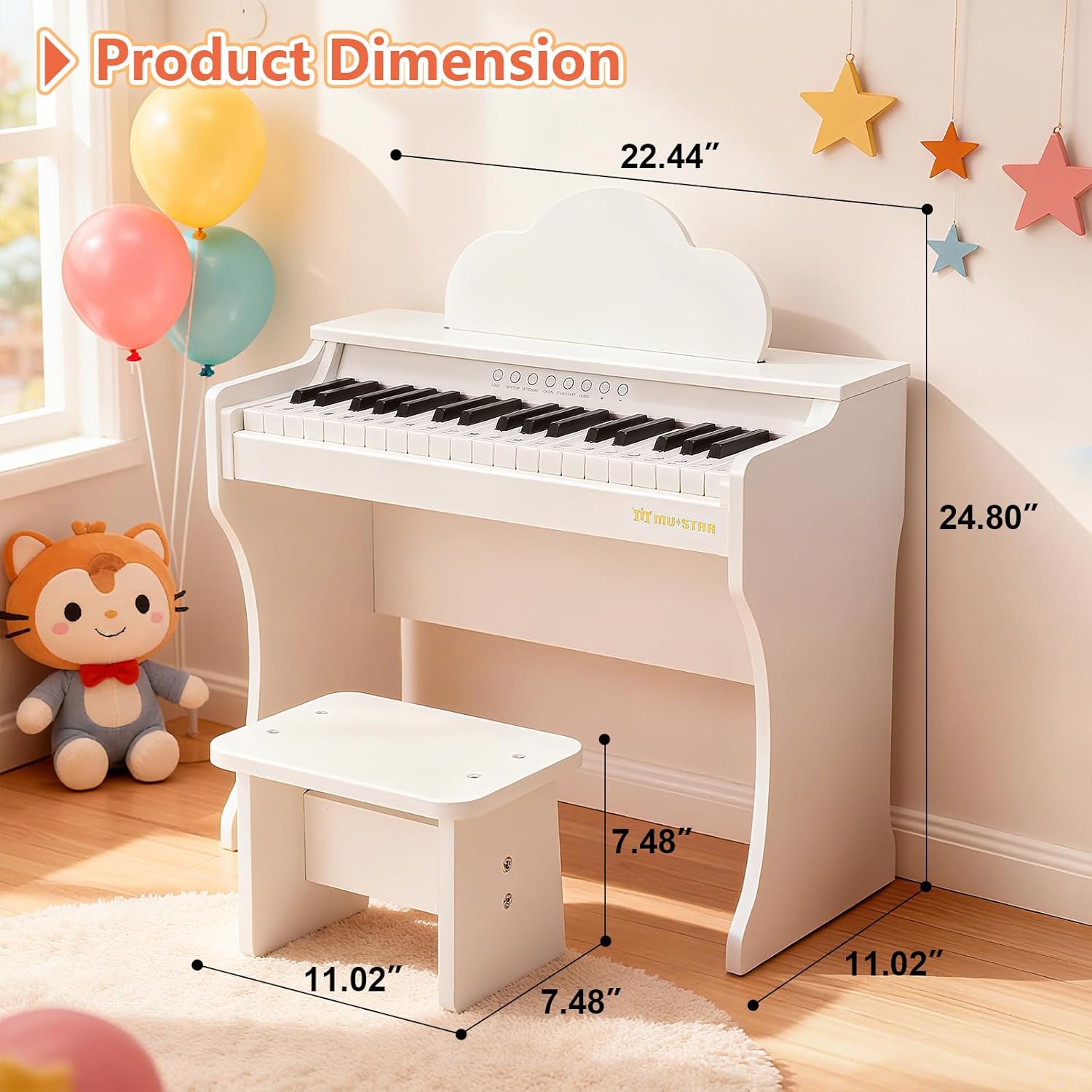
Image: Product dimensions for the piano and stool.
Warranty and Support
For warranty information or technical support, please refer to the contact details provided with your purchase or visit the official MUSTAR brand store online. Keep your purchase receipt as proof of purchase.
You can visit the MUSTAR Store for more information.