
DEEPOWER QS7 (3500W-Dual Motor-60AH)
DEEPOWER Electric Bike User Manual
Model: QS7 (3500W-Dual Motor-60AH)
Introduction
This manual provides essential information for the safe operation, assembly, maintenance, and troubleshooting of your DEEPOWER QS7 Electric Bike. Please read this manual thoroughly before your first ride to ensure optimal performance and safety.

Image: The DEEPOWER QS7 Electric Bike, showcasing its robust frame, fat tires, and integrated battery design.
Safety Information
Always prioritize safety when operating your electric bike. Adhere to local traffic laws and wear appropriate safety gear, including a helmet. Regular inspections and maintenance are crucial for safe operation.
- Always wear a certified helmet.
- Ensure all components are securely fastened before each ride.
- Do not operate the bike under the influence of alcohol or drugs.
- Be aware of your surroundings and traffic conditions.
- Avoid riding in adverse weather conditions if visibility is compromised.
Setup and Assembly
Your DEEPOWER QS7 electric bike arrives 90% pre-assembled. The remaining assembly steps are straightforward and can be completed by following the included instructions or by watching the assembly video available on the product page.
Initial Steps:
- Unpacking: Carefully remove all components from the packaging.
- Handlebar Installation: Attach and secure the handlebars. Ensure all controls are correctly positioned and tightened.
- Front Wheel Installation: Install the front wheel, ensuring the disc brake rotor is correctly aligned with the caliper.
- Pedal Attachment: Attach the pedals, noting that the left and right pedals are distinct (usually marked L and R).
- Seat Post Adjustment: Insert the seat post and adjust the saddle height for comfortable riding.
- Battery Charging: Fully charge the battery before the first use. Connect the charger to the battery port and then to a power outlet. The indicator light on the charger will change when fully charged.

Image: A diagram illustrating key assembly points for the DEEPOWER electric bike, including handlebar, front wheel, and pedal attachment.
Operating Instructions
Powering On/Off:
To power on the bike, press and hold the power button on the intelligent colorful display. To power off, press and hold the same button until the display turns off.
Intelligent Colorful Display:
The display provides real-time information about your ride. It shows current speed, gearshift, battery level, ODO (odometer), and electric assistance level.

Image: Close-up of the DEEPOWER QS7's intelligent colorful display, showing various indicators like speed, battery level, and ODO. Also visible are the hydraulic brake lever, horn, turn signal switch, mobile phone stand, 7S shifter, display board, and twist throttle.
Riding Modes:
- Pure Electric Mode: Engage the twist throttle for motor-only propulsion.
- Pedal Assist (PAS) Mode: The motor provides assistance as you pedal. Adjust the assistance level via the display.
- Bicycle Mode: Ride without any electric assistance, similar to a traditional bicycle.

Image: A graphic illustrating the three riding modes: Pure Electric, Pedal Assist (PAS), and Bicycle Mode, demonstrating how the bike can be used for various riding styles and distances.
Gear Shifting:
The DEEPOWER QS7 features a 7-speed precision gear system. Use the shifter on the handlebar to change gears, allowing you to adapt to different terrains and optimize pedaling efficiency.
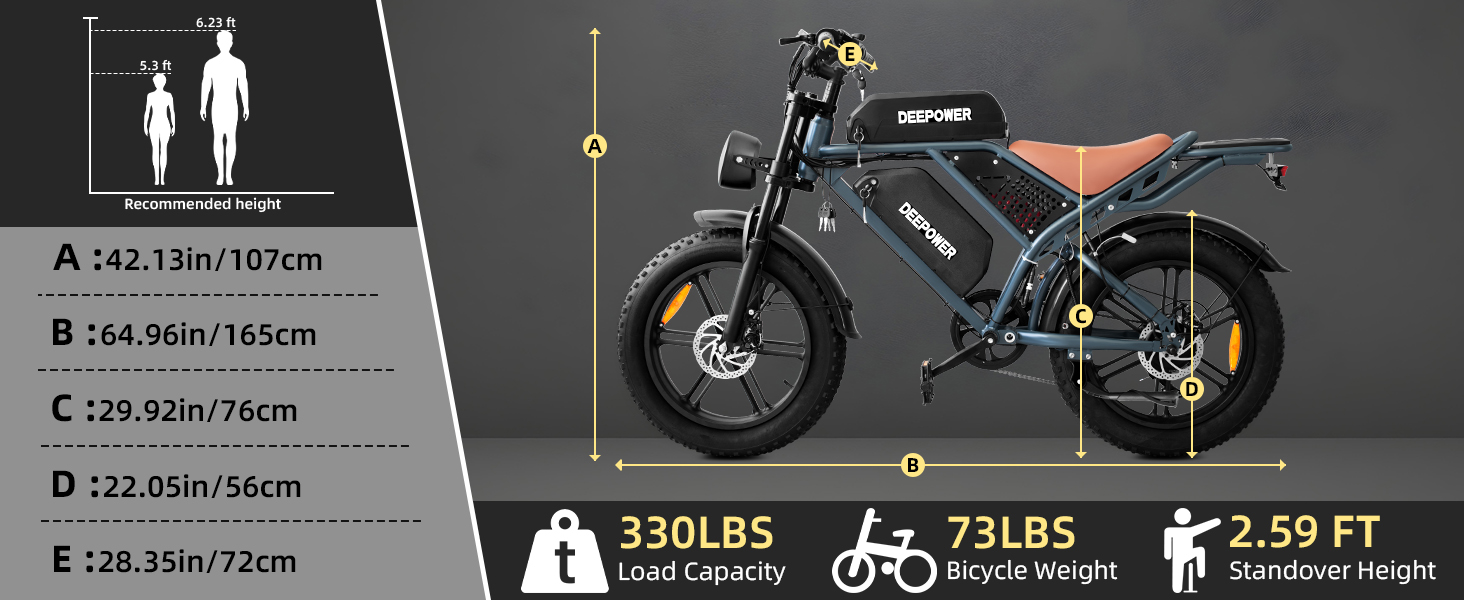
Image: A detailed view of the 7-speed precision gear system and the handlebar shifter, highlighting the smooth gear-shifting capability of the DEEPOWER QS7.
Lighting Operation:
The bike is equipped with 360° LED lighting, including a headlight, brake light, and turn lights. Operate these lights using the controls on the handlebar to ensure visibility, especially during night rides.

Image: A comparison showing the strong spot front lights of the DEEPOWER QS7, emphasizing their brightness for illuminating the road ahead.

Image: A visual representation of the DEEPOWER QS7's tail light, demonstrating its bright glow and integrated turn signal functionality for enhanced visibility from the rear.
Maintenance
Regular maintenance ensures the longevity and safe operation of your DEEPOWER QS7 electric bike.
- Battery Care:
- Charge the battery regularly, even if not in use, to maintain its health.
- Avoid fully discharging the battery frequently.
- Store the battery in a cool, dry place away from direct sunlight.
- Tire Pressure: Check tire pressure before each ride. Maintain the recommended pressure (typically found on the tire sidewall) for optimal performance and safety. The 20" x 4.0" fat tires require specific pressure.
- Brake Inspection: Regularly inspect the dual mechanical disc brakes for wear and proper function. Ensure brake levers are responsive and provide adequate stopping power.
- Chain Lubrication: Keep the chain clean and lubricated to ensure smooth gear shifting and prevent wear.
- General Cleaning: Clean the bike regularly with a damp cloth. Avoid using high-pressure water jets directly on electrical components.
- Fastener Check: Periodically check all bolts and fasteners for tightness, especially after the first few rides.
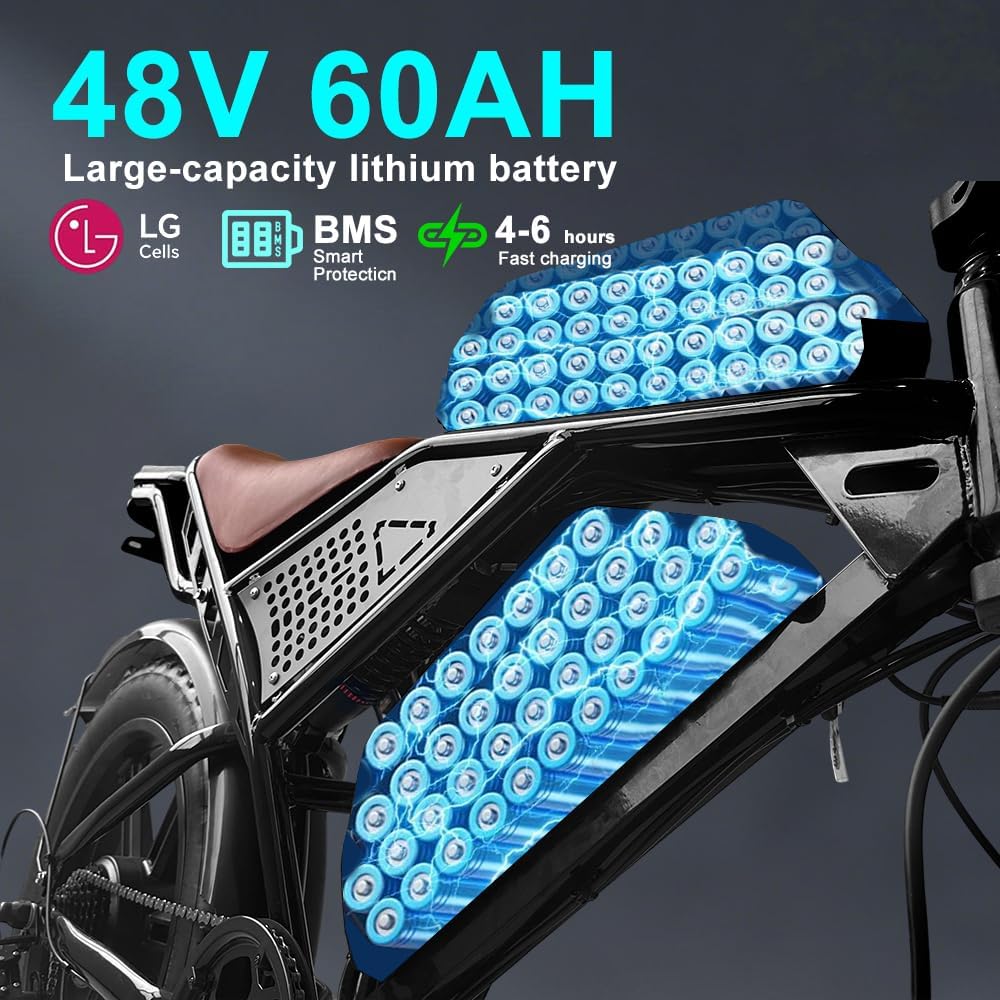
Image: An illustration of the DEEPOWER QS7's dual 48V 60AH large-capacity lithium battery system, highlighting its components and fast charging capability.
Troubleshooting
This section addresses common issues you might encounter. For problems not listed here, please contact customer support.
| Problem | Possible Cause | Solution |
|---|---|---|
| Bike does not power on. | Battery not charged, battery not properly seated, power button issue. | Ensure battery is fully charged and securely installed. Check power button connection. |
| Motor not assisting. | Low battery, PAS level set to zero, brake lever engaged, motor connection issue. | Charge battery. Increase PAS level on display. Release brake levers. Check motor cable connections. |
| Brakes feel weak. | Brake pads worn, cable loose, disc rotor dirty. | Inspect brake pads for wear and replace if necessary. Adjust brake cable tension. Clean disc rotors. |
| Unusual noises during ride. | Loose components, chain issues, motor issue. | Check all fasteners. Lubricate chain. If noise persists, contact support. |
Specifications
Key technical specifications for the DEEPOWER QS7 Electric Bike (3500W-Dual Motor-60AH variant):
- Motor: 1500W Peak + 2000W Peak Rear Motor (3500W Peak Total)
- Torque: 95N·m
- Top Speed: Up to 32 MPH
- Battery: 48V 25Ah + 35Ah Dual High-Density Batteries (Total 60Ah)
- Range: Up to 180 miles (with dual batteries)
- Charging Time: 5-6 hours (single battery)
- Tires: 20" x 4.0" Puncture-Proof Wide Fat Tires
- Brakes: Dual Mechanical Disc Brakes
- Suspension: Double Shoulder Front Fork (80mm travel) and Rear Suspension
- Frame Material: Carbon Steel
- Gears: 7-Speed
- Lighting: 360° LED (Headlight, Brake Light, Turn Lights)
- Max Load Capacity: 330 pounds (approx. 150 kg)
- Overall Dimensions (L/W/H): 68.11 x 25.19 x 43.70 inches
- Item Weight: 40 Kilograms
- Special Features: LCD-Display, Waterproof (IPX5)
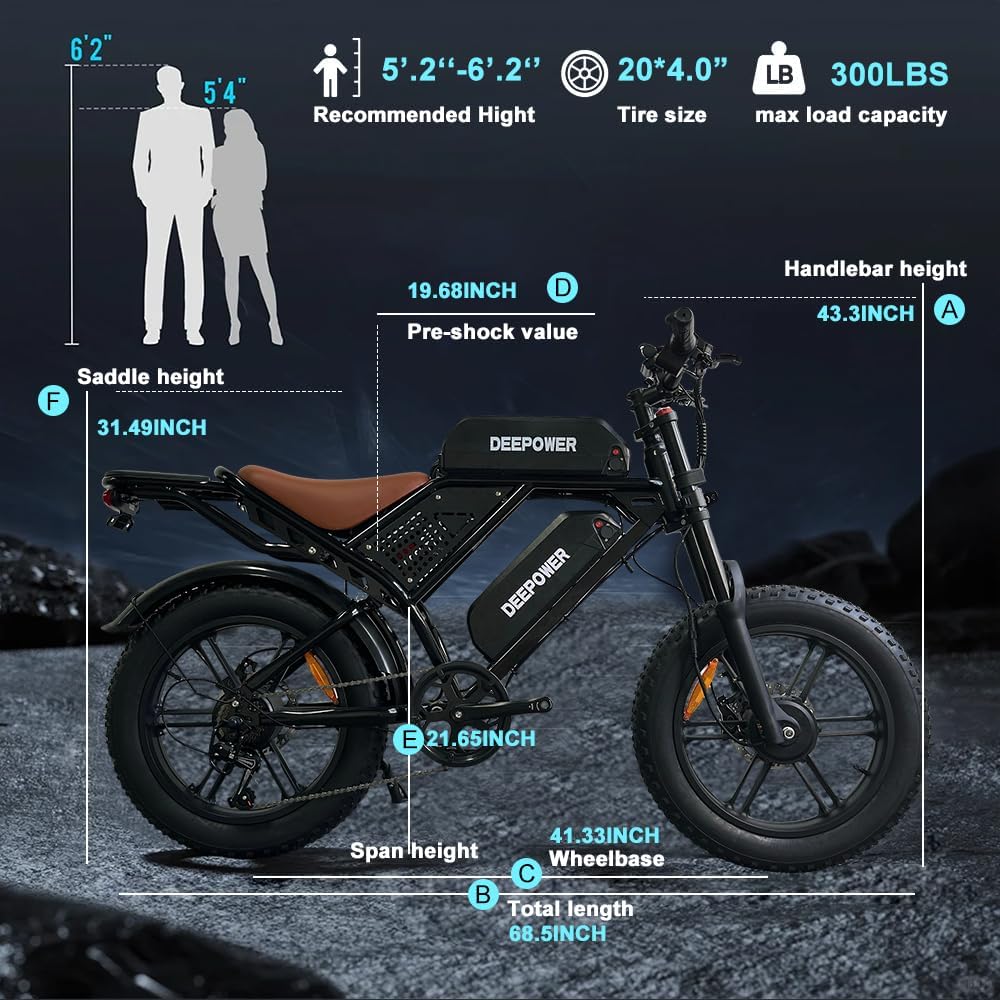
Image: A diagram detailing the dimensions of the DEEPOWER QS7 electric bike, including total length, wheelbase, handlebar height, saddle height, and recommended rider height range (5'2" - 6'2").
Warranty and Support
DEEPOWER provides a 12-month warranty for your electric bike. This warranty covers parts that are proven to be damaged within one year of purchase, provided corresponding pictures or videos are supplied.
For warranty claims or any technical assistance, please contact DEEPOWER customer service. You can find contact information on the DEEPOWER website or through Amazon's seller contact options. Our professional after-sales service team aims to respond within 24 hours on working days.
Contact Information:
- Email Support: Refer to the DEEPOWER website or product page for specific email addresses.
- Working Hours: 9:00 am - 6:00 pm EST, Monday - Friday.

Image: A graphic detailing DEEPOWER's customer service, including 12-month warranty information, contact hours, and a QR code for email support.
Related documentsQS7 (3500W-Dual Motor-60AH)


Ask a question about this manual
Ask about setup, troubleshooting, compatibility, parts, safety, or missing instructions. Manuals+ will review the question and use this page’s manual context to help answer it.