
1. Introduction
Thank you for choosing the L LAVAREDO Kids Digital Sports Watch L8811. This manual provides detailed instructions on how to set up, operate, and maintain your new watch. Please read it carefully to ensure proper use and to fully utilize all its features.
2. Product Features
- Digital Time Display (12/24-hour format)
- LED Backlight for visibility in low light
- Date and Day of the Week display
- Alarm Function with Snooze
- Hourly Chime
- Stopwatch (Chronograph) with 1/100 second precision
- Countdown Timer
- Dual Time Zone display
- 50M Water Resistance (suitable for splashes, rain, hand washing)
- Shock Resistant design
- Comfortable Anti-slip Silicone Strap

An overview of the L LAVAREDO Kids Digital Sports Watch L8811's key features, including its various modes and capabilities.
3. Watch Layout and Button Functions
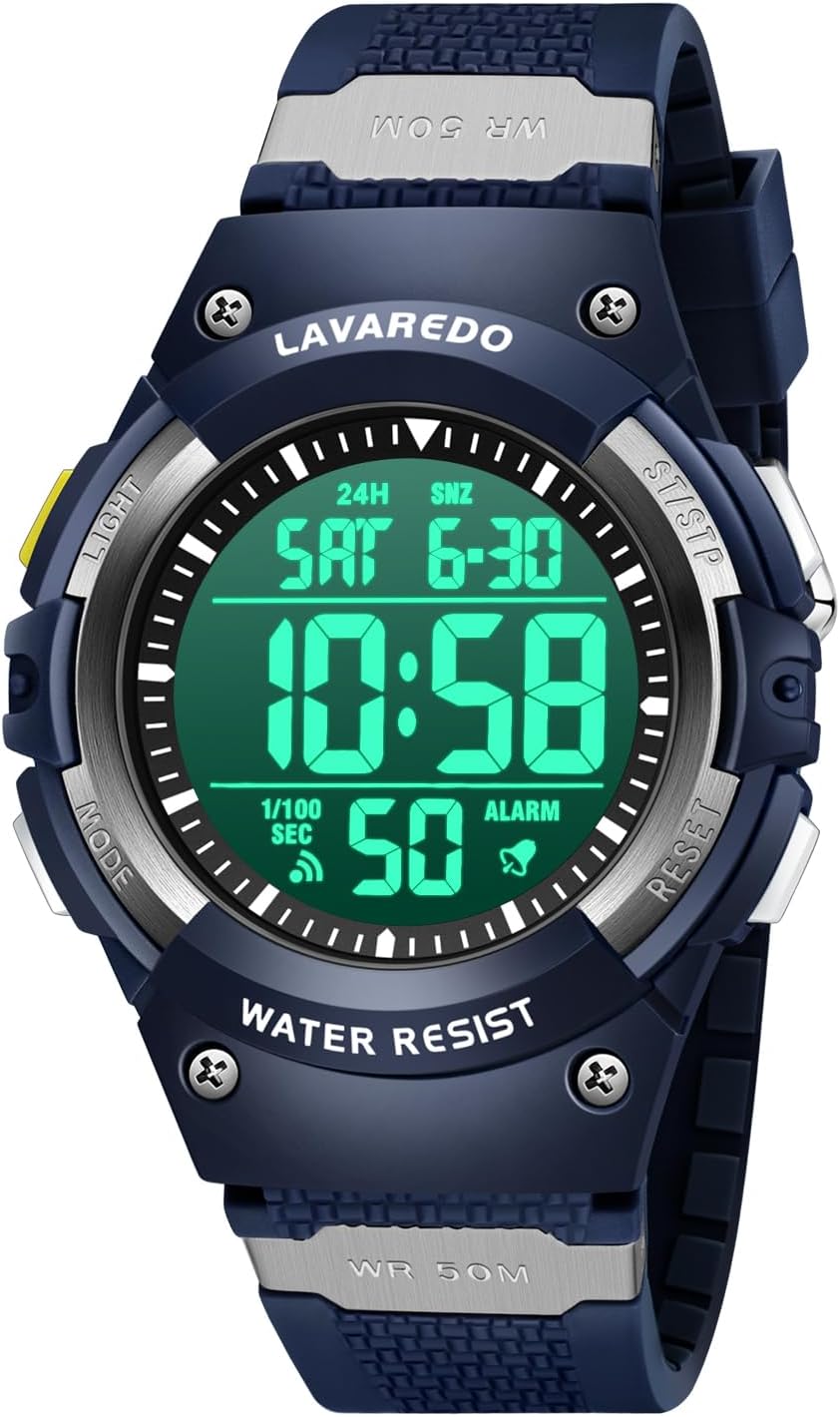
Front view of the L LAVAREDO Kids Digital Sports Watch L8811, highlighting its digital display and button layout.
The watch features four buttons, each with specific functions:
- LIGHT (Top Left): Press to activate the EL backlight for approximately 3 seconds.
- MODE (Bottom Left): Press to cycle through different modes: Time Display → Stopwatch → Timer → Alarm → Dual Time.
- ST/STP (Top Right): Used to Start/Stop the stopwatch or timer. In setting modes, it adjusts values upwards.
- RESET (Bottom Right): Used to Reset the stopwatch or timer. In setting modes, it selects items or confirms settings. Also used to turn on/off alarm, snooze, and hourly chime.
4. Setting Time and Date
To set the current time and date:
- From the normal time display mode, press the MODE button three times to enter the time setting mode. The seconds digits will start flashing.
- Press the RESET button to cycle through the setting items: Seconds → Hours → Minutes → Year → Month → Day → 12/24-hour format.
- While an item is flashing, use the ST/STP button to adjust the value.
- Once all settings are adjusted, press the MODE button to exit the setting mode and return to the normal time display.
5. Operating Modes
5.1 Alarm Function

Visual guide for setting the alarm, snooze, and hourly chime features on the watch.
To set the alarm time:
- Press the MODE button once to enter the Alarm (AL) mode.
- Press and hold the RESET button until the hour digits start flashing.
- Press the MODE button to switch between hour and minute settings.
- Use the ST/STP button to adjust the flashing hour or minute.
- Press the RESET button to exit alarm time setting.
To turn Alarm, Snooze, or Hourly Chime ON/OFF:
- In Alarm (AL) mode, press the ST/STP button to toggle the Alarm ON/OFF. An alarm icon will appear/disappear.
- Press the RESET button to toggle Snooze ON/OFF. 'SNZ' will appear/disappear.
- Press both ST/STP and RESET buttons simultaneously to toggle the Hourly Chime ON/OFF. A chime icon will appear/disappear.
5.2 Stopwatch Function

Detailed instructions and visual cues for operating the stopwatch and countdown timer functions.
To use the stopwatch:
- Press the MODE button twice to enter the Stopwatch (ST) mode.
- Press the ST/STP button to start the stopwatch.
- Press the ST/STP button again to pause the stopwatch.
- While paused, press the RESET button to reset the stopwatch to zero.
- To continue timing after pausing, press ST/STP again.
5.3 Countdown Timer Function
To use the countdown timer:
- Press the MODE button three times to enter the Timer (TR) mode.
- Press and hold the RESET button until the hour digits start flashing.
- Press the MODE button to switch between hour and minute settings.
- Use the ST/STP button to adjust the flashing hour or minute.
- Press the RESET button to exit timer setting.
- Press the ST/STP button to start or pause the countdown.
- When the timer reaches zero, an alarm will sound. Press any button to stop the alarm.
5.4 Dual Time Function

Illustration of the dual time feature, allowing the display of two different time zones simultaneously.
To set and view dual time:
- Press the MODE button four times to enter the Dual Time (DT) mode.
- Press and hold the RESET button until the hour digits start flashing.
- Press the MODE button to switch between hour and minute settings.
- Use the ST/STP button to adjust the flashing hour or minute for the second time zone.
- Press the RESET button to exit dual time setting.
5.5 EL Backlight
Press the LIGHT button (top left) at any time to illuminate the display for easy viewing in dark conditions. The backlight will stay on for approximately 3 seconds.
6. Water Resistance Guidelines

The watch shown with water splashes, emphasizing its 50M water resistance for daily activities like hand washing and rain.
The L LAVAREDO Kids Digital Sports Watch L8811 is designed with 50M (5 ATM) water resistance. This means it is suitable for:
- Daily splashes
- Rain
- Hand washing
Important Limitations:
- DO NOT press any buttons while the watch is wet or submerged in water.
- NOT suitable for swimming, showering, bathing, or sauna. Exposure to hot water or steam can damage the waterproof seals.
- Avoid prolonged exposure to water.
7. Maintenance and Care
- Cleaning: Wipe the watch regularly with a soft, dry cloth. For stubborn dirt, use a slightly damp cloth and then dry thoroughly.
- Avoid Chemicals: Do not expose the watch to strong chemicals, solvents, or detergents, as these can damage the case, strap, or seals.
- Temperature: Avoid extreme temperatures, both hot and cold, as they can affect battery life and watch performance.
- Impact: While shock-resistant, avoid severe impacts or dropping the watch from heights.
- Battery: The watch uses a standard button cell battery. When the display becomes dim or functions are erratic, it may be time for a battery replacement. It is recommended to have the battery replaced by a qualified watch technician to ensure water resistance is maintained.
8. Troubleshooting
| Problem | Possible Cause | Solution |
|---|---|---|
| Display is blank or dim | Low battery | Replace the battery. |
| Buttons are unresponsive | Watch may be in a frozen state or low battery | Try pressing all four buttons simultaneously for a few seconds to reset. If issue persists, replace battery. |
| Time is incorrect | Time not set correctly or accidental adjustment | Refer to Section 4: Setting Time and Date to re-adjust. |
| Water inside the watch | Water resistance exceeded or buttons pressed underwater | Stop using the watch immediately. Take it to a professional watch repair service. |
9. Specifications

Technical drawing detailing the physical dimensions of the watch, including case size and strap measurements.
| Feature | Detail |
|---|---|
| Model Number | L8811 |
| Brand | L LAVAREDO |
| Water Resistance | 50M (5 ATM) |
| Display Type | Digital |
| Case Material | Plastic/Resin |
| Strap Material | Silicone |
| Clasp Type | Buckle |
| Item Weight | 2.82 ounces |
| Package Dimensions | 5.94 x 2.68 x 1.42 inches |
10. Warranty and Support
This L LAVAREDO product is designed for durability and performance. For any questions, concerns, or issues regarding your watch, please contact the seller directly through your purchase platform. They will be able to provide assistance and information regarding warranty coverage and support services.