
1. Introduction
Thank you for choosing the POSEIDON TK125S Cordless Tattoo Pen Kit. This manual provides essential information for the safe and effective operation, setup, and maintenance of your new tattoo machine. Please read these instructions thoroughly before use and retain them for future reference.
2. Safety Information
WARNING: This product must be kept out of reach of children and away from high-temperature areas. Always ensure proper sterilization and hygiene practices when using tattoo equipment.
- Always use sterile, individually packaged needle cartridges.
- Ensure all equipment is clean and disinfected before and after each use.
- Wear appropriate personal protective equipment, including gloves.
- Avoid direct contact with eyes and open wounds.
- Do not attempt to disassemble or modify the device beyond the instructions provided.
- Consult a professional for any medical concerns related to tattooing.
3. Package Contents
Your POSEIDON TK125S Cordless Tattoo Pen Kit includes the following items:
- Cordless Tattoo Pen
- 2 x 1500mAh Rechargeable Batteries
- 20 x Sterile Assorted Needle Cartridges
- Practice Skin
- Tattoo Inks (various colors, including a large black ink)
- USB-C Charging Cable
- Essential Accessories (e.g., ink cups, grip tape)
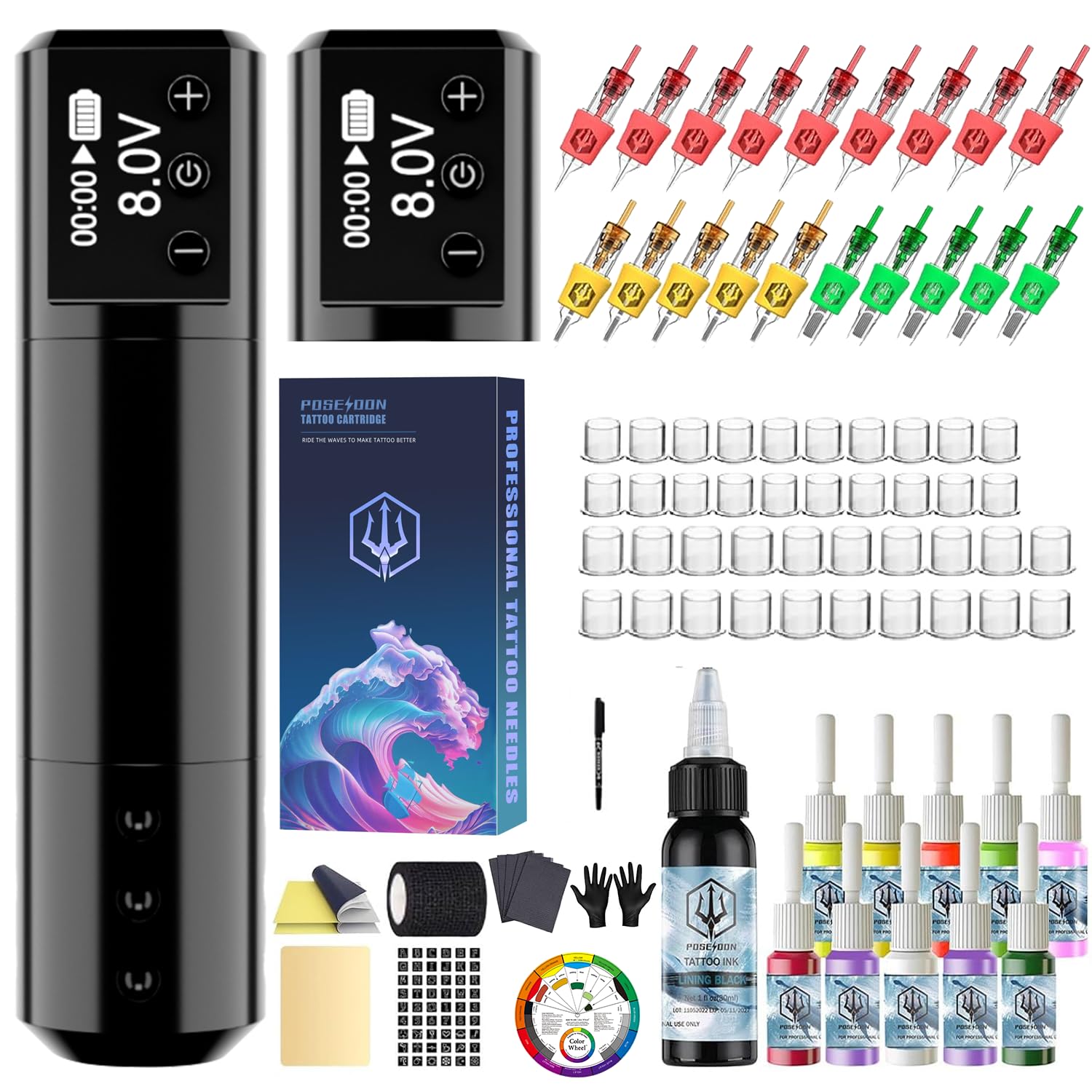
Figure 3.1: An overview of the complete POSEIDON TK125S Cordless Tattoo Pen Kit, showcasing the tattoo pen, two batteries, various needle cartridges, ink bottles, practice skin, and other essential accessories.
Video 3.1: Official product video demonstrating the unboxing, assembly, and initial use of the POSEIDON Cordless Tattoo Pen Kit, including needle insertion and basic operation on practice skin.
4. Product Overview
The POSEIDON TK125S is a cordless tattoo pen designed for ease of use and portability. It features an intuitive LED display and dual long-lasting batteries for uninterrupted operation.
4.1. Tattoo Pen Features
- Cordless Design: Offers freedom of movement without tangled cables.
- LED Display: Clearly shows battery life, voltage, and session timer.
- Adjustable Voltage: 9 voltage levels from 4V to 12V for precise control.
- Quiet Operation: Designed for a low-noise tattooing experience.
- Ergonomic Design: Pen-style for comfortable handling.

Figure 4.1: Detailed view of the POSEIDON tattoo pen, highlighting its key specifications including adjustable working voltage (4-12V), 4.2mm stroke length, 8500 RPM motor speed at 8V, and a 1500mAh battery capacity.
4.2. Battery Features
- Dual 1500mAh Batteries: Provides 4-6 hours of continuous run time per battery.
- USB-C Charging: Modern and convenient charging port for quick recharging.
- Stable Performance: Maintains consistent power output throughout operation.

Figure 4.2: A close-up image of the high-endurance battery for the POSEIDON tattoo pen, emphasizing its USB-C charging capability and stable performance during extended use.
5. Setup
Follow these steps to set up your POSEIDON TK125S tattoo pen:
- Charge Batteries: Ensure both 1500mAh batteries are fully charged using the provided USB-C cable. A full charge typically takes 1-2 hours.
- Attach Battery: Twist the battery pack onto the top of the tattoo pen until securely fastened.
- Insert Needle Cartridge: Select the desired sterile needle cartridge. Push the cartridge firmly into the front end of the tattoo pen until it clicks into place.
- Adjust Needle Depth: Rotate the grip of the tattoo pen to adjust the needle depth to your preference.
- Prepare Ink: Pour a small amount of tattoo ink into a clean ink cup.
- Dip Needle: Gently dip the needle tip into the ink cup to load the ink.

Figure 5.1: A selection of sterile tattoo needle cartridges included in the kit, featuring various configurations like 1205RL, 1207RL, 1209RS, and 1207RM, designed for different tattooing techniques.
6. Operating Instructions
Operating your POSEIDON TK125S tattoo pen is straightforward:
- Power On/Off: Press and hold the power button (usually the central button on the display) for 3 seconds to turn the device on or off.
- Adjust Voltage: Use the '+' and '-' buttons on the LED display to adjust the voltage. The pen offers 9 voltage levels, ranging from 4V to 12V, suitable for both lining and shading.
- Start/Pause Operation: Once powered on and voltage is set, press the power button briefly to start or pause the needle's operation.
- Session Timer: The LED display includes a built-in digital timer to help track your session length.

Figure 6.1: An image demonstrating the POSEIDON tattoo pen being used on a practice skin, illustrating the ergonomic design and ease of handling during tattooing.
7. Maintenance
Proper maintenance ensures the longevity and hygiene of your tattoo pen:
- Cleaning: After each use, carefully wipe down the exterior of the tattoo pen with a suitable disinfectant. Avoid getting liquids inside the motor or battery compartments.
- Needle Disposal: Always dispose of used needle cartridges in a designated sharps container.
- Storage: Store the tattoo pen and accessories in a clean, dry place, away from direct sunlight and extreme temperatures.
- Charging: Only use the provided USB-C cable for charging. Do not overcharge the batteries.
8. Troubleshooting
If you encounter any issues, refer to the following common troubleshooting tips:
- Pen Not Turning On: Ensure the battery is fully charged and securely attached. Press and hold the power button for 3 seconds.
- Needle Not Moving: Check if the needle cartridge is correctly inserted and locked. Verify the voltage setting on the LED display.
- Battery Not Charging: Ensure the USB-C cable is properly connected to both the battery and a power source. Try a different power source or cable if necessary.
- Inconsistent Performance: Ensure the needle cartridge is not damaged or clogged. Check battery level.
For persistent issues, please contact customer support.
9. Specifications
| Feature | Specification |
|---|---|
| Model | TK125S |
| Brand | POSEIDON |
| Battery Type | Lithium Polymer |
| Battery Capacity | 2 x 1500mAh (included) |
| Run Time per Battery | 4-6 hours |
| Charging Port | USB-C |
| Adjustable Voltage | 4-12V (9 levels) |
| Stroke Length | 4.2mm |
| Motor Speed (at 8V) | 8500 RPM |
| Package Dimensions | 8.5 x 8 x 4 inches |
| Package Weight | 2 Pounds |
10. Warranty and Support
For warranty information or technical support, please refer to the product packaging or contact the retailer where you purchased the POSEIDON TK125S Cordless Tattoo Pen Kit. Our customer service team is available to assist you with any questions or concerns.