
Introduction
Thank you for choosing the ROUNY R-T2-SA Smart Air Purifier with Humidifier. This manual provides essential information for the safe and efficient operation, maintenance, and troubleshooting of your new appliance. Please read it thoroughly before use and retain it for future reference.
Product Overview
The ROUNY R-T2-SA is an advanced 2-in-1 appliance designed to improve your indoor air quality. It combines a powerful 3-stage air purification system with an integrated, fog-free humidification function. Its smart sensing capabilities and user-friendly touch controls make it an ideal solution for various living spaces.

Image: The ROUNY R-T2-SA unit, highlighting its air purification and humidification capabilities.
Key Features:
- Detachable Humidifier: The humidifier unit can be attached to the air purifier or removed for standalone air purification. Note: The humidifier unit cannot operate independently.
- Smart Air Quality Sensing: High-precision semiconductor smoke sensor automatically detects air quality and adjusts fan speed accordingly in auto mode.
- Color-Coded Air Quality Indicator: Provides real-time air quality feedback via color changes.
- 3-Stage Filtration System: Includes a pre-filter, True HEPA filter, and activated carbon filter for comprehensive air cleaning.
- Fog-Free Humidification: Natural evaporative humidification without mist, preventing white dust and protecting furniture.
- User-Friendly Touch Control: Simple touch panel for power, mode selection, fan speed, and timer settings (1, 4, 8 hours).
- Quiet Operation: Low noise level suitable for bedrooms and offices.
Important Safety Instructions
To reduce the risk of fire, electric shock, or injury, please observe the following safety precautions:
- Always unplug the appliance before cleaning, performing maintenance, or when not in use.
- Do not operate the appliance with a damaged cord or plug.
- Keep the power cord away from heated surfaces.
- Do not use the appliance outdoors or on wet surfaces.
- Do not allow children to operate the appliance without supervision.
- Ensure the appliance is placed on a stable, level surface.
- Do not block air inlets or outlets.
- Only use ROUNY genuine replacement filters.
- Do not immerse the appliance in water or other liquids.
- For humidification, use distilled or demineralized water to prevent mineral buildup.
Setup
- Unpack the Unit: Carefully remove the air purifier and all accessories from the packaging.
- Remove Filter Packaging: Open the filter compartment (usually at the bottom or back) and remove the plastic packaging from the HEPA and activated carbon filters. Reinsert the filters securely.
- Position the Unit: Place the air purifier on a firm, level surface. Ensure there is at least 20 cm (8 inches) of space around all sides for optimal air circulation.
- Attach Humidifier (Optional): If using the humidification function, align the humidifier unit with the top of the air purifier and secure it according to the markings. Ensure it clicks into place.
- Fill Humidifier Water Tank: If the humidifier is attached, remove the water tank, fill it with clean, distilled, or demineralized water, and replace it securely.
- Connect Power: Plug the power cord into a suitable electrical outlet (240V).
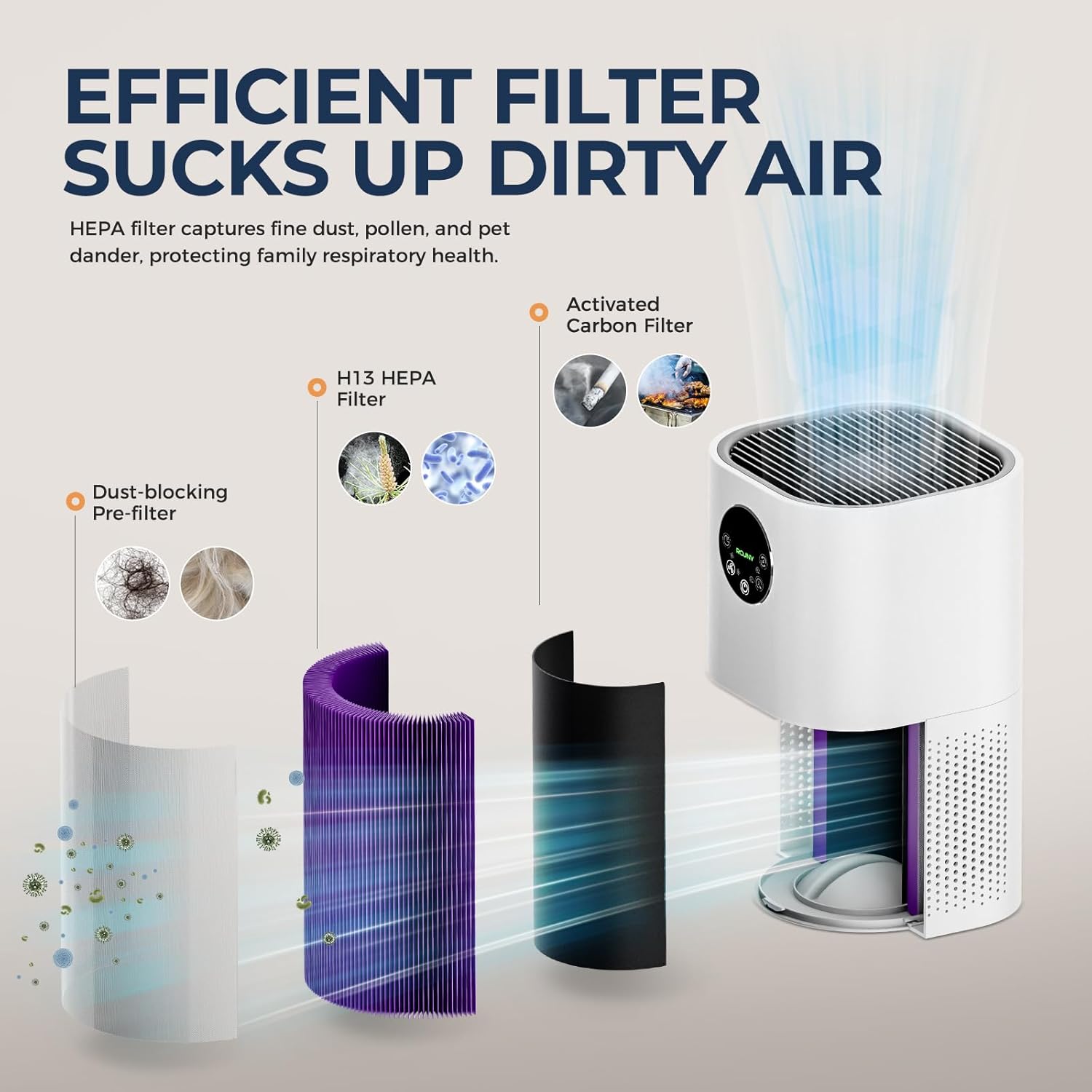
Image: Illustration of the 3-stage filtration system, including the dust-blocking pre-filter, H13 HEPA filter, and activated carbon filter.
Operating Instructions
The ROUNY R-T2-SA features a touch control panel for easy operation.

Image: Detailed view of the touch control panel, indicating functions such as Auto mode, Night mode, Fan speed, Power, and Timer.
Control Panel Functions:
- Power Button (⏻): Press to turn the unit ON or OFF.
- Auto Mode Button (Ⓐ): Activates automatic mode. The unit will detect air quality and adjust fan speed accordingly.
- Night Mode Button (🌙): Sets the unit to operate at the lowest fan speed with dimmed lights for quiet operation during sleep.
- Fan Speed Adjustment Button (💨): Cycles through different fan speed settings (Low, Medium, High).
- Timer Button (⏲): Sets the operating time for 1, 4, or 8 hours. The unit will automatically turn off after the set time.
- Humidifier Button (💧): Activates or deactivates the humidification function. (Only available when the humidifier unit is attached and filled with water).
Air Quality Indicator:
The unit features an indicator light that changes color based on detected air quality:
- Green: Good Air Quality
- Yellow: Moderate Air Quality / Poor Air Quality
- Red: Severe Air Pollution

Image: Visual representation of the smart sensing feature, showing how the indicator light changes color to reflect air quality levels.
Maintenance
Regular maintenance ensures optimal performance and extends the lifespan of your air purifier.
Filter Replacement:
- The filter indicator light will illuminate when it's time to replace the filter.
- The standard filter replacement interval is 3-6 months, depending on usage and air quality.
- To replace:
- Unplug the air purifier.
- Open the filter compartment cover.
- Remove the old filter.
- Insert a new ROUNY genuine replacement filter, ensuring it is correctly oriented.
- Close the filter compartment cover.
- Plug in the unit and reset the filter indicator (refer to the control panel section for specific reset instructions, if any, or consult the manufacturer's website).
Filter Cleaning:
- The pre-filter can be cleaned periodically using a vacuum cleaner to remove large dust particles and pet dander.
- The HEPA and activated carbon filters are not washable and should not be cleaned with water. They must be replaced.
Humidifier Cleaning:
- Regularly clean the water tank and humidifier base to prevent mineral buildup and bacterial growth.
- Unplug the unit before cleaning.
- Remove the water tank and empty any remaining water.
- Wipe the inside of the tank and base with a soft cloth. For mineral deposits, use a descaling solution or a mixture of white vinegar and water. Rinse thoroughly.
- Ensure all parts are dry before reassembling.
Troubleshooting
| Problem | Possible Cause | Solution |
|---|---|---|
| Unit does not turn on. | Not plugged in; power outage; power button not pressed. | Ensure unit is securely plugged in. Check power supply. Press the power button. |
| Weak airflow. | Filters are dirty or clogged; air inlets/outlets blocked. | Clean or replace filters. Ensure no obstructions around the unit. |
| Humidifier not producing mist/humidity. | Water tank empty; humidifier unit not properly attached; mineral buildup. | Refill water tank. Ensure humidifier is correctly installed. Clean humidifier unit. |
| Unusual noise. | Loose filter; foreign object inside; unit not on a level surface. | Check and secure filters. Unplug and inspect for foreign objects. Place on a stable surface. |
| Air quality indicator always red/yellow. | High pollution in the environment; sensor dirty. | Ensure proper ventilation. Clean the air quality sensor (refer to maintenance section for sensor cleaning, if applicable). |
If the problem persists after attempting these solutions, please contact customer support.
Specifications

Image: Detailed product parameters and specifications.
| Feature | Detail |
|---|---|
| Brand | ROUNY |
| Model Number | R-T2-SA |
| Color | White |
| Product Dimensions (L x W x H) | 27 x 27 x 56 cm (approx. 10.6 x 10.6 x 22 inches) |
| Power | 24 Watts |
| Voltage | 240 Volts |
| Material | Plastic |
| Auto Shutoff | Yes |
| Noise Level | 25 dB |
| Control Method | Touch Control |
| Filter Type | HEPA |
| Applicable Area | 20-50 m² |
| Net Weight | 2.6 kg (approx. 5.73 lbs) |
Warranty and Support
For warranty information or technical support, please refer to the warranty card included with your product or visit the official ROUNY website. Keep your purchase receipt as proof of purchase for warranty claims.
Contact Information: Please refer to the product packaging or the manufacturer's website for the most up-to-date customer service contact details.
