
Jocoevol B11859
Farmhouse 57" Executive Desk User Manual
Model: B11859 | Brand: Jocoevol
Introduction
This manual provides comprehensive instructions for the assembly, operation, and maintenance of your Jocoevol Farmhouse 57" Executive Desk. Please read this manual thoroughly before use to ensure safe and efficient operation. Keep this manual for future reference.
Safety Information
Always follow basic safety precautions when using this product to reduce the risk of injury or damage. Ensure all components are securely fastened before use. Do not overload the desk. Keep liquids away from the charging station and electrical outlets. Do not attempt to modify the desk or its electrical components.
Package Contents and Components
Before beginning assembly, verify that all parts listed below are present and undamaged. If any parts are missing or damaged, contact customer support immediately.

Figure 1: Exploded View and Key Components. This diagram illustrates the main components of the executive desk, including the large-capacity desktop, five spacious drawers, a central storage drawer, a file storage cabinet, a headphone hook, a charging station, and a charging cable organizer. Each part is clearly labeled to assist with identification during assembly and use.
List of Components:
- Desktop with integrated charging station (USB ports, Type-C port, AC outlets)
- Desk base panels (left, right, and center supports)
- 5 small drawers
- 1 large spacious center drawer
- 1 dedicated bottom file cabinet door
- 1 file storage drawer (for letter/legal documents)
- Headphone hook
- All necessary assembly hardware (screws, dowels, cam locks, etc.)
Setup and Assembly
Assembly is required for this executive desk. Follow the instructions carefully. It is recommended to have two people for assembly due to the size and weight of the components.
Assembly Steps:
- Unpack Components: Carefully remove all parts from the packaging. Lay them out on a clean, soft surface to prevent scratches.
- Identify Hardware: Sort and identify all screws, dowels, and other hardware using the provided hardware list.
- Assemble Base Structure: Follow the diagram to connect the main base panels. Ensure all connections are secure and aligned.
- Install Drawers: Assemble each drawer according to the instructions. Install drawer slides onto the desk frame and then insert the assembled drawers. Note: Some users have reported that drawer instructions may be inaccurate; if issues arise, try reversing the indicated direction for drawer installation or consulting the manufacturer's online resources.
- Attach Desktop: Carefully place the desktop onto the assembled base. Secure it using the provided fasteners, ensuring the charging station is positioned correctly.
- Connect Charging Station: Ensure the charging station is properly seated and its power cord is accessible for connection to a wall outlet.
- Attach Headphone Hook: Secure the headphone hook to the designated location on the side of the desk using the provided screws.
- Final Check: Verify that all screws are tightened and the desk is stable before placing items on it.
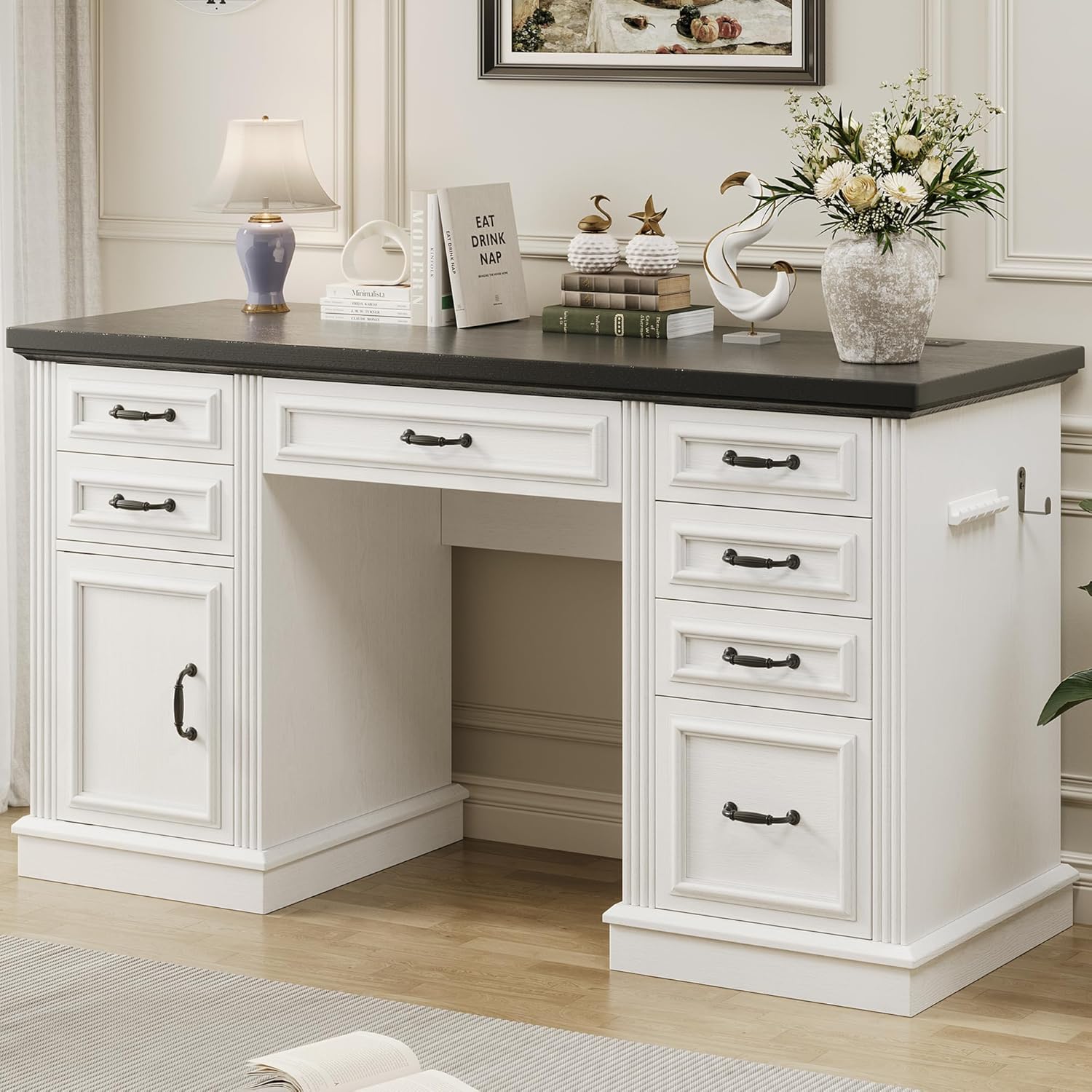
Figure 2: Fully Assembled Executive Desk. This image shows the complete desk with its antique white finish, black hardware, and dark top, ready for use in a home office setting. Note the integrated charging station and headphone hook on the right side.

Figure 3: Product Dimensions. This diagram provides detailed measurements of the desk, including its overall length (56.7 inches), width (20.9 inches), and height (30.3 inches). Individual drawer dimensions are also shown, indicating their depth, width, and height for various storage needs.
Operating Instructions
Using the Charging Station:
The desk features a built-in charging station for convenience. To use it:
- Plug the desk's power cord into a standard wall outlet.
- Connect your devices to the available USB ports, Type-C port, or AC outlets.
- The charging station is designed to power up to 4 devices simultaneously.

Figure 4: Convenient Charging Station. This image highlights the integrated charging station on the desktop, featuring two standard AC outlets, USB ports, and a Type-C port. It allows for simultaneous charging of multiple electronic devices, reducing cable clutter on your workspace.
Utilizing Storage Features:
The desk offers extensive storage options to help keep your workspace organized:
- Small Drawers: Use the 5 small drawers for quick access to office supplies like pens, calculators, and notebooks.
- Center Drawer: The large center drawer is suitable for bulkier items, a keyboard, or a mouse.
- File Cabinet: The dedicated bottom file cabinet and file storage drawer are designed to accommodate letter and legal-sized documents, keeping your paperwork organized and secure.
- Headphone Hook: Utilize the side hook to conveniently store headphones or other small accessories, keeping them within reach and off the desktop.

Figure 5: Comprehensive Storage Solutions. This composite image showcases the desk's diverse storage capabilities, including the quick-access desk dresser for small items, a large central drawer for bulkier office essentials, and a spacious file drawer designed for letter and legal documents. The cabinet provides additional hidden storage for items rarely used.
Maintenance and Care
Proper care will extend the life and appearance of your desk.
- Cleaning: Wipe the desk surfaces with a damp cloth. Avoid harsh chemicals or abrasive cleaners, which can damage the finish.
- Spills: Immediately wipe up any spills to prevent staining or damage to the wood.
- Sunlight: Avoid prolonged exposure to direct sunlight, which can cause fading or discoloration of the finish.
- Weight Capacity: Do not exceed the recommended weight capacity for the desktop or drawers to prevent structural damage.
- Drawer Slides: Periodically check drawer slides for smooth operation. If they become stiff, a small amount of silicone lubricant can be applied to the tracks.
- Fasteners: Periodically check and tighten all assembly fasteners to ensure the desk remains stable.
Troubleshooting
| Problem | Possible Cause | Solution |
|---|---|---|
| Desk is wobbly. | Loose fasteners; uneven floor. | Check and tighten all assembly screws. Use furniture levelers or shims if the floor is uneven. |
| Drawers do not slide smoothly. | Misaligned slides; debris in tracks; overtightened screws. | Ensure drawer slides are correctly aligned and free of obstructions. Loosen screws slightly if overtightened. Apply silicone lubricant to tracks if needed. |
| Charging station not working. | Not plugged in; power outage; faulty device. | Verify the desk's power cord is securely plugged into a live wall outlet. Check household circuit breaker. Test with a different device to rule out device issue. |
| Missing or damaged parts during assembly. | Packaging error; shipping damage. | Do not proceed with assembly. Contact Jocoevol customer support immediately with your purchase details and a list of affected parts. |
Specifications
- Brand: Jocoevol
- Model Number: B11859
- Product Dimensions (D x W x H): 21"D x 57"W x 30.5"H
- Color: Antique White
- Style: Farmhouse
- Base Material: Engineered Wood
- Top Material Type: Engineered Wood
- Finish Type: Unfinished
- Special Features: 6 drawers, Built-In USB Outlet, File Storage Drawer, Large Capacity Storage Cabinet, Large Desktop, Headphone Hook
- Item Weight: 55.4 Pounds
- Assembly Required: Yes
- Care Instructions: Wipe with Damp Cloth
Warranty and Support
For warranty information, product support, or to order replacement parts, please contact Jocoevol customer service. Refer to your purchase receipt for specific warranty terms and conditions.
Customer Support: For assistance, please visit the Jocoevol Store on Amazon or refer to the contact information provided with your product packaging.
Ask a question about this manual
Ask about setup, troubleshooting, compatibility, parts, safety, or missing instructions. Manuals+ will review the question and use this page’s manual context to help answer it.