1. Introduction
This manual provides essential information for the proper setup, operation, and maintenance of your Amzfast 49 Inch Curved Monitor (Model: AMZG49C7U). Please read this manual thoroughly before using the product to ensure optimal performance and safety.

Figure 1: Front view of the Amzfast 49 Inch Curved Monitor AMZG49C7U.
2. Package Contents
Verify that all items listed below are included in your product package:
- Amzfast 49 Inch Curved Monitor (AMZG49C7U) x 1
- Adaptor x 1
- Power Cord (1.5m) x 1
- DP Cable (1.5m) x 1
- User Manual x 1
- Quick Start Guide x 1
3. Setup
3.1. Assembling the Stand
- Carefully remove the monitor from its packaging, keeping it protected on a soft, flat surface.
- Attach the stand base to the stand neck using the provided screw.
- Align the assembled stand with the mounting slot on the back of the monitor.
- Gently push the stand into the slot until it clicks securely into place. Ensure the stand is firmly attached before proceeding.

Figure 2: Illustration of monitor stand assembly and available port connections.
3.2. Connecting Cables
Connect the necessary cables to the monitor's ports located on the rear panel:
- Power: Connect the power adapter to the DC input port and then to a power outlet.
- Video Input: Connect the provided DisplayPort (DP 1.4) cable from your computer's graphics card to one of the DP 1.4 ports on the monitor for optimal 120Hz refresh rate. Alternatively, use an HDMI 2.0 cable for up to 60Hz refresh rate.
- Audio Output: If desired, connect headphones or external speakers to the 3.5mm earphone out port.
The monitor also supports VESA 75x75mm mounting for alternative stand or wall mount solutions.

Figure 3: Side profile of the monitor, highlighting its thin design.
4. Operating Instructions
4.1. Power On/Off
Press the power button located on the rear of the monitor to turn it on or off.
4.2. On-Screen Display (OSD) Menu
Navigate the OSD menu using the joystick control located on the rear of the monitor. This allows adjustment of various display settings.
4.3. Display Features
- DQHD Ultrawide Vision: The 49-inch curved VA panel offers a Dual QHD (5120x1440) resolution with a 1500R curvature for an immersive viewing experience.
- High Refresh Rate & Response Time: Enjoy smooth visuals with a 120Hz refresh rate (via DP 1.4) and a 1ms MPRT response time.
- Adaptive Sync: This technology synchronizes the monitor's refresh rate with your GPU, reducing screen tearing and stuttering.
- Color & HDR: The monitor delivers vibrant visuals with 120% sRGB color gamut coverage, 350 nits brightness, a 3000:1 contrast ratio, and HDR10 support.
- Eye Care Function: Features such as low blue light, flicker-free, and anti-glare technology are integrated to reduce eye fatigue during extended use.

Figure 4: Key display features including resolution, refresh rate, and curvature.
4.4. Smart Split Screen (PIP/PBP)
The monitor supports Picture-in-Picture (PIP) and Picture-by-Picture (PBP) technology, allowing you to display content from two different signal sources simultaneously. This enables multitasking, such as working on one side and watching media on the other.
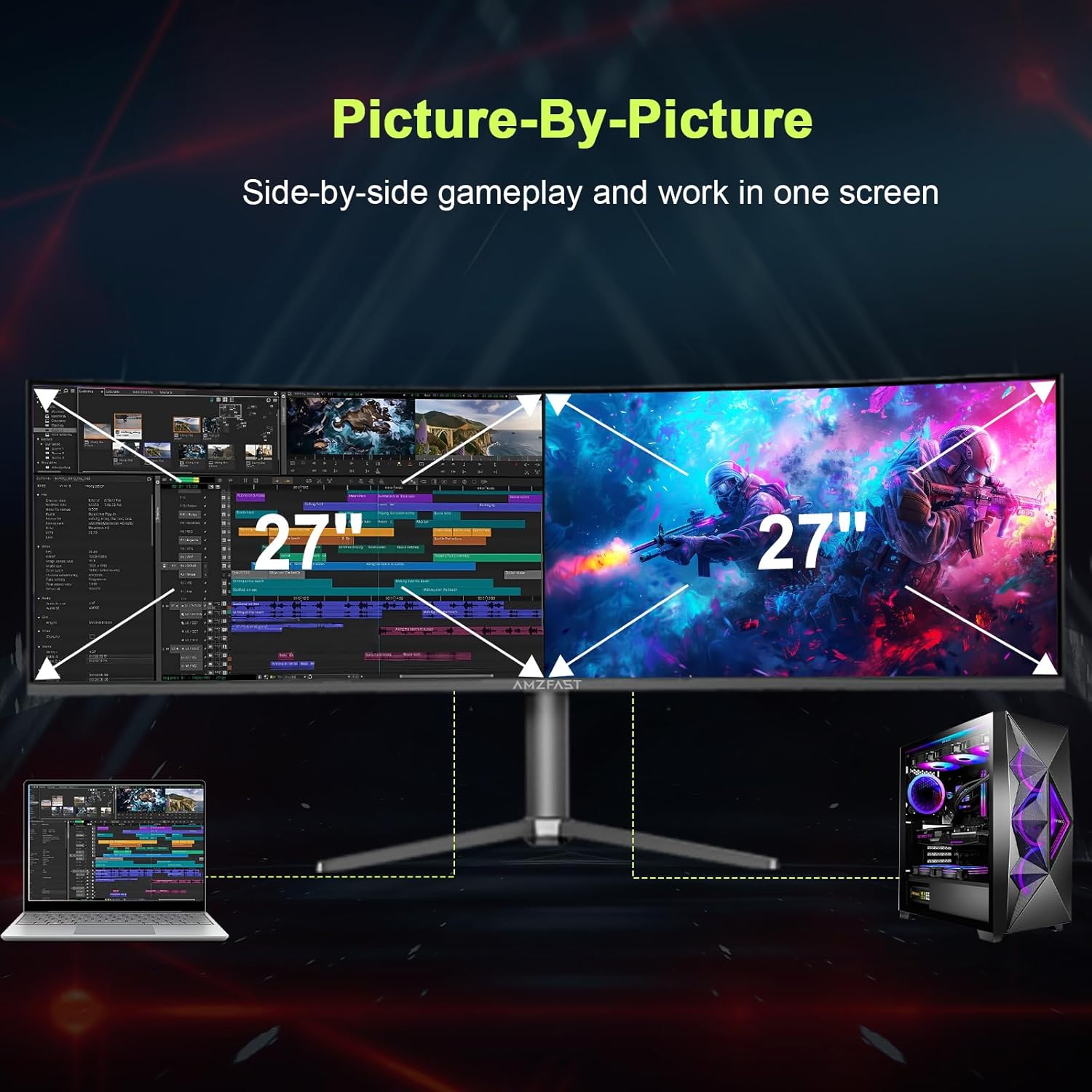
Figure 5: Demonstration of Picture-by-Picture (PBP) functionality.
4.5. Ergonomic Adjustments
The monitor stand offers multiple adjustment options for comfortable viewing:
- Height Adjustment: 0-110mm range.
- Tilt Adjustment: -5° to +20° range.
- Rotation: Left 20°, Right 20°.

Figure 6: Available ergonomic adjustments for the monitor.
4.6. Official Product Video
For a visual overview of the Amzfast 49 inch DQHD curved monitor, please watch the official product video below:
Video 1: Official overview of the Amzfast 49 inch DQHD curved monitor, showcasing its features and design.
5. Specifications
| Feature | Description |
|---|---|
| Model Number | AMZG49C7U |
| Screen Size | 49 Inches |
| Resolution | 5120x1440 Pixels (DQHD) |
| Aspect Ratio | 32:9 |
| Curvature | 1500R |
| Refresh Rate | 120Hz (via DP 1.4) |
| Response Time | 1ms MPRT |
| Color Gamut | 120% sRGB |
| Brightness | 350 Candela per Square Meter (nits) |
| Contrast Ratio | 3000:1 |
| HDR Support | HDR10 |
| Adaptive Sync | Yes |
| PIP/PBP | Yes |
| Connectivity | HDMI 2.0 x 2, DP 1.4 x 2, Audio Out |
| VESA Compatibility | 75x75mm |
| Product Dimensions | 11.61 x 46.69 x 22.28 inches |
| Item Weight | 24.1 pounds |
6. Maintenance
6.1. Cleaning the Monitor
To clean the monitor screen and casing:
- Always power off the monitor and unplug the power cord before cleaning.
- Use a soft, lint-free cloth lightly dampened with water or a non-abrasive screen cleaner.
- Avoid using alcohol, ammonia, or abrasive cleaners, as these can damage the screen surface.
- Do not spray liquid directly onto the screen.
6.2. Storage
When storing the monitor for an extended period, ensure it is powered off, unplugged, and stored in a cool, dry place away from direct sunlight and extreme temperatures.
7. Troubleshooting
If you encounter issues with your monitor, refer to the following common solutions:
- No Power: Ensure the power cord is securely connected to both the monitor and the power outlet. Verify the power outlet is functional.
- No Signal: Check that the video cable (DP or HDMI) is correctly connected to both the monitor and your computer. Ensure the correct input source is selected in the OSD menu.
- Flickering/Tearing: Verify that Adaptive Sync is enabled on both the monitor (via OSD) and your computer's graphics card settings. Ensure your graphics drivers are up to date.
- Image Quality Issues: Adjust brightness, contrast, and color settings via the OSD menu. Ensure the display resolution and refresh rate are set correctly in your computer's display settings.
- Sound Issues: If using the earphone out port, ensure your headphones/speakers are properly connected and the volume is adjusted on both the monitor and your device.
If problems persist, consult the Amzfast customer support for further assistance.
8. Warranty and Support
The Amzfast 49 Inch Curved Monitor AMZG49C7U comes with a 12-month warranty. For warranty claims, technical support, or any product-related inquiries, please contact Amzfast customer service. Refer to the Quick Start Guide for contact details or visit the official Amzfast website.
The product also includes a 30-day free return/replacement policy.