
1. Introduction
Thank you for choosing the UPFAS Automatic Self-Cleaning Cat Litter Box. This device is designed to provide a convenient and hygienic solution for managing your cat's litter needs. Featuring automatic cleaning cycles, app control, and weight monitoring, it aims to simplify pet care while maintaining a clean environment. Please read this manual thoroughly before assembly and operation to ensure proper use and longevity of your product.

Figure 1.1: The UPFAS Automatic Self-Cleaning Cat Litter Box in operation, showing a cat comfortably inside and the companion mobile application.
2. Safety Information
To ensure safe operation and prevent injury or damage, please observe the following safety guidelines:
- Adult Supervision: This product is not a toy. Keep children away from the device during operation.
- Anti-Pinch Design: The litter box incorporates an anti-pinch mechanism. However, always exercise caution around moving parts.
- Real-Time Gravity Sensor: The device is equipped with a gravity sensor that stops operation if a cat enters during a cleaning cycle. The cycle will resume only after the cat has exited.
- Power Supply: Use only the provided power adapter. Ensure the power cord is not damaged or pinched.
- Placement: Place the litter box on a flat, stable surface indoors. Avoid placing it near water sources or in excessively humid environments.
- Litter Type: Use only clumping cat litter. Other types of litter may interfere with the cleaning mechanism.
- Cleaning: Disconnect power before cleaning. Do not immerse the main body base in water. The drum is washable, but ensure it is completely dry before reassembly.
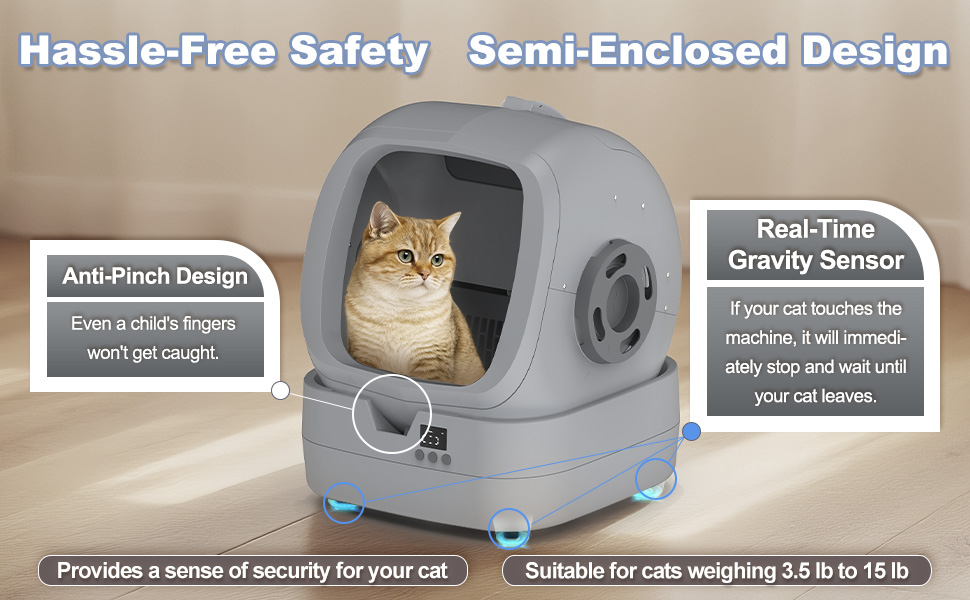
Figure 2.1: Safety features including the anti-pinch design and real-time gravity sensor, ensuring pet safety during operation.
3. Package Contents
Please verify that all components are present before beginning assembly:
- Main Body Base
- Upper Part of the Drum
- Lower Part of the Drum
- Waste Bin
- Upper Lid
- Toilet Guide Bracket
- Left Handle
- Right Handle
- Power Adapter
- Litter Scoop Kit
- User Manual (this document)
- Assembly Hardware (screws, screwdriver)
4. Assembly Instructions
Assembly of the UPFAS Automatic Self-Cleaning Cat Litter Box typically takes approximately 30 minutes. Follow these steps carefully:
- Prepare Components: Lay out all components and hardware on a clean, flat surface.
- Attach Handles: Secure the Left Handle and Right Handle to their respective sides of the drum using the provided screws.
- Assemble Drum: Connect the Upper Part of the Drum to the Lower Part of the Drum. Ensure they align correctly.
- Install Toilet Guide Bracket: Attach the Toilet Guide Bracket inside the drum.
- Insert Waste Bin: Place the Waste Bin into its designated slot in the main body base.
- Attach Upper Lid: Secure the Upper Lid to the top of the drum assembly.
- Mount Drum Assembly: Carefully place the assembled drum onto the Main Body Base, ensuring it seats properly and can rotate freely.
- Final Checks: Verify all connections are secure and the drum rotates without obstruction.

Figure 4.1: Exploded view of the litter box components, illustrating the assembly process.
5. Setup
5.1 Initial Placement and Power
- Place the assembled litter box on a firm, level surface.
- Connect the power adapter to the litter box and then plug it into a wall outlet. The display on the front of the base should illuminate.
5.2 Filling with Litter
- Open the top lid of the drum.
- Pour clumping cat litter into the drum. Ensure the litter level is between the MIN and MAX lines indicated inside the drum. Do not overfill.
- Close the top lid securely.
5.3 App Integration (2.4GHz Wi-Fi or Bluetooth)
The UPFAS litter box can be controlled and monitored via a smartphone application. Follow these steps to connect:
- Download App: Search for the 'UPFAS Pet' app (or similar, refer to packaging for exact name) on your smartphone's app store (iOS or Android).
- Create Account: Open the app and follow the prompts to create a new user account or log in if you already have one.
- Add Device: Select 'Add Device' or the '+' icon within the app.
- Select Device Type: Choose 'Automatic Cat Litter Box' from the list of available devices.
- Connect: Follow the in-app instructions to connect the litter box using either 2.4GHz Wi-Fi or Bluetooth. Ensure your phone is connected to a 2.4GHz Wi-Fi network if using Wi-Fi.
- Confirmation: Once connected, the app will display the device status, and you can begin monitoring and controlling the litter box remotely.

Figure 5.1: Overview of the app control features, enabling comprehensive monitoring and management of the litter box.
6. Operating Instructions
The UPFAS Automatic Self-Cleaning Cat Litter Box offers both automatic and manual operation modes, primarily controlled via the mobile application.
6.1 Automatic Cleaning Cycles
- The litter box is designed to automatically detect when your cat uses it and initiate a cleaning cycle after a set delay (default or user-defined in the app).
- During a cleaning cycle, the drum will rotate to sift the litter, separating waste into the waste bin below.
- The cleaning noise is typically below 35 dB, ensuring a quiet environment.
6.2 App Control Features
The mobile app provides extensive control and monitoring capabilities:
- Manual Cleaning: Initiate a cleaning cycle at any time with a single tap.
- Scheduled Cleaning: Set specific times for cleaning cycles to occur.
- Adjustable Cleaning Frequency: Customize how often the litter box cleans after use.
- Weight Monitoring: Track your cat's weight over time, which can be an indicator of health.
- Litter Box Entry Times: Monitor how often your cat uses the litter box.
- Duration of Each Visit: Observe the time your cat spends in the litter box.
- Usage History: Access detailed logs of all activities.
- Notifications: Receive alerts for waste bin full, abnormal operation, or other important events.
- Quiet Mode: Temporarily disable auto-cleaning for sensitive cats or during specific times (e.g., at night).
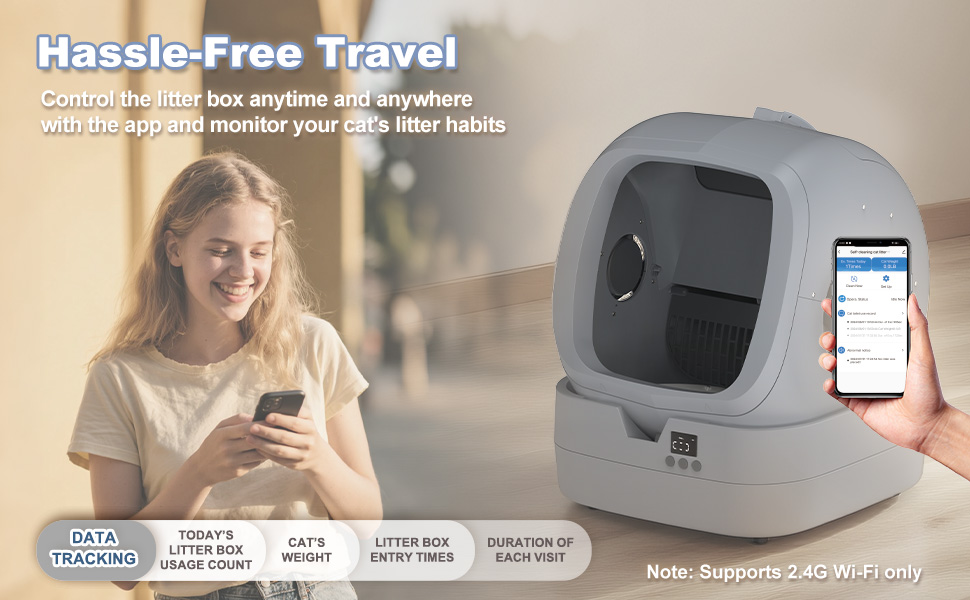
Figure 6.1: Remote control and monitoring of the litter box via the mobile application.

Figure 6.2: The litter box operates quietly, ensuring a peaceful environment for both pets and owners.
7. Maintenance
Regular maintenance is crucial for the optimal performance and hygiene of your UPFAS Automatic Self-Cleaning Cat Litter Box.
7.1 Emptying the Waste Bin
- The app will notify you when the waste bin is full.
- Carefully pull out the waste bin from the main body base.
- Dispose of the waste in accordance with local regulations.
- Clean the waste bin with mild soap and water if necessary, then dry thoroughly before reinserting.
7.2 Cleaning the Drum
The drum features a snap-free design for easy removal and cleaning.
- Disconnect Power: Always unplug the device before performing any cleaning.
- Remove Drum: Gently lift the entire drum assembly from the main body base.
- Remove Excess Litter: Use the included scoop kit to remove any remaining litter from the drum.
- Wash Drum: The drum is fully washable. You can rinse it with water, using mild soap if needed.
- Dry Thoroughly: Ensure the drum is completely dry before reassembling it onto the main body base.
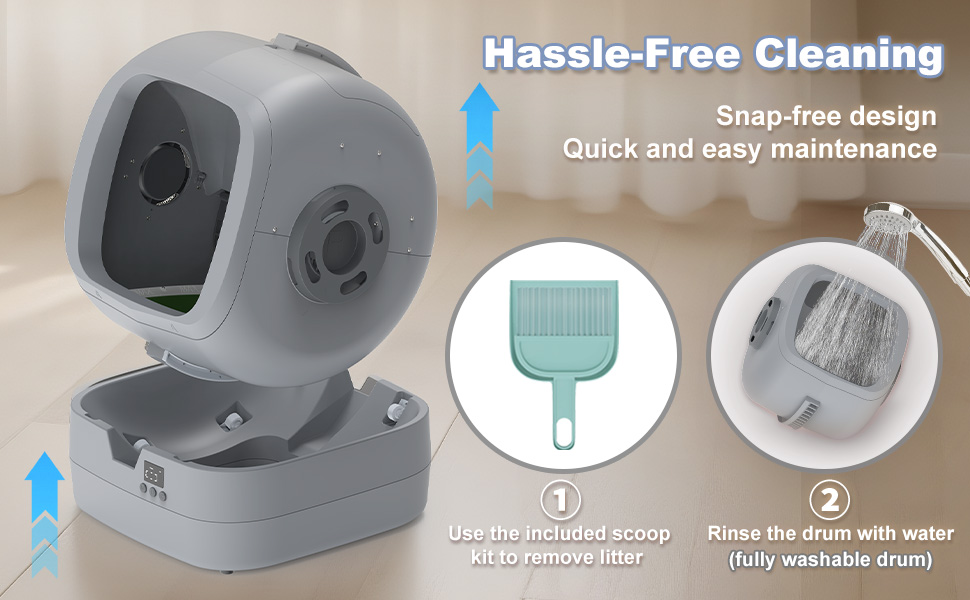
Figure 7.1: Steps for easy drum removal and washing.
7.3 Polymer Fabric Lining
The drum features a double-layer polymer fabric lining designed for durability and hygiene:
- Scratch Resistant: Helps prevent damage from cat claws.
- Anti-stick: Reduces litter adhesion, making cleaning easier.
- Leakage Prevention: The polymer waterproof back glue prevents liquid from seeping through.
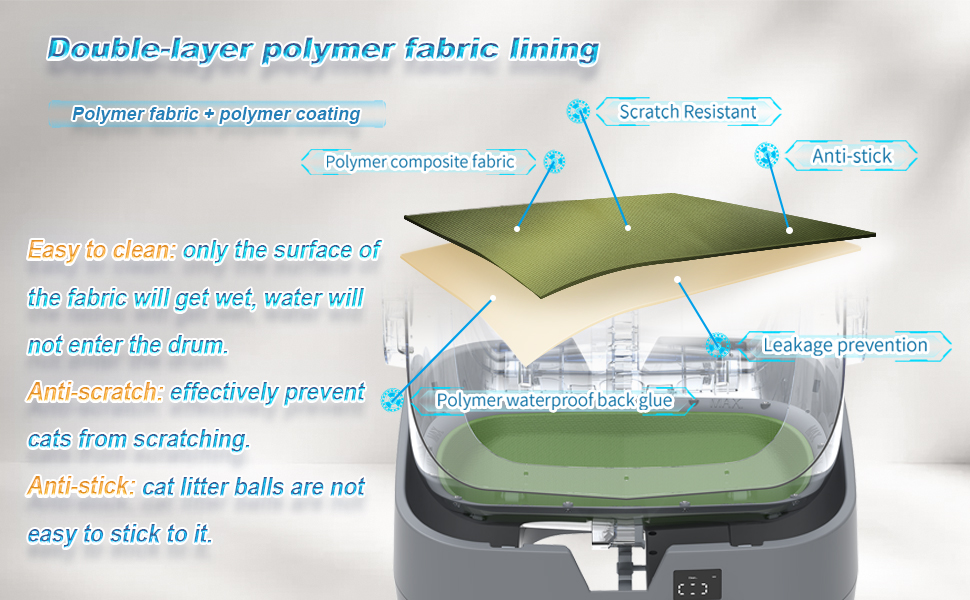
Figure 7.2: Exploded view of the drum lining, highlighting its multi-layer construction and benefits.
8. Troubleshooting
If you encounter issues with your UPFAS Automatic Self-Cleaning Cat Litter Box, refer to the following common problems and solutions:
| Problem | Possible Cause | Solution |
|---|---|---|
| Device not powering on | Power cord disconnected; Power outlet malfunction | Ensure power cord is securely plugged in; Try a different outlet. |
| Drum not rotating | Obstruction; Incorrect assembly; Motor issue | Check for foreign objects; Reassemble drum correctly; Contact support if motor issue suspected. |
| App not connecting | Incorrect Wi-Fi band (not 2.4GHz); Incorrect password; Device too far from router | Ensure phone is on 2.4GHz Wi-Fi; Verify password; Move device closer to router or use Bluetooth. |
| Waste not being sifted | Litter type incompatible; Litter level too low/high; Drum lining issue | Use clumping litter only; Adjust litter level; Inspect drum lining for damage. |
| Foul odor persists | Waste bin full; Infrequent cleaning; Poor ventilation | Empty waste bin regularly; Increase cleaning frequency; Ensure proper room ventilation. |
| Cat not using the litter box | New environment; Noise sensitivity; Unfamiliarity | Allow cat to adjust; Use quiet mode; Place familiar items near the box; Gradually introduce. |
If the problem persists after attempting these solutions, please contact UPFAS customer support for further assistance.
9. Specifications
| Feature | Detail |
|---|---|
| Model Name | Little-Box-500C-DIY |
| Brand | UPFAS |
| Product Dimensions (L x W x H) | 18.23" x 19.84" x 22.44" |
| Item Weight | 20.9 pounds (9.5 Kilograms) |
| Material | Polypropylene (PP) |
| Color | Grey |
| Litter Box Type | Automated Self-Cleaning Litter Box |
| Target Audience | Medium cats and kittens (3.5 lb to 15 lb) |
| Noise Level | Below 35 dB |
| Connectivity | 2.4GHz Wi-Fi, Bluetooth |
| Special Features | App Control, Weight Monitoring, Anti-Pinch, Gravity Sensor, Washable Drum |

Figure 9.1: Key dimensions and noise level specification of the litter box.
10. Warranty and Support
For warranty information, product support, or to report any issues not covered in this manual, please contact UPFAS customer service. Refer to the product packaging or the UPFAS official website for contact details.
Manufacturer: UPFAS
ASIN: B0FJ88D2SS