
Introduction
This manual provides comprehensive instructions for the safe and effective use of your TKMARS Mini Thumb Action Camera, Model WH88. Please read this manual thoroughly before operating the device to ensure optimal performance and to prevent damage.
Product Overview

Image: The TKMARS Mini Thumb Action Camera shown with its various mounting accessories.
The TKMARS Mini Thumb Action Camera is a compact and versatile device designed for capturing high-definition video and photos in various environments. Its small size, magnetic mounting options, and Wi-Fi connectivity make it suitable for hands-free recording during activities such as cycling, hiking, or as a helmet camera.
Key Features:
- Records 1080P HD video.
- Captures high-resolution photos.
- 120° wide-angle lens for broad field of view.
- Wireless Wi-Fi connection for app control and viewing.
- Ultra-small and lightweight design for portability.
- Waterproof function for daily use (with included waterproof housing).
- Supports recording while charging for extended use.
- Automatic loop recording.
- Supports high-capacity Micro SD cards up to 256GB (not included).
- Can function as a webcam.
- Built-in vibration motor for operational feedback.
- Integrated magnetic suction for easy attachment.
Package Contents:
Upon unboxing, please verify that all items listed below are present:
- 1x Sports Camera Host
- 1x Data Cable (Type-C)
- 1x Instruction Manual
- 1x Waterproof Shell
- 1x Frame
- 1x Back Clip
- 1x Lanyard
- 1x Magnetic Lanyard
- 1x Cycling Bracket
- 1x Side Bracket
- 1x 360-degree Adapter
- 1x Curved and Flat Base
- 1x Helmet Bracket
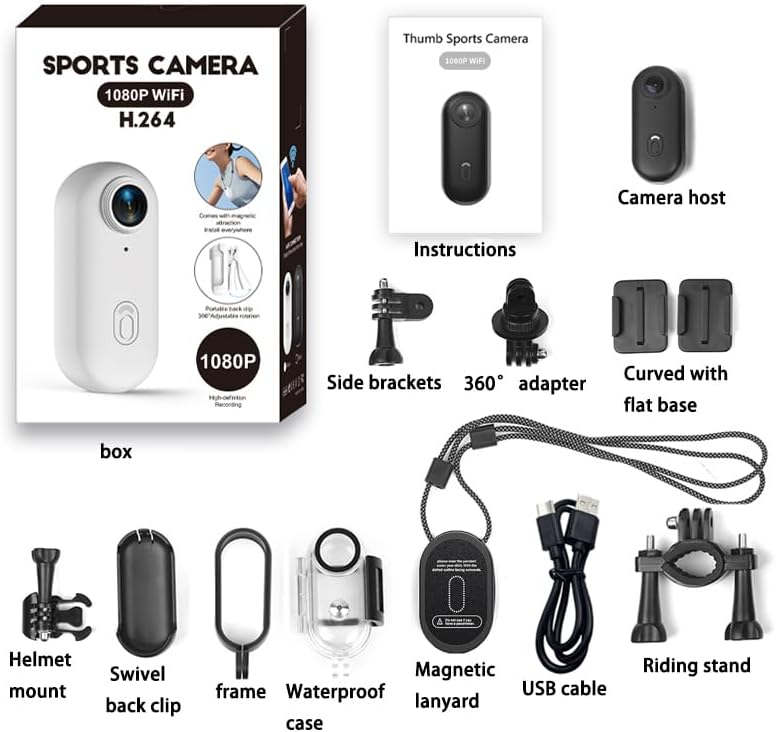
Image: All components included in the TKMARS Mini Thumb Action Camera package, laid out clearly for identification.
Setup
1. Charging the Camera
Before first use, fully charge the camera's built-in 800mAh battery. Connect the camera to a USB power source using the provided Type-C data cable. The charging time is approximately 2 hours. The camera supports recording while charging, allowing for extended operation when connected to a power bank or motorcycle charger.
2. Inserting a Micro SD Card
The camera requires a Micro SD card (not included) for storing recordings. It supports cards up to 256GB. Locate the Micro SD card slot on the camera and gently insert the card until it clicks into place. Ensure the card is inserted correctly to avoid damage.
3. Mounting Options
The TKMARS Mini Thumb Action Camera offers various mounting solutions for hands-free recording:
- Magnetic Lanyard: Wear the camera around your neck for a stable, chest-level perspective.
- 360° Rotating Back Clip: Attach the camera to clothing, backpacks, or other gear.
- Helmet Mount: Use the helmet bracket to secure the camera to the top or side of a helmet for a first-person view.
- Cycling Bracket: Mount the camera to bicycle handlebars.
- Magnetic Suction: The camera's built-in magnet allows direct attachment to metallic surfaces.
- Waterproof Housing: Use this for protection against rain, splashes, and dust, especially during outdoor activities.

Image: Demonstrates the magnetic neck strap and 360-degree rotating back clip for versatile wearing options on a person.

Image: Examples of mounting the camera using magnetic suction and spring clip designs on helmets, handlebars, and clothing for different activities.

Image: Shows the camera installed on a helmet (top and side views) and on bicycle handlebars, illustrating multiple installation methods.
Operating Instructions
1. Power On/Off
- Power On: Press and hold the power button for a few seconds until the indicator light illuminates and the camera vibrates.
- Power Off: Press and hold the power button again for a few seconds until the indicator light turns off and the camera vibrates.
2. Recording Video
With the camera powered on, press the record button once to start video recording. The indicator light will change (e.g., blink) to confirm recording is in progress. Press the record button again to stop recording. Videos are saved in MP4 format at 1920x1080P resolution.
3. Taking Photos
While in standby mode, press the photo button (if separate, or a short press of the record button depending on mode) to capture a still image. Photos are saved in JPG format at 4032x3024 resolution.
4. Wi-Fi Connection and App Usage
The camera features built-in Wi-Fi for seamless connection to a dedicated mobile application. This allows for real-time viewing, playback, editing, and instant sharing of your captured content.
- Download the official TKMARS camera application from your smartphone's app store.
- Power on the camera and activate its Wi-Fi mode (refer to camera's specific button sequence for Wi-Fi activation).
- On your smartphone, go to Wi-Fi settings and connect to the camera's Wi-Fi network (SSID and password typically found in the camera's settings or manual).
- Open the TKMARS app. You should now be able to view a live feed, access recorded files, and adjust camera settings.

Image: The camera wirelessly connected to a smartphone displaying the app interface for video playback and sharing functionality.
Maintenance
- Cleaning: Use a soft, dry cloth to clean the camera body. For the lens, use a specialized lens cleaning cloth and solution. Avoid abrasive materials or harsh chemicals.
- Storage: Store the camera in a cool, dry place away from direct sunlight and extreme temperatures. Remove the Micro SD card if storing for extended periods.
- Battery Care: To prolong battery life, avoid fully discharging the battery frequently. Charge the camera periodically if not used for a long time.
- Waterproof Housing: After using the waterproof housing in water, rinse it with fresh water and dry thoroughly to prevent salt or chlorine buildup.
Troubleshooting
- Camera not turning on: Ensure the battery is charged. Connect to a power source and try again.
- Cannot record: Check if a Micro SD card is inserted and if it has sufficient free space. Format the card if necessary (this will erase all data).
- Wi-Fi connection issues: Ensure the camera's Wi-Fi is activated. Restart both the camera and your smartphone. Verify you are connecting to the correct Wi-Fi network.
- Poor video quality: Ensure the lens is clean. Check that the camera is set to 1080P recording resolution in the app settings.
- Camera freezing: If the camera becomes unresponsive, try a soft reset by pressing and holding the power button for an extended period (e.g., 10-15 seconds) until it powers off.
Specifications
| Product Dimensions | 5 x 2 x 3 cm; 150 g |
| Manufacturer | TKMARS |
| Item Model Number | WH88 |
| Photo Sensor Technology | CMOS |
| Video Capture Resolution | 1080p (1920*1080P) |
| Video Format | MP4 (H.264 encoding) |
| Video Frame Rate | 30FPS |
| Image Resolution | 4032*3024 |
| Image Format | JPG |
| Lens Angle | 120° Wide-Angle |
| Flash Memory Type | Micro SD (up to 256GB, not included) |
| USB Interface | Type-C |
| Battery Capacity | 800mAh |
| Charging Time | Approximately 2 hours |
| Battery Life | Up to 3.5 hours |
| Connectivity Technology | Wi-Fi |
| Supported Operating Systems | Windows 2000/XP/Vista/Windows 7 |
| Color | Black |
Warranty and Support
Specific warranty information is not provided in this manual. For details regarding warranty coverage, technical support, or service, please refer to the product packaging, the official TKMARS website, or contact your retailer.