
Introduction
This manual provides essential instructions for the safe and effective operation of your OnLyee CR1030 Upgraded Emergency Weather Radio. Designed for reliability in various situations, this multi-functional device offers NOAA weather alerts, AM/FM radio, multiple charging options, and integrated lighting features. Please read this manual thoroughly before use and retain it for future reference.

Figure 1: OnLyee CR1030 Emergency Weather Radio, showcasing its main features including the solar panel, flashlight, and control panel.
Product Features
- NOAA Weather Alert: Automatically scans and locks all 7 NOAA Weather Channels for real-time crisis alerts.
- Multiple Power Sources: Integrated 12000mAh rechargeable battery, oversized 8500mm² monocrystalline solar panel, military-grade hand crank generator, and option for 3x AAA backup batteries (not included).
- AM/FM Radio: Enhanced weather reception with high-sensitivity receiver IC and premium 57mm speakers.
- Integrated Lighting: Ultra-bright 3W LED flashlight and a foldable 2.5W reading lamp.
- SOS Alarm: Built-in 120dB SOS alarm with loud siren and flashing beacon for emergencies.
- Power Bank Function: USB-A and USB-C output ports for charging external devices.
- Durability: IPX6 water-resistant, dustproof, and shockproof design.
Setup
- Initial Charge: Before first use, fully charge the internal 12000mAh lithium-ion battery using the provided USB-C cable and a compatible power adapter (not included). Connect the USB-C cable to the "INPUT" port on the side of the radio. The "CHARGING" indicator light will illuminate.
- Battery Selection: Locate the battery selection switch on the front panel. Slide it to "LI-ION" to use the internal rechargeable battery or "AAA" if you are using AAA batteries (not included) as a backup.
- Antenna: Extend the telescopic antenna for optimal AM/FM/NOAA reception.
- Protective Film: Remove the protective film from the screen before use to prevent potential overheating or burns.
Operating Instructions
1. Radio Functions (AM/FM/NOAA)
- Power On/Off & Volume: Rotate the "VOLUME" knob clockwise to turn the radio on and adjust the volume. Rotate counter-clockwise to turn off.
- Band Selection: Use the "FM AM WB" slide switch to select between FM, AM, or Weather Band (WB) modes.
- Tuning: Rotate the "TUNING" knob on the side of the radio to find your desired station or weather channel. The frequency display on the front panel will indicate the current tuning.
- Weather Band (NOAA): In WB mode, rotate the "WEATHER BAND" knob to select one of the 7 NOAA channels for local weather alerts.

Figure 2: The OnLyee CR1030 radio displaying its NOAA weather band functionality, held by hands against a cloudy sky background.
2. Charging Methods
- USB-C Charging: Connect the provided USB-C cable to the "INPUT" port and a power source (e.g., wall adapter, computer USB port). The "CHARGING" indicator will light up.
- Solar Charging: Open the solar panel on top of the radio and position it directly towards sunlight. The "CHARGING" indicator will light up when receiving sufficient sunlight. This method is ideal for maintaining battery charge or for emergency power in sunny conditions.
- Hand Crank Charging: Unfold the hand crank located on the side of the radio. Rotate the crank clockwise or counter-clockwise at a steady pace (approximately 2 revolutions per second) to generate power. The "CHARGING" indicator will light up. This method is for emergency power generation.
- AAA Batteries: Insert 3 AAA batteries (not included) into the battery compartment. Slide the battery selection switch to "AAA".

Figure 3: The OnLyee CR1030 radio with its solar panel deployed, illustrating solar charging capability.
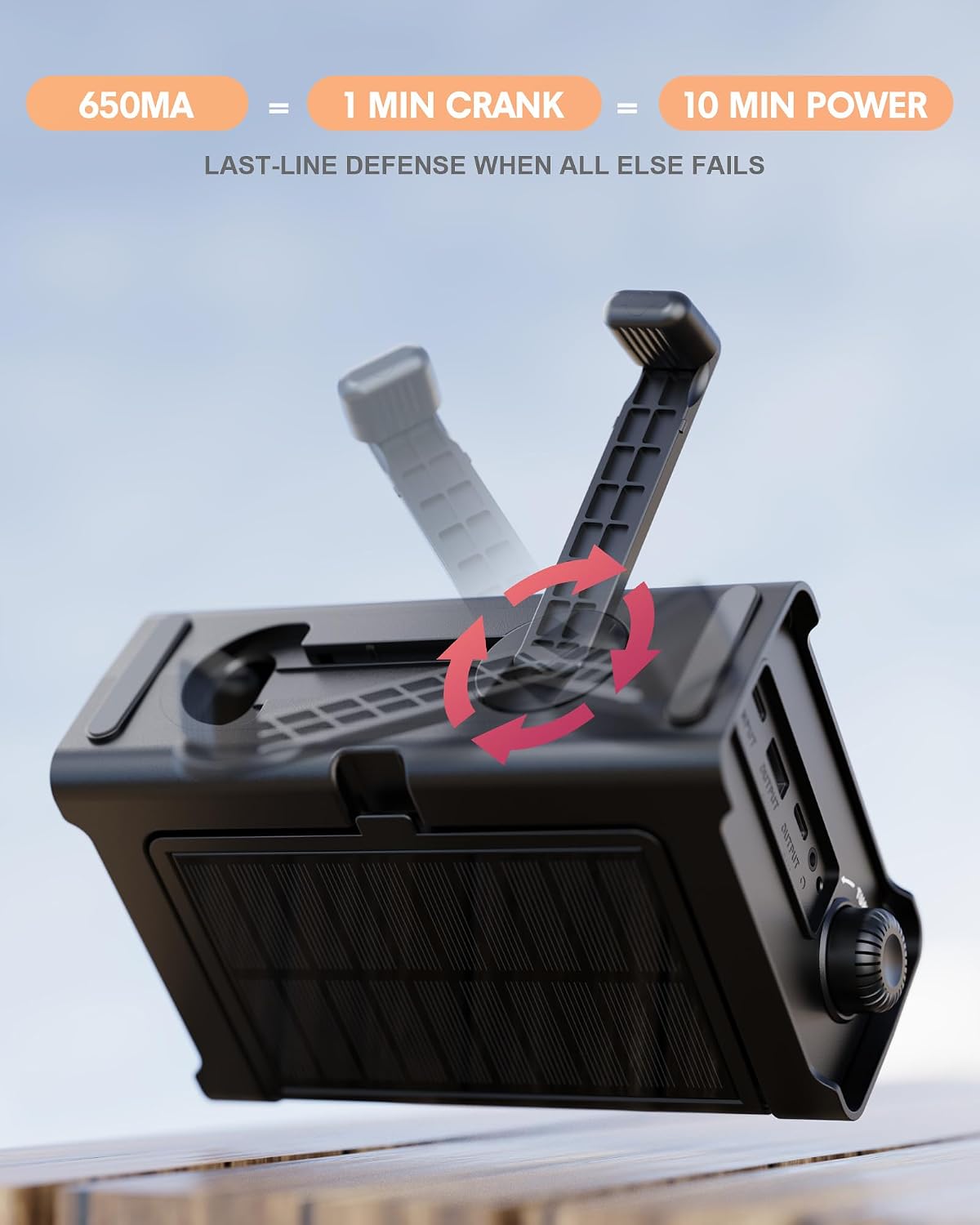
Figure 4: The OnLyee CR1030 radio with its hand crank extended, demonstrating manual power generation.
3. Lighting Functions
- Flashlight: Press the "FLASHLIGHT" button once for high brightness, a second time for low brightness, and a third time to turn it off.
- Reading Lamp: Lift the solar panel to reveal the foldable reading lamp. Press the light button located on the underside of the solar panel to turn the reading lamp on/off.

Figure 5: The OnLyee CR1030 radio demonstrating its flashlight and reading lamp features, providing illumination in dark environments.
4. SOS Alarm
In an emergency, press and hold the "SOS" button for 2 seconds to activate the 120dB alarm and flashing red beacon. This feature is designed to attract attention and signal for help. Press the "SOS" button again to deactivate.
5. Power Bank Function
To charge external devices, connect your device's charging cable to the "OUTPUT" USB-A or USB-C ports on the side of the radio. The radio's internal 12000mAh battery will provide power to your device. This is useful for charging smartphones or other small electronics during power outages.
Maintenance
- Cleaning: Wipe the radio with a soft, dry cloth. Do not use harsh chemicals or abrasive cleaners.
- Storage: Store the radio in a cool, dry place away from direct sunlight and extreme temperatures. For long-term storage, ensure the internal battery is charged to approximately 50-70% and recharge every 3-6 months to maintain battery health.
- Water Resistance: The radio is IPX6 water-resistant, meaning it can withstand strong jets of water. Do not submerge the radio in water. Ensure all port covers are securely closed to maintain water resistance.
Troubleshooting
| Problem | Possible Cause | Solution |
|---|---|---|
| Radio not turning on. | Low battery or incorrect battery selection. | Charge the internal battery via USB, solar, or hand crank. Ensure the battery selection switch is set to "LI-ION" or "AAA" if using AAA batteries. |
| Poor radio reception. | Antenna not extended or weak signal area. | Fully extend the telescopic antenna. Try repositioning the radio for better signal. |
| Device not charging from output ports. | Radio battery is low or device cable is incompatible. | Ensure the radio's internal battery is sufficiently charged. Verify the charging cable is correctly connected and compatible with your device. |
| Solar panel not charging. | Insufficient sunlight or panel not positioned correctly. | Ensure the solar panel is open and directly exposed to strong sunlight. Adjust the angle for optimal exposure. |
Specifications
- Model: CR1030
- Product Dimensions: 6.81 x 2.91 x 4.76 inches
- Item Weight: 1.59 pounds
- Battery: 12000mAh rechargeable Li-ion (included), 3x AAA backup (not included)
- Tuner Technology: AM/FM
- Radio Bands Supported: 7-Band NOAA, AM (520-1710 KHz), FM (87-108 MHz)
- Connectivity: USB-C Input, USB-A Output, USB-C Output, Headphone Jack
- Special Features: 120dB SOS Alarm & Flashing Beacon, 3W LED Flashlight, 2.5W Reading Lamp, IPX6 Water-Resistant, Dustproof, Shockproof.
What's in the Box
- OnLyee CR1030 Emergency Weather Radio x1
- USB-C Charging Cable x1
- Owner's Manual x1
Warranty and Support
The OnLyee CR1030 Emergency Weather Radio comes with a 1-year manufacturer's warranty. For warranty claims, technical support, or any inquiries, please contact OnLyee customer service through the retailer's platform or visit the official OnLyee website.
Video 1: Official product video demonstrating the OnLyee Weather Radio's features and functionality.
Video 2: Official product video highlighting the hand crank, solar, and battery charging options for emergency preparedness.
