
Product Overview
The SEDETA 71-inch Executive Desk with File Cabinet is designed to provide a spacious and functional workstation for home or office environments. This L-shaped desk integrates ample storage solutions, including a file cabinet, storage drawers, and adjustable shelves, along with a built-in power outlet for convenience.
Key features include:
- Spacious 70.9" x 31.5" desktop for multiple monitors and work supplies.
- Integrated file cabinet with space for letter, A4, and legal-sized files.
- Two additional storage drawers and adjustable open shelves.
- Built-in charging station with 4 AC outlets and 2 USB ports, featuring an on-off switch for safety.
- Constructed from engineered wood with 2" wide heavily coated steel legs for durability.
- Adjustable leg pads for stability on uneven floors.

Figure 1: The SEDETA 71-inch Executive Desk with File Cabinet in Brown.
Important Safety Information
Please read and follow these safety guidelines to ensure safe use and longevity of your desk:
- Always assemble the desk on a stable, level surface.
- Ensure all parts are securely fastened before use.
- Do not overload the desk, as it may tip over.
- Keep the desk away from heat sources.
- Avoid placing heavy objects on the edges to prevent tipping.
- Use the built-in power outlets responsibly. Do not exceed the rated capacity (125V/12A for AC, 5V/2A for USB).
Assembly Guide
Assembly of the SEDETA Executive Desk requires careful attention to detail. All necessary parts are numbered, and clear, detailed instructions are included in the packaging. We recommend having a second person assist with certain steps, especially when lifting larger components.
- Unpack and Verify: Carefully unpack all components and compare them against the parts list provided in your instruction manual. Ensure no parts are missing or damaged. If any parts are missing or damaged, please contact customer support immediately.
- Prepare Workspace: Clear a spacious, level area for assembly. Lay down a blanket or cardboard to protect your floor and desk components from scratches.
- Follow Step-by-Step Instructions: Refer to the detailed assembly manual provided with your product. Each step is illustrated and numbered. Pay close attention to the orientation of parts.
- Do Not Overtighten: Initially, tighten screws only enough to hold parts together. Fully tighten all fasteners only after the entire section or desk is assembled, as indicated in the manual. This allows for minor adjustments during assembly.
- Attach Legs and Cabinet: Assemble the desk legs and the storage cabinet according to the instructions.
- Connect Desktop: Carefully attach the desktop to the assembled leg and cabinet structures. This step may require two people.
- Install Drawers and Shelves: Insert the drawers and adjustable shelves into the cabinet.
- Final Check: Once assembled, ensure all connections are secure and the desk is stable.
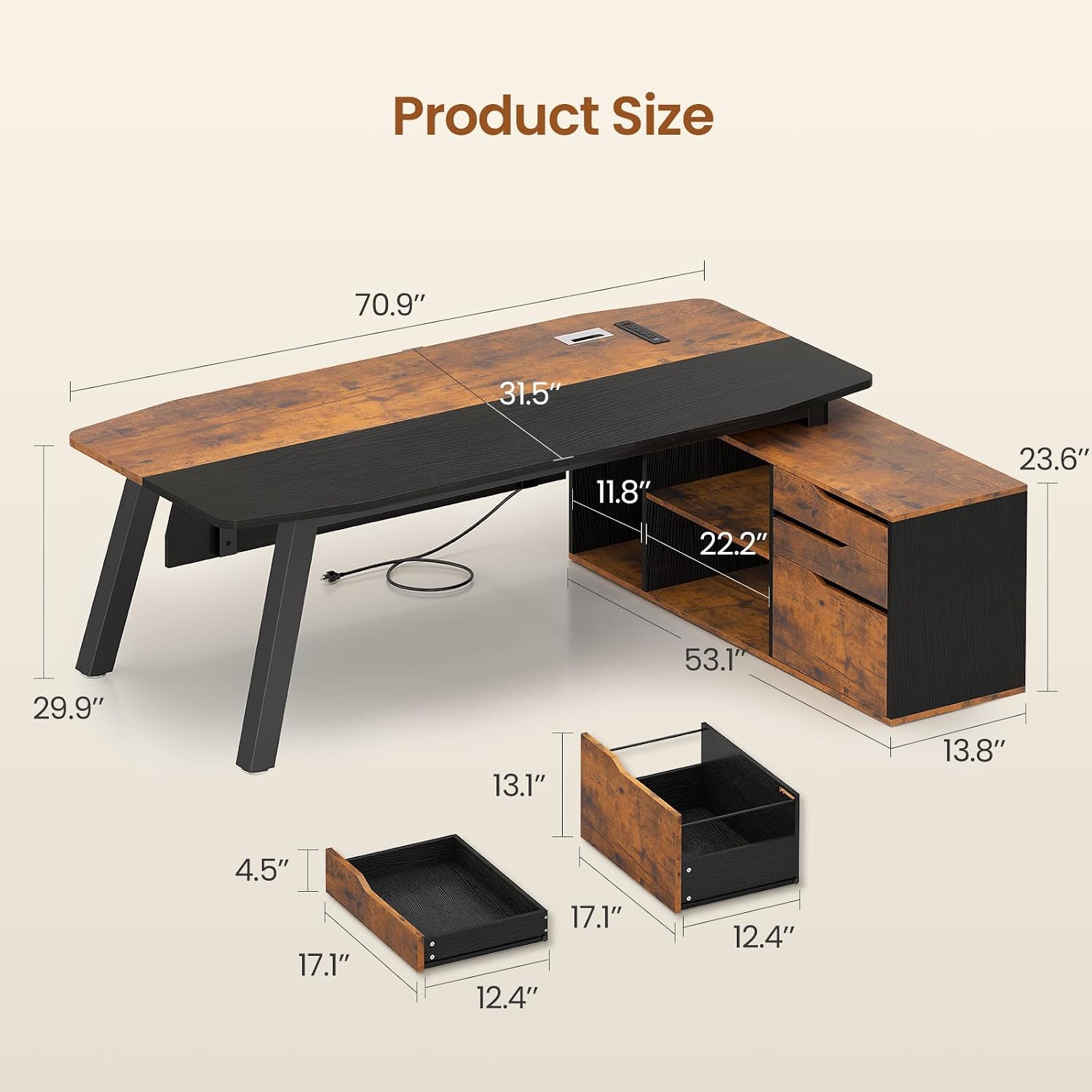
Figure 2: Product dimensions for assembly reference.

Figure 3: Assembled SEDETA Executive Desk.
Video 1: Overview of the SEDETA 71-inch Executive Desk with File Cabinet, showcasing its features and design.
Operating Your SEDETA Executive Desk
Built-in Charging Station
The desk features a convenient built-in charging station to power your electronic devices. It includes 4 standard AC outlets (125V/12A) and 2 USB ports (5V/2A).
- Power On/Off: Use the integrated on-off switch to control power to all outlets and USB ports. This allows for one-button power management and enhances safety.
- Connecting Devices: Plug your devices directly into the AC outlets or USB ports. Ensure devices are compatible with the provided voltage and amperage.
- Cable Management: Utilize the desk grommet for organized cable routing, keeping your workspace tidy.

Figure 4: Built-in charging station with AC outlets and USB ports.
Storage Features
The integrated storage cabinet offers versatile organization for your office essentials.
- File Cabinet: The bottom drawer is designed as a file cabinet, accommodating letter, A4, and legal-sized hanging files.
- Storage Drawers: Two additional drawers provide enclosed storage for smaller items, keeping your desktop clutter-free.
- Adjustable Shelves: The open shelving area features adjustable shelves, allowing you to customize the space for books, decorative items, or office supplies.
- CPU Stand: A dedicated space is provided for a computer tower, keeping it off the floor and easily accessible.

Figure 5: Detail of the three storage drawers, including the file cabinet.

Figure 6: Multifunctional storage cabinet with adjustable shelves and CPU space.
Video 2: Demonstration of the storage capabilities, including drawers and shelves.
Care and Maintenance
To maintain the appearance and longevity of your SEDETA Executive Desk, follow these care instructions:
- Cleaning: Wipe the desk surfaces with a damp cloth for general cleaning. For a dry finish, follow with a dry cloth.
- Avoid Harsh Chemicals: Do not use abrasive cleaners or harsh chemicals, as these can damage the engineered wood finish.
- Spills: Promptly wipe up any spills to prevent staining or water damage.
- Sunlight Exposure: Avoid prolonged exposure to direct sunlight to prevent fading or discoloration of the wood finish.
Troubleshooting
If you encounter any issues with your SEDETA Executive Desk, refer to the following common solutions:
- Desk is Wobbly:
- Ensure all assembly screws are fully tightened.
- Adjust the leg pads at the bottom of the desk legs to level the desk on uneven floors.
- Drawers Do Not Slide Smoothly:
- Check that the drawer slides are correctly installed and aligned.
- Ensure no obstructions are in the drawer tracks.
- Missing or Damaged Parts:
- Before assembly, verify all parts against the included parts list.
- If parts are missing or damaged upon arrival, contact SEDETA customer service for a free replacement or partial refund.
- Power Outlets Not Working:
- Ensure the desk's power cord is securely plugged into a functional wall outlet.
- Check that the on-off switch on the charging station is in the "on" position.
- Verify that the total power draw of connected devices does not exceed the station's capacity (125V/12A for AC, 5V/2A for USB).
Product Specifications
| Feature | Detail |
|---|---|
| Brand | SEDETA |
| Model Number | 4429_1 |
| Desk Design | Executive Desk, L-Shape |
| Product Dimensions (D x W x H) | 53.1"D x 70.9"W x 29.9"H |
| Color | Brown |
| Material Type | Engineered Wood |
| Base Material | Engineered Wood, Steel Legs |
| Special Features | Built-In USB Outlet, Scratch Resistant, Adjustable Leg Pads |
| Number of Drawers | 3 (including 1 file drawer) |
| Number of Shelves | 3 (open shelves) |
| Item Weight | 106 Pounds |
| Required Assembly | Yes |
| Power Outlet | 4 AC Outlets (125V/12A), 2 USB Ports (5V/2A) |
Warranty and Customer Support
The SEDETA Executive Desk comes with a Limited Warranty. For specific terms and conditions, please refer to the warranty documentation included with your purchase or contact SEDETA customer service.
Missing or Damaged Parts: If your desk arrives damaged, scratched, or with missing parts, please contact our customer service team immediately. We are committed to providing a free replacement or offering a partial refund to ensure your satisfaction.
For further assistance or inquiries, please visit the official SEDETA website or contact our support team through the retailer where you purchased the product.