
AZZUNO MIG-175F
AZZUNO PULSE Aluminum MIG Welder MIG-175F Instruction Manual
Model: MIG-175F
Introduction
This manual provides essential information for the safe and effective operation, setup, and maintenance of your AZZUNO PULSE Aluminum MIG Welder, model MIG-175F. This multiprocess welding machine supports Flux Core MIG, Gas MIG, PULSE Aluminum MIG, Stick, and Lift TIG welding. Please read this manual thoroughly before using the equipment.
Safety Information
Welding can be dangerous. Always follow safety precautions to prevent injury or damage. This section outlines general safety guidelines. Refer to local and national safety standards for comprehensive information.
- Electric Shock Can Kill: Ensure proper grounding. Do not touch live electrical parts. Wear dry welding gloves and protective clothing.
- Fumes and Gases Can Be Dangerous: Work in a well-ventilated area. Use fume extractors if necessary. Keep your head out of the fumes.
- Welding Rays Can Burn Eyes and Skin: Wear a welding helmet with appropriate shade filter. Use protective clothing, including long sleeves and pants.
- Fire and Explosion Hazard: Keep flammable materials away from the welding area. Have a fire extinguisher readily available.
- Hot Parts Can Cause Severe Burns: Allow welded materials and equipment to cool before handling.
- Magnetic Fields: Pacemaker wearers should consult their doctor before welding.
- Noise: Wear hearing protection if noise levels are high.
Product Overview and Features
The AZZUNO MIG-175F is a versatile multiprocess welder designed for various welding applications. It combines multiple welding functions into a single unit, offering flexibility and performance.
5-in-1 Welding Modes
This welder supports five distinct welding processes, making it suitable for a wide range of materials and projects.
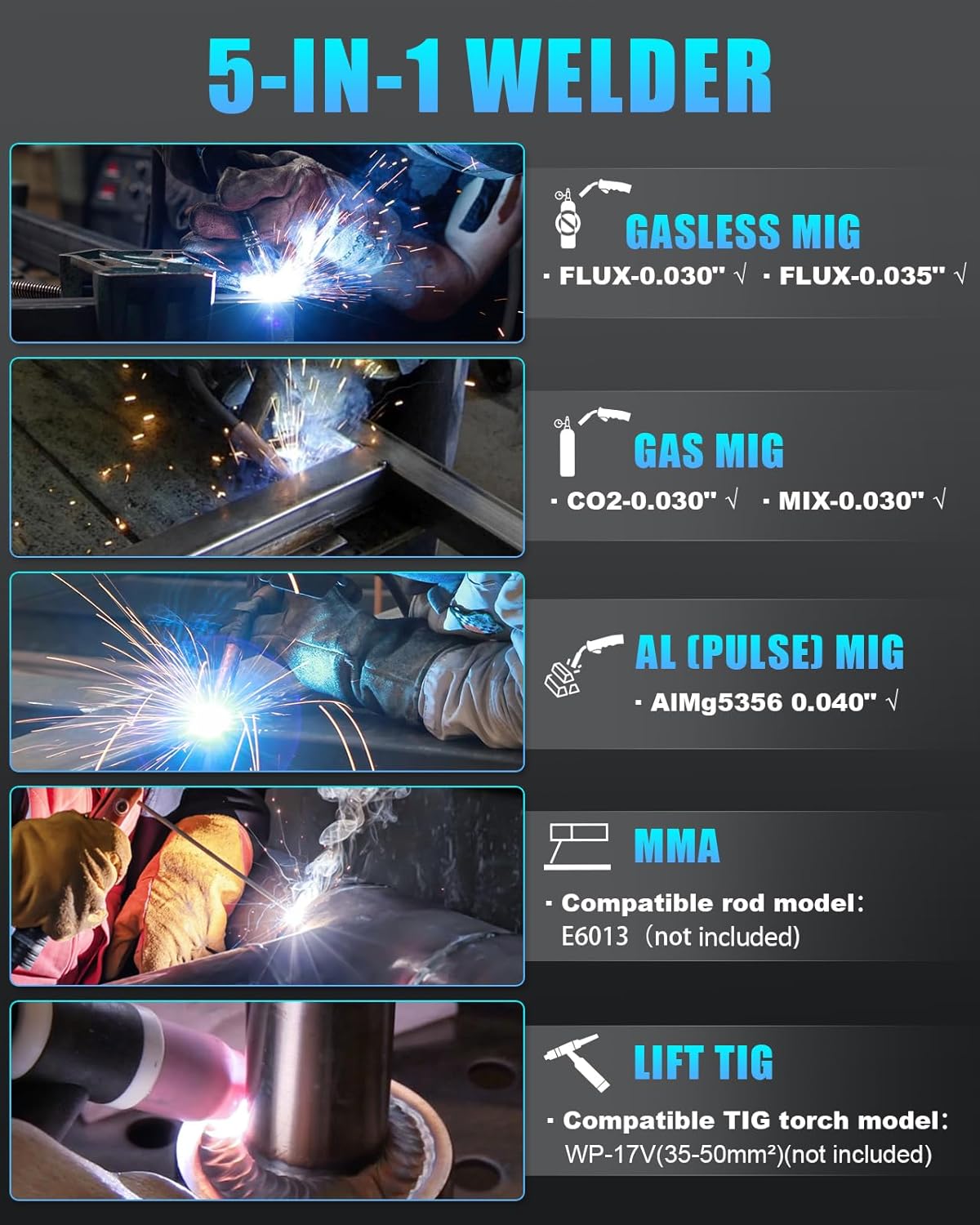
Figure 1: Overview of the five welding modes supported by the AZZUNO MIG-175F welder. These include Gasless MIG (Flux-0.030", Flux-0.035"), Gas MIG (CO2-0.030", MIX-0.030"), AL (PULSE) MIG (AlMg5356 0.040"), MMA (compatible rod model E6013), and Lift TIG (compatible TIG torch model WP-17V(35-50mm²)).
- Flux Core MIG (Gasless MIG): Ideal for outdoor welding or when gas cylinders are inconvenient. Supports 0.030" and 0.035" flux core wire.
- Gas MIG: For cleaner welds with shielding gas (CO2 or mixed gas). Supports 0.030" wire.
- PULSE Aluminum MIG: Specialized for aluminum welding, using AlMg5356 0.040" wire. Provides precise heat control for high-quality aluminum welds.
- Stick (MMA): For welding with coated electrodes, compatible with E6013 rods (not included).
- Lift TIG: For precise welding of various metals, requiring a WP-17V(35-50mm²) TIG torch (not included).
Single Pulse Aluminum Welding
The Single Pulse technology enhances aluminum welding by providing precise heat control. This minimizes common defects such as warping, cracks, and porosity, resulting in smoother and more consistent welds. It is particularly effective for thin aluminum sheets, ensuring better fusion and reduced heat-affected zones.

Figure 2: Comparison of weld quality. Single Pulse welding produces a clean, consistent bead, while CO2 and Gasless welding may show more spatter and less uniform results, especially on aluminum.
SYN, 2T, and 4T Welding Functions
The MIG-175F includes advanced functions for optimized welding control:
- SYNERGIC (SYN) Mode: Automatically adjusts voltage and amperage settings for optimal performance based on selected wire type and material thickness, simplifying setup for beginners.
- 2T (Two-Touch) Mode: Standard trigger operation. Press and hold the trigger to weld, release to stop.
- 4T (Four-Touch) Mode: For continuous welding. Press and release the trigger to start, press and release again to stop. This reduces operator fatigue during long welding sessions.

Figure 3: The control panel and display of the AZZUNO MIG-175F, indicating the SYN, 2T, and 4T functions designed for user-friendly operation and reduced fatigue.
Wire Compatibility
The welder is designed to accommodate various wire spool sizes, from 1lb to 10lbs, eliminating the need for frequent spool changes for different projects.

Figure 4: The wire feed compartment of the AZZUNO MIG-175F, illustrating its capacity to hold both 10lb and 1-2lb wire spools without requiring modifications.
Setup and Installation
Proper setup is crucial for safe and effective welding. Follow these steps carefully.
Unpacking and Inspection
- Unpack all components and verify against the packing list.
- Inspect the welder and accessories for any shipping damage. Contact your supplier immediately if damage is found.
Power Connection
- The MIG-175F operates on 110V or 220V power. Use the appropriate adapter cord provided.
- Ensure the power source is properly grounded and can supply the required amperage (175Amp).
- Connect the power cord to a dedicated circuit if possible.
Accessory Connection

Figure 5: All accessories included with the AZZUNO MIG-175F welder, demonstrating the comprehensive kit for various welding tasks.
- Ground Clamp: Connect the ground clamp cable to the appropriate terminal on the welder and securely attach the clamp to the workpiece or welding table.
- MIG Torch: Connect the MIG torch to the front panel connector. Ensure it is securely fastened.
- Electrode Holder (for Stick/MMA): Connect the electrode holder cable to the positive (+) terminal for most stick welding applications.
- Gas Hose (for Gas MIG/PULSE MIG): Connect one end of the gas hose to the gas inlet on the welder and the other end to your shielding gas cylinder regulator. Ensure all connections are leak-free.
- TIG Torch (for Lift TIG): If using Lift TIG, connect your compatible TIG torch (WP-17V(35-50mm²)) to the designated port.
Wire Installation
Installing the welding wire correctly is essential for consistent wire feeding.

Figure 6: Step-by-step illustration of installing a 1-pound welding wire spool, showing the spindle, spring, and retaining nut.
- Open the wire feed compartment.
- Place the wire spool onto the spindle, ensuring it rotates freely.
- Secure the spool with the retaining nut and spring.
- Feed the wire through the guide tube and into the drive rollers.
- Close the drive roller tension arm and adjust tension appropriately (not too tight, not too loose).
- For aluminum welding, replace the original liner inside the welding gun with the included Teflon liner to ensure smooth feeding of soft aluminum wire.
- With the torch pointed away from yourself and others, press the trigger to feed the wire through the torch liner until it exits the contact tip.
Operating Instructions
This section details how to operate your AZZUNO MIG-175F welder for various welding processes.
Control Panel Overview

Figure 7: The user-friendly control panel of the AZZUNO MIG-175F, showing the digital display for voltage and amperage, mode selection knob, and indicators.
- 1. Power Light: Indicates the machine is powered on.
- 2. Over Heat Indicator: Illuminates if the machine overheats, indicating a need to cool down.
- 3. SYN Mode Button: Press and hold for 3 seconds to activate Synergic mode.
- 4. 2T/4T Mode Button: Toggles between 2-Touch and 4-Touch trigger modes.
- 5. Welding Modes Knob: Rotate to select between MMA, Lift TIG, Flux, Gas MIG (CO2/MIX), and AL (PULSE) MIG.
- Voltage Knob: Adjusts welding voltage.
- Amperage Knob: Adjusts welding amperage.
General Welding Procedure
- Prepare Workpiece: Clean the workpiece thoroughly, removing rust, paint, oil, and other contaminants.
- Connect Ground Clamp: Securely attach the ground clamp to the workpiece.
- Select Welding Mode: Use the "MODE" knob to select the desired welding process (e.g., Flux, Gas MIG, AL PULSE MIG, MMA, Lift TIG).
- Adjust Settings:
- For Synergic (SYN) mode, press and hold the SYN button. The machine will automatically suggest optimal voltage and amperage.
- For manual mode, adjust the Voltage and Amperage knobs according to your material thickness and wire type. Refer to welding charts for guidance.
- Select Trigger Mode: Choose 2T or 4T using the dedicated button based on your preference and weld length.
- Begin Welding: Put on all personal protective equipment (PPE). Position the torch/electrode, initiate the arc, and perform the weld.
- Monitor Performance: Observe the weld pool and adjust settings as needed for optimal results.
Maintenance
Regular maintenance ensures the longevity and reliable performance of your welding machine.
- Daily/Before Use:
- Inspect all cables and connections for damage or wear.
- Check the MIG torch nozzle, contact tip, and diffuser for spatter buildup and replace if necessary.
- Ensure the wire feed rollers are clean and free of debris.
- Weekly/Monthly:
- Clean the interior of the machine using compressed air to remove dust and metal particles. Ensure power is disconnected before opening the casing.
- Check the gas hose for leaks (if using gas).
- Inspect the power cord for any damage.
- Storage: Store the welder in a clean, dry environment, protected from dust and moisture.
Troubleshooting
This section provides solutions to common issues you might encounter during operation.
| Problem | Possible Cause | Solution |
|---|---|---|
| No power to the machine. | Power cord disconnected, circuit breaker tripped, faulty power switch. | Check power cord connection. Reset circuit breaker. Contact service if switch is faulty. |
| Wire not feeding. | Wire tangled, drive rollers loose/dirty, contact tip blocked, liner clogged. | Untangle wire. Adjust drive roller tension. Clean/replace contact tip. Clean/replace liner. |
| Poor weld quality (porosity, spatter). | Incorrect settings, insufficient gas flow (for Gas MIG), contaminated workpiece, worn contact tip. | Adjust voltage/amperage. Check gas cylinder/flow rate. Clean workpiece. Replace contact tip. |
| Machine overheats (Over Heat Indicator on). | Exceeded duty cycle, poor ventilation. | Allow machine to cool down. Ensure adequate airflow around the welder. |
| No arc. | Poor ground connection, incorrect polarity, faulty torch/electrode holder. | Ensure ground clamp is secure. Check polarity settings for the chosen process. Inspect torch/holder. |
Specifications
Technical specifications for the AZZUNO MIG-175F Multiprocess Welder and included aluminum wire.
AZZUNO MIG-175F Welder
- Model: MIG-175F
- Input Voltage: 110V/220V (Dual Voltage)
- Max Output Current: 175 Amp
- Welding Processes: PULSE Aluminum MIG, Flux Core MIG, Gas MIG, Stick (MMA), Lift TIG
- Wire Spool Capacity: 1LB - 10LBS
- Dimensions (Approximate): 17.7" (L) x 9.5" (W) x 13.6" (H) (Based on "ACCESSORIES" image)
- Weight (Approximate): 23 LBS (Based on "ACCESSORIES" image)
Included .040" Magnesium Aluminum MIG Welding Wire ER5356

Figure 8: Detailed specifications of the ER5356 aluminum MIG welding wire, including dimensions and polarity.
- Wire Model: ER5356
- Material: Magnesium Aluminum Alloy
- Wire Diameter: 0.040" (1.0mm) - Note: Image states .037", but product title and feature bullets state .040". Using .040" as per product title.
- Net Weight: 1 LB
- Polarity: DCEP (Direct Current Electrode Positive)
- Spool Diameter: 3.95" (Approximate)
- Spool Height: 1.77" (Approximate)
Warranty and Support
For warranty information, technical support, or service inquiries, please refer to the contact information provided with your purchase documentation or visit the official AZZUNO website. Keep your purchase receipt as proof of purchase for warranty claims.
AZZUNO Official Store: Visit the AZZUNO Store on Amazon
Related documentsMIG-175F


Ask a question about this manual
Ask about setup, troubleshooting, compatibility, parts, safety, or missing instructions. Manuals+ will review the question and use this page’s manual context to help answer it.