
1. Introduction
The iSonic P4820 Ultrasonic Cleaner is designed for effective and gentle cleaning of CPAP masks, tubing, and various sleep apnea accessories. This device utilizes 160W ultrasonic power at 35,000 Hz to remove residue without causing damage to delicate components. A built-in 100W heater maintains a water temperature of 149°F (65°C) to enhance cleaning performance. The 2.6-quart (2.5-liter) stainless steel tank and included plastic tray provide a secure environment for your items. With five timer settings ranging from 5 to 25 minutes, the P4820 offers flexible cleaning cycles. Safety features include a cooling fan and overheat protection for reliable, long-term operation.

Image: The iSonic P4820 Ultrasonic Cleaner shown with a CPAP mask and hose, highlighting its intended use for sleep apnea equipment.
2. What's in the Box
Upon unpacking your iSonic P4820 Ultrasonic Cleaner, please verify that all the following components are present:
- Ultrasonic Cleaning Machine (Main Unit)
- Cleaning Basket
- Ultrasonic Cleaning Tablet Box (Optional, may vary by package)
- Power Cable
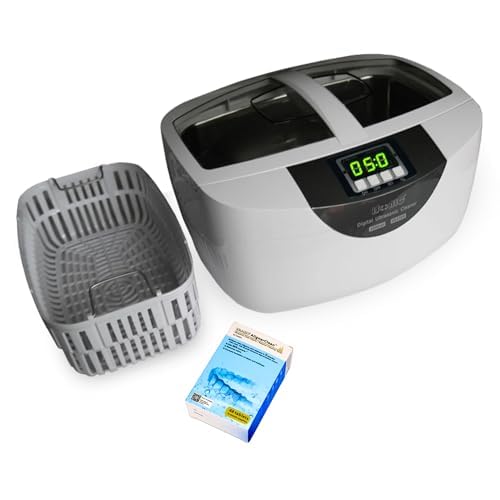
Image: Contents of the iSonic P4820 package, including the main unit, cleaning basket, and a box of cleaning tablets.
3. Safety Information
Please read all safety instructions carefully before operating the iSonic P4820 Ultrasonic Cleaner to prevent injury or damage to the unit.
- Electrical Safety: Ensure the unit is connected to a grounded outlet. Do not operate with wet hands or near water sources. Unplug the unit when not in use or before cleaning.
- Water and Heat: Always fill the tank with water before turning on the unit. Do not operate the heater without sufficient water. The water can become hot; exercise caution when handling.
- Chemicals: Use only cleaning solutions recommended for ultrasonic cleaners. Avoid corrosive or flammable liquids.
- Ventilation: Ensure adequate ventilation around the unit during operation.
- Children and Pets: Keep the unit out of reach of children and pets.
- Damage: Do not operate the unit if the power cord or plug is damaged, or if the unit has been dropped or damaged in any way. Contact customer support for assistance.
4. Setup
- Unpack: Carefully remove all components from the packaging.
- Placement: Place the ultrasonic cleaner on a stable, flat, and dry surface, away from direct sunlight and heat sources. Ensure there is adequate space around the unit for ventilation.
- Power Connection: Plug the power cable into the unit's power inlet, then plug the other end into a grounded electrical outlet.
- Fill Tank: Open the lid and fill the stainless steel tank with tap water. For optimal cleaning, distilled water is recommended, especially for CPAP components. Do not exceed the 'MAX' fill line.
5. Operation
Follow these steps for effective cleaning of your CPAP equipment:
- Prepare Solution: Fill the tank with water as described in the Setup section. If using an ultrasonic cleaning tablet (e.g., iSonic AlignerClean), dissolve it in the water according to the tablet's instructions.
- Load Items: Place your CPAP mask, water chamber, or hose into the cleaning basket. Gently lower the basket into the ultrasonic cleaner's tank. Ensure items are fully submerged but not overcrowded.

Image: Visual guide for the three simple steps of CPAP cleaning: adding solution, loading items, and setting the timer with heat.
5.1. Cleaning CPAP Components
The iSonic P4820 is designed to accommodate various CPAP parts. Please note the tank size is 9.6" L x 5.9" W x 3" H.
- CPAP Mask: The unit holds one standard CPAP mask. Simply drop it in with the basket.
- Water Chamber: One standard water chamber can fit flat in the tank at a time.
- 6-Foot Hose: To clean a 6-foot hose, fold it in half and clean one side at a time. Run a second cleaning cycle for the other half.

Image: A diagram showing the capacity of the iSonic P4820 for CPAP masks, water chambers, and how to clean a 6-foot hose in two halves.
Tip: Clean each part one at a time for best results!
5.2. Setting Timer and Heat
- Power On: Press the 'ON/OFF' button to turn on the unit. The default timer setting will display.
- Set Timer: Press the 'SET' button repeatedly to cycle through the available timer settings (5, 10, 15, 20, 25 minutes). Select the desired cleaning duration.
- Activate Heater: Press the 'TC' (Temperature Control) button to activate the built-in heater. The heater will warm the water to approximately 149°F (65°C) to improve cleaning efficiency. The heater can be used independently or in conjunction with the ultrasonic cleaning cycle.
- Start Cleaning: Press the 'ON/OFF' button again to start the ultrasonic cleaning cycle. The display will count down the remaining time.
- End of Cycle: The unit will automatically shut off when the timer reaches zero.
- Remove Items: Carefully open the lid and use the basket to remove the cleaned items. Rinse them thoroughly under clean running water and allow them to air dry completely before reassembly or storage.
6. Maintenance
Regular maintenance ensures the longevity and optimal performance of your iSonic P4820 Ultrasonic Cleaner.
- Draining Water: After each use, unplug the unit and carefully pour out the water from the tank. Avoid spilling water on the control panel.
- Cleaning the Tank: Wipe the stainless steel tank with a soft cloth to remove any residue. For stubborn stains, use a mild, non-abrasive cleaner. Do not use harsh chemicals or abrasive pads.
- Exterior Cleaning: Wipe the exterior of the unit with a soft, damp cloth. Do not immerse the unit in water.
- Storage: Store the unit in a cool, dry place when not in use.
7. Troubleshooting
If you encounter issues with your iSonic P4820, refer to the following common problems and solutions:
| Problem | Possible Cause | Solution |
|---|---|---|
| Unit does not turn on. | No power supply; power cable not connected; unit malfunction. | Check power connection and outlet. Ensure the power button is pressed. If problem persists, contact customer support. |
| Poor cleaning results. | Insufficient cleaning time; water temperature too low; items overcrowded; incorrect cleaning solution. | Increase cleaning time. Activate the heater. Clean items individually or in smaller batches. Use recommended ultrasonic cleaning solution. |
| Unit stops during operation. | Overheat protection activated; timer completed. | Allow unit to cool down. Check if the timer has reached zero. |
| Unusual noise or vibration. | Unit not on a stable surface; foreign object in tank. | Ensure unit is on a flat, stable surface. Check tank for any obstructions. |
If these solutions do not resolve the issue, please contact iSonic customer support for further assistance.
8. Specifications
Key technical specifications for the iSonic P4820 Ultrasonic Cleaner:
- Product Dimensions: 11.4 x 8.8 x 7.3 inches
- Weight: 4 Pounds
- Model Number: P4820-CPAP
- Ultrasonic Power: 160W
- Ultrasonic Frequency: 35,000 Hz
- Heater Power: 100W
- Heater Temperature: Preset at 149°F (65°C)
- Tank Capacity: 2.6 Quarts (2.5 Liters)
- Timer Settings: 5, 10, 15, 20, 25 minutes
- Manufacturer: iSonic
9. Warranty & Support
For warranty information, product support, or service inquiries, please contact iSonic directly. Details regarding your product's specific warranty period and terms can typically be found in the documentation included with your purchase or on the official iSonic website.
Manufacturer: iSonic
For the most current support information, please visit the iSonic Store on Amazon or their official website.