
1. Introduction
This manual provides essential information for the proper use and maintenance of your Motorola Moto G56 5G Ai smartphone. Designed for durability and performance, this device features IP68 and IP69 protection, a 6.7-inch FHD+ display, a 50MP camera system, and a robust MediaTek Dimensity 7060 processor. Please read this guide thoroughly to ensure optimal performance and longevity of your device.
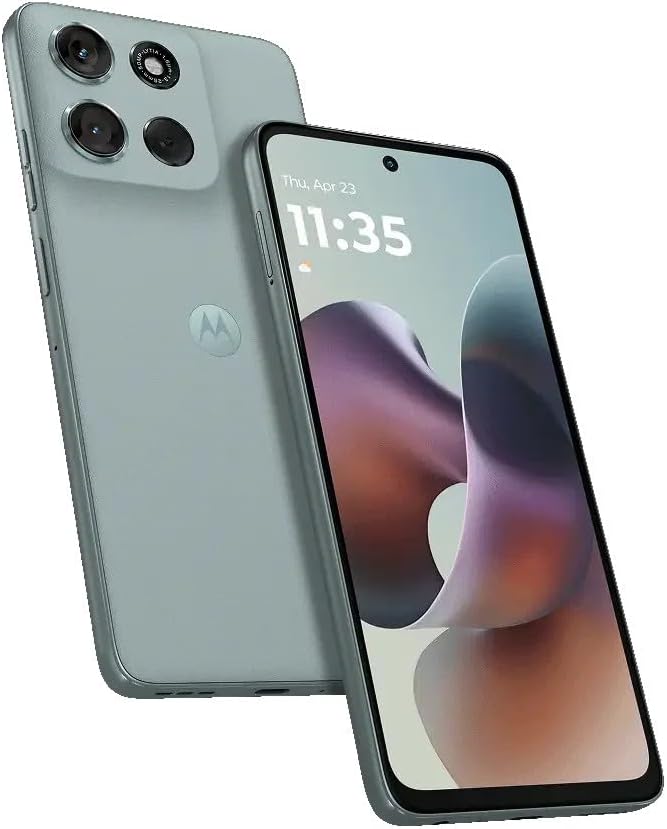
Image: Front and rear view of the Motorola Moto G56 5G Ai smartphone in Gray Mist.
2. What's in the Box
Verify that all items are present in your product packaging:
- Motorola Moto G56 5G Ai Smartphone
- Protective Phone Case
- Power Adapter (33W)
- USB Type-C Cable

Image: Illustration of the box contents, showing the Moto G56 5G, a protective case, a 33W power adapter, and a USB Type-C cable.

Image: The included 33W power adapter and USB Type-C cable, highlighting the fast charging capability.
3. Setup
3.1 SIM Card Installation
- Locate the SIM tray on the side of your device.
- Insert the SIM ejector tool into the small hole on the SIM tray to open it.
- Place your Nano SIM card(s) and/or microSD card into the tray with the gold contacts facing down.
- Carefully reinsert the tray into the phone.
3.2 Initial Power On
- Press and hold the Power button until the Motorola logo appears.
- Follow the on-screen prompts to complete the initial setup, including language selection, Wi-Fi connection, and Google account setup.
3.3 Network Compatibility
This device is a Global Unlocked GSM phone. In the USA market, it is primarily compatible with T-Mobile, Metro by T-Mobile, Mint Mobile, Tello, and other carriers operating on the T-Mobile network. It is not compatible with CDMA networks such as Verizon, AT&T, Xfinity, Boost, Virgin, Visible, or Cricket Wireless within the USA. Outside the USA, the phone is compatible with any carrier worldwide.

Image: A visual guide indicating compatible (T-Mobile, Mint, Tello, Ultra, outside USA) and incompatible (Verizon, AT&T, Xfinity, Boost, Virgin, Visible, Cricket, other CDMA) network carriers for the device.
4. Operating Your Device
4.1 Display and Navigation
The Moto G56 5G Ai features a 6.7-inch Full HD+ (2400 x 1080) LCD display with a 120Hz refresh rate, protected by Corning Gorilla Glass 7i3. Navigate using touch gestures, swipe, tap, and pinch to zoom. The display offers 1000 nits of brightness for clear visibility in various lighting conditions.
4.2 Camera System
Your device is equipped with a versatile camera system:
- Rear Camera: 50MP Sony LYTIA 600 sensor (f/1.8 aperture, 0.8µm pixel size, Quad Pixel Technology for 1.6µm) with PDAF.
- Ultra-wide Camera: 8MP (f/2.2 aperture, 1.12µm pixel size).
- Front Camera: 32MP (f/2.2 aperture, 0.7µm pixel size, Quad Pixel Technology for 1.4µm).
Access the camera app from the home screen or lock screen to capture photos and videos.
4.3 Performance and Storage
Powered by the MediaTek Dimensity 7060 (6nm) processor with a 2.6GHz octa-core CPU and IMG BXM-8-256 GPU, the Moto G56 5G Ai delivers responsive performance. It includes 8GB of RAM and 256GB of internal storage, expandable via microSD.
4.4 Battery Life and Charging
The device features a 5200mAh battery for extended use. With TurboPower™ 30 charging, you can quickly recharge your device, gaining hours of power in minutes.
5. Maintenance
The Motorola Moto G56 5G Ai is built with enhanced durability features:
- IP68 and IP69 Ratings: Provides protection against dust ingress and immersion in water (IP68) and high-pressure, high-temperature water jets (IP69).
- Military-Grade Durability: Designed to withstand drops, shocks, and extreme temperatures.
- Scratch-Resistant Screen: The display is protected by Corning Gorilla Glass 7i3 to resist scratches from daily use.
To maintain your device, avoid exposing it to extreme conditions beyond its specified ratings. Clean the screen with a soft, lint-free cloth. Do not use harsh chemicals.
6. Troubleshooting
6.1 Common Issues
- Device not powering on: Ensure the battery is charged. Connect to the charger for at least 15 minutes, then attempt to power on.
- Apps freezing or crashing: Close and restart the app. If the issue persists, clear the app's cache and data in Settings > Apps.
- Slow performance: Close unused apps, clear cache, or restart the device. Consider uninstalling rarely used applications.
- Battery draining quickly: Reduce screen brightness, disable unused features like Wi-Fi or Bluetooth, and check battery usage in Settings to identify power-hungry apps.
6.2 Network Connectivity Issues
- No signal or poor signal: Verify SIM card is correctly inserted. Check network compatibility (refer to Section 3.3). Restart the phone.
- Cannot connect to Wi-Fi: Ensure Wi-Fi is enabled. Forget the network and reconnect. Restart your router.
7. Specifications
| Feature | Detail |
|---|---|
| Model Name | Moto G56 (XT2529-1) |
| Operating System | Android 15 |
| Processor | MediaTek Dimensity 7060 (6nm) with 2.6GHz octa-core CPU |
| Display | 6.7-inch FHD+ (2400 x 1080) LCD, 120Hz refresh rate, Corning Gorilla Glass 7i3 |
| RAM | 8 GB |
| Storage | 256 GB (expandable via microSD) |
| Rear Camera | 50MP (main) + 8MP (ultra-wide) |
| Front Camera | 32MP |
| Battery | 5200 mAh, TurboPower 30 charging |
| Connectivity | 5G, NFC, Dual SIM (1 Nano SIM + 1 microSD) |
| Durability | IP68, IP69, Military-grade durability |
| Sensors | Fingerprint reader, Proximity, Accelerometer, Ambient Light, Gyroscope, SAR sensor, E-Compass |
| Dimensions | 7 x 4 x 2 inches (Package) |
| Weight | 14 ounces |
8. Warranty and Support
Your Motorola Moto G56 5G Ai is covered by a manufacturer's warranty. For specific warranty terms and conditions, please refer to the warranty card included with your product or visit the official Motorola support website. For technical assistance, troubleshooting, or service inquiries, please contact Motorola customer support.
Motorola Support Website: www.motorola.com/support


