
1. Introduction
Thank you for choosing the YPOO Room Runner Treadmill. This manual provides essential information for the safe and efficient use of your new fitness equipment. Please read it thoroughly before assembly and operation, and keep it for future reference.
The YPOO Room Runner is a compact, foldable treadmill designed for home use, offering speeds up to 8km/h and a 3-stage manual incline. It features quiet operation, app connectivity, and a convenient remote control for an enhanced workout experience.

Image: The YPOO Room Runner treadmill shown in both its unfolded, operational state and its compact, folded state, highlighting its versatility and space-saving design.
2. Safety Instructions
To ensure your safety and prolong the life of your treadmill, please adhere to the following guidelines:
- Read all instructions: Familiarize yourself with the treadmill's operation before first use.
- Placement: Place the treadmill on a flat, stable surface with adequate clearance around it (at least 2 meters behind and 0.6 meters on each side).
- Electrical Safety: Ensure the power outlet is properly grounded. Do not use extension cords or adapters. Unplug the treadmill when not in use or before cleaning/maintenance.
- User Weight Limit: Do not exceed the maximum user weight of 136 kg (300 lbs).
- Children and Pets: Keep children and pets away from the treadmill during operation.
- Medical Conditions: Consult a physician before starting any exercise program, especially if you have pre-existing medical conditions.
- Emergency Stop: Always know the location of the emergency stop button and how to use it.
- Footwear: Always wear appropriate athletic footwear while using the treadmill.
- Maintenance: Perform regular maintenance as described in this manual.
3. Setup
3.1 Unpacking
- Carefully remove the treadmill from its packaging.
- Check all components against the packing list to ensure nothing is missing or damaged.
- Retain packaging materials for potential future transport or return.
3.2 Assembly
The YPOO Room Runner is designed for easy assembly. Typically, this involves unfolding the unit and securing the handrails. Refer to the included quick start guide for specific steps.
3.3 Placement
Choose a location with a stable, level floor. Ensure there is sufficient space around the treadmill for safe operation and access. The compact design allows for storage under furniture when folded.

Image: A woman demonstrating how to store the YPOO Room Runner treadmill compactly under a sofa, highlighting its slim 11cm thickness and built-in wheels for easy movement.
3.4 Power Connection
- Connect the power cord to the treadmill's power input.
- Plug the power cord into a grounded electrical outlet.
- Ensure the power switch on the treadmill is in the OFF position before plugging it in.

Image: A close-up view of the power cord being connected to the treadmill's power input, showing the secure connection point.
4. Operating Instructions
4.1 Powering On/Off
- To power on, flip the main power switch located near the power cord input to the ON position. The display will illuminate.
- To power off, flip the main power switch to the OFF position.
4.2 Using the Control Panel and Remote Control
The treadmill can be controlled via the integrated control panel on the handrail or the included remote control. Both offer similar functionalities for starting, stopping, and adjusting speed.
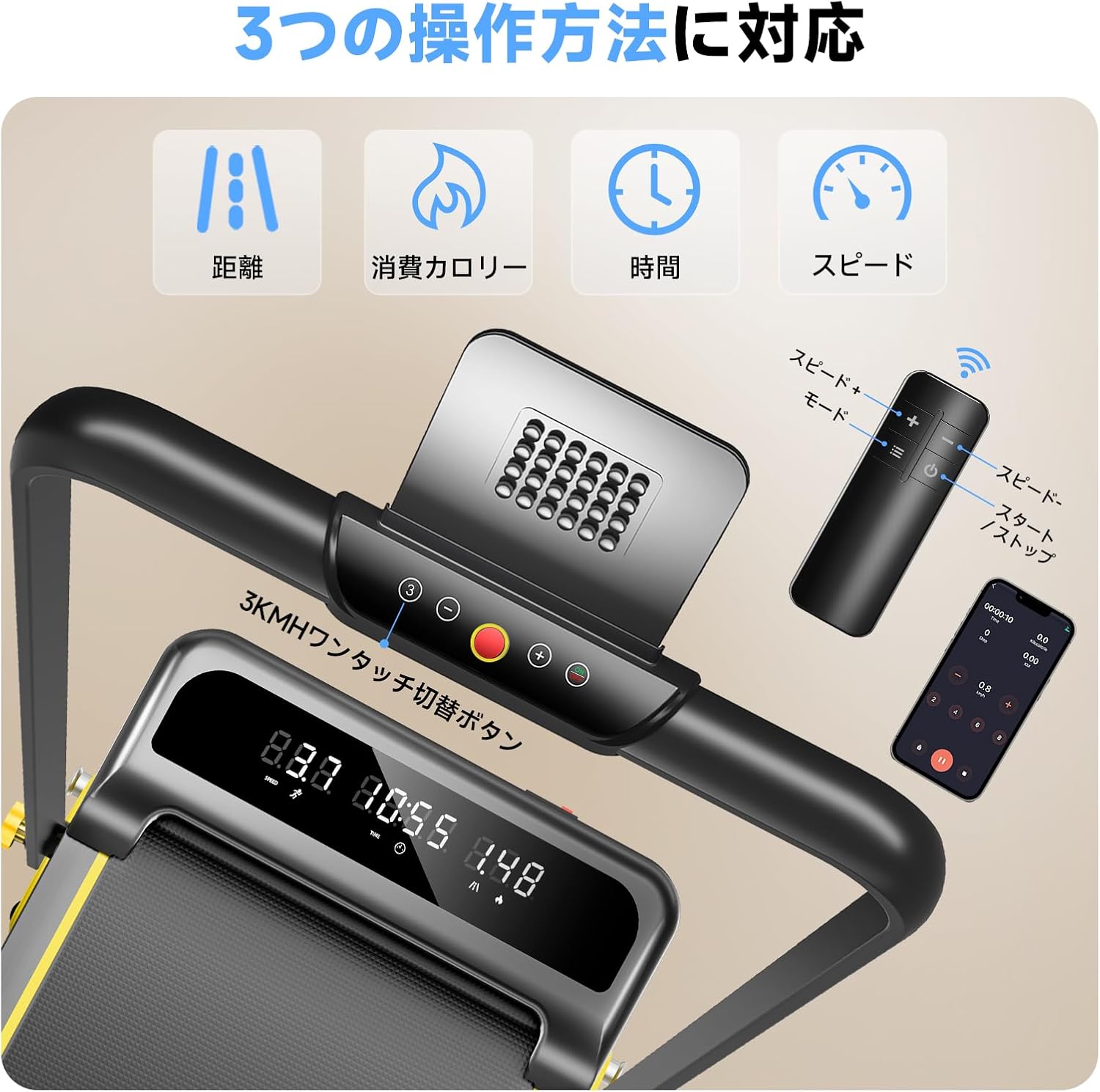
Image: A detailed view of the treadmill's control panel, the handheld remote control, and a smartphone screen displaying the YPOO FIT app, illustrating the multiple control options.
- Start/Stop: Press the 'Start' or 'Stop' button on the control panel or remote to begin or end your workout.
- Speed Adjustment: Use the '+' and '-' buttons to increase or decrease the speed. The speed range is 0.8 km/h to 8 km/h.
- Quick Speed Buttons: The control panel may feature quick-select buttons for common speeds (e.g., 3 km/h).
4.3 Adjusting Incline
The YPOO Room Runner features a 3-stage manual incline adjustment. To change the incline:
- Ensure the treadmill is stopped and unplugged for safety.
- Locate the incline adjustment pins at the rear of the treadmill.
- Adjust the pins to select your desired incline level: 1.5% (light exercise), 4.5% (fat burning), or 8% (intensive training).
- Ensure the pins are securely locked in place before resuming use.

Image: A woman exercising on the treadmill, accompanied by visual cues demonstrating the three manual incline settings (1.5%, 4.5%, 8%) and their corresponding benefits.
4.4 Display Information
The treadmill's display shows key workout metrics:
- Distance: Total distance covered during the current workout.
- Calories: Estimated calories burned.
- Time: Duration of the current workout.
- Speed: Current speed in km/h.
4.5 Workout Modes
The YPOO Room Runner supports various workout modes to suit your fitness goals:
- Work Mode (0.8-2.5 km/h): Ideal for light activity while working or reading.
- Walking Mode (2.5-5 km/h): Suitable for brisk walking and general fitness.
- Running Mode (5-8 km/h): For more intense cardio and running workouts.
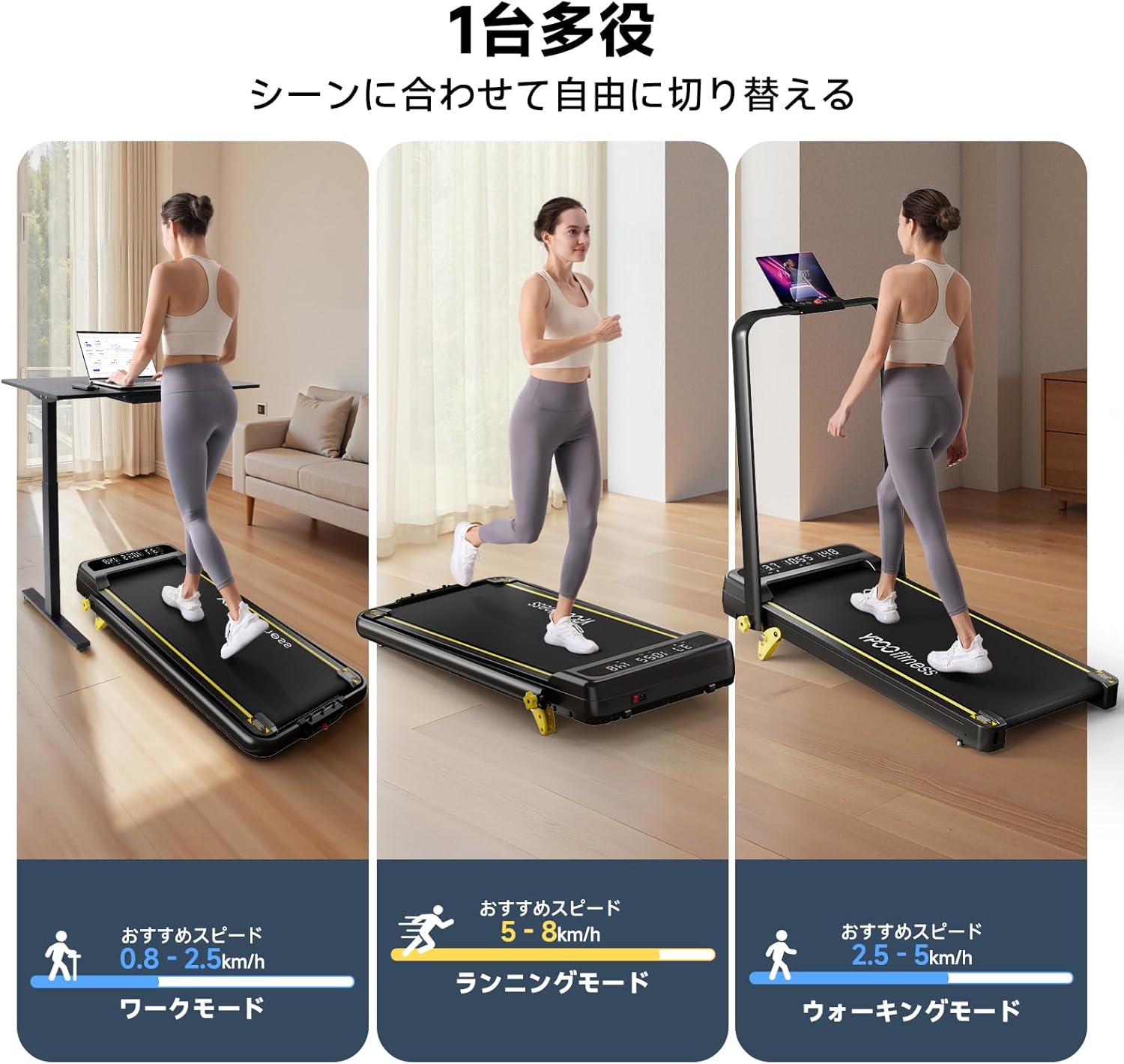
Image: Three panels illustrating the treadmill's versatility: a person walking slowly while using a laptop (Work Mode), a person running (Running Mode), and a person walking briskly (Walking Mode).
4.6 App Connectivity (YPOO FIT)
Enhance your workout experience by connecting your treadmill to the YPOO FIT app. The app allows you to track your progress, set goals, and access various training programs.
- Download the YPOO FIT app from your device's app store.
- Follow the in-app instructions to pair your treadmill via Bluetooth.
- Utilize the app for detailed workout data, personalized plans, and interactive training.

Image: A woman running on the YPOO Room Runner treadmill, with a large overlay showing the YPOO FIT application interface on a smartphone, emphasizing app integration.
5. Maintenance
Regular maintenance ensures optimal performance and longevity of your YPOO Room Runner treadmill.
5.1 Cleaning
- Always unplug the treadmill before cleaning.
- Wipe down the console and exterior surfaces with a soft, damp cloth. Avoid abrasive cleaners or solvents.
- Periodically vacuum underneath the treadmill to remove dust and debris.
5.2 Running Belt
- Lubrication: The YPOO Room Runner features a running belt designed to be maintenance-free, requiring no lubrication.
- Belt Tension and Alignment: Over time, the running belt may require adjustment. If the belt feels loose, slips, or drifts to one side, refer to the detailed instructions in the full user manual (if provided separately) or contact customer support for guidance on adjusting tension and alignment.
5.3 General Care
- Store the treadmill in a dry, temperate environment away from direct sunlight and moisture.
- Avoid placing heavy objects on the treadmill when not in use.
6. Troubleshooting
If you encounter issues with your YPOO Room Runner, refer to the following common troubleshooting steps:
| Problem | Possible Cause | Solution |
|---|---|---|
| Treadmill does not power on. | Power cord not connected; Power switch off; Circuit breaker tripped. | Ensure power cord is securely plugged in; Turn power switch ON; Check household circuit breaker. |
| Running belt slips or hesitates. | Belt tension too low. | Adjust belt tension (refer to full manual or contact support). |
| Running belt drifts to one side. | Belt alignment off. | Adjust belt alignment (refer to full manual or contact support). |
| Unusual noise during operation. | Loose parts; Debris under belt; Motor issue. | Inspect for loose parts and tighten; Clean under the belt; If noise persists, contact support. |
| Error Code 007 (or similar). | Specific internal fault. | Turn off the treadmill, unplug it, wait 30 seconds, then plug it back in and restart. If the error persists, contact customer support with the specific error code. |
If you cannot resolve an issue using these steps, please contact YPOO customer support.
7. Specifications
Key technical specifications for the YPOO Room Runner Treadmill:
- Model: Room Runner MAX8km/h
- Speed Range: 0.8 - 8 km/h
- Incline: 3-stage manual adjustment (1.5%, 4.5%, 8%)
- Motor: 2.5 HP (Peak)
- Maximum User Weight: 136 kg (300 lbs)
- Running Belt Dimensions: 930 mm (length) x 380 mm (width)
- Folded Thickness: Approximately 11 cm
- Noise Level: Approximately 45 dB (during typical operation)
- Connectivity: Bluetooth for YPOO FIT App, Remote Control
- Display: Multi-function LED display (Time, Distance, Calories, Speed)

Image: A visual representation of the treadmill's robust construction, featuring a 136 KG weight on the running deck, emphasizing its high weight capacity and the five-layer durable belt.
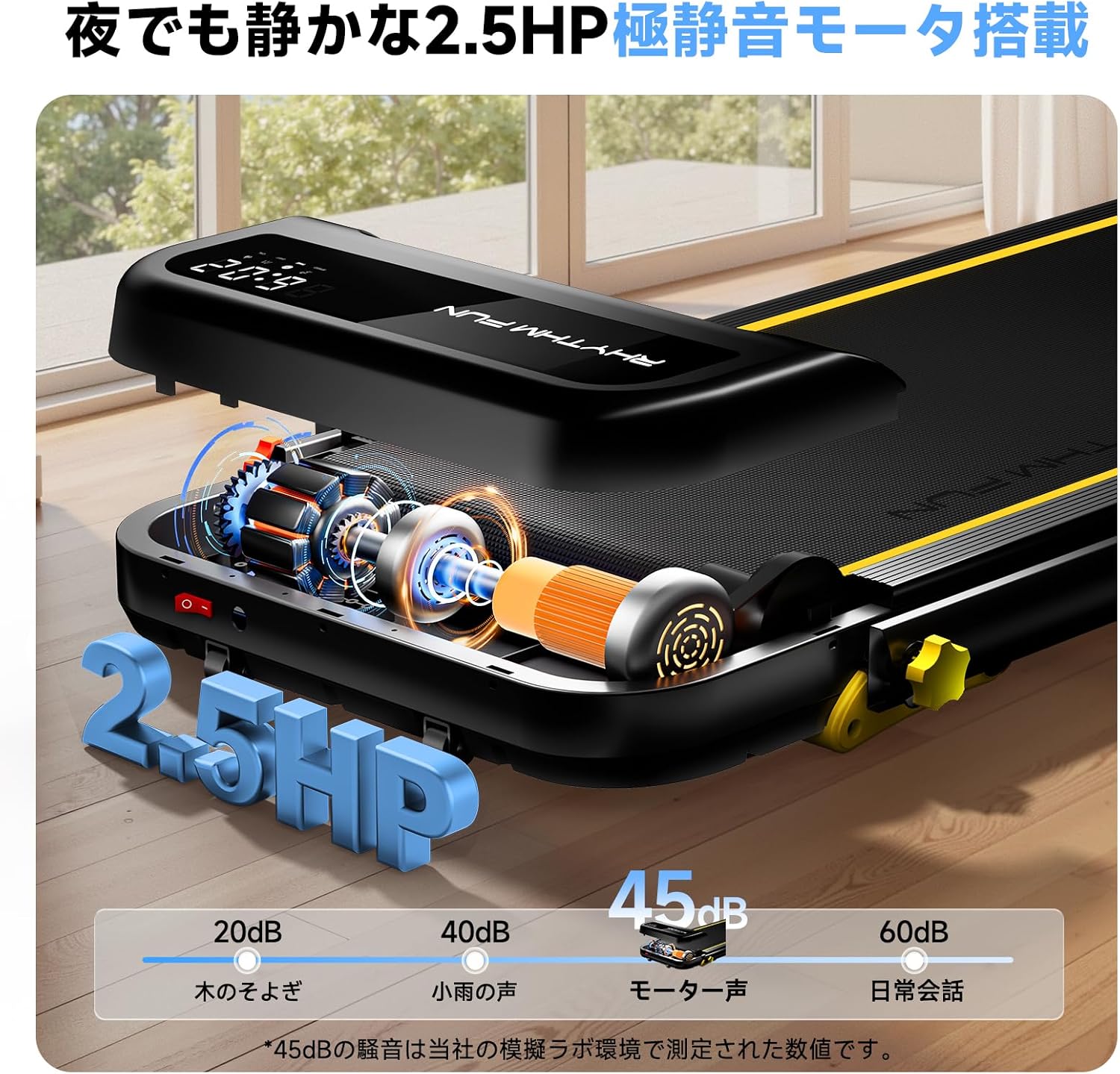
Image: An exploded view of the treadmill's internal motor and components, highlighting its 2.5HP quiet motor and a comparison of noise levels (e.g., 45dB for motor sound).
8. Warranty and Support
YPOO provides a limited warranty for the Room Runner Treadmill:
- Frame Warranty: 1-year limited warranty on the main frame.
- Parts Warranty: 90-day limited warranty on critical components and parts.
This warranty covers manufacturing defects under normal use. It does not cover damage resulting from misuse, accident, unauthorized modification, or improper maintenance.
Customer Support
For technical assistance, warranty claims, or any questions regarding your YPOO Room Runner Treadmill, please contact YPOO customer support. Refer to your purchase documentation or the YPOO official website for the most current contact information.