
1. Introduction
Thank you for choosing the Nitecore izzCool 20 Pro Handheld Air Conditioner Fan. This device is designed to provide personal cooling and humidification with its high-speed fan and misting capabilities. It features a 100-level stepless wind speed control and a unique ring-shaped water tank for extended operation.
Key features include:
- 100-level stepless wind speed control for precise airflow adjustment.
- Maximum wind speed of 8.6m/s (19 mph).
- Integrated ring-shaped water tank for misting function, offering up to 44 hours of cooling.
- Apparent temperature drop of up to 16°C (28.8°F) with misting.
- Built-in 5,000mAh battery for long-lasting use.
- LED real-time display for battery, wind speed, and mode information.
- Compact and lightweight design (189g / 6.67 oz) with a pearlescent finish.

Figure 1: Nitecore izzCool 20 Pro Handheld Air Conditioner Fan.
2. Setup
2.1 Charging the Device
Before first use, fully charge the izzCool 20 Pro. Connect the provided USB-C cable to the charging port located at the bottom of the device and to a suitable USB power adapter (not included).
- The LED display will indicate charging status.
- A full charge typically takes several hours.

Figure 2: USB-C charging port and lockout switch location.
2.2 Filling the Water Tank (for Misting Function)
To use the misting function, fill the ring-shaped water tank. Use clean, distilled water to prevent mineral buildup.
- Locate the water tank cap, typically on the top or side of the fan head.
- Open the cap and carefully fill the tank with water. Do not overfill.
- Close the cap securely to prevent leaks.

Figure 3: Ring-shaped water tank design and filling point.
3. Operating Instructions
3.1 Power On/Off
- To power on, slide the lockout switch (if present) to unlock, then press and hold the power button.
- To power off, press and hold the power button again.
3.2 Adjusting Wind Speed
The izzCool 20 Pro features a 100-level stepless wind speed control.
- Use the fan slider or designated buttons to increase or decrease the wind speed.
- The current wind speed level will be displayed on the LED screen.

Figure 4: Fan slider for 100-level stepless wind speed control.
3.3 Misting Function
Activate the misting function for enhanced cooling and humidification.
- Press the mist button to turn the mist function on or off.
- The mist function can operate independently or in conjunction with the fan.
- Ensure the water tank is filled before activating the mist.

Figure 5: Misting function for cooling and humidifying.
3.4 LED Real-Time Display
The LED display provides essential information about the device's status.
- Remaining Battery Percentage: Shows the current battery level.
- Current Wind Speed Level: Indicates the fan's intensity (1-100).
- Cool Mist Mode: Icon indicates if misting is active.
- Fan Mode: Icon indicates if fan is active.
- Mist Mode: Icon indicates if misting is active (can be separate from Cool Mist Mode depending on settings).
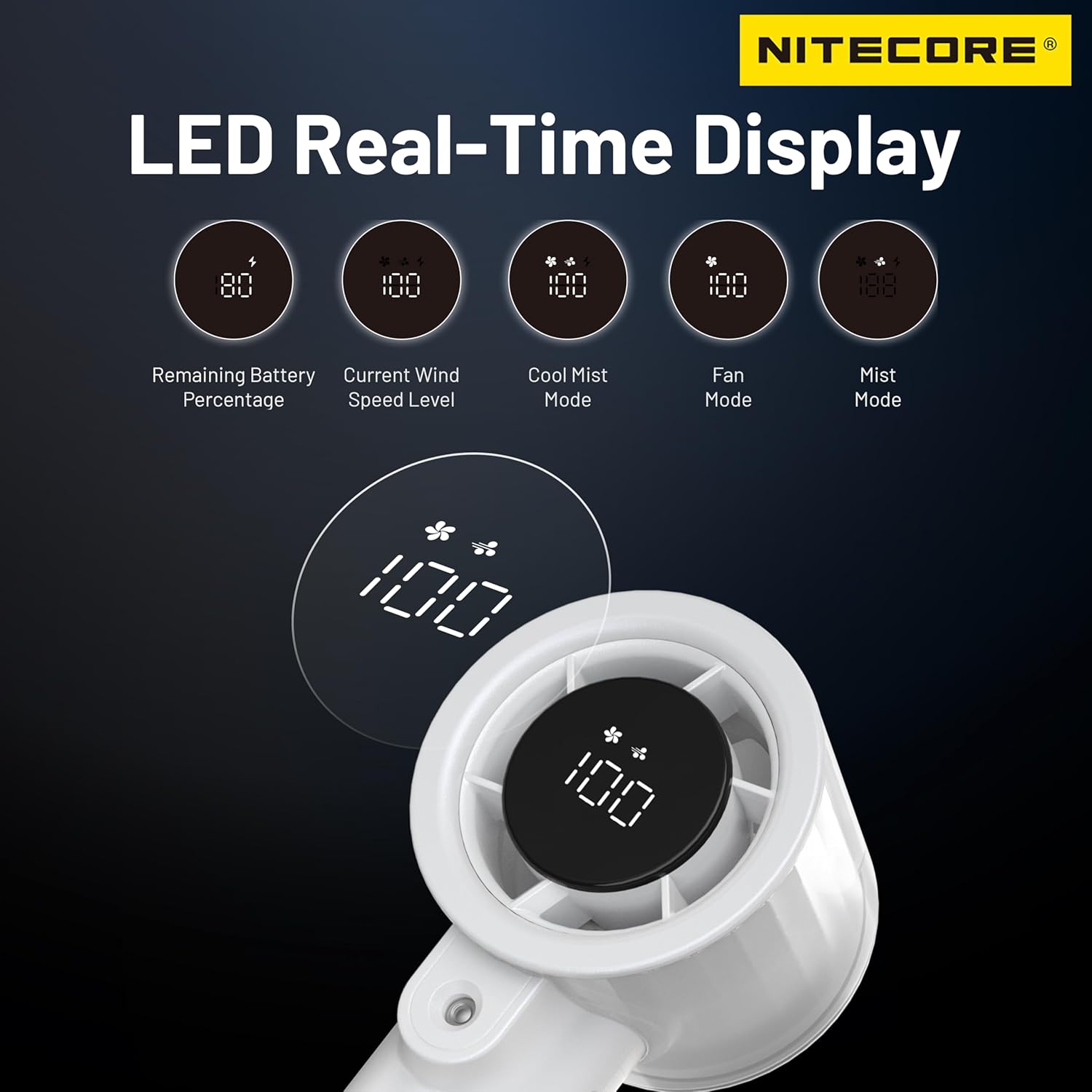
Figure 6: LED display showing various operational indicators.
4. Maintenance
4.1 Cleaning the Water Tank
Regular cleaning of the water tank is essential to prevent mold and bacteria growth, especially if using tap water.
- Ensure the device is powered off and unplugged.
- Empty any remaining water from the tank.
- Wipe the inside of the tank with a soft cloth and mild detergent. Rinse thoroughly with clean water.
- Allow the tank to air dry completely before refilling or storing.
4.2 Cleaning the Fan Blades and Exterior
Dust and debris can accumulate on the fan blades and exterior.
- Use a soft, dry cloth to wipe the exterior of the device.
- For fan blades, use a soft brush or compressed air to gently remove dust. Do not insert fingers or objects into the fan grille while the device is on.
5. Troubleshooting
If you encounter issues with your Nitecore izzCool 20 Pro, refer to the following common problems and solutions:
| Problem | Possible Cause | Solution |
|---|---|---|
| Device does not turn on. | Low battery; Lockout switch engaged. | Charge the device fully; Disengage the lockout switch. |
| No mist is produced. | Water tank is empty; Atomizer plate is clogged. | Refill the water tank; Clean the atomizer plate as per maintenance instructions. |
| Weak airflow. | Low battery; Fan blades are obstructed or dirty. | Charge the device; Clean the fan blades. |
| LED display is not working. | Device is off; Malfunction. | Ensure device is powered on; Contact customer support if issue persists. |
If the problem persists after attempting these solutions, please contact Nitecore customer support.
6. Specifications
| Feature | Detail |
|---|---|
| Model Name | izzCool 20 Pro |
| Brand | Nitecore |
| Color | White |
| Electric Fan Design | Blower |
| Power Source | Battery Powered (5,000mAh built-in) |
| Product Dimensions (D x W x H) | 2.1"D x 2.4"W x 6.2"H |
| Special Features | Misting, Portable |
| Number of Speeds | 100 (Stepless) |
| Noise Level | 45 Decibels |
| Wattage | 10 watts |
| Material | Plastic |
| Finish Type | Pearlescent |
| Included Components | Lanyard |
| Max Wind Speed | 8.6m/s (19 mph) |
| Temperature Drop (with mist) | Up to 16°C (28.8°F) |
7. Warranty and Support
Nitecore products are manufactured to high quality standards. For warranty information and customer support, please refer to the official Nitecore website or contact their customer service directly.
For further assistance, you may visit the Nitecore Store on Amazon or the official Nitecore website.

