
1. Product Overview
The VECELO Kitchen Pantry Cabinet is a versatile 2-tier storage unit designed to enhance kitchen organization. It features a spacious microwave shelf, a convenient drawer, and enclosed cabinets, along with an integrated charging station for small appliances.
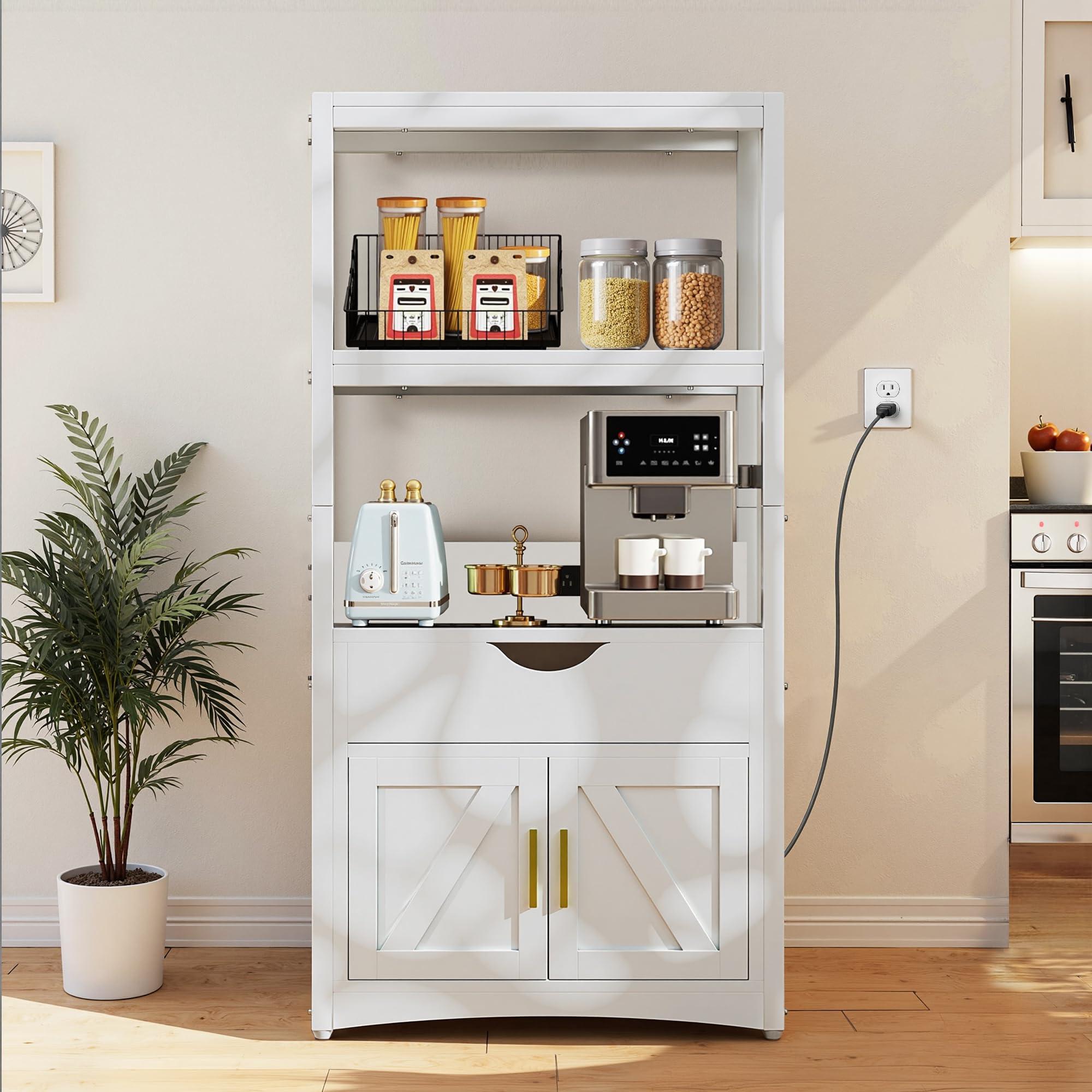
Image: Front view of the VECELO Kitchen Pantry Cabinet, showcasing its 2-tier design, central drawer, and lower cabinets.
2. Safety Information
- Always secure the cabinet to the wall or floor using the provided anti-tip kit to prevent accidental tipping.
- Do not overload shelves. Distribute weight evenly to maintain stability.
- Keep the area around the cabinet clear to avoid potential hazards and ensure proper ventilation for appliances.
- Ensure all electrical connections for the charging station are secure and follow local electrical codes.
- Keep children and pets away from the cabinet during assembly and ensure all small parts are out of reach.
3. Setup and Assembly
This cabinet requires assembly. Please follow the instructions carefully. An instruction manual is included with the product. For a visual guide, refer to the official installation video below.
3.1 Assembly Video Guide
Video: Quick installation instructions for the VECELO Kitchen Pantry Cabinet. This video provides a step-by-step visual guide to assemble the cabinet components.
3.2 Key Assembly Steps (Refer to included manual for full details)
- Unpack and Verify: Carefully unpack all components and hardware. Compare with the parts list in your included manual to ensure all pieces are present.
- Assemble Base Frame: Attach the side panels to the bottom shelf using the designated screws and dowels.
- Install Drawer Slides: Secure the drawer slides to the interior side panels of the cabinet.
- Construct Drawer: Assemble the drawer components and attach the remaining drawer slides. Insert the drawer into the cabinet.
- Attach Upper Shelves: Secure the upper shelves to the main frame, ensuring they are level and stable.
- Install Charging Station: Mount the built-in charging station into its designated slot on the back panel. Connect the power cord.
- Attach Cabinet Doors: Install the magnetic catches and hinges, then attach the cabinet doors to the lower section.
- Final Adjustments: Ensure all screws are tightened and the cabinet is stable. Attach anti-tip hardware to a wall stud.
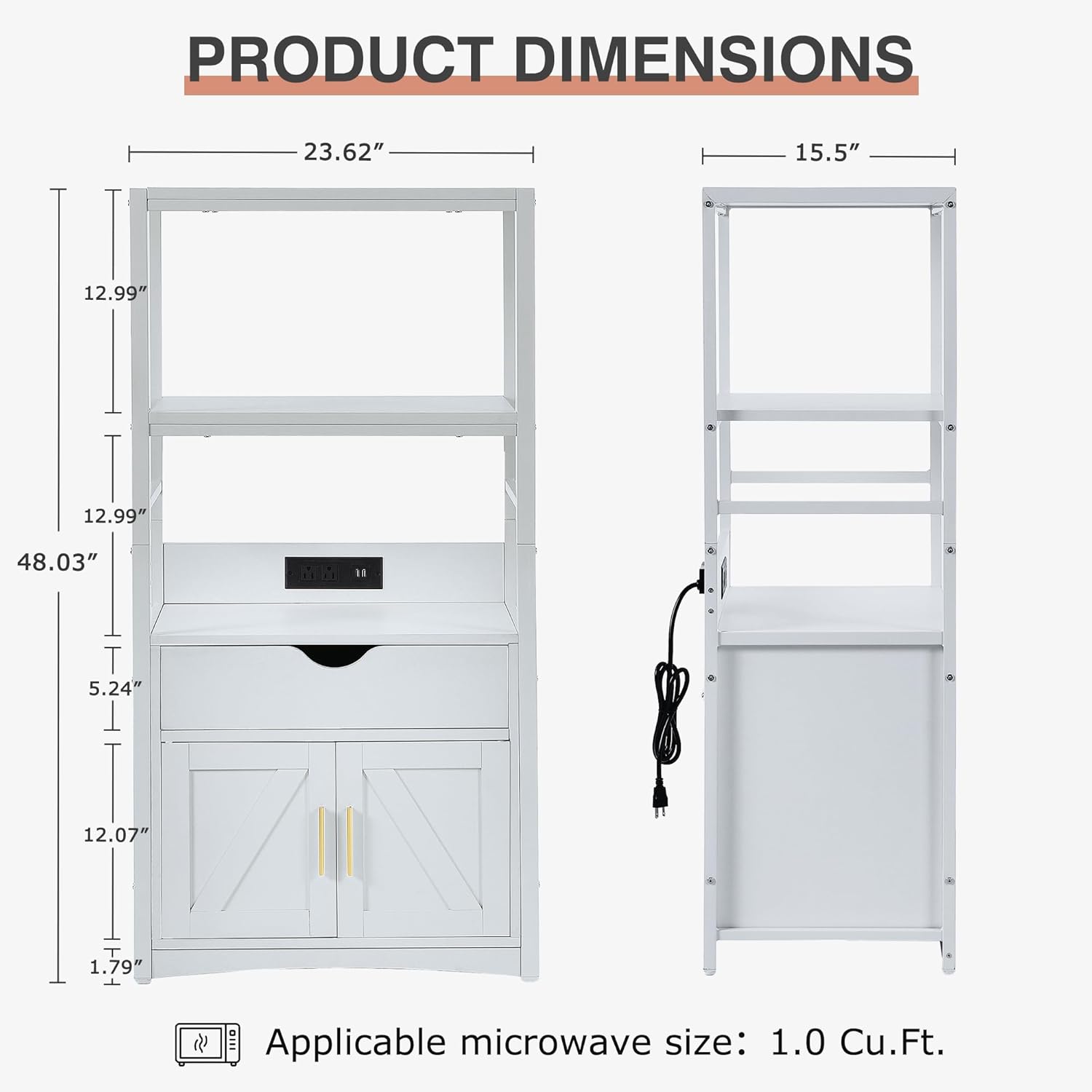
Image: Detailed product dimensions, showing height, width, and depth of various sections, including the microwave shelf area.

Image: Close-up showing construction details like magnetically attached cabinet doors, reinforced corners, and metal handles, highlighting the cabinet's sturdy design.
4. Operating Instructions
4.1 Using the Charging Station
The integrated charging station provides convenient power outlets and USB ports for your kitchen appliances. Simply plug the cabinet's main power cord into a wall outlet. You can then plug in devices such as coffee makers, blenders, or phone chargers directly into the station.
- Ensure the cabinet's power cord is fully inserted into a functional wall outlet.
- Plug your small appliances or charging cables into the available outlets or USB ports.
- Avoid overloading the charging station. Refer to the station's specifications for maximum wattage.

Image: Illustrates the widening and heightening design for appliances, along with details of the drawer for cutlery and hidden cabinets for storage.
4.2 Storage Utilization
The cabinet offers various storage options:
- Top Shelves: Ideal for frequently used items, decorative pieces, or smaller appliances.
- Microwave Shelf: Designed to accommodate most standard microwaves (up to 1.0 Cu.Ft. recommended) or other larger kitchen gadgets.
- Drawer: Perfect for organizing cutlery, utensils, or small kitchen accessories.
- Lower Cabinets: Provides enclosed storage for bulkier items, pantry staples, or items you wish to keep out of sight.

Image: Diagram illustrating the large storage capacity, categorizing areas for tableware, kitchen appliances, microwave, coffee machine, cutlery, and food storage.
5. Maintenance and Care
- Cleaning: Wipe surfaces with a soft, damp cloth. Avoid abrasive cleaners or harsh chemicals that may damage the finish.
- Spills: Clean up spills immediately to prevent moisture damage to the wood material.
- Inspection: Periodically check all screws and fasteners to ensure they remain tight. Re-tighten if necessary.
- Charging Station: Ensure the charging station remains dry and free from debris. Do not attempt to repair the electrical components yourself.
6. Troubleshooting
- Wobbly Cabinet: Ensure all assembly screws are securely tightened. Verify the cabinet is placed on a level surface. Adjust feet if applicable.
- Drawer Not Sliding Smoothly: Check that the drawer slides are correctly installed and free from obstructions. Apply a silicone-based lubricant if needed.
- Charging Station Not Working: Verify the cabinet's main power cord is securely plugged into a live wall outlet. Check if the appliance plugged into the station is functioning correctly. If issues persist, discontinue use and contact customer support.
- Damaged Parts: If any parts are damaged during shipping or assembly, do not proceed with assembly. Contact customer support for replacement parts.
7. Specifications
| Feature | Detail |
|---|---|
| Brand | VECELO |
| Model Number | T4-AI-SR01-WHE-WW1 |
| Color | White |
| Material | Engineered Wood |
| Product Dimensions (D x W x H) | 15.55"D x 23.62"W x 48.03"H |
| Item Weight | 50 Pounds |
| Number of Tiers | 2 |
| Number of Drawers | 1 |
| Special Feature | Built-In Charging Station (Power Outlets & USB Ports) |
| Assembly Required | Yes |
8. Warranty and Support
8.1 Warranty Information
The VECELO Kitchen Pantry Cabinet is backed by a 1-year warranty. This warranty covers manufacturing defects and issues arising from normal use. Please retain your proof of purchase for warranty claims.
Additionally, the product is eligible for a 30-day free return/exchange policy from the date of purchase.
8.2 Customer Support
For any questions, concerns, or assistance with assembly, parts, or warranty claims, please contact VECELO customer support. Responsive customer support is available to ensure your satisfaction.
Contact information can typically be found on the VECELO official website or through your purchase platform.

