
1. Introduction
This manual provides detailed instructions for the safe and effective use of your Ulefone Armor 33 Pro 5G Dual Screen Rugged Phone. Please read this manual thoroughly before operating the device to ensure optimal performance and longevity. Keep this manual for future reference.
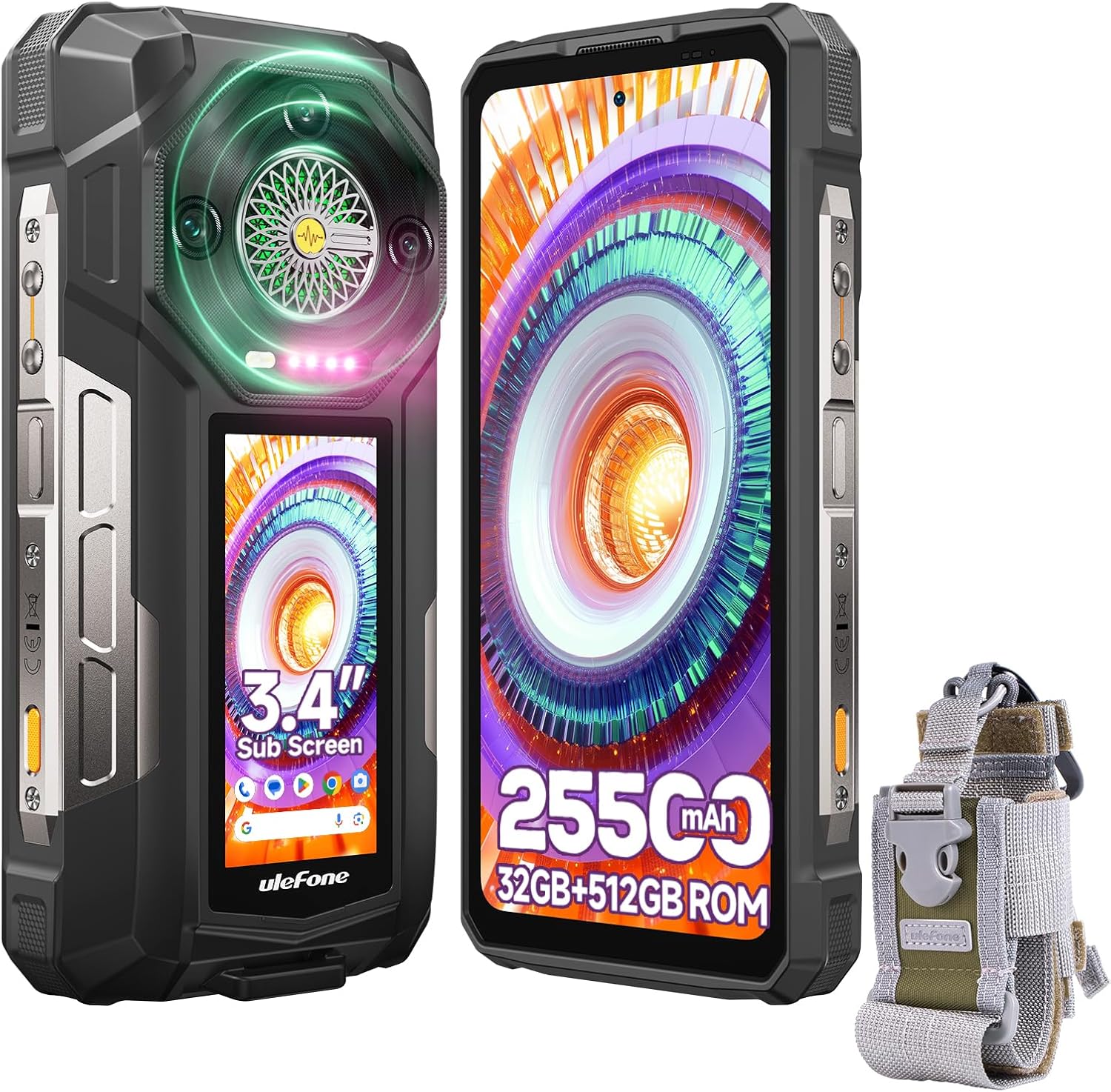
Image: The Ulefone Armor 33 Pro rugged smartphone, showcasing its main display, secondary rear display, and the accompanying Molle Holster.
2. Device Overview
The Ulefone Armor 33 Pro features a robust design with dual screens and advanced functionalities.
2.1 Main Display
- Size: 6.95 inches
- Resolution: FHD+ (1080 x 2460 pixels)
- Refresh Rate: 120Hz
- Brightness: 700 nits peak brightness for visibility in strong sunlight.
- Protection: Corning Gorilla Glass 5

Image: Diagram illustrating the 6.95-inch main display with its 120Hz refresh rate, 700 nits brightness, and 1080x2460 resolution.
2.2 Secondary Display
- Size: 3.4 inches
- Resolution: 412 x 960 pixels
- Aspect Ratio: 4:3
- Brightness: 600 nits peak brightness
- Features: 5-point multi-touch technology.
- Protection: Corning Gorilla Glass 5
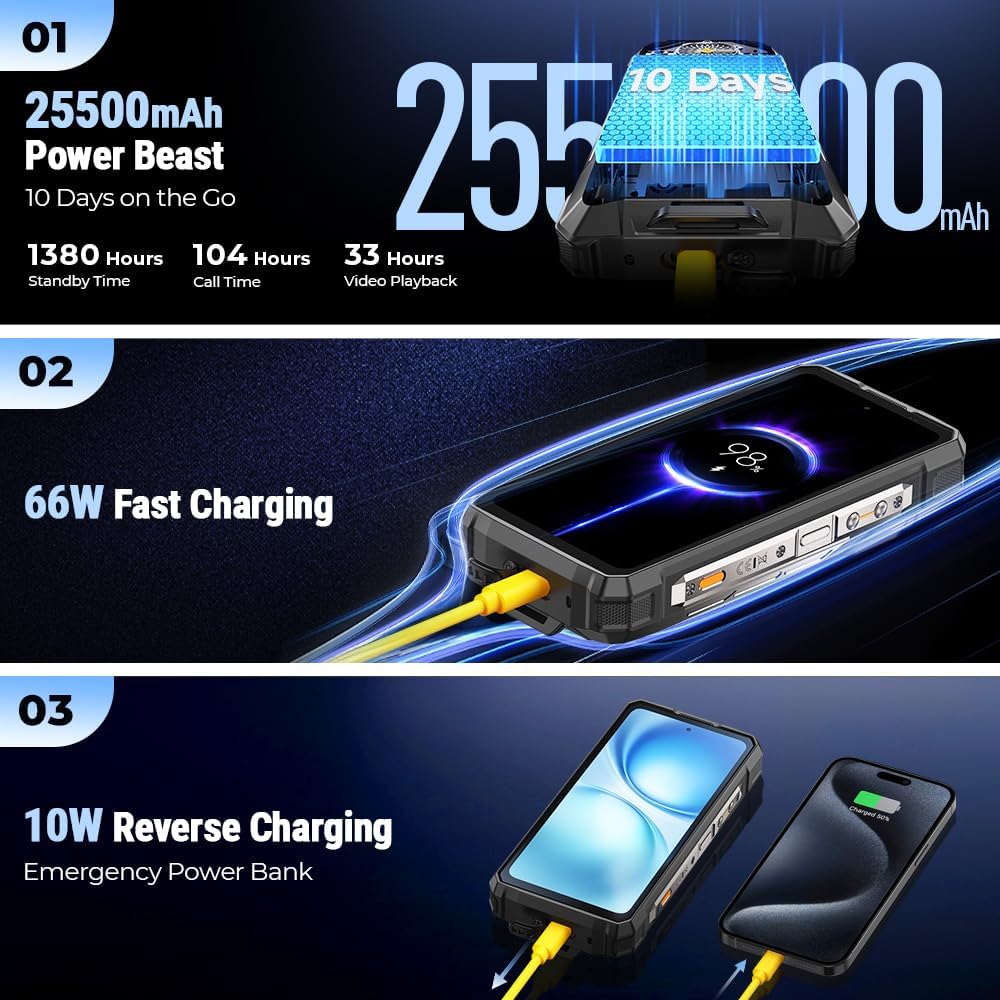
Image: Diagram detailing the 3.4-inch secondary back screen, highlighting its resolution, aspect ratio, and multi-touch capability.
2.3 Camera System
- Main Camera: 50MP (OV50H sensor, f/1.95 large aperture, 7P lens, EIS Anti-blur)
- Ultra-wide Macro Camera: 50MP (Samsung JN1 sensor, f/2.2 large aperture, 117.3° FOV, IsoCell 2.0)
- Night Vision Camera: 64MP (OV64B sensor, f/1.79 large aperture, 79.4° FOV, PDAF, 4 IR LEDs for sharper images)
- Front Camera: 32MP

Image: Visual breakdown of the Ulefone Armor 33 Pro's triple camera system, including the 50MP main, 50MP ultra-wide macro, and 64MP night vision cameras with their respective specifications.
2.4 Performance and Connectivity Core
- Processor: MediaTek Dimensity 7300X (4nm)
- RAM: 16GB (expandable to 32GB)
- Internal Storage: 512GB (expandable to 2TB via MicroSD)
- Network: Dual 5G connectivity

Image: Diagram illustrating the MediaTek Dimensity 7300X processor, 32GB RAM, 512GB ROM, and Dual 5G connectivity features of the Ulefone Armor 33 Pro.
2.5 Ports and Buttons
- SIM/SD Card Slot: Supports 3 cards (2x Nano SIM + 1x MicroSD).
- USB Port: USB Type-C for charging and data transfer.
- Audio Jack: 3.5mm headphone jack.
- Custom Key: Programmable button for quick access to functions.
- Fingerprint Sensor: Integrated for secure unlocking.
- IR Blaster: For remote control functionality.

Image: A collage of images showcasing various advanced features of the Ulefone Armor 33 Pro, including NFC, WiFi 6E, Bluetooth 5.4, custom key, 3-card slot, 3.5mm headphone jack, face unlock, fingerprint ID, IR blaster, outdoor toolbox, GPS, and FM radio.
Image: Rear view of the Ulefone Armor 33 Pro, showing the camera module, secondary screen, and a product information label.
3. Setup
3.1 SIM Card and MicroSD Card Installation
- Locate the SIM card tray on the side of the device.
- Use the provided SIM ejector tool to open the tray.
- Carefully place your Nano SIM cards and/or MicroSD card into the designated slots. Ensure correct orientation.
- Gently push the tray back into the device until it is flush with the body.
The device supports two Nano SIM cards and one MicroSD card simultaneously.
3.2 Initial Power On
- Press and hold the Power button (usually on the right side) until the Ulefone logo appears.
- Follow the on-screen instructions to complete the initial setup, including language selection, Wi-Fi connection, and Google account setup.
3.3 Charging the Device
- Connect the USB Type-C cable to the charging port at the bottom of the phone.
- Connect the other end of the cable to the provided 66W power adapter.
- Plug the power adapter into a wall outlet.
- The device supports 66W fast charging.
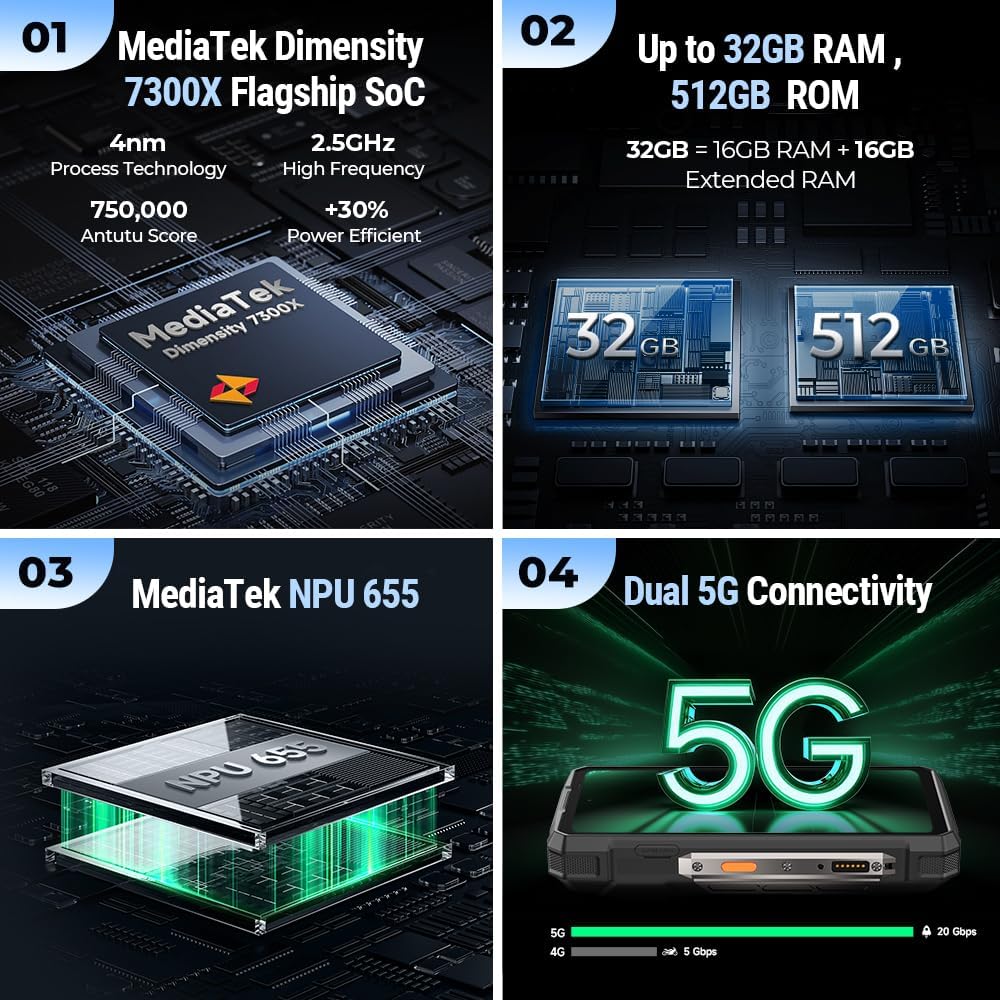
Image: Visual representation of the 25500mAh battery capacity, 66W fast charging, and 10W reverse charging capabilities of the Ulefone Armor 33 Pro.
4. Operating Instructions
4.1 Using the Dual Screens
The Ulefone Armor 33 Pro features both a large main display and a smaller secondary display on the rear.
- Main Screen: Primarily used for all standard smartphone operations, including apps, browsing, and media consumption.
- Secondary Screen: Can display notifications, time, battery status, and provide quick access to certain functions without activating the main screen. Refer to the device settings for customization options for the secondary display.
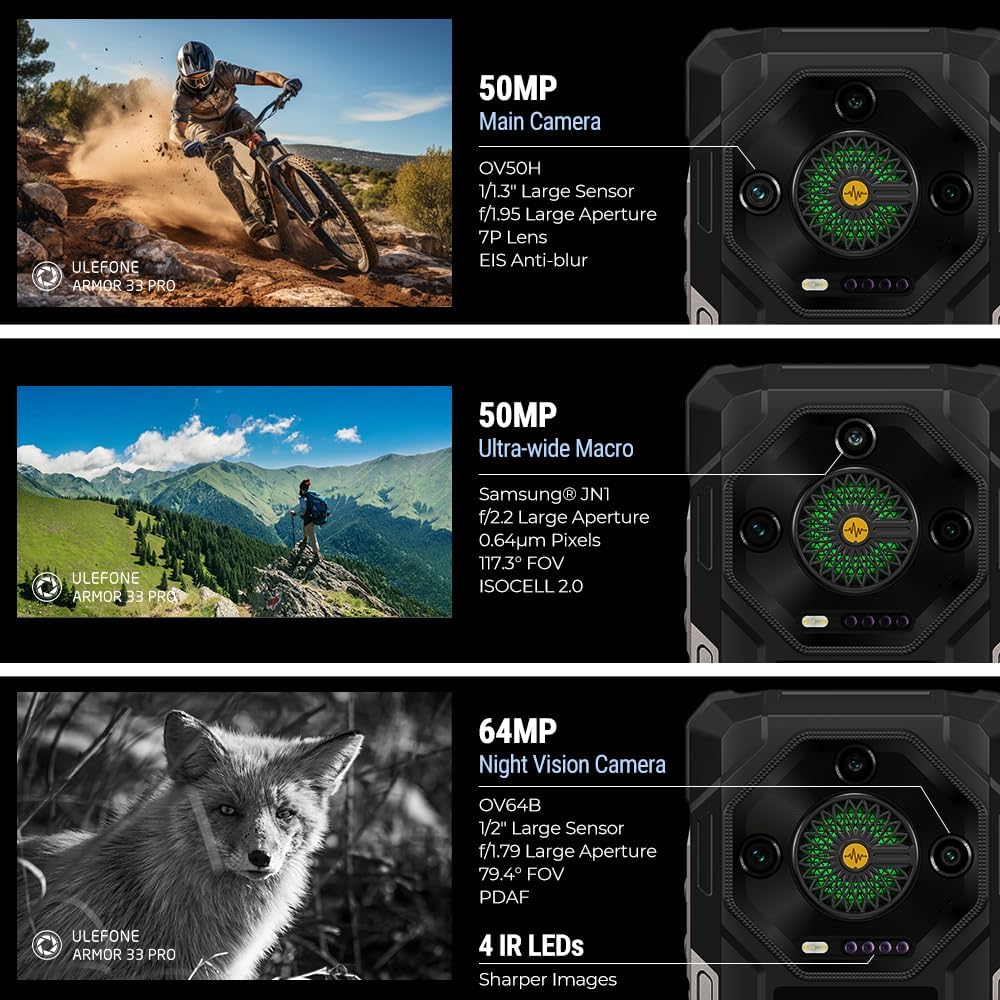
Image: Illustration demonstrating the simultaneous use of the main and secondary screens on the Ulefone Armor 33 Pro, highlighting its dual-screen functionality.
4.2 Camera Operation
Access the camera application from the home screen or app drawer. The device features multiple camera lenses for various photography needs.
- Standard Photo: Use the 50MP main camera for general photography.
- Wide-Angle/Macro: Switch to the 50MP ultra-wide macro lens for expansive landscapes or close-up shots.
- Night Vision: Activate the 64MP infrared night vision camera for clear images in low-light or complete darkness. The NightElf 3.0 technology enhances night photography.
- Selfie Camera: Use the 32MP front camera for self-portraits and video calls.
4.3 Battery Management
- High Capacity: The 25500mAh battery provides extended usage times.
- Fast Charging: Utilize the 66W charger for rapid recharging.
- Reverse Charging: The device supports 10W reverse charging, allowing it to act as a power bank for other devices. Connect a compatible USB-C to USB-C cable or an adapter to the phone and the device you wish to charge.
4.4 Audio and Notifications
- Loudspeaker: The 118 dB, 4W speaker provides powerful audio output.
- Infinite Halo 2.0: The rear Infinite Halo lighting system provides visual cues for various events:
- Music: Visualizes audio playback.
- Calling: Indicates incoming calls.
- Notification: Alerts for new notifications.
- Charging: Shows charging status.

Image: Depiction of the Infinite Halo 2.0 lighting system on the rear of the Ulefone Armor 33 Pro, showing its different light patterns for music, calls, notifications, and charging, alongside the 118dB loudspeaker.
4.5 Connectivity and Navigation
- Network: Supports Dual 5G connectivity.
- Wi-Fi: Features Wi-Fi 6E for high-speed wireless internet.
- Bluetooth: Bluetooth 5.4 for connecting wireless accessories.
- NFC: Near Field Communication for contactless payments and data exchange.
- GPS: Integrated GPS, GLONASS, Beidou, Galileo, and QZSS for accurate positioning.
- IR Blaster: Use as a universal remote control for compatible devices.
- FM Radio: Built-in FM radio functionality.
4.6 Security Features
- Fingerprint ID: Register your fingerprints for quick and secure unlocking.
- Face Unlock: Use facial recognition for convenient access to your device.
4.7 Molle Holster Usage
The included Molle Holster provides a secure and convenient way to carry your Ulefone Armor 33 Pro.
- Attachment: Designed to attach to Molle-compatible gear, belts, or straps.
- Secure Fit: Features an elastic cord and quick-release buckle to hold the phone securely.
- Orientation: Can be mounted upright or sideways.
- Adjustment: Magic adjustment straps allow for a customized fit.
Image: Detailed view of the Molle Holster, illustrating its utility, elastic cord, compatibility with various devices, upright/sideways mounting options, quick-release buckle, and magic adjustment features.
5. Maintenance and Care
The Ulefone Armor 33 Pro is designed to be rugged, but proper care ensures its longevity.
- Rugged Certification: The device is IP68/IP69K and MIL-STD-810H certified, meaning it is waterproof (up to 1.5m for 30 min), dust-proof, and drop-proof (up to 1.8m).
- Cleaning: Use a soft, damp cloth to clean the device. Avoid harsh chemicals or abrasive materials. Ensure all port covers are securely closed before exposing the phone to water or dust.
- Temperature: Avoid exposing the device to extreme temperatures (hot or cold) for extended periods.
- Impact: While rugged, severe impacts can still cause damage. Handle with care.
6. Troubleshooting
If you encounter issues with your Ulefone Armor 33 Pro, refer to the following common solutions:
| Problem | Possible Solution |
|---|---|
| Device does not power on | Ensure the battery is charged. Connect to the charger and wait a few minutes before attempting to power on again. |
| Screen is unresponsive | Restart the device by holding the Power button for approximately 10-15 seconds. If the issue persists, contact support. |
| Cannot connect to Wi-Fi | Check if Wi-Fi is enabled in settings. Restart your router and the phone. Ensure you are entering the correct password. |
| Poor call quality | Check network signal strength. Ensure there are no obstructions around the microphone or earpiece. Try restarting the phone. |
| Battery drains quickly | Close unused applications. Reduce screen brightness. Disable unnecessary features like GPS or Bluetooth when not in use. Check battery usage in settings to identify power-hungry apps. |
For further assistance, refer to the integrated service center app on your device or visit the official Ulefone support website.
7. Specifications
| Feature | Detail |
|---|---|
| Model Name | Armor 33 Pro |
| Operating System | Android 14 |
| Processor | MediaTek Dimensity 7300X (4nm) |
| RAM | 16GB (expandable to 32GB) |
| Internal Storage | 512GB (expandable to 2TB via MicroSD) |
| Main Screen Size | 6.95 Inches |
| Main Screen Resolution | 1920 x 1080 (FHD+) |
| Main Screen Refresh Rate | 120Hz |
| Secondary Screen Size | 3.4 Inches |
| Battery Capacity | 25500 mAh |
| Charging | 66W Fast Charging, 10W Reverse Charging |
| Main Camera | 50MP |
| Ultra-wide Macro Camera | 50MP |
| Night Vision Camera | 64MP |
| Front Camera | 32MP |
| Connectivity | 5G, WiFi 6E, Bluetooth 5.4 |
| Navigation | GPS, GLONASS, Beidou, Galileo, QZSS, NavIC |
| Durability | IP68/IP69K, MIL-STD-810H Certified |
| Audio Jack | 3.5 mm |
| Item Weight | 10.6 ounces |
| Dimensions | 5.51 x 3.23 x 0.54 inches (Package Dimensions) |
8. Safety Information
- Do not attempt to disassemble or repair the device yourself. This may void the warranty and cause damage.
- Use only Ulefone-approved chargers and accessories.
- Avoid exposing the device to open flames or extreme heat.
- Dispose of the device and its battery responsibly according to local regulations.
- Keep the device away from children and pets.
- Do not use the device while driving or operating heavy machinery.
9. Warranty and Support
Your Ulefone Armor 33 Pro is covered by a manufacturer's warranty. Please refer to the warranty card included in your package for specific terms and conditions.
For technical support, troubleshooting, or service inquiries, you can utilize the integrated service center app on your device. Alternatively, visit the official Ulefone website for support resources and contact information.
Manufacturer: Ulefone


