
Introduction
This manual provides detailed instructions for the setup, operation, maintenance, and troubleshooting of your JOVELL Replacement Remote Control for the DVD-168 DVD Player. Please read this manual thoroughly before using the remote control to ensure proper functionality and to maximize its lifespan.
Setup
1. Battery Installation
The remote control requires two AAA batteries (not included) for operation.
- Locate the battery compartment on the back of the remote control.
- Slide the battery compartment cover downwards to open it.
- Insert two AAA batteries, ensuring the positive (+) and negative (-) terminals align correctly with the markings inside the compartment.
- Slide the battery compartment cover back into place until it clicks securely.
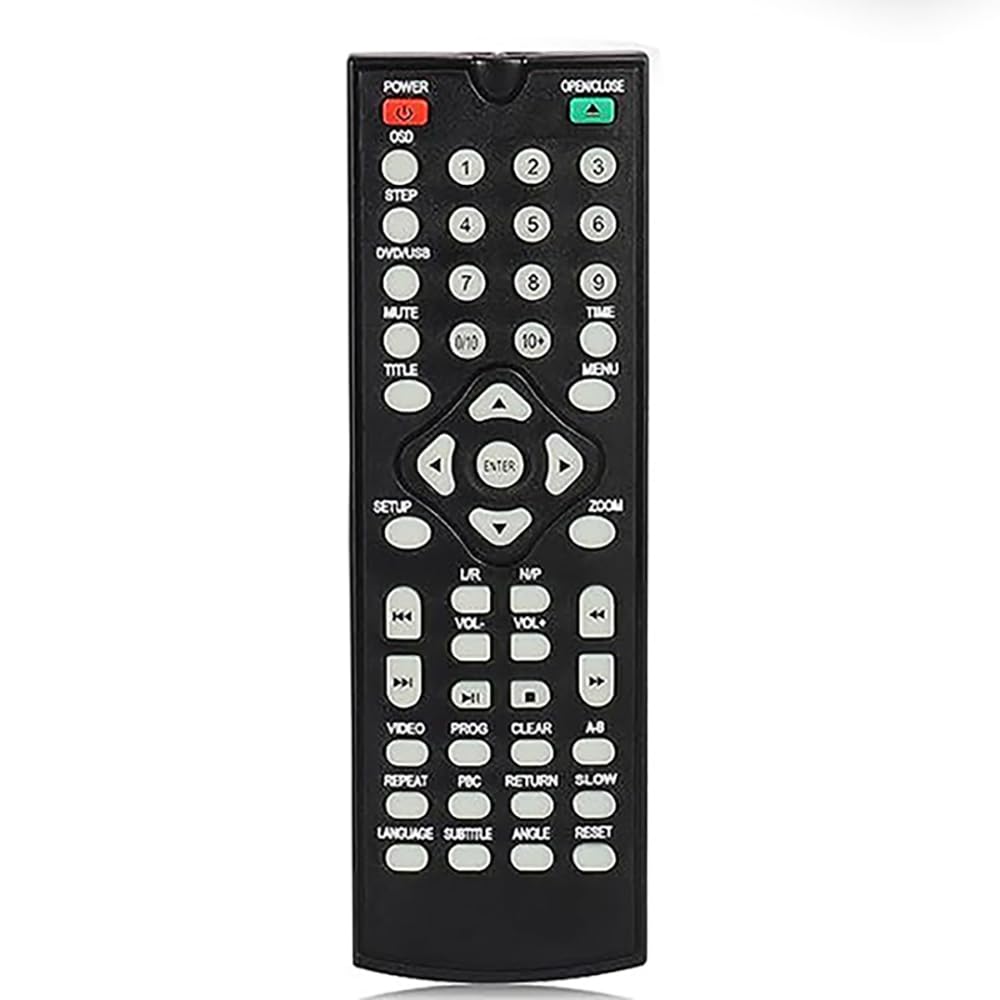
Figure 1: JOVELL Replacement Remote Control. The image displays the front and back of the remote, highlighting the battery compartment on the rear.
2. Initial Pairing (No Pairing Required)
This replacement remote control is pre-programmed for the DVD-168 DVD Player and typically does not require any manual pairing or setup. Once batteries are installed, it should function directly with your DVD-168 DVD Player.
- Ensure your DVD-168 DVD Player is powered on.
- Point the remote control directly at the DVD player's infrared (IR) receiver.
- Press any button (e.g., Power, Play) to test functionality.
Operating Instructions
The JOVELL Replacement Remote Control provides full functionality for your DVD-168 DVD Player. Below is a general overview of common button functions.
| Button | Function |
|---|---|
| POWER | Turns the DVD player on or off. |
| PLAY (►) | Starts playback of a DVD or selected track. |
| PAUSE (⏸) | Pauses playback. Press again to resume. |
| STOP (◼) | Stops playback. Press twice to return to the beginning of the disc. |
| REWIND (◀◀) | Rewinds playback. |
| FAST FORWARD (►►) | Fast forwards playback. |
| PREV (◀◀|) | Skips to the previous chapter or track. |
| NEXT (|>►►) | Skips to the next chapter or track. |
| MENU | Accesses the DVD disc menu. |
| SETUP | Accesses the DVD player's system setup menu. |
| VOLUME (+/-) | Adjusts the volume level (if supported by the DVD player's audio output). |
| MUTE | Mutes or unmutes the audio. |
| NUMBER BUTTONS (0-9) | Direct selection of tracks, chapters, or inputting numerical values. |
| DIRECTIONAL ARROWS (▲ ◀ ► ▼) | Navigates through menus and options. |
| ENTER/OK | Confirms a selection in menus. |
Note: Specific button functions may vary slightly depending on the DVD-168 DVD Player's firmware or features.
Maintenance
Cleaning the Remote Control
- Wipe the remote control with a soft, dry cloth.
- For stubborn dirt, slightly dampen the cloth with water or a mild, non-abrasive cleaner.
- Do not use harsh chemicals, solvents, or abrasive cleaning pads, as these can damage the remote's surface or internal components.
- Ensure no liquid enters the remote control, especially around buttons or the battery compartment.
Battery Replacement
- Replace batteries when the remote control's response becomes sluggish or stops working.
- Always replace both batteries at the same time with new AAA batteries.
- Do not mix old and new batteries, or different types of batteries.
- Remove batteries if the remote control will not be used for an extended period to prevent leakage.
- Dispose of used batteries according to local regulations.
Troubleshooting
| Problem | Possible Cause | Solution |
|---|---|---|
| Remote control is not working. | Dead or incorrectly installed batteries. | Replace batteries with new ones, ensuring correct polarity (+/-). |
| Remote control has limited range or intermittent response. | Weak batteries; Obstruction between remote and DVD player; Remote not pointed directly at IR receiver. | Replace batteries; Remove any obstructions; Ensure direct line of sight to the DVD player's IR receiver. |
| Certain buttons do not function. | Button malfunction; Feature not supported by DVD player. | Check if other buttons work. If only specific buttons fail, the remote may be faulty. Confirm if the DVD-168 DVD Player supports the specific function. |
| Remote control is unresponsive after battery replacement. | Batteries inserted incorrectly; Remote control fault. | Double-check battery polarity. If still unresponsive, the remote may be defective. |
Specifications
- Model: DVD-168 Replacement Remote Control
- Brand: JOVELL
- Compatible Devices: DVD-168 DVD Player
- Connectivity Technology: Infrared (IR)
- Power Source: 2 x AAA Batteries (not included)
- Special Feature: Lightweight
- Max Number of Supported Devices: 1
Warranty and Support
For warranty information or technical support regarding your JOVELL Replacement Remote Control, please refer to the documentation provided with your purchase or contact JOVELL customer service directly. Contact details are typically available on the manufacturer's official website or on the product packaging.
Please note that warranty terms and support availability may vary.