
1. Introduction
Thank you for choosing the PPMIC TX05 Portable Karaoke Machine. This manual provides essential information for setting up, operating, and maintaining your device. Please read it thoroughly before use to ensure optimal performance and safety.

Image: The PPMIC TX05 Karaoke Machine, designed for portability with a convenient shoulder strap.
2. Package Contents
Ensure all items are present in the package:
- 1 × Karaoke Machine
- 2 × Wireless Microphones (Requires AA batteries, not included)
- 1 × Power Cable (USB-A to Type-C, requires 5V/1A USB-A power adapter, not included)
- 1 × Auxiliary Cable
- 1 × Remote Control
- 1 × Shoulder Strap
- 1 × User Manual

Image: All components included in the PPMIC TX05 package, neatly arranged.
3. Product Overview & Key Features
The PPMIC TX05 is a portable karaoke machine designed for high-quality audio and versatile connectivity.
- Dual-Chamber Acoustic Design: Delivers 100W RMS power with a 6.5" woofer for deep bass (20Hz) and Vocal Focus Tweeters for clear highs (20kHz), ensuring studio-separated sound with minimal distortion.
- Customizable Sound: Manual controls for bass, treble, and microphone reverb allow precise audio tuning.
- Long-Lasting Battery: Equipped with a 6000mAh battery and smart dual-core DSP chips for up to 18 hours of continuous playtime.
- Portable & Durable: Compact (5.4×10.2×12.5 inches, 5.5 lbs) with a shoulder strap, metal-reinforced corners, and a leather-textured surface for scratch and wear resistance.
- Multi-function Connectivity: Supports Bluetooth 5.3, Micro TF cards, USB drives, AUX input, and a 6.35mm mic/guitar input.
- True Wireless Stereo (TWS): Link two TX05 speakers for an immersive 360° soundstage.

Image: Detailed view of the TX05's dual-chamber acoustic design, highlighting the 6.5-inch woofer and 2-inch tweeter.
4. Setup & Connectivity
4.1 Bluetooth Connection
To connect your device via Bluetooth:
- Press the ON/OFF button on the karaoke machine to enter Bluetooth mode. A voice prompt will confirm "Bluetooth mode".
- On your smartphone, tablet, or PC, enable Bluetooth and search for "TX05" in the list of available devices.
- Select "TX05" to pair. A voice prompt will confirm "The Bluetooth device is connected successfully".

Image: The TX05 Karaoke Machine wirelessly connected to a phone, tablet, laptop, and television via Bluetooth.
4.2 Other Input Methods
The TX05 supports multiple audio input options:
- TF Card: Insert a Micro TF card into the TF Card slot to play music directly.
- USB Drive: Insert a USB flash drive into the USB slot to play music directly.
- AUX Input: Connect an external device (e.g., TV, CD player, MP3 player) using the provided 3.5mm Auxiliary Cable to the AUX port.
- MIC Input: A 6.35mm input is available for connecting a wired microphone or guitar.

Image: Close-up of the TX05 control panel highlighting the USB, TF Card, Live Earphone, AUX, and MIC input ports.
4.3 TV Connection
You can connect the TX05 to your TV for a home karaoke experience:
- Via Bluetooth: Pair the TX05 with your TV's Bluetooth output (if available) as described in section 4.1.
- Via AUX Cable: Connect the AUX port of the TX05 to your TV's 3.5mm audio output port using the Auxiliary Cable.

Image: Demonstrates connecting the TX05 to a television using both Bluetooth and an AUX cable for karaoke.
4.4 True Wireless Stereo (TWS) Pairing
To link two TX05 karaoke speakers for an immersive 360° soundstage:
- Ensure both TX05 speakers are powered on and in Bluetooth mode.
- On one of the speakers, press the TWS button. It will search for another TX05 unit.
- Once connected, a voice prompt will confirm TWS pairing. You can then play audio through both speakers simultaneously.

Image: Two TX05 speakers wirelessly connected in TWS mode, illustrating 360° stereo sound.
5. Operating Instructions
5.1 Control Panel Overview
The top panel of the TX05 features several knobs and buttons for controlling audio and functions:
- MIC VOL+: Adjusts the volume of the microphones.
- ECHO+: Controls the echo effect for vocals.
- BASS+: Adjusts the bass level of the music.
- TREBLE+: Adjusts the treble level of the music.
- MASTER+: Controls the overall master volume.
- LED: Toggles and changes the light effects.
- REC: Initiates recording (vocals only due to copyright).
- MIC PRIORITY: Prioritizes microphone audio over background music.
- ACCOMPANY: Reduces original vocals in music for karaoke.
- TWS: Initiates True Wireless Stereo pairing.
- MODE: Switches between input modes (Bluetooth, TF Card, USB, AUX).
- PREV/NEXT: Skips to previous/next track.
- PLAY/PAUSE/ON/OFF: Plays/pauses music, also functions as power on/off.
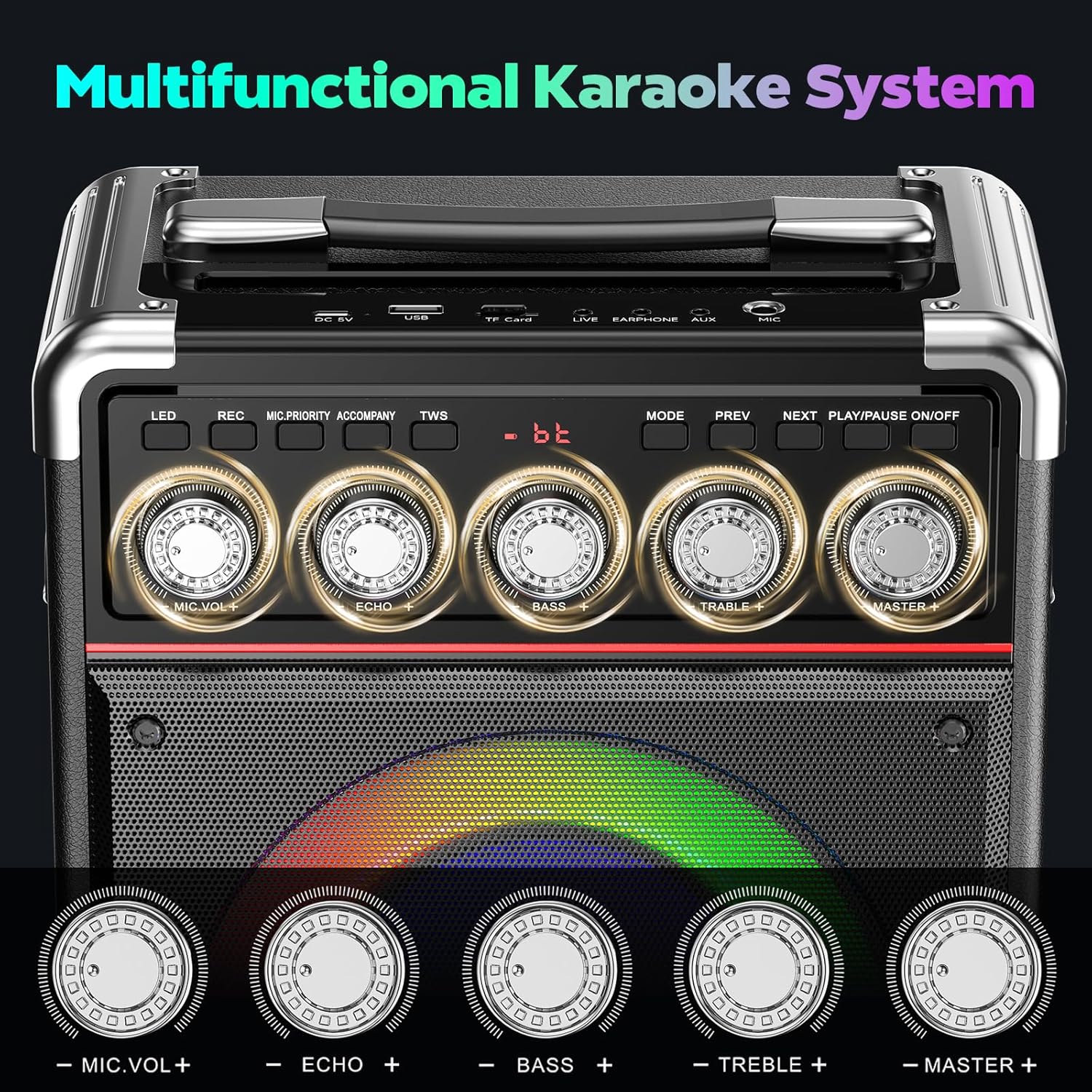
Image: Detailed view of the TX05 control panel, showing all knobs and buttons for audio adjustment and function control.
5.2 Wireless Microphones
The TX05 comes with two wireless microphones for singing.
- Insert 2 AA batteries (not included) into each microphone.
- Press and hold the power button on the microphone to turn it on. The microphone will automatically pair with the karaoke machine.
- Adjust microphone volume using the MIC VOL+ knob on the machine or the +/- buttons on the microphone.

Image: The TX05 Karaoke Machine with its two wireless microphones, illustrating the simple one-touch connection process.
5.3 Light Effects
The TX05 features rhythm-colored lights on the speaker. Press the LED button on the control panel to cycle through different light effects and turn them on/off.

Image: The TX05 Karaoke Machine showcasing different rhythm-colored light patterns on its speaker grille.
5.4 Remote Control
The included remote control allows for convenient operation from a distance. Functions include power, mode selection, volume adjustment, track skipping, and sound effects.
5.5 Quick Start Guide Video
For a visual guide on setting up and using your PPMIC TX05, please watch the official quick start video:
Video: "How to Use PPMIC TX05 Karaoke Machine - Quick Start Guide" by PPMIC Direct. This video provides step-by-step instructions for initial setup and basic operation of the karaoke machine.
6. Charging
The karaoke machine features a 6000mAh battery. To charge the device:
- Connect the provided USB-A to Type-C power cable to the DC 5V port on the machine.
- Use a 5V/1A (max 10W power) USB-A power adapter (not included) to connect to a power source.
- A red light will indicate that the device is charging. The machine does not support fast charging.

Image: Illustrates the 6000mAh battery capacity and charging specifications for the TX05.
7. Troubleshooting (FAQ)
- Does the machine include a screen display?
No, the product does not come with a screen. Images showing a screen are for demonstration of connectivity. - Does this machine have a built-in song library?
No, it does not include a pre-installed song library. You can play music via Bluetooth, USB drive, or TF card from your external devices. - Why can the recording function only capture vocals?
Due to music copyright restrictions, all karaoke machines currently on the market are unable to record background music when the recording function is enabled. - Why won’t my machine charge?
This machine does not support fast charging. Use only a 5V/1A–2A USB-A power adapter to charge via the Type-C port. - What should I do if the microphone isn’t working?
First, try replacing the AA batteries. If that doesn’t resolve the issue, please contact customer support.
8. Specifications
| Feature | Detail |
|---|---|
| Brand | PPMIC |
| Model Name | TX05 |
| Color | Black |
| Item Dimensions (D x W x H) | 5.4"D x 10.2"W x 12.5"H |
| Item Weight | 5.5 Pounds |
| Power Source | 6000 mAh Battery Powered |
| Number of Speakers | 2 |
| Connectivity Technology | Auxiliary, Bluetooth 5.3, TF Card, USB |
| Special Features | Bass/Treble/Echo Adjustment, Light Up Speaker, PA System, Stereo Pairing (TWS), Suitcase-Style |
9. Warranty & Support
PPMIC offers a 3-year warranty for the TX05 Karaoke Machine. For any issues or support needs, please contact us via Amazon message. We are committed to providing friendly customer service and lifetime technical support.
You can easily register your product and access support by messaging us through Amazon. We provide coverage for up to 3 years.

