
YPOO YPOO Treadmills for Home with Incline, Auto Foldable Running Treadmills, 8.0 MPH Walking Pad Treadmill with Bluetooth, 3
YPOO Treadmill User Manual
Model: Auto Inlcline Treadmill
Product Overview
The YPOO Auto Incline Treadmill is designed to provide a comprehensive and convenient home workout experience. This versatile machine supports various fitness levels, from walking to running, with speeds up to 8.0 MPH. Its auto-folding mechanism ensures easy storage, making it suitable for compact living spaces. Integrated Bluetooth connectivity allows for real-time tracking of fitness metrics and entertainment during workouts. The adjustable incline feature helps to intensify exercise and target different muscle groups effectively.
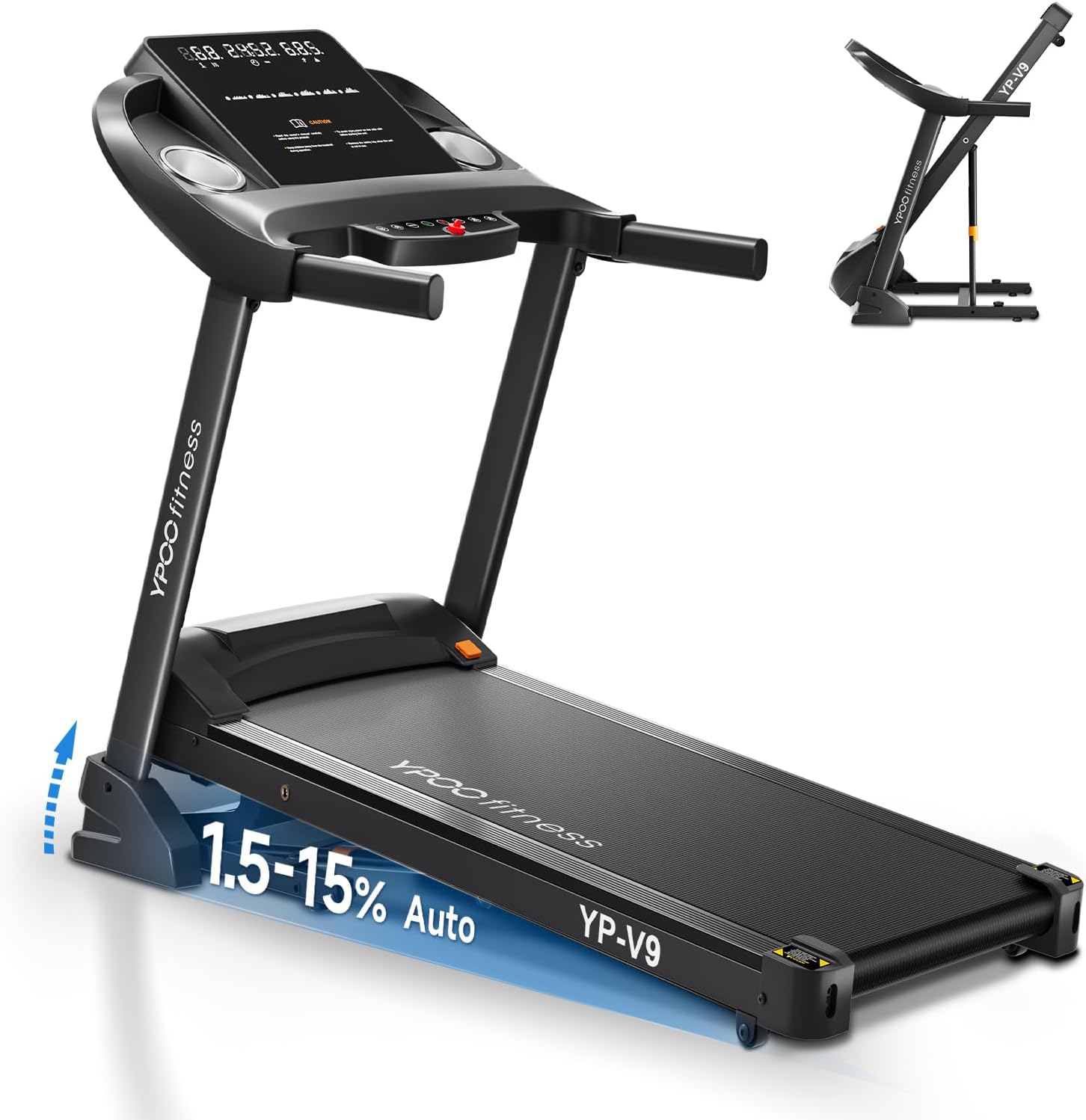
Image: YPOO Auto Incline Treadmill, illustrating its design and auto-incline feature.
Key Features:
- Versatile Speed Options: Quick-access controls for speeds up to 8.0 MPH, suitable for walking, jogging, and running.
- Bluetooth Connectivity: Connects to the YPOOFIT App for real-time tracking of distance, calories, time, and speed. Built-in music player for entertainment.
- Auto Folding & Space-Saving Design: Features a soft-drop hydraulic mechanism for safe, hands-free folding and transport wheels for easy storage.
- Auto Incline: Offers 3 levels of incline up to 15% to enhance calorie burn and muscle engagement.
- Sturdy Construction: Supports users up to 300 pounds with a 5-layer non-slip running belt.
- Quiet Operation: Designed for smooth operation with low noise levels (below 65dB).
Safety Information
Before operating the treadmill, please read and understand all safety instructions. Failure to follow these instructions may result in injury or damage to the product.
- Always place the treadmill on a flat, stable surface.
- Ensure adequate clear space around the treadmill (at least 6 feet behind and 2 feet on each side).
- Keep children and pets away from the treadmill during operation.
- Always attach the safety key clip to your clothing before starting the treadmill. The safety key is a critical safety feature that will stop the machine if you fall or move too far from the console.
- Do not exceed the maximum weight capacity of 300 pounds.
- Wear appropriate athletic footwear.
- If you feel faint, dizzy, or experience pain, stop your workout immediately.
- Unplug the treadmill from the power outlet when not in use or before cleaning/maintenance.
Setup and Assembly
The YPOO Auto Incline Treadmill comes 95% pre-assembled, significantly simplifying the setup process. You will primarily need to tighten a few screws to complete the assembly.
Package Contents:

Image: All components included in the YPOO Treadmill package.
- Base Protection Cover x2
- Lubricating Oil x2
- Power Cord x1
- Hex Tool x1
- Safety Lock x1
- User Manual x1
- Flat Gasket x6
- M6*10 Screws x2
- M8*20 Screws x4
- M8*35 Screws x2
Assembly Steps:
- Carefully remove all components from the packaging.
- Unfold the treadmill frame according to the detailed instructions in the included user manual.
- Secure the uprights and console using the provided screws and hex tool. The assembly typically involves tightening 8 screws.
- Ensure all connections are secure before plugging in the power cord.
- Place the treadmill in its desired location, ensuring it is on a level surface and has sufficient clearance around it.
Refer to the detailed installation tutorials provided in your user manual for visual guidance and specific steps.
Operating Instructions
Familiarize yourself with the control panel and its functions for an optimal workout experience.
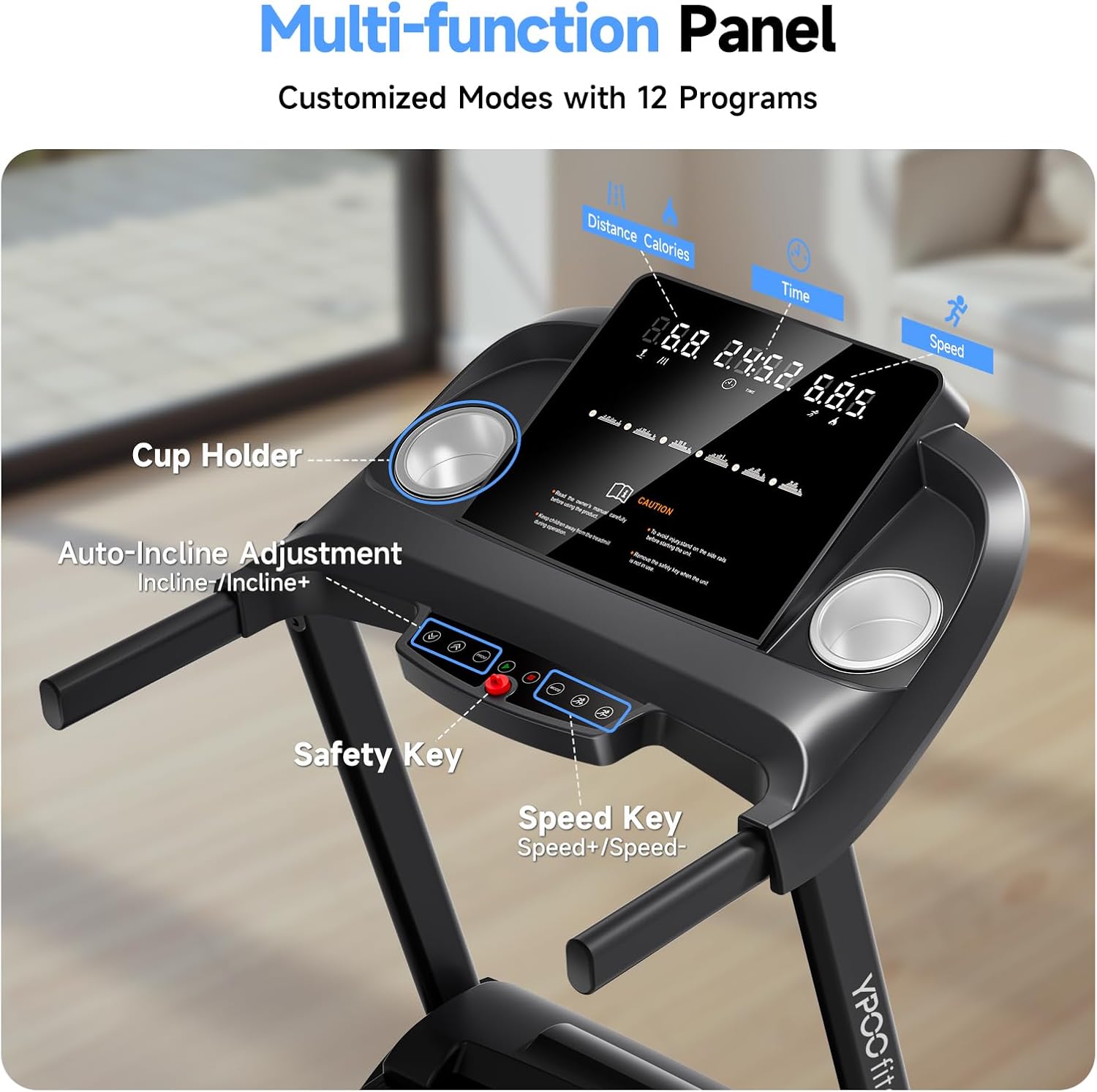
Image: Multi-function control panel of the YPOO Treadmill.

Image: Display metrics and control buttons.
Getting Started:
- Power On: Plug the power cord into a grounded outlet.
- Attach Safety Key: Ensure the safety key is properly inserted into its slot on the console and the clip is attached to your clothing. The treadmill will not operate without the safety key.
- Start Workout: Press the Start button to begin. The belt will start moving at a low speed.
- Adjust Speed: Use the Speed + and Speed - buttons to increase or decrease the belt speed. Quick-access buttons for 3 mph, 6 mph, and 8 mph are also available.
- Adjust Incline: Use the Incline + and Incline - buttons to adjust the incline level from 1.5% to 15%.
- Stop Workout: Press the Stop button to gradually slow down and stop the treadmill. Pulling the safety key will also immediately stop the treadmill.
Using Bluetooth and YPOOFIT App:

Image: Treadmill with Bluetooth music playback.

Image: Connected fitness with YPOO FIT app.
- Pairing: Enable Bluetooth on your smartphone or tablet. Search for the treadmill's Bluetooth name (refer to your manual for the exact name, typically "YPOO Treadmill" or similar) and pair.
- YPOOFIT App: Download the YPOOFIT App from your device's app store (Google Play or Apple App Store).
- Tracking: Once connected, the app will sync and display real-time workout data including distance, calories burned, time, and speed.
- Preset Programs: The treadmill features 12 preset P-button programs and countdown modes for varied exercise intensities. Select a program from the console to begin.
Maintenance
Regular maintenance ensures the longevity and optimal performance of your YPOO Treadmill.

Image: Internal view of the treadmill's motor and belt system.
- Cleaning: Wipe down the treadmill surfaces with a damp cloth after each use to remove sweat and dust. Avoid using abrasive cleaners.
- Belt Lubrication: The running belt requires periodic lubrication to ensure smooth operation and prevent wear. Use the provided lubricating oil as instructed in your detailed user manual. Frequency depends on usage, typically every few months.
- Belt Tension and Alignment: Periodically check the running belt for proper tension and alignment. Adjust as needed following the instructions in your user manual to prevent slipping or excessive wear.
- Motor Area: Keep the area around the motor clean and free of dust and debris to ensure proper ventilation.
- Storage: When not in use, the treadmill can be folded using its auto-folding mechanism and stored upright to save space. Ensure it is unplugged before folding.

Image: Treadmill in folded position for storage.
Troubleshooting
This section provides solutions to common issues you might encounter with your YPOO Treadmill.
| Problem | Possible Cause | Solution |
|---|---|---|
| Treadmill does not power on. | Power cord not plugged in; circuit breaker tripped; safety key not inserted. | Ensure power cord is securely plugged into a grounded outlet. Check your home's circuit breaker. Verify the safety key is fully inserted. |
| Running belt slips or hesitates. | Belt too loose; belt needs lubrication. | Adjust belt tension according to the user manual. Apply lubricating oil to the running deck as per maintenance instructions. |
| Unusual noise during operation. | Loose components; belt misalignment; motor issue. | Check all assembly bolts and tighten if loose. Adjust belt alignment. If noise persists, contact customer support. |
| Display not working correctly. | Loose connection; power issue. | Ensure all console connections are secure. Try unplugging and replugging the treadmill. |
For issues not listed here or if solutions do not resolve the problem, please contact YPOO customer support.
Specifications
| Feature | Detail |
|---|---|
| Brand | YPOO |
| Model Name | YPOO Treadmills for Home with Incline, Auto Foldable Running Treadmills, 8.0 MPH Walking Pad Treadmill with Bluetooth, 300 lbs Weight Capacity Quiet |
| Product Dimensions | 51.8"D x 23.8"W x 44.5"H |
| Item Weight | 40 Pounds |
| Material | Alloy Steel |
| Maximum Speed | 8 Miles per Hour |
| Minimum Speed | 0.5 Miles per Hour |
| Maximum Incline Percentage | 15.0% (3 levels) |
| Maximum Horsepower | 2.5 Horsepower |
| Maximum Weight Recommendation | 300 Pounds |
| Number of Programs | 12 |
| Power Source | Corded Electric |
| Screen Size | 15.7 Inches |
| Metrics Measured | Calories Burned, Distance, Speed, Time |
| Special Features | Auto Incline, Auto-Folding, Foldable, Wheeled |
| Assembly Required | Yes (95% pre-assembled) |
| UPC | 699838700024 |
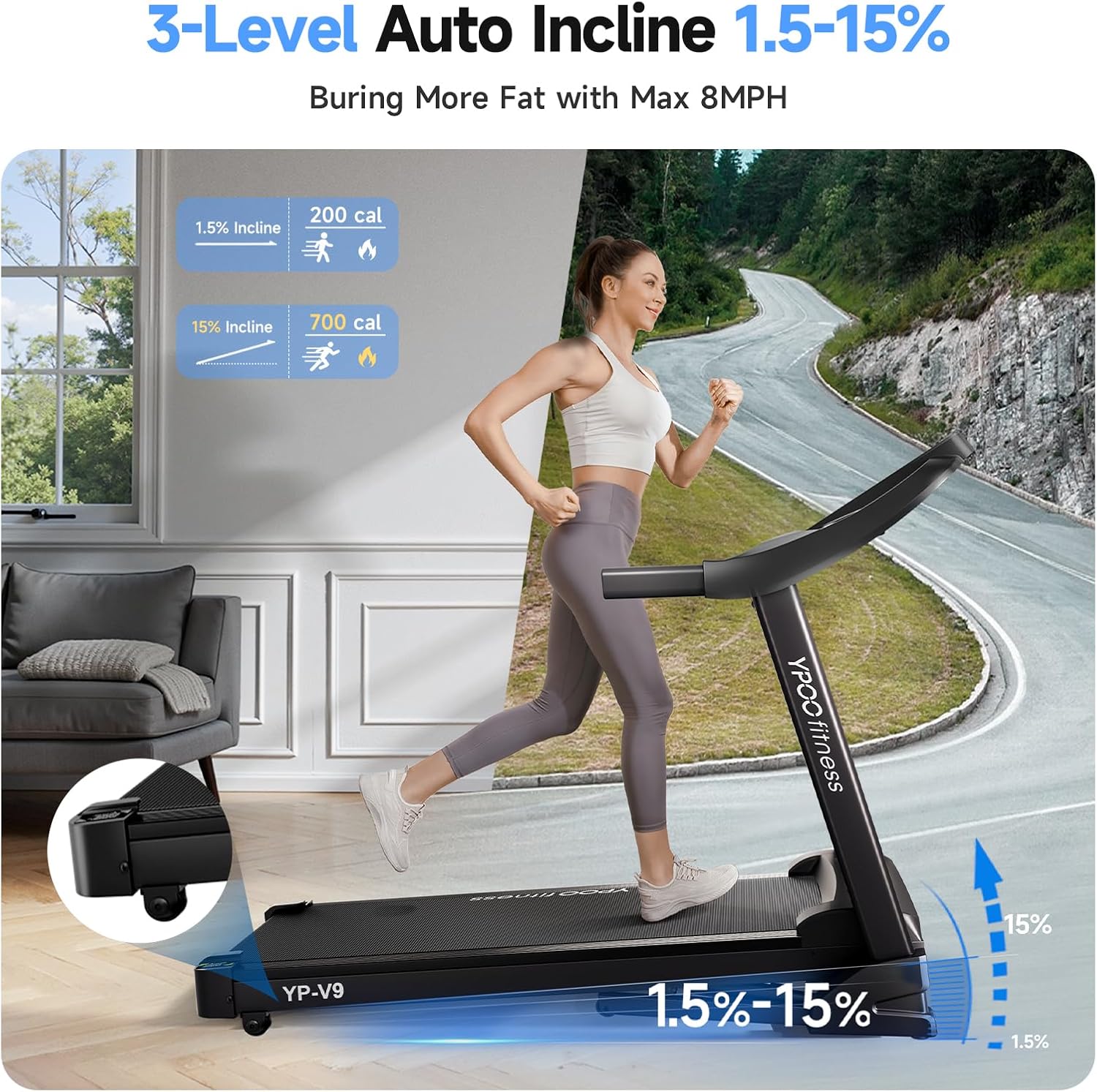
Image: Illustration of the 3-level auto incline feature.
Warranty and Support
Your YPOO Treadmill comes with a manufacturer's warranty and dedicated customer support.
- Warranty: The product includes a 1-year warranty from the date of purchase. Please retain your proof of purchase for warranty claims.
- Customer Support: For any questions, technical assistance, or warranty claims, please contact YPOO customer support. Refer to the contact information provided in your original product packaging or visit the official YPOO store on Amazon for support details.
- Returns: The product is eligible for 30-day easy returns.
For additional resources and product information, you may visit the YPOO Store on Amazon.
Related documentsYPOO Treadmills for Home with Incline, Auto Foldable Running Treadmills, 8.0 MPH Walking Pad Treadmill with Bluetooth, 3


Ask a question about this manual
Ask about setup, troubleshooting, compatibility, parts, safety, or missing instructions. Manuals+ will review the question and use this page’s manual context to help answer it.