
Important Safeguards
Please read all instructions before operating the Sage The Luxe Brewer Thermal coffee maker and save them for future reference. Failure to follow these instructions may result in injury or damage to the appliance.
- Ensure the appliance is properly grounded.
- Do not immerse the power cord, plug, or appliance in water or any other liquid.
- Always unplug the appliance from the power outlet before cleaning or when not in use.
- Keep the appliance and its cord out of reach of children.
- Do not operate the appliance with a damaged cord or plug.
- Use only cold water in the water tank.
- Do not open the filter basket during the brewing cycle.
Components
Familiarize yourself with the parts of your Sage The Luxe Brewer Thermal coffee maker.

Figure 1: Front view of the Sage The Luxe Brewer Thermal coffee maker, showing the clear water tank on the left, the control panel below it, and the thermal carafe and brew basket on the right.
- Water Tank (removable)
- Lid for Water Tank
- Brew Basket (cone filter compatible)
- Thermal Carafe with Lid
- LCD Display
- Control Dial / Start Button
- Function Buttons (e.g., Brew, Cold Brew, Custom)
Setup
1. Unpacking and Initial Cleaning
- Remove all packaging materials and promotional labels from your coffee maker.
- Wash the thermal carafe, carafe lid, brew basket, and water tank in warm, soapy water. Rinse thoroughly and dry all parts.
- Wipe the exterior of the appliance with a soft, damp cloth.
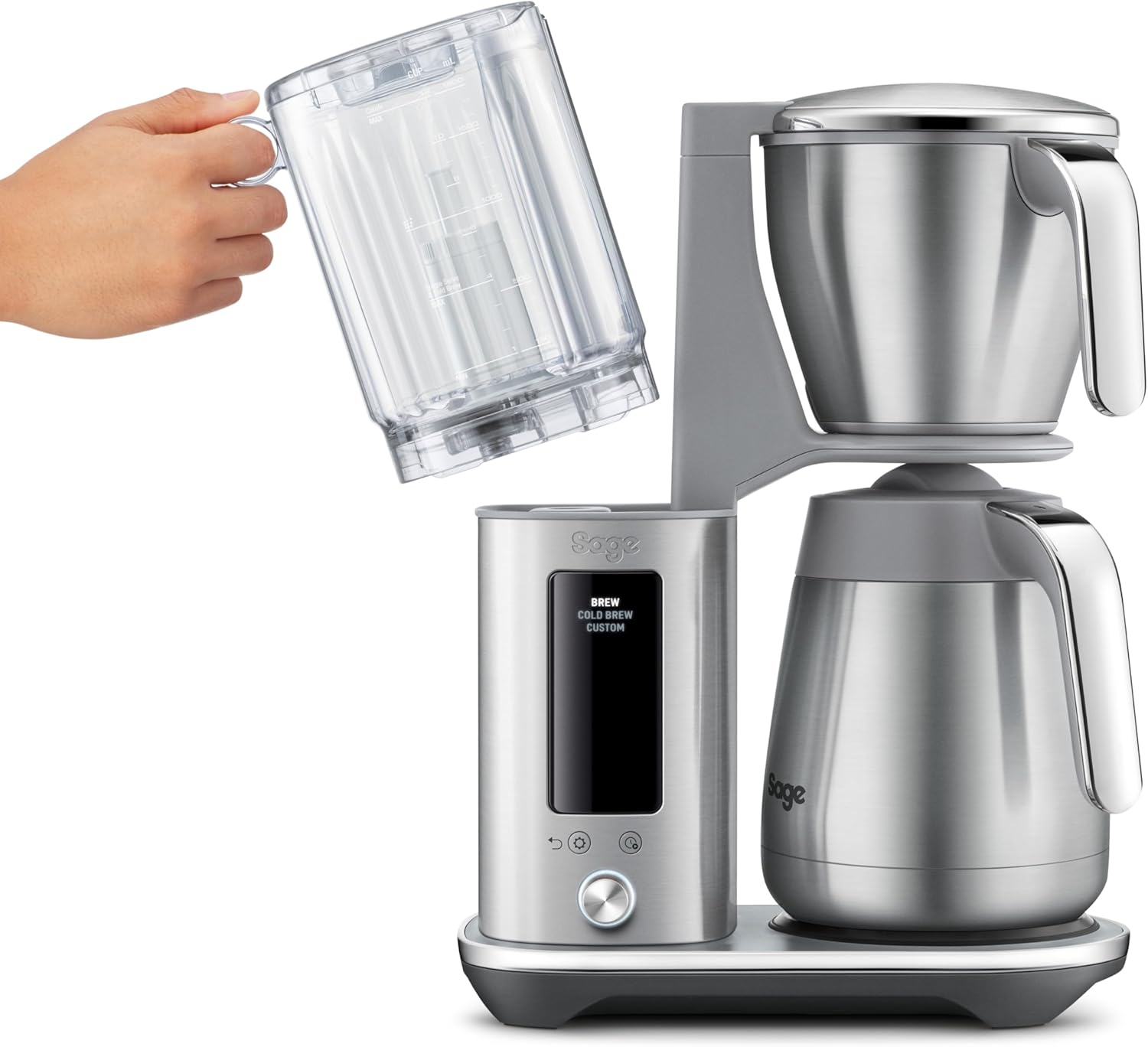
Figure 2: A hand demonstrating the removal of the water tank for cleaning or refilling.
2. First Use Cycle
Before brewing coffee for the first time, it is recommended to run a water-only cycle to prime the system and remove any manufacturing residues.
- Fill the water tank with fresh, cold water to the MAX line.
- Place an empty filter paper in the brew basket.
- Ensure the thermal carafe with its lid is correctly positioned on the heating plate.
- Select the "Brew" function and start the cycle. Allow the full cycle to complete.
- Discard the water from the carafe. Your coffee maker is now ready for use.
Operating Instructions
1. Brewing Standard Coffee (Gold Cup Standard)
The Gold Cup setting is designed to brew coffee according to SCA (Specialty Coffee Association) standards for optimal flavor extraction.
- Fill the water tank with fresh, cold water to your desired level.
- Place a #4 cone filter paper into the brew basket.
- Add your preferred amount of medium-ground coffee to the filter. A general guideline is 60 grams of coffee per liter of water.
- Ensure the thermal carafe with its lid is correctly placed under the brew basket.
- Select the "Brew" option on the control panel. The display will show the selected brew type.
- Press the Start button (usually the center of the dial) to begin brewing. The display will show the brewing progress.

Figure 3: The coffee maker in operation, displaying the elapsed time since brewing began on the LCD screen.
2. Cold Brew Function
The Cold Brew function allows for a concentrated cold brew in approximately 30 minutes.
- Fill the water tank with fresh, cold water to the desired level for cold brew.
- Place a #4 cone filter paper into the brew basket.
- Add coarse-ground coffee suitable for cold brew to the filter.
- Ensure the thermal carafe with its lid is correctly placed.
- Select the "Cold Brew" option on the control panel.
- Press the Start button to begin the cold brew cycle.
- Once complete, the concentrated cold brew can be diluted with water or milk and served over ice.
3. Customizing Brew Profiles
The coffee maker allows you to adjust various parameters to create your personalized coffee experience.
- Select the "Custom" option on the control panel.
- Use the control dial to navigate through settings such as:
- Bloom Time: Pre-wetting duration for coffee grounds.
- Brew Temperature: Water temperature during brewing.
- Flow Rate: Speed at which water is dispensed over the grounds.
- Keep Warm: Duration the thermal carafe keeps coffee warm.
- Rotate the dial to adjust the value for each setting, and press the dial to confirm.
- Once all settings are configured, press the Start button to begin brewing with your custom profile.

Figure 4: A user interacting with the control dial to customize brewing parameters on the LCD screen.
4. Programmable Delayed Start
Set your coffee maker to start brewing automatically at a later time, up to 24 hours in advance.
- Prepare the coffee maker with water and coffee grounds as you would for a regular brew.
- Press the "Delay Start" button (refer to your specific model's button layout if different).
- Use the control dial to set the desired start time.
- Confirm the time and the coffee maker will display a timer counting down to the programmed start.
Maintenance
1. Daily Cleaning
Regular cleaning ensures optimal performance and taste.
- After each use, discard used coffee grounds and filter paper.
- Wash the brew basket, carafe, and carafe lid in warm, soapy water. Rinse thoroughly.
- Wipe down the exterior of the coffee maker with a damp cloth.
- Do not use abrasive cleaners or scouring pads.
2. Descaling
Mineral deposits from water can build up over time, affecting performance. Descale your machine regularly, depending on water hardness and frequency of use.
- Empty the water tank and carafe.
- Prepare a descaling solution according to the manufacturer's instructions (e.g., white vinegar and water, or a commercial descaler).
- Pour the descaling solution into the water tank.
- Place the empty carafe with its lid under the brew basket.
- Run a full brew cycle with the descaling solution.
- After the cycle, discard the solution from the carafe.
- Rinse the water tank and carafe thoroughly.
- Run at least two full cycles with fresh, clean water to rinse out any remaining descaling solution.
3. Water Filter Replacement
If your model includes a water filter in the tank, replace it every 2-3 months or as indicated by the appliance.
- Remove the old water filter from its holder in the water tank.
- Soak the new water filter in cold water for 5 minutes.
- Insert the new filter into the filter holder, ensuring it is securely seated.
Troubleshooting
| Problem | Possible Cause | Solution |
|---|---|---|
| Coffee not brewing | No water in tank; appliance not plugged in; brew cycle not initiated. | Fill water tank; ensure power cord is securely plugged in; press Start button. |
| Coffee tastes weak | Insufficient coffee grounds; grounds too coarse; incorrect water-to-coffee ratio. | Increase coffee amount; use finer grind; adjust ratio (e.g., 60g/L). |
| Coffee overflows from filter basket | Too much coffee grounds; grounds too fine; filter basket clogged. | Reduce coffee amount; use coarser grind; clean filter basket thoroughly. |
| Appliance not turning on | No power; power outlet malfunction. | Check power connection; try a different outlet; contact customer support if issue persists. |
Specifications
- Model Number: SDC465BSS4EEU1
- Brand: Sage
- Capacity: 1.77 Liters
- Dimensions (L x W x H): 44 cm x 27.5 cm x 49.5 cm (17.32 in x 10.83 in x 19.49 in)
- Weight: 7.83 Kilograms (17.26 lbs)
- Material: Brushed Stainless Steel
- Special Features: One-button Gold Cup brewing, Rapid Cold Brew, Customizable brew profiles, Double-wall thermal carafe, Programmable delayed start.
- Coffee Filter Size: #4 Cone
- Power Source: Corded Electric
- Operating Mode: Fully Automatic

Figure 5: Diagram illustrating the dimensions of the coffee maker.
Warranty and Support
For warranty information and customer support, please refer to the warranty card included with your product or visit the official Sage Appliances website. Keep your proof of purchase for any warranty claims.
Manufacturer: Sage Appliances


