
1. Introduction
Thank you for choosing the DIGIQUEST Dual Inverter V5 Air Conditioner. This system is designed to provide efficient and comfortable climate control for two separate rooms using a single outdoor unit. This manual provides essential information for the safe and effective installation, operation, and maintenance of your air conditioning system. Please read it thoroughly before using the product and keep it for future reference.
Safety Information
WARNING: Installation must be performed by qualified personnel in accordance with local and national electrical and refrigeration safety standards. Improper installation can lead to electric shock, fire, or serious injury.
- Ensure the power supply matches the unit's specifications (220-240 V/50 Hz).
- Do not attempt to repair or modify the unit yourself. Contact qualified service personnel.
- Keep the area around the outdoor unit clear to ensure proper airflow.
- The refrigerant used is R32. Handle with care and ensure proper ventilation during installation and servicing.
2. Product Overview
The DIGIQUEST Dual Inverter V5 system consists of two indoor units (9000 BTU and 12000 BTU) and one outdoor unit, offering independent climate control for two distinct areas.

Image: Main components of the DIGIQUEST Dual Inverter V5 system, showing two indoor units, one outdoor unit, and two remote controls.
Key Features:
- Dual Indoor Units: Independent climate control for two rooms (9000 BTU and 12000 BTU).
- High Energy Efficiency: A++ for cooling, A+++ for heating (warm season).
- Integrated Wi-Fi: Control via smartphone app, compatible with Alexa and Google Home.
- I Feel Function: Remote control sensor detects ambient temperature for precise comfort.
- 3D Airflow: Adjustable vertical and horizontal louvers for optimal air distribution.
- Silent & Night Mode: Reduced noise levels for undisturbed sleep.
- Turbo Function: Rapid cooling or heating.
- 24-Hour Timer: Program automatic on/off times.
- Automatic Restart: Resumes operation after power failure.
- Independent Dehumidification: Removes excess moisture from the environment.
- Twin Rotary Inverter Compressor: Reduces vibrations and noise, optimizes efficiency.
3. Installation and Setup
The DIGIQUEST Dual Inverter V5 air conditioning system requires professional installation. This section provides general guidelines; refer to the detailed installation manual provided with the product for specific instructions.
Components Included:
- Two (2) Indoor Units (9000 BTU and 12000 BTU)
- One (1) Outdoor Unit (18000 BTU equivalent capacity)
- Two (2) Remote Controls
- User Manual
Installation Considerations:
- Location: Choose appropriate locations for indoor units to ensure optimal air distribution and for the outdoor unit to allow sufficient airflow and drainage.
- Piping: The maximum total piping length is 45 meters. The maximum length between the outdoor and any indoor unit is 25 meters. The maximum height difference between the outdoor and indoor units is 10 meters, and between indoor units is 5 meters.
- Electrical Connection: Connect to a 220-240V/50Hz power supply. Ensure proper grounding.
- Refrigerant: The system uses R32 refrigerant (1.10 kg charge). Ensure proper handling and leak testing during installation.

Image: Illustrative diagram demonstrating the dual setup of the air conditioner, with one outdoor unit serving two indoor units in different rooms (e.g., bedroom and living room).
4. Operating Instructions
Your DIGIQUEST Dual Inverter V5 air conditioner can be controlled via the included remote control or through the Smart Life smartphone application.
4.1 Remote Control Operation
Each indoor unit comes with its own remote control. Point the remote control directly at the indoor unit when operating.
- Power Button: Turns the unit ON or OFF.
- Mode Button: Cycles through operating modes: Auto, Cool, Heat, Dry (Dehumidification), Fan.
- Temperature Adjustment: Use the Up/Down arrows to set the desired temperature.
- Fan Speed: Adjusts fan speed (Auto, Low, Medium, High).
- Swing Button: Activates 3D airflow, allowing vertical and horizontal louver movement.
- Timer Button: Sets the 24-hour ON/OFF timer.
- I Feel Button: Activates the I Feel function, using the remote's sensor for temperature detection.
- Turbo Button: Engages rapid cooling or heating.
- Sleep/Night Mode: Reduces fan speed and noise for quiet operation during sleep.
4.2 Wi-Fi and Smart Life App Control
The integrated Wi-Fi allows you to control your air conditioner from anywhere using the Smart Life app on your smartphone.
- Download the App: Search for "Smart Life" on the App Store (iOS) or Google Play Store (Android).
- Register/Log In: Create an account or log in to your existing Smart Life account.
- Add Device: Follow the in-app instructions to add your DIGIQUEST air conditioner. Ensure your phone is connected to a 2.4GHz Wi-Fi network during setup.
- Control: Once connected, you can adjust modes, temperature, fan speed, set timers, and monitor the unit's status remotely.
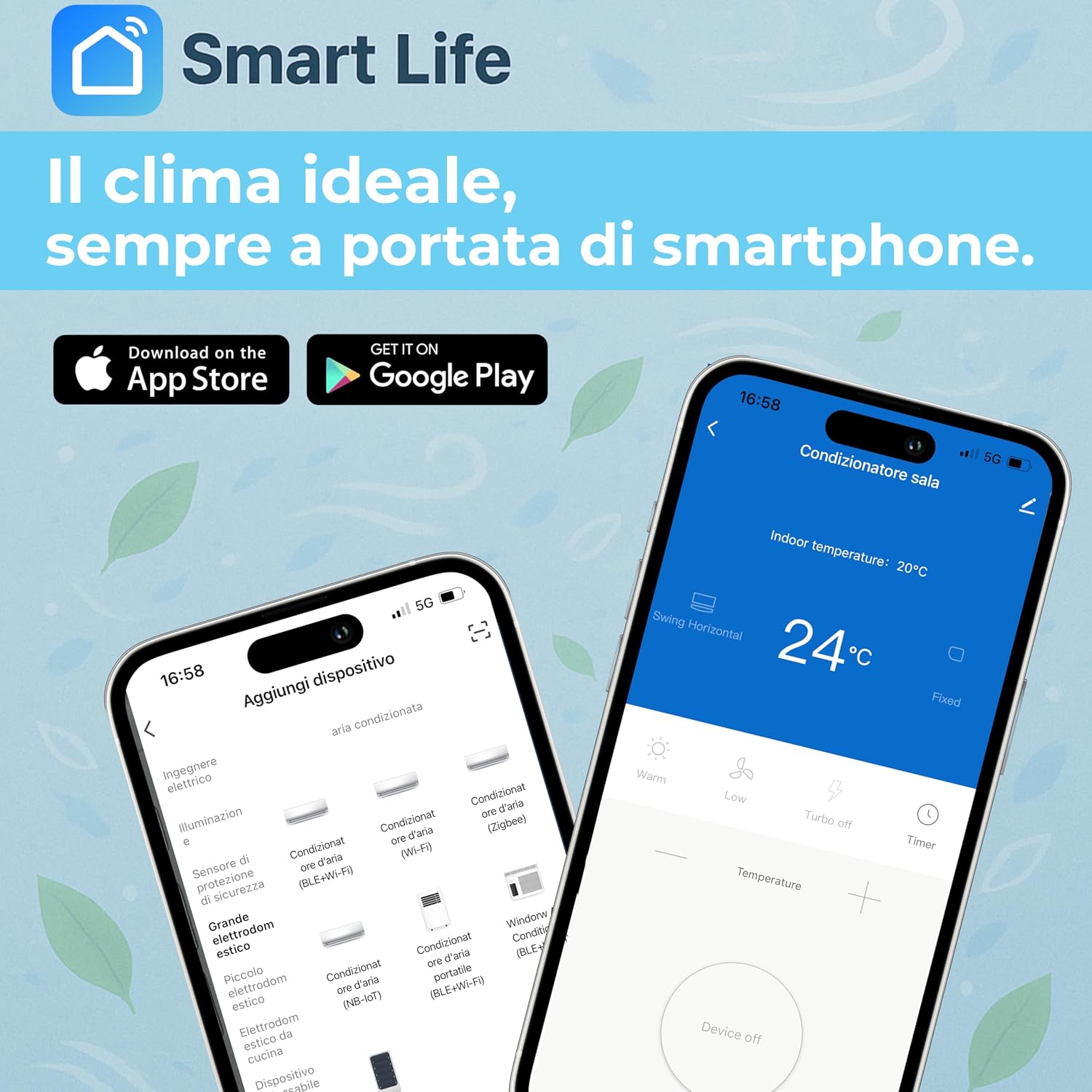
Image: Screenshots of the Smart Life application, illustrating the process of adding a new device and the main control interface for the air conditioner.
4.3 Smart Home Integration (Alexa & Google Home)
The system is compatible with Amazon Alexa and Google Home for voice control.
- Link Accounts: In your Alexa or Google Home app, enable the "Smart Life" skill/service and link your Smart Life account.
- Discover Devices: Ask Alexa or Google Assistant to discover new devices.
- Voice Commands: You can now use voice commands to control your air conditioner, such as "Alexa, set living room AC to 22 degrees" or "Hey Google, turn on bedroom AC."
5. Maintenance
Regular maintenance ensures optimal performance and extends the lifespan of your air conditioner. Always disconnect power before performing any maintenance.
5.1 Indoor Unit Maintenance
- Air Filter Cleaning: Clean the air filters every two weeks or more frequently if used heavily. Open the front panel, remove the filters, wash them with lukewarm water and mild detergent, rinse thoroughly, and dry completely before reinstalling.
- Exterior Cleaning: Wipe the indoor unit's exterior with a soft, damp cloth. Do not use harsh chemicals or abrasive cleaners.
5.2 Outdoor Unit Maintenance
- Coil Cleaning: Periodically check the outdoor unit's coils for dirt and debris. Clean gently with a brush or vacuum cleaner.
- Clear Obstructions: Ensure no leaves, dirt, or other obstructions block the airflow around the outdoor unit.
- Professional Check: It is recommended to have a qualified technician perform an annual check-up, including refrigerant levels and overall system performance.
6. Troubleshooting
Before contacting customer support, please refer to the following common issues and solutions.
| Problem | Possible Cause | Solution |
|---|---|---|
| Unit does not turn on | No power supply; Remote control batteries low; Power outage. | Check circuit breaker; Replace remote control batteries; Unit will auto-restart after power restoration. |
| Insufficient cooling/heating | Dirty air filters; Blocked outdoor unit; Incorrect temperature setting; Doors/windows open. | Clean air filters; Clear obstructions from outdoor unit; Adjust temperature; Close doors and windows. |
| Unusual noise | Loose parts; Obstruction in fan; Unit not level. | Contact qualified service personnel. |
| Water leakage from indoor unit | Blocked drain pipe; Improper installation. | Check and clear drain pipe; Contact qualified service personnel for inspection. |
| Wi-Fi connection issues | Incorrect Wi-Fi password; Router too far; 5GHz network used. | Verify password; Move router closer or use a Wi-Fi extender; Ensure connection to a 2.4GHz network. |
For issues not listed here or if problems persist, please contact DIGIQUEST customer support.
7. Technical Specifications
Below are the key technical specifications for the DIGIQUEST Dual Inverter V5 Air Conditioner (Model CLIMA00066).

Image: Energy efficiency label for the DIGIQUEST Dual Inverter V5, detailing cooling and heating performance, SEER (6.2), SCOP (5.1), and sound power levels (indoor 51 dB, outdoor 65 dB).
| Feature | Specification |
|---|---|
| Model Number | CLIMA00066 |
| Type | Dual Split Air Conditioner (Air/Air) |
| Indoor Unit Capacity 1 | 9000 BTU |
| Indoor Unit Capacity 2 | 12000 BTU |
| Total Cooling Capacity | 18000 BTU |
| Power Supply | 220-240 V / 50 Hz |
| Refrigerant | R32 (GWP: 675, Charge: 1.10 kg) |
| Cooling Energy Efficiency Class | A++ |
| Heating Energy Efficiency Class | A+ (Average Season), A+++ (Warm Season) |
| SEER (Cooling) | 6.2 |
| SCOP (Heating) | 4.0 (Average Season), 5.1 (Warm Season) |
| Nominal Cooling Power Consumption | 1638 W |
| Nominal Heating Power Consumption | 1420 W |
| Annual Energy Consumption (Cooling) | 290 kWh/year |
| Annual Energy Consumption (Heating) | 1540 kWh/year (Average Season), 1289 kWh/year (Warm Season) |
| Indoor Unit Noise Level (9000 BTU) | 32dB ~ 51dB |
| Indoor Unit Noise Level (12000 BTU) | 33dB ~ 53dB |
| Outdoor Unit Noise Level | 65dB |
| Operating Temperature Range (Outdoor Cooling) | 16°C ~ 52°C |
| Operating Temperature Range (Outdoor Heating) | -15°C ~ 24°C |
| Indoor Unit Dimensions (9000 BTU, L x W x H) | 700 x 198 x 270 mm |
| Indoor Unit Dimensions (12000 BTU, L x W x H) | 805 x 197 x 270 mm |
| Item Weight (approx.) | 37.6 Kilograms |
8. Warranty and Support
8.1 Warranty Information
The DIGIQUEST Dual Inverter V5 Air Conditioner comes with a Limited Warranty. Please refer to the warranty card included with your product for specific terms, conditions, and duration. Keep your proof of purchase for warranty claims.
8.2 Customer Support
DIGIQUEST offers specialized customer support throughout Italy. For technical assistance, troubleshooting, or warranty claims, please contact our support team.
- Website: Visit the official DIGIQUEST website for contact details and FAQs.
- Social Media: Connect with DIGIQUEST on social media platforms for updates and support.
- Seller Support: For purchase-related inquiries, you may also contact the seller, DSspa, through your Amazon order history.
