
1. Introduction
Thank you for purchasing the SOONBOX S9 Bluetooth Speaker. This high-fidelity portable speaker combines powerful audio with dynamic RGB lighting to enhance your listening experience. This manual provides essential information for setting up, operating, maintaining, and troubleshooting your device. Please read it carefully before use and retain it for future reference.
2. Product Overview
The SOONBOX S9 is designed for portability and robust sound. It features a compact design with a convenient carry handle, making it suitable for various environments. The speaker includes a hexagonal grille, integrated RGB lighting, and a user-friendly control interface.
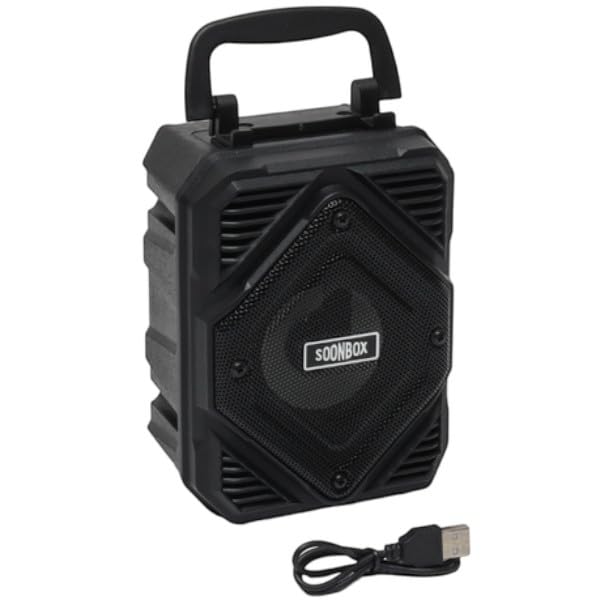
Figure 1: Front view of the SOONBOX S9 Bluetooth Speaker, showcasing its hexagonal speaker grille and active RGB lighting.
2.1 Controls and Ports
The speaker features an intuitive control panel and various connectivity ports. While specific button labels may vary, common functions include:
- Power Button: To turn the speaker on or off.
- Mode Button: To switch between Bluetooth, AUX, USB, and TF card modes.
- Volume Controls: Buttons for increasing or decreasing audio volume.
- Play/Pause Button: To control audio playback.
- RGB Light Button: To cycle through or turn off RGB lighting effects.
- USB Port: For USB drive playback.
- TF Card Slot: For TF (MicroSD) card playback.
- AUX Input: For wired audio connection.
- Charging Port: For connecting the charging cable.
3. Setup
3.1 Charging the Speaker
Before first use, fully charge the speaker. Connect the provided charging cable to the speaker's charging port and a compatible USB power adapter (not included). The charging indicator light will typically show red during charging and turn off or change color when fully charged. A full charge takes approximately 3 hours.
3.2 Powering On/Off
- To Power On: Press and hold the Power button for a few seconds until you hear an audible prompt or see the RGB lights activate.
- To Power Off: Press and hold the Power button again for a few seconds until the speaker powers down.
3.3 Bluetooth Pairing
To connect your SOONBOX S9 speaker to a Bluetooth-enabled device:
- Ensure the speaker is powered on and in Bluetooth mode. If not, press the Mode button until you hear a Bluetooth pairing prompt. The RGB lights may flash to indicate pairing mode.
- On your mobile device (smartphone, tablet, computer), enable Bluetooth and search for available devices.
- Select "SOONBOX S9" from the list of found devices.
- Once paired, the speaker will provide an audible confirmation, and the RGB lights may change to a steady pattern.
3.4 Other Connectivity Options
- AUX Input: Connect an audio device using a 3.5mm AUX cable (not included) to the speaker's AUX port. Press the Mode button to switch to AUX mode.
- USB Playback: Insert a USB flash drive containing MP3 audio files into the USB port. The speaker will automatically switch to USB mode and begin playback.
- TF Card Playback: Insert a TF (MicroSD) card containing MP3 audio files into the TF card slot. The speaker will automatically switch to TF card mode and begin playback.
4. Operating Instructions
4.1 Audio Playback
- Play/Pause: Press the Play/Pause button to start or pause music playback.
- Volume Adjustment: Use the Volume Up (+) and Volume Down (-) buttons to adjust the speaker's output volume.
- Track Navigation: Use the Next Track and Previous Track buttons (often integrated with volume controls) to skip songs.
4.2 RGB Lighting Control
Press the dedicated RGB Light button to cycle through different lighting modes or to turn the lights off. The lighting effects synchronize with your music for a dynamic visual experience.
4.3 Hands-Free Calling
When connected via Bluetooth to a smartphone, the SOONBOX S9 can be used for hands-free calling:
- Answer Call: Press the Play/Pause button once to answer an incoming call.
- End Call: Press the Play/Pause button once during a call to end it.
- Reject Call: Press and hold the Play/Pause button to reject an incoming call.

Figure 2: The SOONBOX S9 speaker positioned on a wooden table, demonstrating its compact and portable design suitable for various indoor settings.
5. Maintenance
5.1 Cleaning
Wipe the speaker's exterior with a soft, dry, lint-free cloth. Do not use abrasive cleaners, alcohol, benzene, or other chemical solvents, as these may damage the surface or internal components. Avoid getting moisture into any openings.
5.2 Storage
Store the speaker in a cool, dry place away from direct sunlight, extreme temperatures, and high humidity. If storing for an extended period, ensure the battery is partially charged (around 50%) to prolong its lifespan.
5.3 Battery Care
To maximize battery life, avoid fully discharging the speaker frequently. Recharge the battery when the low battery indicator or prompt is given. Do not expose the battery to excessive heat or attempt to replace it yourself.
6. Troubleshooting
If you encounter issues with your SOONBOX S9 speaker, refer to the following table for common problems and solutions:
| Problem | Solution |
|---|---|
| Speaker does not power on. | Ensure the battery is charged. Connect the speaker to a power source and try again. |
| No sound from the speaker. | Check the volume level on both the speaker and the connected device. Ensure the correct input mode (Bluetooth, AUX, USB, TF) is selected. |
| Bluetooth pairing fails. | Ensure the speaker is in pairing mode. Turn off and on Bluetooth on your device. Move the speaker closer to your device (within 10 meters). Forget "SOONBOX S9" from your device's Bluetooth list and try pairing again. |
| RGB lights are not working. | Press the RGB Light button to cycle through modes or turn them on. Ensure the speaker is powered on. |
| Poor audio quality. | Ensure the speaker is within Bluetooth range. Check for interference from other wireless devices. Try a different audio source or file. |
7. Specifications
Key technical specifications for the SOONBOX S9 Bluetooth Speaker:
| Feature | Value |
|---|---|
| Model Name | S9 |
| Brand | Generic |
| Speaker Maximum Output Power | 3 Watts |
| Frequency Response | 20 Hz |
| Connectivity Technology | Bluetooth |
| Audio Output Mode | Stereo |
| Material | Plastic |
| Bluetooth Range | 10 Meters |
| Power Source | Battery Powered |
| Battery Charge Time | 3 Hours |
| Item Dimensions (D x W x H) | 6.5D x 12W x 8.5H centimetres |
| Item Weight | 350 Grams |
| Control Method | Push Button |
| Number of Microphones | 1 |
| Water Resistance Level | Not Water Resistant |
8. Warranty Information
The SOONBOX S9 Bluetooth Speaker comes with a 6-month limited manufacturer warranty. This warranty covers defects in materials and workmanship under normal use. It does not cover damage caused by misuse, accidents, unauthorized modifications, or normal wear and tear. Please retain your proof of purchase for warranty claims.
9. Support
For further assistance, technical support, or warranty inquiries, please contact the retailer where you purchased the SOONBOX S9 speaker. You may also refer to the manufacturer's website for additional resources, if available.


