
VEEAPE AP2
VEEAPE Tiny Pump Mini Bike Tire Pump - AP2
Portable Electric Bicycle Pump & Multi-Purpose Inflator
Product Overview
The VEEAPE Tiny Pump AP2 is a compact, portable electric air pump designed for various inflation needs, including bicycle tires, small motorcycle tires, and sports balls. It features a built-in rechargeable lithium battery, a digital display for precise pressure readings, and an automatic shut-off function for safe and accurate inflation. This versatile device also includes an LED light for emergency illumination and can function as a power bank for charging mobile devices.
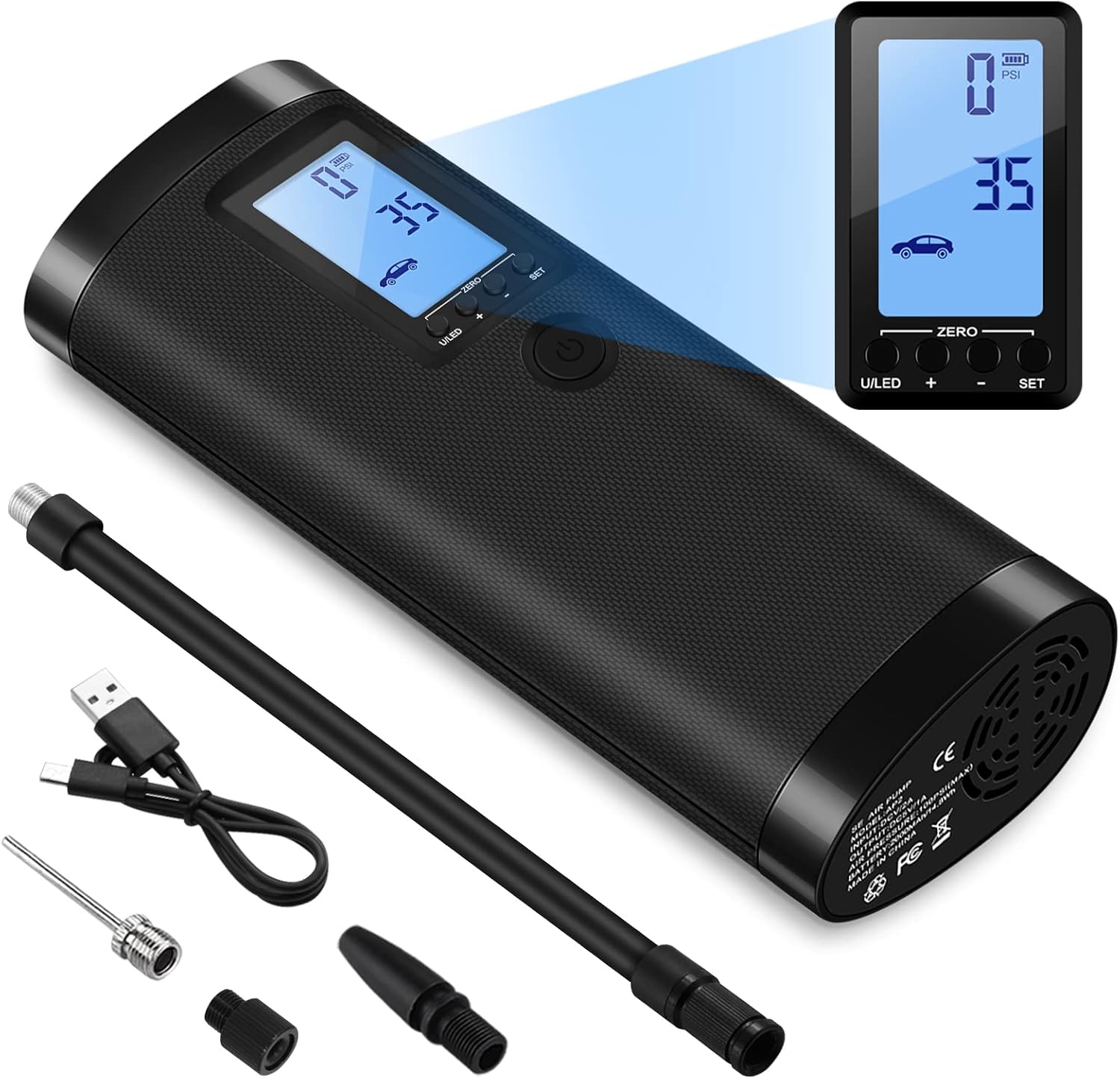
Figure 1: VEEAPE Tiny Pump AP2 and included accessories.
Safety Information
- This air pump is designed for bicycle tires, small motorcycle tires, small swimming rings, basketballs, footballs, and rugby balls.
- DO NOT use for big truck tires, large motorcycle tires, travel pillows, air mattresses, inflatable toys, or large pool inflatable devices (e.g., pool floats, boats).
- This product is a portable mini air pump for emergency use on small tires and is not a professional tire pump for car tires. Inflating car tires may be very slow and is generally not recommended.
- The air pump may contain only 30% to 60% charge upon first use. Fully charge the device before initial operation.
- The air pump operates with a noise level of approximately 80 dB. This is normal due to its operating principle.
- The hose connection area may become hot after inflation. This is normal due to pneumatic compression.
- Keep out of reach of children.
Setup
Initial Charging
Before first use, fully charge the VEEAPE Tiny Pump using the provided Type-C USB cable. The device has a built-in 2*2000mAh lithium battery. The digital display will indicate the charging status.

Figure 2: The device can be charged via USB and also functions as a power bank.
Attaching the Air Hose
Screw the flexible air hose onto the top of the inflator. Ensure it is snug but do not overtighten. Select the appropriate adapter for your item (Presta valve, Schrader valve, ball needle, etc.) and attach it to the end of the air hose.
Operating Instructions
- Power On: Long press the power button for 3 seconds. The display will light up and show the current settings.
- Select Mode: Short press the "SET" button to cycle through the 5 available inflation modes: Car, Motorcycle, Bicycle, Ball, and Custom.
- Switch Units: Short press the "U/LED" button to switch between air pressure units: PSI, BAR, KPA, and Kg/cm².
- Adjust Preset Pressure: Use the "+" and "-" buttons to adjust the desired target pressure. Long press these buttons for quick adjustment.
- Start Inflation: Short press the power button to begin inflation. The pump will automatically stop when the preset pressure is reached.
- Power Off: Long press the power button for 3 seconds to turn off the device.
Video 1: Official VEEAPE demonstration of the portable air compressor's features and operation.
Using the LED Light
The device has a built-in super bright LED light for emergency lighting. To activate, short press the "U/LED" button. Press again to cycle through light modes (e.g., steady, flashing) or turn off.
Modes and Pressure Settings
The VEEAPE Tiny Pump offers 5 preset modes with adjustable pressure ranges:
| Mode | Default PSI | Adjustable Range (PSI) |
|---|---|---|
| Car | 35 PSI (2.4 bar) | 0 - 65 PSI |
| Motorcycle | 40 PSI | 0 - 55 PSI |
| Bicycle | 38 PSI | 0 - 120 PSI |
| Custom | 120 PSI | 0 - 150 PSI |
| Ball | 8 PSI | 0 - 15 PSI |
Each mode has a set maximum safety PSI to prevent over-inflation and bursting.

Figure 3: The multi-purpose inflator can be used for various items.
Video 2: A quick demonstration of the VEEAPE Tiny Pump inflating a basketball.
Maintenance
Clearing Readings for Accuracy
To increase measurement accuracy, especially due to altitude differences, you can clear the device's readings. After turning on the device, if the measured pressure value is not 0, press the "U/LED" and "SET" buttons simultaneously for 3 seconds. The display will flash rapidly, indicating the clearing process. Important: Do not connect any items to be inflated when performing this clearing process.
Heat Dissipation
The VEEAPE Tiny Pump has a built-in fan to provide good heat dissipation, allowing it to work continuously without overheating. Ensure the ventilation ports are not obstructed during operation.

Figure 4: Internal fan for efficient heat dissipation.
Troubleshooting
| Problem | Possible Cause | Solution |
|---|---|---|
| Device does not power on. | Low battery. | Fully charge the device. |
| Inaccurate pressure reading (not 0 when idle). | Altitude differences or sensor calibration needed. | Perform reading clearing (press U/LED and SET for 3 seconds). |
| Device is very noisy during operation. | Normal operating characteristic. | This is normal for air pumps. Noise reduction is optimized to 80 dB. |
| Hose connection gets hot. | Normal during pneumatic compression. | Allow to cool down if excessively hot. Ensure proper ventilation. |
| Does not inflate large tires (trucks, large motorcycles). | Product is not designed for large volume/high pressure items. | Use only for recommended items (bicycles, small motorcycles, balls). |
Specifications
| Feature | Detail |
|---|---|
| Model | AP2 |
| Brand | VEEAPE |
| Max Pressure | 150 PSI |
| Battery Capacity | 2*2000mAh Lithium Battery |
| Charging Port | Type-C USB |
| Output Port | USB (for power bank function) |
| Noise Level | 80 dB |
| Dimensions (L x W x H) | 6.0" x 2.4" x 1.49" (approx.) |
| Item Weight | 0.46 Kilograms (approx. 1 lb) |
| Air Flow Capacity | 20 Liters/Minute |
| Included Adapters | Presta valve, Schrader valve, Ball needle, Swimming ring nozzle |
Warranty and Support
VEEAPE provides a 1-year warranty for the Tiny Pump AP2. Our after-sales team is available to assist you with any inquiries or issues. Please refer to the contact information provided in your product packaging or visit the official VEEAPE store on Amazon for support.
For more information, visit the VEEAPE Store on Amazon.