
Introduction
The GKEAPZA 660W 8-Port GaN USB C Fast Charging Station is designed to provide efficient and simultaneous charging for multiple electronic devices. Featuring advanced GaN technology, it offers high power output across its 8 ports, including 6 USB-C Power Delivery (PD) ports and 2 USB-A Quick Charge (QC) ports. This manual provides essential information for the safe and effective use of your charging station.
Package Contents
- 1 x GKEAPZA 660W USB C Charging Station
- 1 x 1.5m Detachable AC Power Cord
- 1 x User Manual
Product Overview

Image Description: A close-up view of the GKEAPZA 660W charging station, highlighting its 8 charging ports. The image clearly labels the six USB-C ports (C1-C6) as 100W each and the two USB-A ports (A1-A2) as 30W each, indicating their respective power outputs.
The GKEAPZA 660W charging station features a compact design with a U-shaped base for stability. It includes:
- 6 x USB-C Ports (C1-C6): Each supporting up to 100W Power Delivery (PD/PPS) for fast charging laptops, tablets, and smartphones.
- 2 x USB-A Ports (A1-A2): Each supporting up to 30W Quick Charge (QC) for compatible devices.
- RGB Ambient Light: Located on the top, with a switch to change colors or turn off.
- Detachable AC Power Cord: A 1.5m cable for flexible placement.
Setup Instructions
- Unpack the Charging Station: Carefully remove the charging station and its accessories from the packaging.
- Connect the Power Cord: Insert the detachable 1.5m AC power cord into the power input port on the charging station.
- Plug into a Power Outlet: Connect the other end of the AC power cord to a standard wall power outlet (100-240V AC).
- Placement: Place the charging station on a stable, flat surface, ensuring adequate ventilation around the unit. The U-shaped base provides stability.

Image Description: A side-by-side comparison illustrating the benefit of the charging station. The 'before' image shows a cluttered desk with multiple individual chargers and tangled cables. The 'later' image displays a neat setup with the GKEAPZA charging station centrally located, charging a laptop, smartphone, and wireless earbuds with organized cables.
Operating Instructions
Charging Devices
- Connect Your Devices: Use appropriate charging cables to connect your devices to the available USB-C (C1-C6) or USB-A (A1-A2) ports.
- Intelligent Power Distribution: The charging station intelligently detects connected devices and distributes power optimally to ensure efficient charging for each device.
- Simultaneous Charging: You can charge up to 8 devices concurrently. The USB-C ports are ideal for power-hungry devices like laptops, while USB-A ports are suitable for smartphones and other accessories.
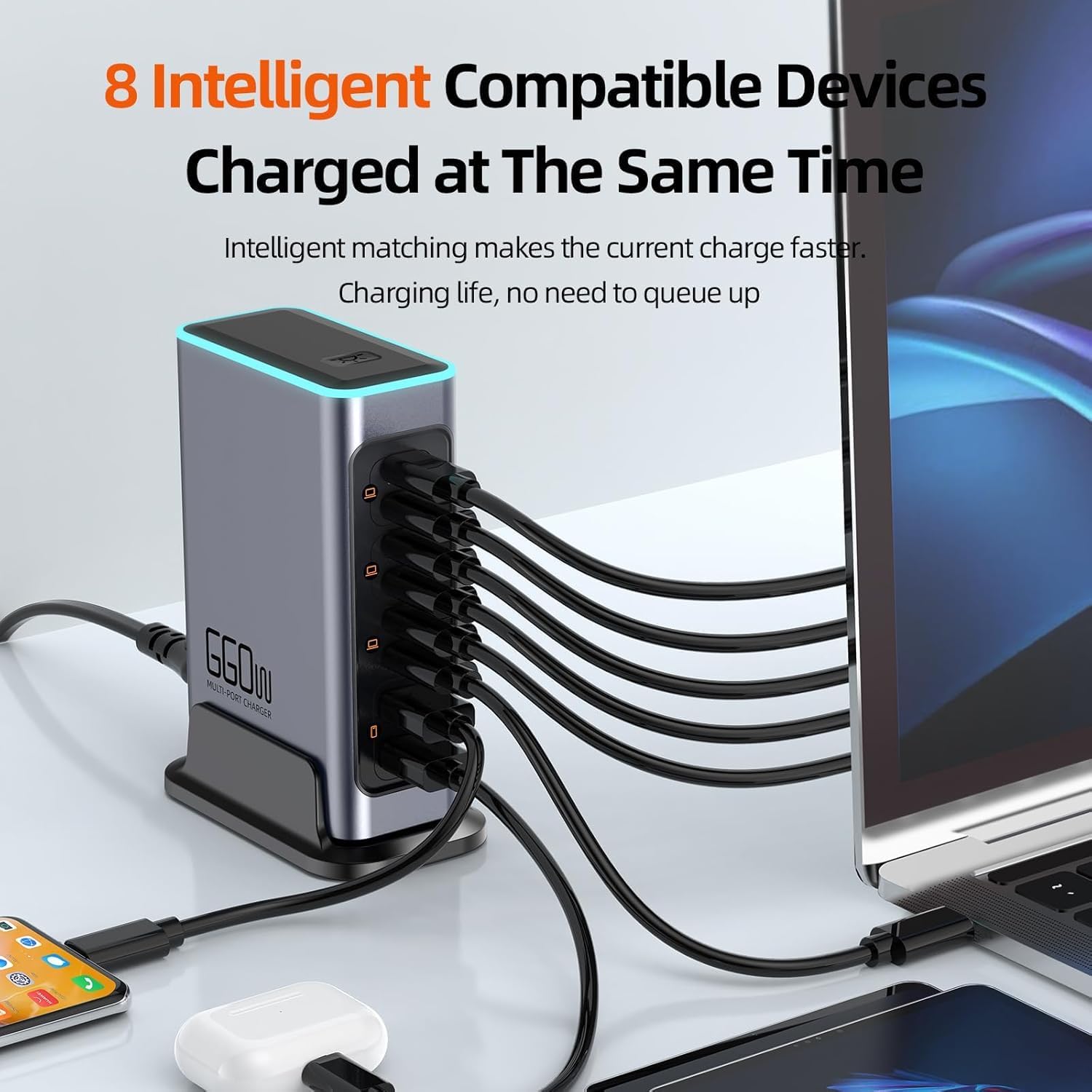
Image Description: The GKEAPZA 660W charging station actively charging multiple devices simultaneously. Cables extend from the station to a laptop, a smartphone, and wireless earbuds, demonstrating its multi-device charging capability.

Image Description: A GKEAPZA 660W charging station connected via a USB-C cable to a laptop, indicating 100W fast charging. A person is shown using the laptop, illustrating the station's ability to power high-demand devices.
RGB Ambient Light Control
- Change Color: Short press the ambient light switch located on the top of the unit to cycle through different light colors.
- Turn Off: Long press the ambient light switch to turn off the ambient light.

Image Description: A detailed view of the top section of the charging station, highlighting the ambient light button switch and the colorful atmosphere lamp feature. This image shows the textured fuselage and non-slip mat on the base.
Maintenance
- Cleaning: Disconnect the charging station from the power outlet before cleaning. Use a soft, dry cloth to wipe the surface. Do not use liquid cleaners or aerosols.
- Storage: When not in use for extended periods, store the charging station in a cool, dry place away from direct sunlight and moisture.
- Ventilation: Ensure the charging station has adequate ventilation during operation to prevent overheating. Do not cover the unit.
Troubleshooting
- Device not charging:
- Ensure the charging station is properly plugged into a live power outlet.
- Verify that the charging cable is securely connected to both the device and the charging station.
- Try a different port on the charging station.
- Test with a different charging cable to rule out cable issues.
- Ensure your device is compatible with the charging port (e.g., USB-C for PD, USB-A for QC).
- Slow charging:
- Confirm your device and cable support fast charging protocols (PD, QC).
- Ensure the charging station is not overloaded. While it intelligently distributes power, extremely high demand from multiple devices simultaneously might slightly reduce individual port speeds.
- Check if the cable is rated for the required power output (e.g., 100W for laptop charging).
- Charging station feels warm:
- It is normal for the charging station to generate some heat during operation, especially when charging multiple high-power devices.
- Ensure there is proper ventilation around the unit.
- If the unit becomes excessively hot or emits smoke/unusual odors, immediately disconnect it from the power outlet and contact customer support.
Specifications
| Model Number | WLX-F8L |
| Total Wattage | 660W |
| Input Voltage | 100-240V AC |
| USB-C Ports (C1-C6) | 6 x 100W PD/PPS (Max) |
| USB-A Ports (A1-A2) | 2 x 30W QC (Max) |
| Total USB Ports | 8 |
| Dimensions | 8.27 x 3.66 x 2.32 inches |
| Item Weight | 13.1 ounces |
| Special Feature | Travel-friendly, RGB Ambient Light |
| Safety Protections | Over-temperature, Over-current, Over-voltage, Over-charging, Over-heating, Short-circuit protection |
Warranty and Customer Support
GKEAPZA provides lifetime services for this 660W USB C Charging Station. If you encounter any issues or have questions regarding your product, please do not hesitate to contact our customer service team.
Our dedicated 24-hour friendly customer service is available to assist you. Please refer to the contact information provided with your product packaging or visit the official GKEAPZA website for support details.
Safety Information
- Do not expose the charging station to water or excessive moisture.
- Do not disassemble, modify, or attempt to repair the unit yourself. This will void the warranty and may cause damage or injury.
- Avoid extreme temperatures. Operate and store the device within recommended temperature ranges.
- Keep out of reach of children.
- Use only the provided power cord or a certified replacement.
- Disconnect the power cord during lightning storms or when unused for long periods.