
1. Introduction
This manual provides essential information for the safe and efficient use of your SHARP SIM-Free Tablet SH-T04C. Please read this manual thoroughly before using the device and keep it for future reference.
2. Product Overview
The SHARP SH-T04C is a 10.1-inch SIM-free tablet designed for versatile use. It features a durable build and a sleek design.
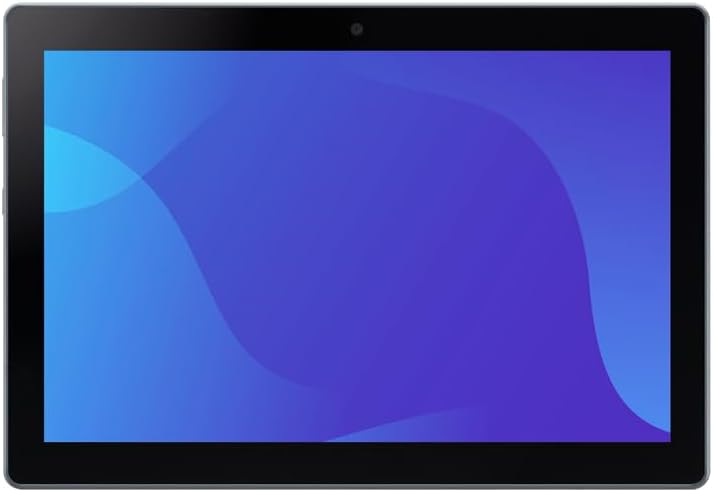
Figure 2.1: Front view of the SHARP SH-T04C tablet, showcasing its 10.1-inch display.

Figure 2.2: Multiple views of the SHARP SH-T04C tablet, illustrating its slim profile and button placement.
3. Setup
3.1 Initial Power On
- Press and hold the power button located on the side of the tablet until the SHARP logo appears.
- Follow the on-screen instructions to complete the initial setup, including language selection, Wi-Fi connection, and Google account setup.
3.2 Charging the Tablet
To charge the tablet, connect a compatible AC adapter (SH-AC05, sold separately) to the USB Type-C port on the device. A full charge takes approximately 160 minutes with the recommended adapter.
3.3 Inserting a SIM Card (eSIM)
This tablet supports eSIM functionality. Please refer to your mobile carrier's instructions for activating and setting up the eSIM. Physical SIM cards are not supported.
4. Operating Instructions
4.1 Basic Navigation
- Touch: Tap the screen to select items, open apps, or type.
- Swipe: Drag your finger across the screen to scroll or navigate between screens.
- Pinch-to-Zoom: Use two fingers to zoom in or out on images and web pages.
4.2 Security Features
The SH-T04C includes fingerprint authentication for secure access to your device and data.

Figure 4.1: The tablet features a fingerprint sensor for enhanced security.
5. Key Features
5.1 Large 10.1-inch Display
Enjoy an immersive viewing experience with the tablet's approximately 10.1-inch TFT WUXGA (1920x1200) display, ideal for documents, videos, and web browsing.

Figure 5.1: The large 10.1-inch screen makes it easy to view documents and videos, suitable for web conferences.
5.2 Durable Design: Waterproof and Dustproof
The SH-T04C is built to withstand various environments, featuring IPX5/8 waterproof and IP6X dustproof ratings. This ensures reliable performance even in challenging conditions.
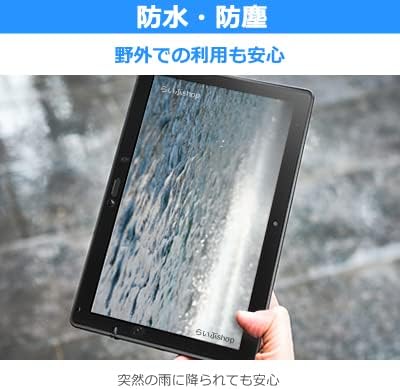
Figure 5.2: The tablet's waterproof design provides peace of mind even when exposed to sudden rain.
5.3 High-Speed 5G Connectivity
Experience fast and stable internet with 5G connectivity, optimized for tablet use. This allows for efficient data transfer and smooth online experiences.

Figure 5.3: The tablet's stable 5G antenna performance, leveraging its size, expands the communication area by approximately 10% compared to smartphones.
5.4 Long-Lasting Battery
Equipped with a 6,680mAh battery, the tablet offers extended usage. Intelligent charging helps maintain battery health over time.

Figure 5.4: The large 6,680mAh battery and intelligent charging support ensure long-term performance with reduced battery degradation.
5.5 Noise Canceling Function
The tablet features a 2-microphone noise canceling function, reducing ambient noise during calls for clearer communication.

Figure 5.5: The 2-microphone noise canceling function reduces surrounding noise during calls, ensuring clear audio.
6. Maintenance
6.1 Cleaning the Tablet
The SH-T04C can be cleaned using alcohol disinfectant sheets. This allows for maintaining hygiene, especially in environments where cleanliness is crucial. For detailed cleaning instructions, please refer to the official product website or contact customer support.
7. Troubleshooting
If you encounter any issues with your SHARP SH-T04C tablet, please refer to the following general troubleshooting steps:
- Restart the device: A simple restart can often resolve minor software glitches.
- Check connections: Ensure all cables and accessories are properly connected.
- Update software: Make sure your tablet's operating system and applications are up to date.
- Factory reset: As a last resort, you may perform a factory reset. Back up all important data before proceeding, as this will erase all data on the device.
For more specific issues or persistent problems, please contact SHARP customer support or an authorized service center.
8. Specifications
| Feature | Description |
|---|---|
| Model Name | SH-T04C |
| Operating System | Android 14 |
| Dimensions (H×W×D) | Approx. 170mm × 246mm × 8.3mm (excluding protrusions) |
| Weight | Approx. 481g |
| SIM Type | eSIM |
| CPU | Snapdragon 695 5G Mobile Platform 2.2GHz + 1.8GHz Octa-core |
| Internal Memory | RAM 4GB / ROM 64GB |
| Display | Approx. 10.1-inch / TFT WUXGA 1,920×1,200 |
| Rear Camera | Approx. 8 million effective pixels CMOS |
| Front Camera | Approx. 8 million effective pixels CMOS |
| Wi-Fi | IEEE802.11a/b/g/n/ac |
| Bluetooth | Ver.5.1 |
| Battery Capacity | 6,680mAh (built-in battery) |
| Waterproof / Dustproof | IPX5・8 (bath waterproof compatible) / IP6X |
| Biometric Authentication | Fingerprint authentication |
| Communication Functions | 5G・LTE・Wi-Fi |
| Tethering | Bluetooth (4 devices), USB (1 device) |
| Charging Time | Approx. 160 minutes (using SH-AC05 [sold separately]) |
9. Accessories
The following accessory is available for the SHARP SH-T04C:
- AC Adapter SH-AC05: Sold separately, this adapter is recommended for optimal charging performance.
10. Warranty and Support
For warranty information and customer support, please refer to the documentation provided with your purchase or contact your authorized SHARP dealer. Ensure you retain your proof of purchase for warranty claims.