1. Introduction
The Augnner 6-in-1 Wireless Charging Station is a versatile device designed to simplify your charging experience. It integrates wireless charging capabilities for multiple devices, a digital alarm clock, and an adjustable night light into a single unit. This manual provides detailed instructions for setup, operation, and maintenance of your charging station.
2. Package Contents
Please verify that all items are present in your package:
- 1 x Augnner 6-in-1 Wireless Charging Station
- 1 x Type-C Power Cable
- 1 x Power Adapter
- 1 x User Manual
3. Product Overview
Familiarize yourself with the components of your Augnner 6-in-1 Wireless Charging Station:

Figure 3.1: Front view of the Augnner 6-in-1 Wireless Charging Station, showing dedicated areas for smartphone, smartwatch, and earbuds, alongside the digital clock and night light.
- Smartphone Charging Pad: Designated area for wireless charging of compatible smartphones.
- Smartwatch Charging Stand: Integrated stand for charging compatible smartwatches.
- Earbuds Charging Area: Flat surface for wireless charging of compatible earbud cases.
- Digital Clock Display: Shows current time and alarm status.
- Night Light: Adjustable light source with multiple brightness and color temperature settings.
- Control Buttons: Buttons for setting time, alarm, and controlling the night light.
- USB-C Input Port: For connecting the power cable.
4. Setup Instructions
- Unpack the Device: Carefully remove all components from the packaging.
- Connect Power: Insert the Type-C power cable into the USB-C input port on the back of the charging station. Connect the other end of the cable to the provided power adapter, then plug the adapter into a wall outlet.
- Placement: Place the charging station on a stable, flat surface, such as a bedside table or desk. Ensure there is adequate ventilation around the device.
5. Operating Instructions
5.1. Wireless Charging
The charging station supports wireless charging for compatible smartphones, smartwatches, and earbuds.
- Smartphone Charging: Place your compatible smartphone directly onto the designated charging pad. The device supports both horizontal and vertical charging orientations, allowing you to watch videos or make calls while charging. Ensure the phone is centered on the pad for optimal charging.
- Smartwatch Charging: Place your compatible smartwatch onto the smartwatch charging stand. Ensure it is correctly aligned and begins charging.
- Earbuds Charging: Place your compatible wireless earbud case onto the designated earbud charging area.
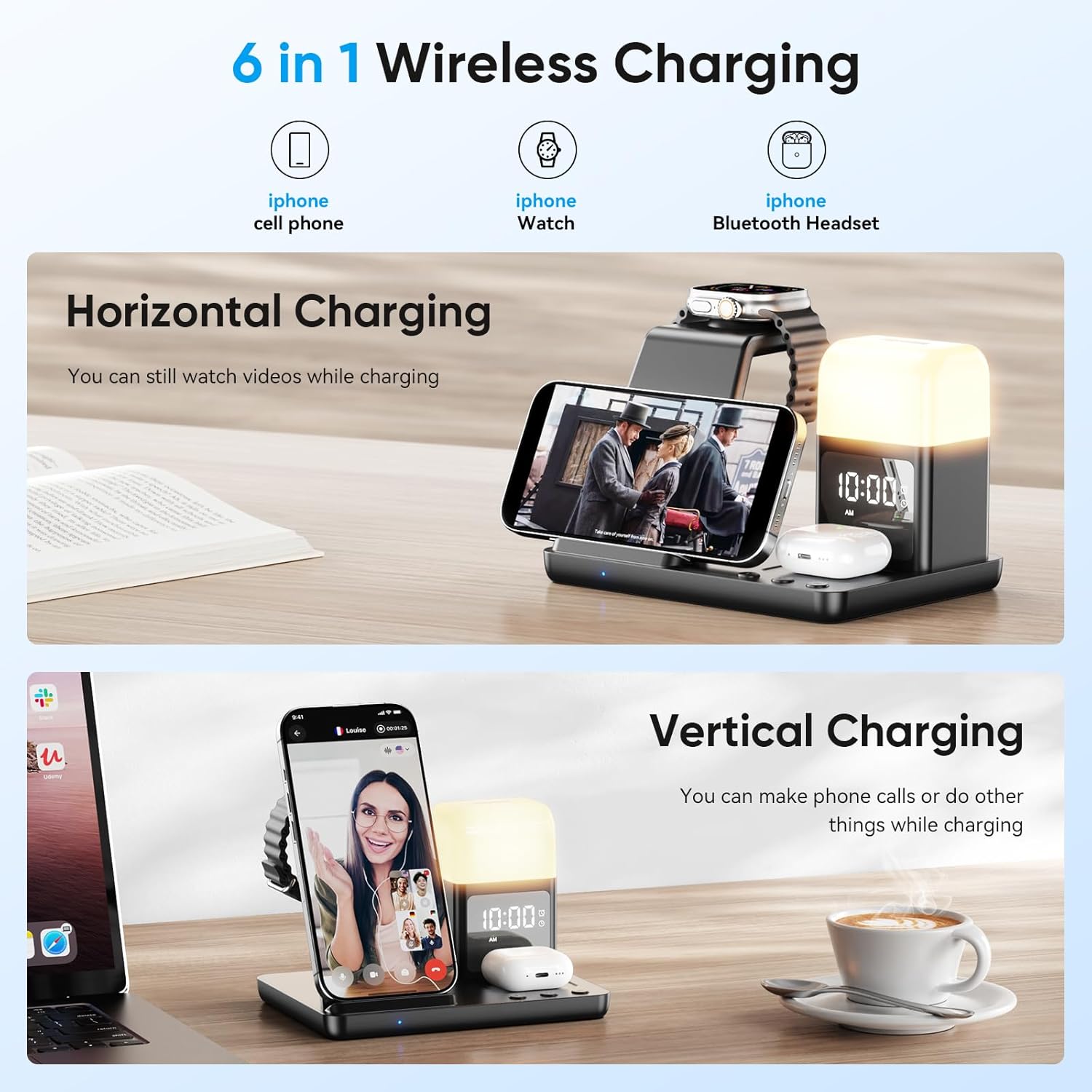
Figure 5.1: Illustration of a smartphone charging in both horizontal and vertical positions on the charging station.
Important Notes for Charging:
- For optimal charging, ensure your device is placed centrally on the charging pad.
- The charging station supports charging through most transparent phone cases.
- Avoid placing objects like phone grips, magnets, metal pads, or credit cards between your phone and the charging pad, as these can interfere with wireless charging or cause damage.
- AirPods Charging Case Compatibility:
Supported Wireless Charging Cases: A3059, A2968, A2700, A2566, A2190, A1938
Not Supported for Wireless Charging: A3058, A2897, A1602

Figure 5.2: Visual guide for phone case compatibility, indicating that transparent cases are supported while cases with grips, magnets, metal, or credit cards are not.
5.2. Digital Alarm Clock
The integrated digital clock features an alarm function.
- Setting the Time: Refer to the specific control buttons (usually marked 'M' for Mode or similar) and '+' / '-' buttons on the device to enter time setting mode. Adjust hours and minutes accordingly.
- Setting the Alarm: Follow similar steps to enter alarm setting mode. Set your desired alarm time.
- Alarm On/Off/Snooze: Use the designated button (often the 'M' button or a dedicated alarm button) to activate, deactivate, or snooze the alarm when it sounds.
5.3. Night Light
The night light offers adjustable brightness and color temperature.

Figure 5.3: A user interacting with the adjustable night light feature of the charging station.
- Activation: Touch the designated touch button (often indicated by a light icon) to turn the night light on or off.
- Brightness Adjustment: Repeatedly touch the control button to cycle through brightness levels (e.g., 30%, 60%, 100%) or to dim the light.
- Color Temperature: The night light can be adjusted to emit warm, natural, or cool light. This adjustment is typically done via the same touch control button or a separate mode button.
6. Compatibility
The Augnner 6-in-1 Wireless Charging Station is compatible with a wide range of devices:
- iPhones: iPhone 16/15/14/13/12/11 Series, iPhone XS/XR/X/8/8 Plus
- Samsung Galaxy Phones: Galaxy S23/S22/S21/S20/S10/S9/S8/S7, Z Flip/Fold Series, Note 10/9/8
- AirPods: AirPods 4/3/2/Pro/Pro 2 (refer to specific case models in Section 5.1 for wireless charging compatibility)
- iWatch: iWatch 10/9/8/7/6/5/4/3/2/1
7. Safety Information
Your Augnner charging station is equipped with advanced safety features to protect your devices:
- Intelligent Protection: Features precise temperature control, robust over-voltage protection, reliable short-circuit protection, and efficient over-current protection.
- Foreign Object Detection (FOD): Automatically detects and prevents charging when foreign metallic objects are placed on the charging pad.
- Heat Dissipation: Designed with heat dissipation holes on the rear to maintain optimal operating temperature.
To ensure safe operation, please observe the following:
- Do not disassemble or modify the device.
- Keep the device away from water, moisture, and high temperatures.
- Use only the provided power adapter and cable.
8. Maintenance
To maintain your charging station in optimal condition:
- Cleaning: Disconnect the power before cleaning. Wipe the surface with a soft, dry cloth. Do not use abrasive cleaners or solvents.
- Storage: When not in use for extended periods, store the device in a cool, dry place.
9. Troubleshooting
If you encounter issues with your charging station, please refer to the following common solutions:
| Problem | Possible Cause | Solution |
|---|---|---|
| Device not charging | Loose power connection Incorrect device placement Incompatible phone case Foreign object on pad Incompatible device | Ensure power cable and adapter are securely connected. Reposition device centrally on the charging pad. Remove thick or metallic phone cases. Remove any metallic objects from the charging pad. Verify device compatibility (refer to Section 6). |
| Night light not working | No power Incorrect operation | Check power connection. Ensure you are using the correct touch control (refer to Section 5.3). |
| Alarm clock not setting/sounding | No power Incorrect settings | Check power connection. Review alarm setting instructions (refer to Section 5.2) and ensure the alarm is activated. |
If the problem persists, please contact customer support.
10. Specifications
- Brand: Augnner
- Model: 6-in-1 Inductive Charging Station
- Color: Black
- Connections: USB (Type-C)
- Special Features: Fast charging, Multi-device charging, Wireless charging, Travel-friendly, Digital Alarm Clock, Night Light
- Input Voltage: 9 Volts
- Output Current: 3 A
- Output Voltage: 9 Volts
- ASIN: B0FHW9KMF2
11. Warranty and Support
Information regarding warranty and customer support is not available in the provided product details. Please refer to the product packaging or the manufacturer's official website for further details on warranty coverage and how to contact support.


