
Product Overview
The ropelux 7000 LM 3-Head Solar Motion Sensor Flood Light is an advanced outdoor lighting solution designed for enhanced security and illumination. Featuring three adjustable LED light heads, dual motion sensors, and efficient monocrystalline silicon solar panels, this light provides powerful, energy-efficient lighting for various outdoor spaces. Its IP65 waterproof rating ensures reliable performance in diverse weather conditions.

Image: Two ropelux 3-head solar motion sensor flood lights, showcasing their design and adjustable panels.
Key Features
- Super Bright LED Lighting: 360 premium LED beads deliver up to 7000 lumens of 6500K super bright light, covering up to 32ft with a 270° wider irradiation area.
- Dual Motion Sensors: Enhanced detection with a 30ft, 180° sensing range for sensitive and delay-free activation.
- Efficient Solar Panels: Equipped with 3 monocrystalline silicon solar panels and 6000mAh batteries for improved sunlight utilization and extended battery life.
- Dusk to Dawn Operation: Automatically turns on at dusk and off at dawn, ensuring energy efficiency.
- 3 Lighting Modes: Offers Dim Mode (20% brightness always on), Smart Mode (10% brightness, 100% on motion, then 10%), and Security Mode (off, 100% on motion, then off).
- Easy Installation: Wireless design with no adapters needed; mounts easily with included screws.
- IP65 Waterproof: Durable construction for reliable outdoor use in rain or snow.
- Adjustable Light Heads: Allows for precise direction of light to illuminate specific areas.
Package Contents
Please verify that all components are present in the package:
- Lamp body (x2)
- Lamp pole (x2)
- Hexagonal screwdriver (x2)
- Long screws (x6)
- Nuts (x6)
- Bracket (x2)
- Holding piece (x2)
- Pointed screws (x4)
- Expansion tube (x4)
Specifications
| Feature | Detail |
|---|---|
| Brand | ropelux |
| Model Number | 12-SL01USRO1 |
| Light Output | 7000 Lumens (Max) |
| Color Temperature | 6500 Kelvin (White Light) |
| Power Source | Solar Powered |
| Battery Capacity | 6000mAh (3 AAA batteries included) |
| Motion Sensor Range | 30ft, 180° |
| Water Resistance | IP65 Waterproof |
| Material | Acrylonitrile Butadiene Styrene, Aluminum, Polycarbonate |
| Product Dimensions | 9.8"L x 7.09"W x 3.74"H |
| Item Weight | 2.6 Pounds |
| Installation Type | Wall Mount |
| Control Method | Push Button |
Setup and Installation
Follow these steps to properly set up and install your ropelux solar flood light:
1. Unboxing and Initial Check
Carefully remove all components from the packaging. Inspect for any damage. Ensure all items listed in the 'Package Contents' section are present.
2. Choosing an Installation Location
Select a location that receives direct sunlight for at least 6-8 hours daily to ensure optimal charging of the solar panels. The light should be mounted on a wall or sturdy surface where its illumination is desired.

Image: Illustration demonstrating the importance of direct sunlight exposure for the monocrystalline solar panel for superior conversion efficiency.
3. Assembling the Mounting Bracket
- Attach the lamp pole to the bracket using the provided screws and nuts.
- Secure the holding piece to the lamp pole.
- Attach the main lamp body to the holding piece. Ensure all connections are tight.
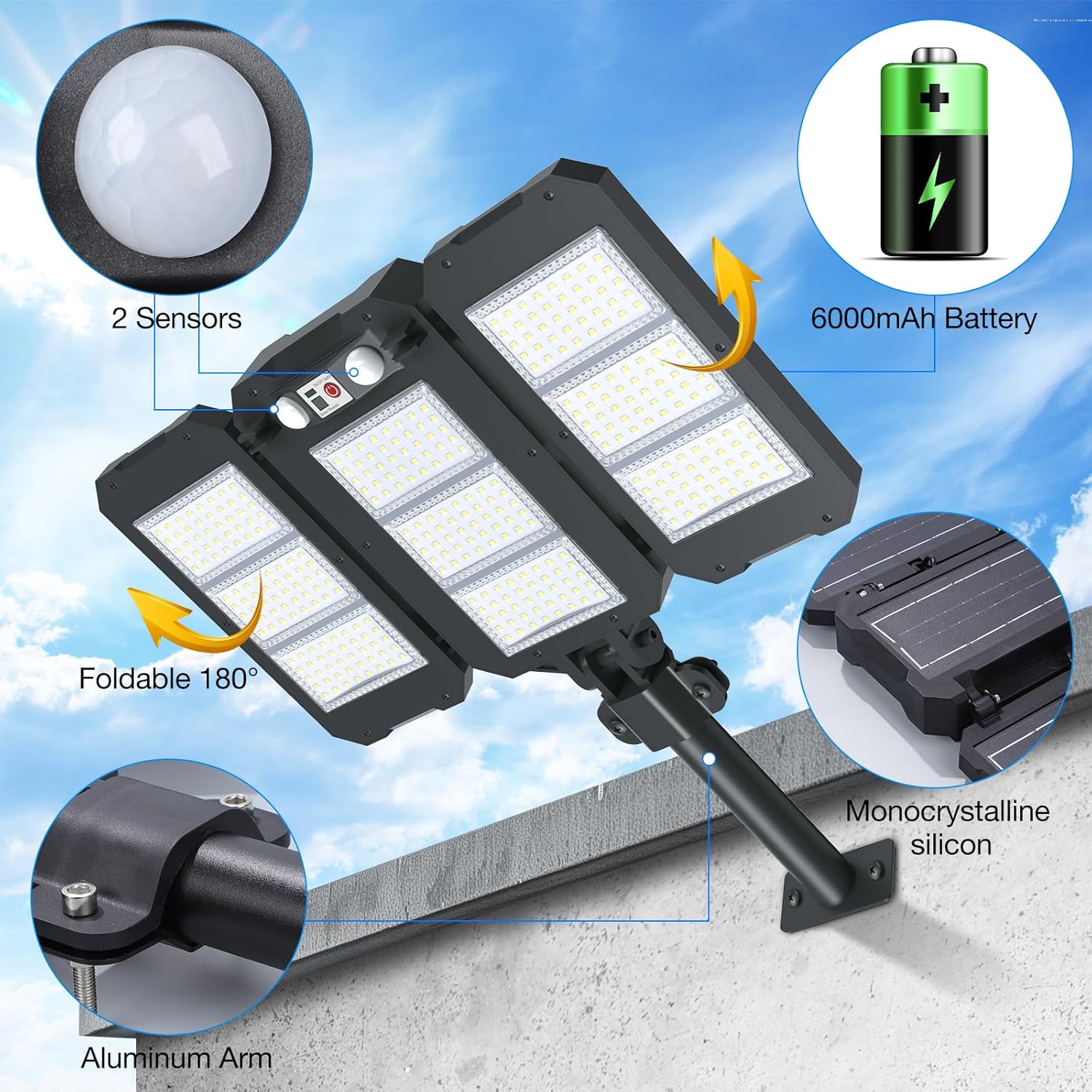
Image: Overview of the solar light's components, highlighting the dual sensors, 6000mAh battery, foldable design, aluminum arm, and monocrystalline silicon solar panel.
4. Mounting the Light
- Mark the desired drill points on the wall using the bracket as a template.
- Drill holes at the marked points. Insert the expansion tubes if necessary for a secure fit.
- Mount the assembled light onto the wall using the pointed screws.
- Adjust the angle of the solar panels and the three light heads to optimize sunlight exposure and illumination coverage. The light heads are foldable up to 180 degrees.

Image: Step-by-step visual guide for the wireless wall-mount installation of the solar floodlight.
5. Initial Activation
Before first use, ensure the light is switched ON. The light will flash to indicate the current mode (1 flash = Mode 1, 2 flashes = Mode 2, 3 flashes = Mode 3). Allow the solar panel to charge for a full day in direct sunlight before night operation.
Video: A user demonstrates the unboxing and installation process of the ropelux solar light, highlighting its compact design, adjustable panels, and easy mounting. The video also shows the light's auto-sensing capabilities and how it activates in darkness.
Operating Instructions
The ropelux solar light features three distinct operating modes, selectable via the push button on the unit. The light automatically detects dusk and dawn to manage power efficiently.
Understanding the Modes
- Mode 1 (Dim Mode): The light maintains a constant 20% brightness from dusk until dawn. This mode provides continuous low-level illumination.
- Mode 2 (Smart Mode): The light stays at 10% brightness. Upon detecting motion, it brightens to 100% for 18 seconds, then returns to 10% brightness.
- Mode 3 (Security Mode): The light remains off. Upon detecting motion, it illuminates at 100% brightness for 18 seconds, then turns off completely.

Image: Visual representation of the three distinct lighting modes and their behavior in response to motion and ambient light.
Changing Modes
Press the power button located on the light unit to cycle through the modes. Each press will advance to the next mode. The light will flash to confirm the selected mode (1 flash for Mode 1, 2 for Mode 2, 3 for Mode 3).
Video: A user demonstrates the three operating modes of the ropelux solar light in a nighttime setting, showing how to switch between modes and the light's response to motion detection.
Maintenance
To ensure the longevity and optimal performance of your ropelux solar light, regular maintenance is recommended.
- Cleaning the Solar Panel: Periodically wipe the solar panel with a soft, damp cloth to remove dust, dirt, or debris. A clean panel ensures maximum sunlight absorption and charging efficiency.
- Checking Connections: Occasionally inspect the mounting screws and bracket connections to ensure they remain secure, especially after strong winds or adverse weather.
- Battery Care: The internal batteries are designed for long-term use. If the light's performance significantly degrades over time, ensure the solar panel is receiving adequate sunlight.
- Environmental Considerations: While IP65 waterproof, avoid submerging the unit in water. Ensure snow or ice does not continuously cover the solar panel during winter months.
Troubleshooting
If you encounter issues with your ropelux solar light, refer to the following common problems and solutions:
- Light does not turn on at night:
- Ensure the power switch is in the 'ON' position.
- Verify the solar panel is receiving at least 6-8 hours of direct sunlight daily. Relocate if necessary.
- Check for any obstructions (e.g., leaves, dirt) on the solar panel and clean it.
- Confirm it is dark enough for the light sensor to activate. Test in a completely dark environment.
- Light is dim or only stays on for a short period:
- The battery may not be fully charged. Ensure adequate sunlight exposure for several days.
- Clean the solar panel to maximize charging efficiency.
- Check the selected operating mode. Mode 1 (Dim Mode) is designed for lower, continuous brightness.
- Motion sensor is not working or is too sensitive:
- Ensure the sensor lens is clean and free from obstructions.
- Adjust the angle of the light heads and the main unit to optimize the sensor's coverage area.
- External factors like strong winds causing movement in nearby foliage can sometimes trigger the sensor.
- Light flashes unexpectedly:
- A flashing light typically indicates a mode change. Press the power button to cycle through modes and select your desired setting.
- If flashing persists, ensure the unit is fully charged.
Warranty and Support
The ropelux 7000 LM 3-Head Solar Motion Sensor Flood Light comes with a limited warranty. For specific warranty details, please refer to the product packaging or contact ropelux customer support.
If you require further assistance or have questions not covered in this manual, please contact ropelux customer service. Contact information can typically be found on the product packaging or the official ropelux website.

