
1. Product Overview
The MBYULO Cordless Vacuum Cleaner Model EHBL-A001-V01 is designed for efficient home cleaning. It features a powerful 600W brushless motor, providing up to 60,000Pa suction for various cleaning tasks. The vacuum is equipped with a long-lasting battery, an intuitive LED display, and an anti-tangle brushroll for effective cleaning on multiple surfaces.
Key Features:
- 600W Brushless Motor: Delivers 60,000Pa suction for deep cleaning.
- Extended Runtime: Up to 75 minutes of continuous cleaning (25 minutes in Max mode) with 7x2500mAh lithium batteries.
- Smart LED Display: Shows battery life, filter status, and blockage alerts.
- Anti-Tangle Brushroll: Designed to reduce hair wrap by 80%, suitable for various floor types including hardwood and carpets.
- Advanced Filtration: Cyclonic airflow and HEPA13 filter capture 99.99% of particles.
- One-Touch Dustbin Emptying: Large capacity dust cup for convenient disposal.
- Lightweight and Ergonomic: Easy to maneuver for comfortable cleaning.

Image: The MBYULO Cordless Vacuum Cleaner highlighting its 600W upgraded motor and 60Kpa super suction power.

Image: A woman using the MBYULO Cordless Vacuum Cleaner, illustrating its 75-minute runtime for whole-house cleaning.
2. Setup and Assembly
2.1 Unpacking and Component Check
Carefully unpack all components from the box. Ensure all items listed below are present:
- MBYULO EHBL battery vacuum cleaner main unit
- Sofa brush nozzle
- 2-in-1 brush and crevice nozzle
- Brush cleaning tool
- HEPA filter replacement
- Adapter
- Rechargeable wall mount
- Instruction manual

Image: All components included with the MBYULO Cordless Vacuum Cleaner, laid out for inspection.
2.2 Assembly
- Connect the extension wand to the main vacuum body until it clicks into place.
- Attach the desired cleaning head (e.g., floor brush) to the other end of the extension wand until it clicks.
- For handheld use, attach accessories directly to the main vacuum body.
2.3 Initial Charging
Before first use, fully charge the vacuum cleaner. The vacuum can be charged using the provided adapter and wall mount.
- Mount the rechargeable wall bracket in a convenient location near a power outlet.
- Place the vacuum onto the wall mount. Ensure the charging pins align.
- Connect the adapter to the wall mount and plug it into a power outlet.
- A full charge takes approximately 4 hours. The LED display will indicate charging status and battery level.

Image: The MBYULO Cordless Vacuum Cleaner being charged and stored on its wall-mounted bracket.
3. Operating Instructions
3.1 Power On/Off and Suction Modes
To power on the vacuum, press the power button located on the main unit. The LED display will illuminate, showing the current battery percentage and suction mode.
- Power Button: Press once to turn on, press again to turn off.
- Mode Button: Use the mode selection button to cycle through the three suction modes: Eco, Mid, and Max.

Image: Close-up of the MBYULO Cordless Vacuum Cleaner's LED display, indicating battery level, roller blockage, Eco, Mid, and Max modes, and clogged air ducts.
3.2 Cleaning with the Floor Brush
The main floor brush is suitable for all floor types, including hardwood, tile, and carpets. It features built-in LED lights to illuminate hidden debris.
- Ensure the floor brush is securely attached to the extension wand.
- Select the appropriate suction mode for your cleaning task. Eco mode is recommended for daily cleaning to maximize battery life.
- The brush head offers 270-degree flexibility for easy maneuvering around furniture and into tight spaces.
Video: Demonstration of the EHBL Cordless Vacuum's floor brush in action, showing its effectiveness on various surfaces.
3.3 Using Attachments
The included sofa brush nozzle and 2-in-1 brush and crevice nozzle can be attached directly to the main unit for handheld cleaning or to the extension wand for extended reach.
- Sofa Brush Nozzle: Ideal for upholstery, pet hair on furniture, and delicate surfaces.
- 2-in-1 Brush and Crevice Nozzle: Use the crevice tool for tight corners, edges, and narrow gaps. Slide the brush down for dusting blinds, keyboards, or car interiors.
4. Maintenance
Regular maintenance ensures optimal performance and extends the lifespan of your MBYULO Cordless Vacuum Cleaner.
4.1 Emptying the Dustbin
Empty the dustbin after each use to prevent clogs and maintain strong suction power.
- Locate the one-touch release button on the dustbin.
- Position the dustbin over a trash receptacle.
- Press the release button to open the bottom flap and empty the contents.
- Close the flap securely until it clicks.
4.2 Cleaning Filters
The vacuum features a multi-layer filtration system, including a HEPA13 filter. Clean filters every 2 weeks or as needed.
- Twist and remove the dust cup from the main unit.
- Remove the HEPA filter and other filter components.
- Tap off loose dirt. Wash washable filters under cold running water.
- Allow all filter components to air dry completely for at least 24 hours before reinstalling. Do not use heat to dry.
- Reinstall the HEPA filter onto the motor inlet first, then attach the dust cup.
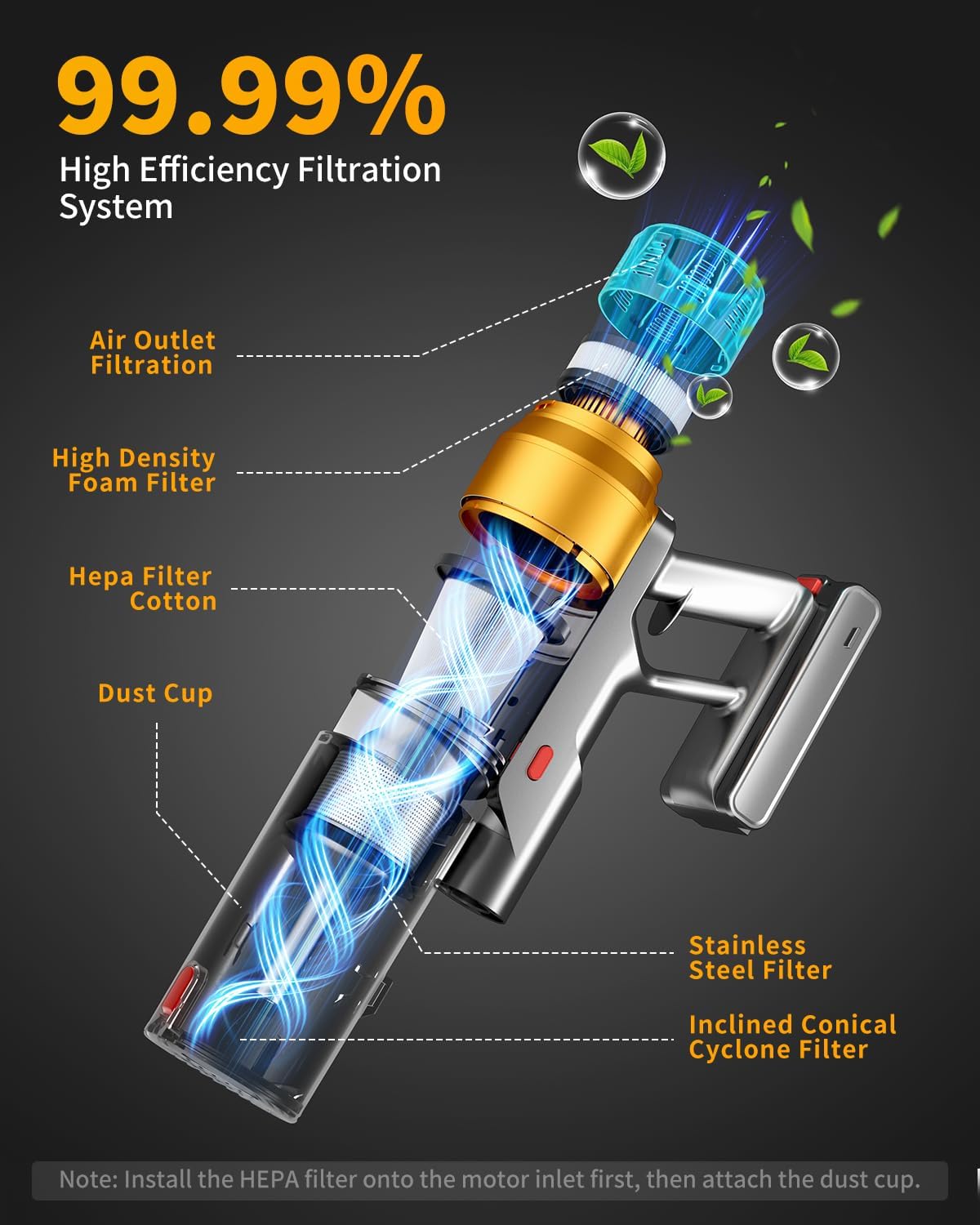
Image: Exploded view diagram illustrating the MBYULO Cordless Vacuum Cleaner's 99.99% high-efficiency filtration system, including air outlet filtration, high-density foam filter, HEPA filter cotton, dust cup, stainless steel filter, and inclined conical cyclone filter.
4.3 Cleaning the Brushroll
Regularly check the brushroll for tangled hair or debris and remove it using the provided brush cleaning tool.
- Turn off the vacuum and detach the floor brush.
- Locate the brushroll release mechanism (refer to the diagram in the manual).
- Remove the brushroll and use the cleaning tool to cut and remove any tangled hair or fibers.
- Reinsert the brushroll and secure it in place.

Image: Comparison of the MBYULO Cordless Vacuum Cleaner's anti-tangle brushroll (labeled EHBL) with a standard brushroll (labeled Others), demonstrating its effectiveness in preventing hair wrap.
5. Troubleshooting
If you encounter issues with your MBYULO Cordless Vacuum Cleaner, refer to the following common solutions:
| Problem | Possible Cause | Solution |
|---|---|---|
| No power/Vacuum not turning on | Battery is depleted; Power button not pressed correctly. | Charge the battery fully; Ensure the power button is pressed firmly. |
| Low suction power | Dustbin is full; Filters are clogged; Brushroll is obstructed. | Empty the dustbin; Clean or replace filters; Remove any obstructions from the brushroll. |
| Brushroll not rotating | Hair or debris tangled in brushroll; Brushroll not installed correctly. | Clean the brushroll; Reinstall the brushroll correctly. |
| Vacuum stops unexpectedly | Battery overheating; Blockage detected. | Allow the vacuum to cool down; Check for and clear any blockages in the air ducts or brushroll. |
If the issue persists, please contact MBYULO customer support for further assistance.
6. Specifications
| Feature | Detail |
|---|---|
| Brand | MBYULO |
| Model Name | EHBL-A001-V01 |
| Power Source | Battery Powered |
| Wattage | 680 watts |
| Motor Horsepower | 0.8046 horsepower |
| Special Feature | 600W Premium Motor, Extra-long Life Battery, Rechargeable Wall Bracket, OLED Color Screen, 270 Degree Flexibility, Edge Clean Design, 11-Level Filtration System |
| Filter Type | HEPA Filter (HEPA13) |
| Is Cordless? | Yes |
| Capacity | 1.6 Liters |
| Battery Life | Up to 75 minutes (25 minutes in Max mode) |
| Product Dimensions | 11"L x 7"W x 16"H |
| Item Weight | 5 pounds |
| Number of Speeds | 3 |
| Surface Recommendation | All floors (Carpet, Hard Floor) |
| Vacuum Collection Technology | Cyclonic, Bagless |
| UPC | 737745281547 |
7. Warranty and Support
MBYULO is committed to providing high-quality products and customer satisfaction. For any product maintenance needs, questions, or issues, please contact our dedicated support team.
Our team is ready to assist you and provide effective solutions. Please refer to the contact information provided with your purchase or visit the official MBYULO website for support details.

Image: A customer service representative, symbolizing MBYULO's 24-hour support.