
plplaaoo S350H
plplaaoo XY S350H Bluetooth Power Amplifier Board User Manual
Model: S350H
Introduction
This manual provides detailed instructions for the installation, operation, and maintenance of your plplaaoo XY S350H Bluetooth Power Amplifier Board. Please read this manual thoroughly before using the product to ensure proper function and safety.
Important Safety Information
To prevent electric shock, fire, or damage to the unit, please observe the following safety precautions:
- Ensure the power supply voltage is within the specified range (DC 18V-38V).
- Do not expose the amplifier board to moisture or extreme temperatures.
- Avoid short-circuiting the output terminals.
- Do not attempt to disassemble or modify the unit. Refer all servicing to qualified personnel.
- Keep out of reach of children.
- Ensure proper ventilation to prevent overheating.
Product Overview
The plplaaoo XY S350H is a high-performance 2.1 channel Bluetooth power amplifier board featuring dual TPA3255 HiFi chips. It offers powerful audio output, versatile connectivity, and precise sound control for home theater systems and professional audio setups.
Components and Features
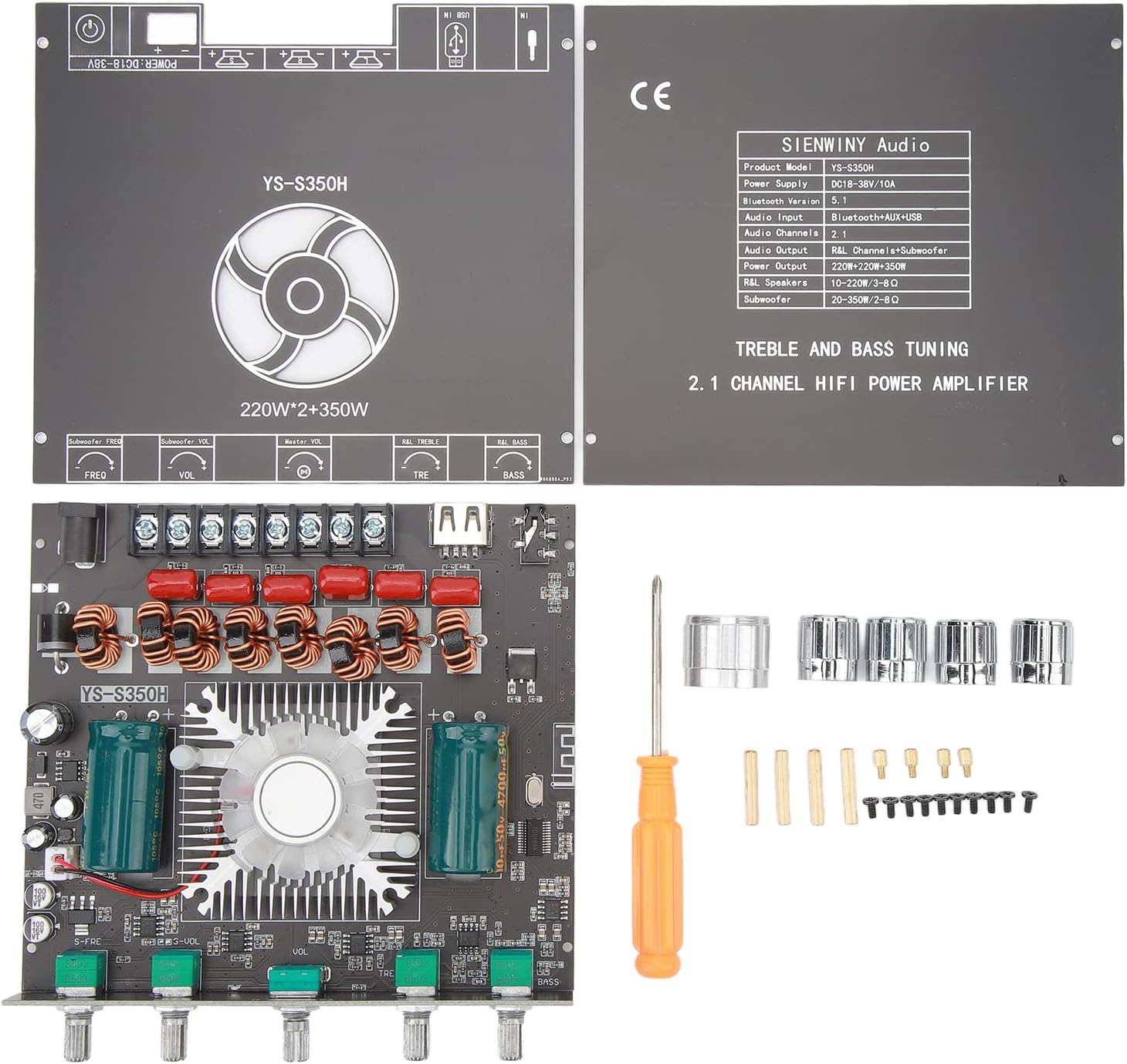

- Dual TPA3255 HiFi Chips: For high-fidelity audio performance.
- Output Power: 220W x 2 (Left/Right channels) + 350W (Subwoofer).
- Wide Voltage Input: DC 18V-38V.
- Multiple Audio Inputs: Bluetooth 5.1, AUX, USB drive, USB sound card.
- Precise Sound Control: Independent high and low frequency adjustment knobs for treble and bass.
- Comprehensive Protection: Short circuit, overvoltage, undervoltage, clipping, and overheating protection.
- YS Audio APP Control: For convenient wireless control.
Specifications
| Feature | Detail |
|---|---|
| Product Model | YS-S350H |
| Power Supply | DC 18V-38V/10A |
| Bluetooth Version | 5.1 |
| Audio Input | Bluetooth+AUX+USB |
| Audio Channels | 2.1 |
| Audio Output | R&L Channel + Subwoofer |
| R&L Channel Output Power | 220W x 2 |
| Subwoofer Output Power | 350W |
| R&L Speakers Impedance | 10-220W / 3-8Ω |
| Subwoofer Impedance | 20-350W / 2-8Ω |
| Package Dimensions | 6.3 x 5.51 x 1.97 inches |
| Item Weight | 13.5 ounces |
| Manufacturer | plplaaoo |
Setup Instructions
Follow these steps to correctly set up your XY S350H amplifier board.
1. Power Connection
- Connect a DC power adapter (18V-38V, 10A recommended) to the DC 5.5mm x 2.1mm power input jack on the board.
- If using a power supply without a DC plug, connect the positive and negative wires directly to the corresponding screw terminals labeled "DC IN". Ensure correct polarity.
- Caution: Ensure the power supply is off before connecting or disconnecting any wires.
2. Speaker Connection
- Connect your left and right channel speakers to the "R&L Speakers" output terminals. Ensure the impedance of your speakers is between 3-8Ω and power rating is 10-220W.
- Connect your subwoofer to the "Subwoofer" output terminals. Ensure the impedance of your subwoofer is between 2-8Ω and power rating is 20-350W.
- Observe correct polarity (+ to + and - to -) for all speaker connections.
3. Audio Input Connection

- Bluetooth 5.1: Power on the amplifier. The Bluetooth indicator will flash. Search for "YS-S350H" on your device's Bluetooth settings and pair. The indicator will become solid blue upon successful connection.
- AUX Input: Connect an audio source (e.g., smartphone, CD player) to the AUX input jack using a 3.5mm audio cable.
- USB Drive Input: Insert a USB drive containing audio files into the USB port. The amplifier will automatically detect and play audio.
- USB Sound Card Input: Connect the amplifier to a computer via the USB port. The computer should recognize it as an audio output device.
Operating Instructions
Power On/Off
Once all connections are secure, connect the power adapter to a wall outlet. The amplifier will power on. Disconnect the power adapter to turn off the unit.
Input Selection
The amplifier automatically switches between inputs. When a new input source is connected (e.g., AUX cable inserted, USB drive connected), it will prioritize that input. Bluetooth will be the default if no other wired input is active.
Volume Control
Use the "Master Vol" knob to adjust the overall volume level. The "Subwoofer Vol" knob controls the volume specifically for the subwoofer output.
Treble and Bass Adjustment
- TRE (Treble) Knob: Rotate to increase or decrease high-frequency sounds.
- BASS Knob: Rotate to increase or decrease low-frequency sounds.
Subwoofer Frequency Adjustment
Use the "Subwoofer Freq" knob to adjust the crossover frequency for the subwoofer, allowing you to fine-tune how the subwoofer integrates with your main speakers.
YS Audio APP Control
For advanced control, download the YS Audio APP on your smartphone. Pair your phone with the amplifier via Bluetooth and use the app to manage settings wirelessly.
Maintenance
- Cleaning: Use a soft, dry cloth to wipe the surface of the amplifier board. Do not use liquid cleaners or solvents.
- Ventilation: Ensure the cooling fan and heatsink are free from dust and obstructions to maintain optimal performance and prevent overheating.
- Storage: When not in use for extended periods, store the amplifier in a cool, dry place away from direct sunlight and moisture.
Troubleshooting
| Problem | Possible Cause | Solution |
|---|---|---|
| No power | Power adapter not connected or faulty; incorrect voltage. | Check power connections; ensure power supply is 18V-38V DC and functional. |
| No sound | Incorrect input selected; speaker wires loose; volume too low; faulty audio source. | Verify input source; check speaker connections and polarity; increase volume; test with a different audio source. |
| Distorted sound | Volume too high; incorrect speaker impedance; faulty audio source or cable. | Reduce volume; ensure speakers match impedance requirements; try a different audio cable or source. |
| Bluetooth not connecting | Amplifier not in pairing mode; device too far; interference. | Ensure amplifier is powered on and indicator is flashing; bring device closer; restart both devices. |
| Overheating | Poor ventilation; excessive volume for extended periods. | Ensure adequate airflow around the board; reduce volume; check for obstructions on the heatsink/fan. |
Warranty and Support
This product is covered by a standard manufacturer's warranty. For specific warranty terms and conditions, please refer to the documentation provided at the time of purchase or contact your retailer.
For technical support or inquiries, please contact plplaaoo customer service through the retailer's platform or their official website. Please have your product model (S350H) and purchase details ready.
Ask a question about this manual
Ask about setup, troubleshooting, compatibility, parts, safety, or missing instructions. Manuals+ will review the question and use this page’s manual context to help answer it.