
1. Introduction
The AVERA CM10 is a modulating instantaneous water heater designed to provide a continuous supply of hot water for up to two services simultaneously. This LP gas boiler features advanced technology for efficient operation, gas savings, and enhanced safety in your home. Its slim design, digital panel, and LED display ensure ease of use and integration into modern living spaces.
Key Features:
- Capacity: 10 liters per minute, suitable for 2 simultaneous services.
- Modulating Technology: Automatically adjusts temperature between 35°C and 65°C for consistent hot water without mixing with cold water.
- LP Gas Saving: Optimized consumption through a forced combustion system.
- Low Water Pressure Ignition: Operates with water pressure as low as 0.080 MPa, ideal for homes with varying water pressure.
- Digital Panel & LED Display: Intuitive control and real-time temperature display.
- Safety Features: Water temperature sensor, double gas valve, flame protection, automatic shutdown for water flow interruption or overheating.
- Easy Maintenance: Includes a removable water filter and a diagnostic system for error codes.

Figure 1: AVERA CM10 water heater highlighting its main features and benefits.
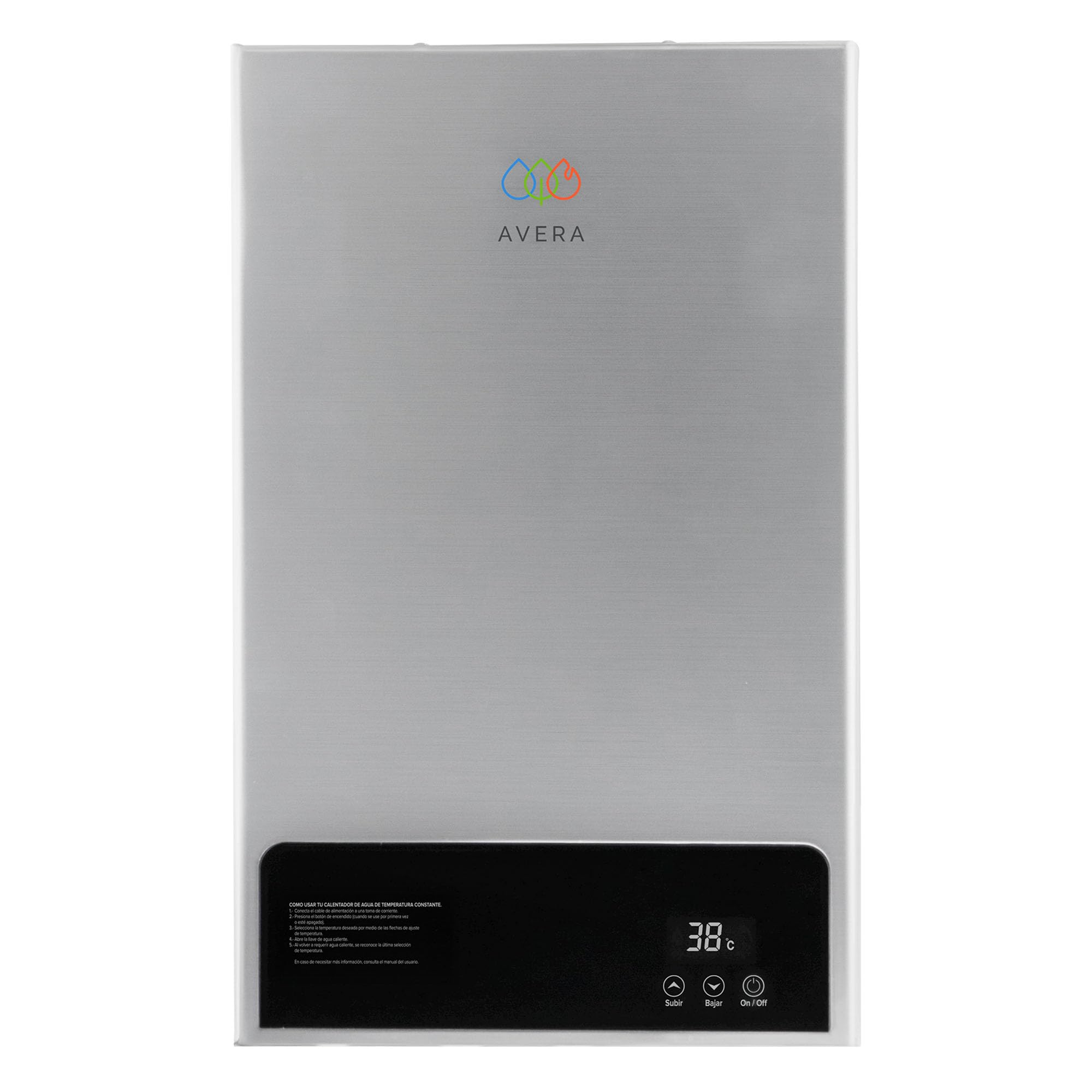
Figure 2: Physical dimensions and weight of the AVERA CM10 water heater.
2. Safety Information
Read all safety warnings and instructions carefully before installing or operating the appliance. Failure to follow these instructions may result in fire, explosion, electric shock, property damage, personal injury, or death.
General Safety Precautions:
- Installation must be performed by a qualified professional in accordance with local codes and regulations.
- Ensure proper ventilation for the appliance, especially when installed indoors.
- Do not store or use flammable materials near the water heater.
- Regularly check for gas leaks. If you smell gas, immediately shut off the gas supply, ventilate the area, and contact a professional.
- Do not tamper with safety devices or controls.
- Ensure the electrical supply is 127 Volts as specified.
Integrated Safety Features:
- Water Temperature Sensor: Monitors and regulates water temperature.
- Double Gas Valve: Provides an additional layer of safety for gas flow control.
- Flame Protection: Automatically shuts off gas supply if the flame extinguishes.
- Automatic Shutdown: Activates in case of water flow interruption or overheating to prevent damage.
- Protection Against Freezing: Designed with features to prevent freezing in cold conditions, though additional measures may be required in extreme climates.

Figure 3: Safety features of the AVERA CM10, including protection against leaks, overheating, and freezing.
3. Setup and Installation
Proper installation is crucial for the safe and efficient operation of your AVERA CM10 water heater. Always consult the full installation manual provided with the product and adhere to all local building and safety codes.
Pre-Installation Checks:
- Water Pressure: Verify that your home's water pressure is sufficient. The CM10 operates with low pressure (0.080 MPa), but a pressurizer may be beneficial for optimal performance, especially if you experience very low pressure.
- Gas Type: Ensure your home uses LP (Liquefied Petroleum) gas. This model is specifically designed for LP gas.
- Location: Choose a location that allows for proper ventilation and access for maintenance. The unit can be installed indoors with proper ventilation or outdoors under a covered area.

Figure 4: Identify your gas service type (LP Gas vs. Natural Gas) to ensure compatibility.
Installation Requirements:
- Maintain a minimum of 2 meters between your shower and the water tank/gas service.
- Maintain a maximum of 5 meters between your shower and the water heater.
- Ensure adequate space for connections: 1/2" cold water inlet, 1/2" hot water outlet, and 1/2" gas connection.
- The electrical connection requires 127 Volts.

Figure 5: Important distances and considerations for proper installation, including water pressure recommendations.
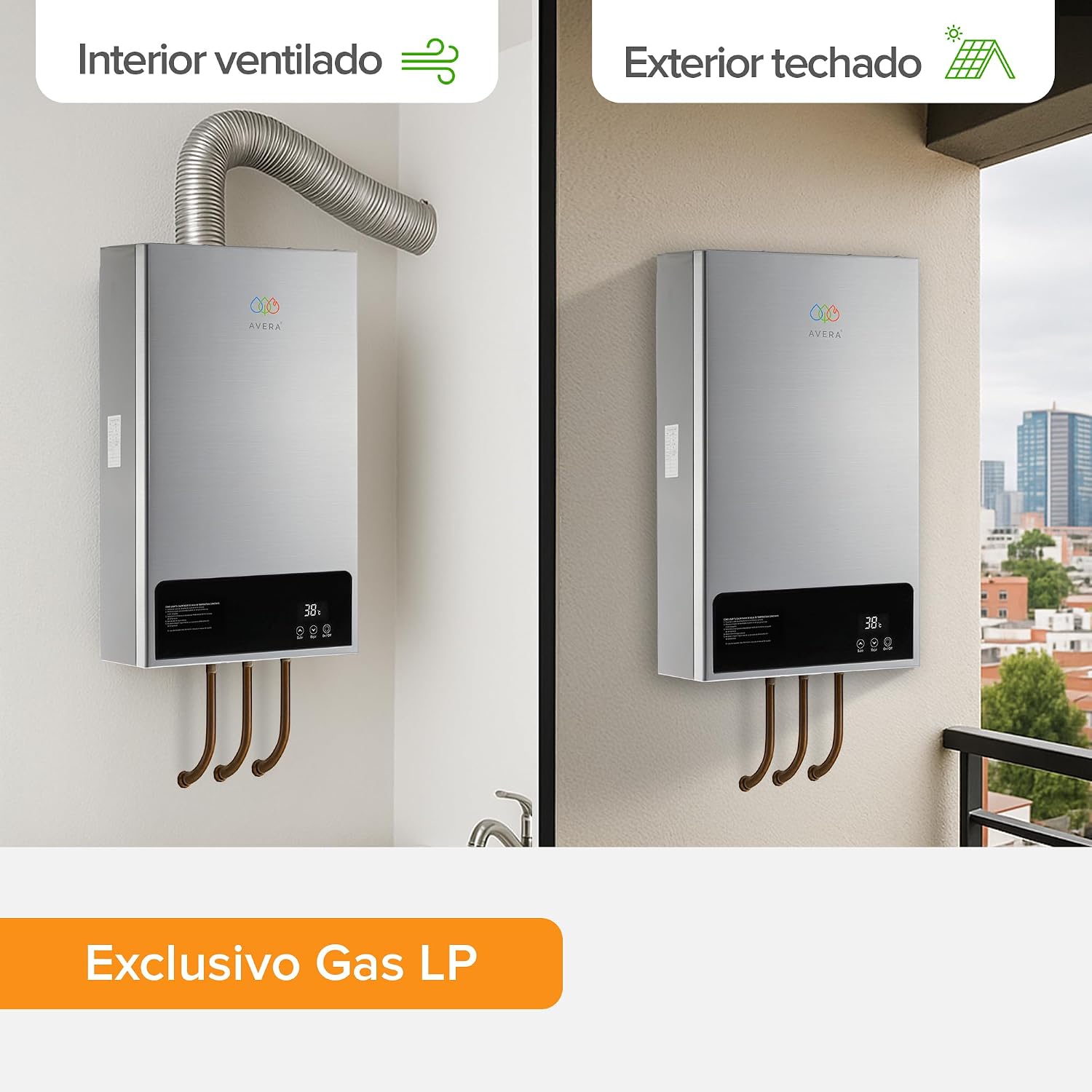
Figure 6: Installation options: ventilated interior with flue or covered exterior.
Included Components:
- Duct
- User Manual
- Water Heater Unit
- Screws for mounting
4. Operating Instructions
The AVERA CM10 is designed for user-friendly operation with its digital control panel.
Digital Panel Overview:
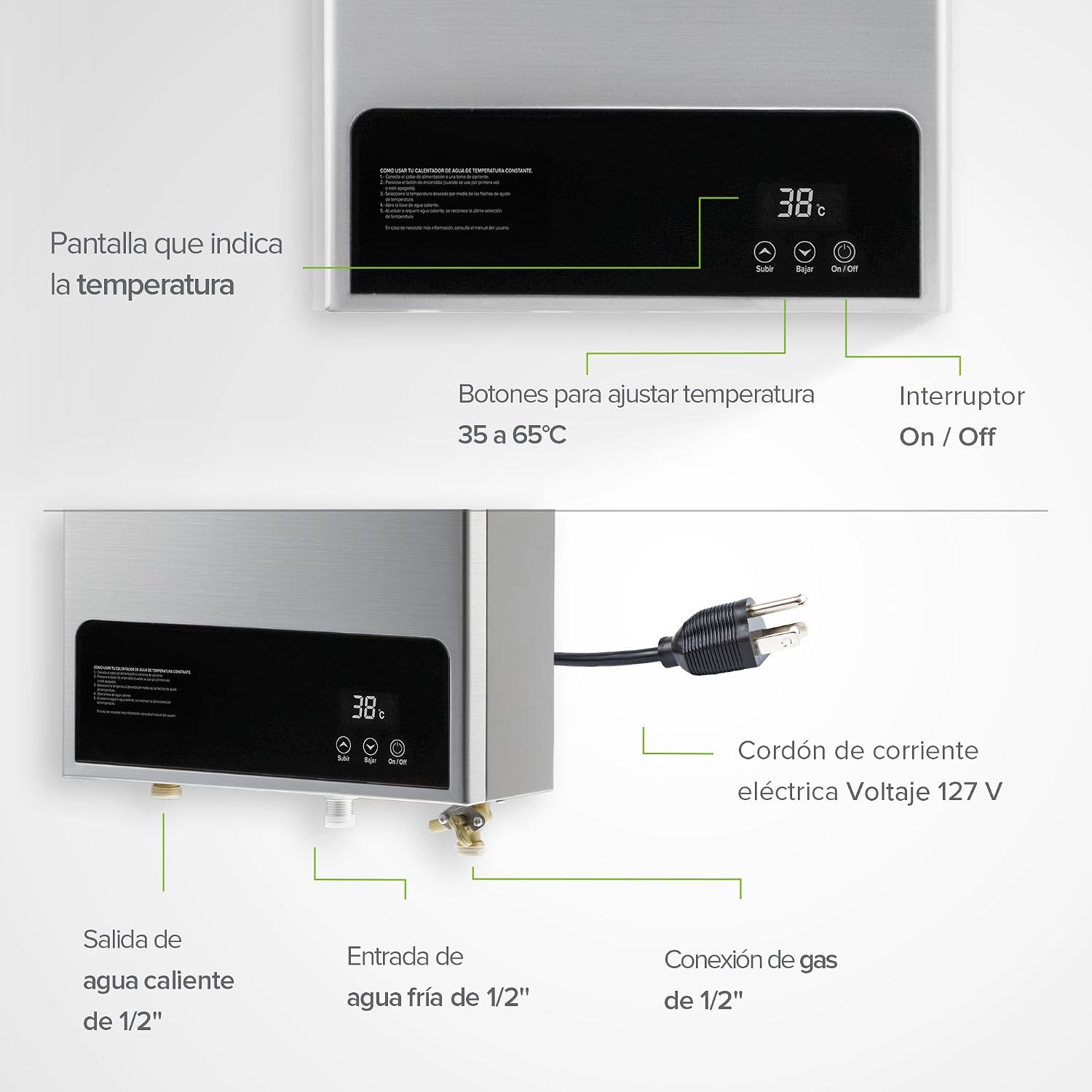
Figure 7: Detailed view of the digital control panel and connections.
- LED Display: Shows the current water temperature in real-time.
- Temperature Adjustment Buttons: Use these buttons to set your desired water temperature between 35°C and 65°C. The modulating function will automatically maintain this temperature.
- On/Off Switch: Powers the unit on or off.
Starting the Water Heater:
- Ensure the gas supply is open and the unit is properly connected to the electrical outlet (127V).
- Turn on the On/Off switch.
- Open a hot water tap. The unit will automatically ignite and begin heating water.
- Adjust the desired temperature using the control buttons on the digital panel.
5. Maintenance
Regular maintenance ensures the longevity and efficient performance of your AVERA CM10 water heater.
Routine Maintenance:
- Water Filter: The unit is equipped with a removable water filter. Periodically clean this filter to prevent blockages and maintain water flow. Refer to the detailed manual for instructions on how to remove and clean the filter.
- Exterior Cleaning: Clean the exterior of the unit with a soft, damp cloth. Do not use abrasive cleaners or solvents.
- Ventilation: Ensure that the ventilation openings are clear and unobstructed.
- Professional Inspection: It is recommended to have the unit inspected by a qualified technician annually to check gas connections, combustion, and overall performance.
Error Code Diagnosis:
The AVERA CM10 features a diagnostic system that displays error codes on the LED screen to indicate specific issues. Refer to the comprehensive troubleshooting section in the full manual for a list of error codes and their corresponding solutions. If an error code persists after attempting the recommended solution, contact customer support.
6. Troubleshooting
This section addresses common issues you might encounter with your AVERA CM10 water heater. For more detailed troubleshooting, refer to the complete manual.
Common Issues and Solutions:
- No Hot Water / Unit Not Igniting:
- Check if the gas supply is open.
- Ensure the electrical connection is secure and power is available (127V).
- Verify that water pressure is sufficient. Although the unit works with low pressure, extremely low pressure might prevent ignition. Consider installing a water pressurizer if your home's water pressure is consistently very low.
- Check if the water filter is clean and not obstructed.
- Inconsistent Water Temperature:
- Ensure the desired temperature is set correctly on the digital panel.
- Check for fluctuations in water pressure.
- Error Code Displayed:
- Note the specific error code displayed on the LED screen.
- Consult the full user manual for the meaning of the error code and recommended steps.
- If the issue persists, contact customer support.
- Gas Smell:
- Immediately shut off the gas supply.
- Open windows and doors to ventilate the area.
- Do not operate any electrical switches or appliances.
- Contact a qualified gas technician or emergency services immediately.
7. Specifications
Detailed technical specifications for the AVERA CM10 Modulating LP Gas Instantaneous Water Heater.
| Specification | Detail |
|---|---|
| Model Number | CM10 |
| Brand | AVERA |
| Capacity | 10 Liters/minute |
| Energy Source | LP Gas |
| Voltage | 127 Volts |
| Wattage | 32 Watts |
| Product Dimensions (W x H x D) | 35 cm x 56 cm x 14.5 cm |
| Weight | 10.12 kg (Product); 8.5 kg (Net) |
| Material | Alloy Steel |
| Color | Grey |
| Maximum Pressure | 0.8 MPa (800,000 Pascal) |
| Temperature Range | 35°C to 65°C |
| Special Features | Automatic Ignition, Overheating Protection, LED Display |
| Plug Profile | Wall |
8. Warranty and Support
Your AVERA CM10 Modulating LP Gas Instantaneous Water Heater comes with a 2-year warranty, ensuring peace of mind regarding its quality and performance.

Figure 8: The AVERA CM10 includes a 2-year warranty.
Customer Support:
For any questions, technical assistance, or warranty claims, please contact AVERA customer support. Have your model number (CM10) and purchase information ready when contacting support to expedite the process.
Please refer to the contact information provided in your product packaging or on the official AVERA website for the most up-to-date support details.
