
1. Introduction
Thank you for choosing the Barrina LS12 Corner Plant Stand with Grow Lights. This 9-tier S-shaped plant stand is designed to maximize your space while providing optimal lighting conditions for your indoor plants with its integrated full-spectrum T5 grow lights. This manual provides essential information for safe assembly, operation, maintenance, and troubleshooting to ensure you get the most out of your new plant stand.

Image 1.1: The Barrina LS12 Corner Plant Stand elegantly displayed in a home setting, showcasing its S-shape design and multiple tiers filled with various potted plants.
2. Important Safety Instructions
Please read and understand all safety instructions before assembling or using this product. Keep this manual for future reference.
- Electrical Safety: Ensure the power outlet used is appropriate for the grow lights. Do not overload electrical circuits. Keep the power cord away from heat sources, sharp edges, and water. Do not operate the grow lights with a damaged cord or plug.
- Weight Capacity: Each shelf is designed to hold up to 11 pounds (5 kg). Do not exceed this weight limit to prevent damage or instability. Distribute weight evenly across the shelves.
- Stability: Place the plant stand on a flat, stable, and level surface. For added safety, especially in households with children or pets, utilize the included anti-tip straps to secure the stand to a wall.
- Assembly: Assemble the unit according to the instructions. Ensure all screws and fasteners are securely tightened before use.
- Indoor Use Only: This plant stand is designed for indoor use only. Do not expose it to outdoor elements or high humidity.
- Cleaning: Disconnect power to the grow lights before cleaning. Use a soft, dry cloth for cleaning. Avoid abrasive cleaners or solvents.
3. Package Contents
Before assembly, please check that all parts listed below are present and undamaged. If any parts are missing or damaged, please contact Barrina customer support.
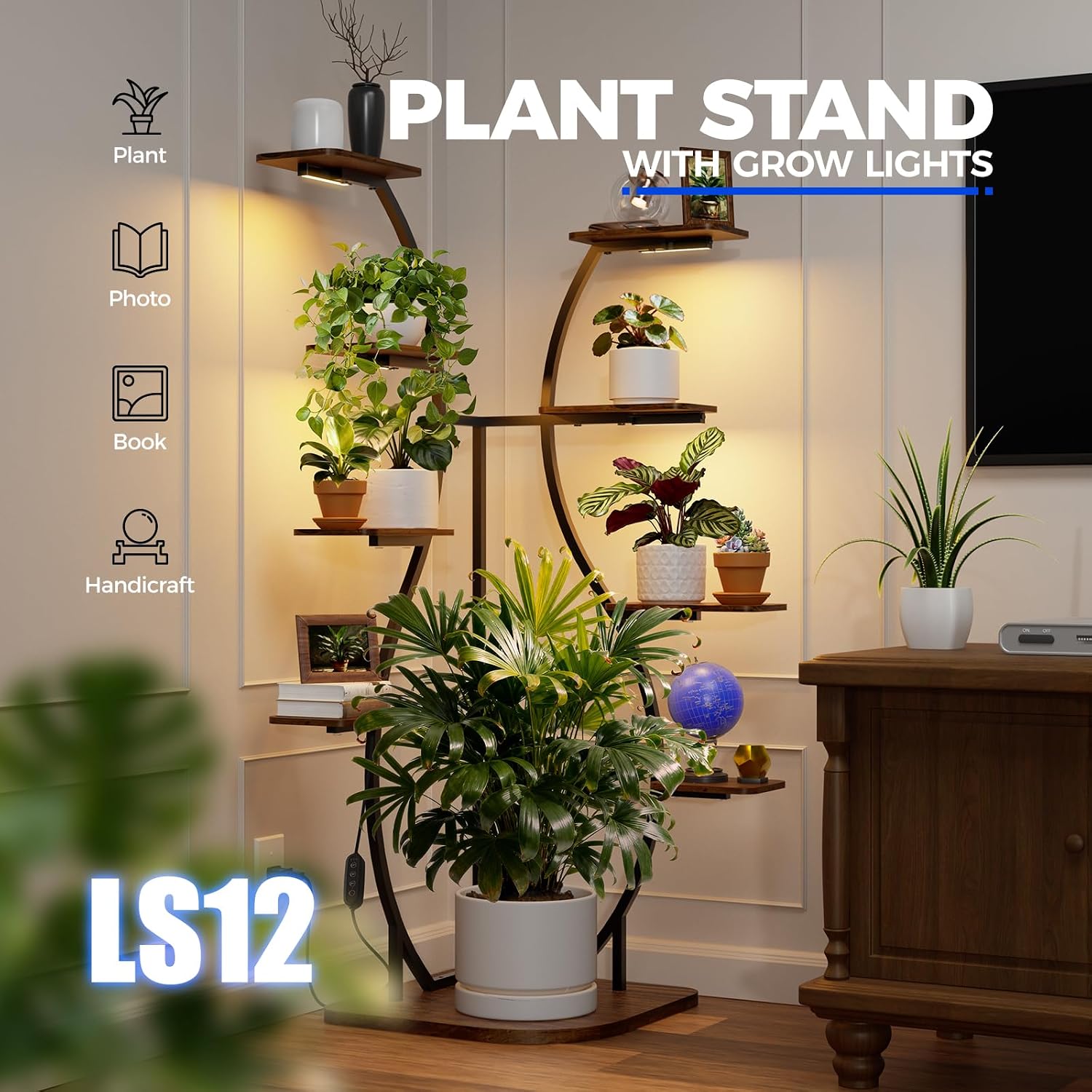
Image 3.1: An exploded view diagram illustrating all components included in the package, such as the main metal frame, various wooden shelf sizes, four T5 grow light bars, and the power adapter with an inline controller.
List of Components:
- Main Metal Frame Sections (various curved and straight pieces)
- Wooden Shelves (various sizes and shapes)
- T5 Full Spectrum Grow Lights (4 units)
- Power Adapter with Inline Controller
- Connection Cables for Grow Lights
- Assembly Hardware (screws, nuts, Allen key, wrench)
- Anti-Tip Straps
- Instruction Manual (this document)
4. Assembly Instructions
Assembly is straightforward and typically takes one person about 40-60 minutes. Follow these steps carefully.
Assembly Video Guide:
Video 4.1: A detailed step-by-step video demonstrating the assembly process for the Barrina LS12 Corner Plant Stand with Grow Lights, from unboxing to final setup.
Step-by-Step Written Guide:
- Unpack and Identify Parts: Lay out all components on a clean, soft surface. Refer to Image 3.1 to identify each part.
- Assemble the Base Frame: Connect the initial metal frame pieces to form the base structure. Ensure the orientation is correct as per the diagrams. Secure with the provided screws and Allen key, but do not fully tighten until the entire frame is assembled.
- Attach Vertical Supports: Connect the main vertical curved and straight metal supports to the base frame. Align holes carefully.
- Install Shelves: Attach the wooden shelves to the designated points on the metal frame. Note that shelves come in different sizes and shapes; match them to their corresponding positions. Secure each shelf with screws.
- Tighten All Fasteners: Once all frame pieces and shelves are in place, go back and securely tighten all screws and nuts. Ensure the stand is stable and level.
- Install Grow Lights: Attach the T5 grow light bars to the underside of the desired shelves using the provided clips or adhesive strips. Ensure they are positioned to provide light to the plants below.
- Connect Grow Lights: Use the provided connection cables to link the grow lights together. Plug the main power adapter into the first grow light, then plug the adapter into a wall outlet.
- Secure with Anti-Tip Straps: Position the plant stand in its desired corner. Attach the anti-tip straps to the top rear of the stand and secure them to the wall using appropriate wall anchors (not included).
5. Operating Instructions - Grow Lights
The Barrina LS12 features integrated full-spectrum T5 grow lights with convenient timing functions to support healthy plant growth.
5.1 Powering On/Off
Locate the inline controller on the power cord. Press the power button (usually marked with a circle and vertical line) to turn the grow lights ON or OFF.

Image 5.1: The inline controller for the T5 grow lights, featuring a power button and dedicated buttons for setting the timer to 4, 8, or 12 hours.
5.2 Timer Functions
The grow lights include three timing functions that repeat daily:
- 4H (4 Hours): Press the '4H' button. The lights will stay on for 4 hours and then turn off. They will automatically turn on again at the same time the next day for 4 hours.
- 8H (8 Hours): Press the '8H' button. The lights will stay on for 8 hours and then turn off. They will automatically turn on again at the same time the next day for 8 hours.
- 12H (12 Hours): Press the '12H' button. The lights will stay on for 12 hours and then turn off. They will automatically turn on again at the same time the next day for 12 hours.
To cancel the timer, press the power button to turn the lights off manually. To reset the timer, turn the lights off and then select your desired timer setting again.
5.3 Full Spectrum Light Benefits
The included T5 grow lights provide a warm 3000K full spectrum, suitable for all stages of plant growth, from seedling to flowering and fruiting. This spectrum mimics natural sunlight, providing the necessary wavelengths for photosynthesis and healthy development.
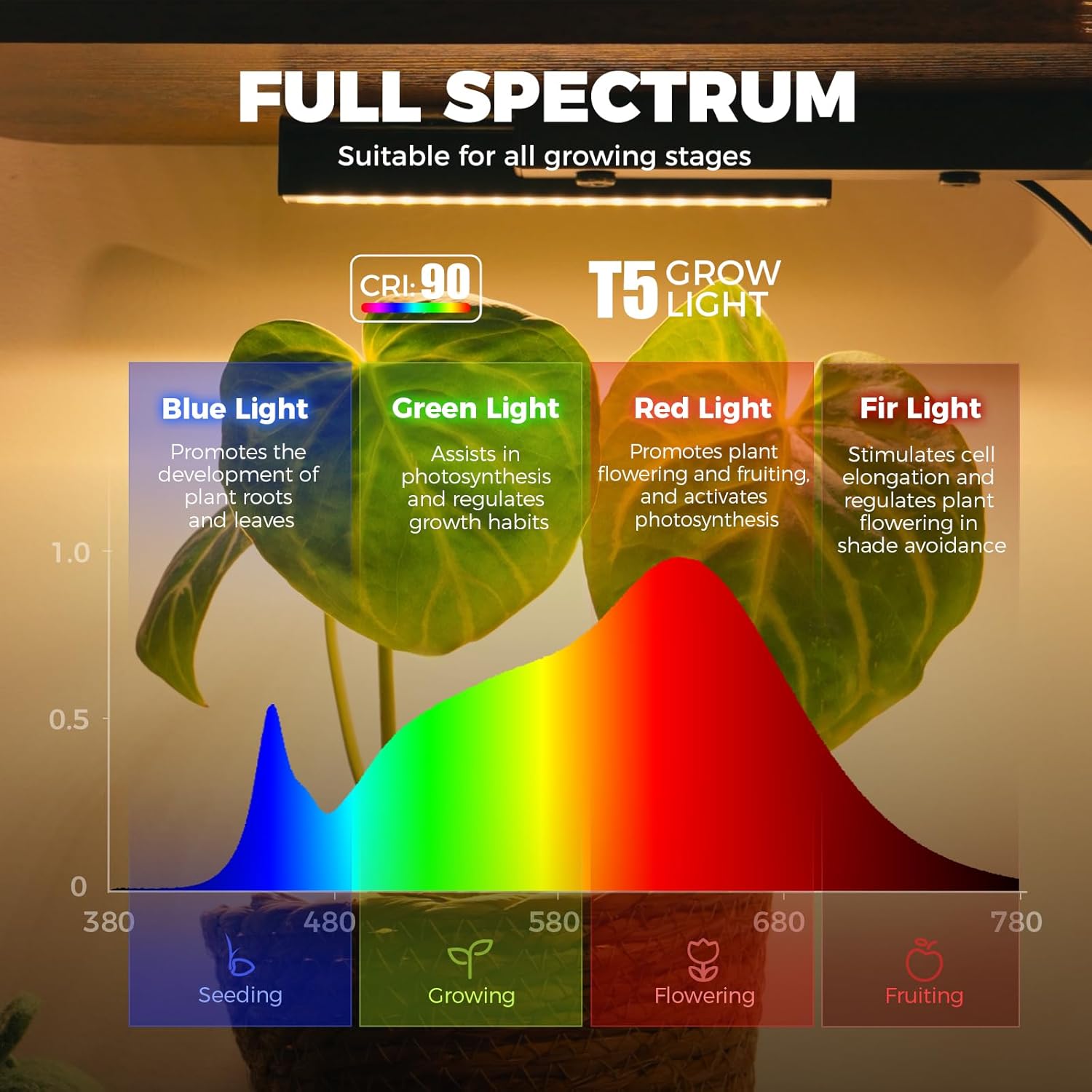
Image 5.2: A spectral chart detailing the different light wavelengths (blue, green, red, far-red) and their specific roles in plant development, confirming the full-spectrum capability of the T5 grow lights.
5.4 Product Overview Video:
Video 5.3: A brief overview video showcasing the Barrina LS12 Corner Plant Stand with Grow Lights, highlighting its design, features, and how it illuminates plants.
6. Maintenance
Regular maintenance will help prolong the life and appearance of your plant stand.
- Cleaning the Stand: Dust the metal frame and wooden shelves regularly with a soft, dry cloth. For stubborn marks, use a slightly damp cloth and wipe dry immediately. Avoid harsh chemicals.
- Cleaning Grow Lights: Ensure the grow lights are unplugged before cleaning. Gently wipe the light tubes with a soft, dry cloth to remove dust or debris that may accumulate and reduce light output. Do not use water or cleaning solutions directly on the lights.
- Checking Connections: Periodically check all screws and fasteners to ensure they remain tight. Re-tighten if necessary to maintain stability.
- Light Replacement: The T5 LED grow lights are designed for long life. If a light bar needs replacement, contact Barrina customer support for compatible replacement parts.
7. Troubleshooting
If you encounter any issues with your Barrina LS12 plant stand, refer to the table below for common problems and solutions.
| Problem | Possible Cause | Solution |
|---|---|---|
| Grow lights do not turn on. | 1. Power cord not plugged in. 2. Loose connection between lights. 3. Power outlet not working. 4. Controller malfunction. | 1. Ensure power cord is securely plugged into outlet and light bar. 2. Check all connection cables between light bars. 3. Test outlet with another device. 4. Contact customer support if controller is suspected. |
| Plant stand feels wobbly. | 1. Not all screws are tightened. 2. Uneven floor surface. 3. Weight unevenly distributed. | 1. Re-tighten all assembly screws. 2. Move stand to a level surface or use shims. 3. Redistribute plants and items evenly. |
| Timer function not working correctly. | 1. Timer not set properly. 2. Power interruption. | 1. Turn lights off, then re-select desired timer setting. 2. If power was interrupted, reset the timer. |
8. Specifications
| Feature | Detail |
|---|---|
| Model | LS12 S-Shape |
| Dimensions (L x W x H) | 27.8 x 26.61 x 63.7 inches (70.6 x 67.6 x 161.8 cm) |
| Number of Tiers | 9 |
| Material | Metal, Wood |
| Color | Yellow (Wood finish) |
| Load Capacity (per shelf) | 11 pounds (5 kg) |
| Grow Light Type | Full Spectrum T5 LED (Warm 3000K) |
| Grow Light Timer | 4H / 8H / 12H (Daily Cycle) |
| Special Features | 90° Corner Fit, Anti-Tip Straps Included |
9. Warranty and Support
Barrina products are designed for quality and durability. For warranty information, technical support, or to order replacement parts, please contact Barrina customer service through their official website or the retailer where you purchased the product. Please have your model number (LS12) and purchase date available when contacting support.
For more information, visit the Barrina Store on Amazon.