
1. Product Overview
The XIAOMI Poco C85 is a 4G LTE smartphone designed for reliable performance and an immersive user experience. It features a large 6.9-inch display, a powerful octa-core processor, and a 50MP AI dual camera system. The device is equipped with a 6000 mAh battery for extended usage.
Inspired by the "dancing aurora at night," the design of the Poco C85 captures the beauty of the northern lights with flowing light and shadow, offering a unique premium look.
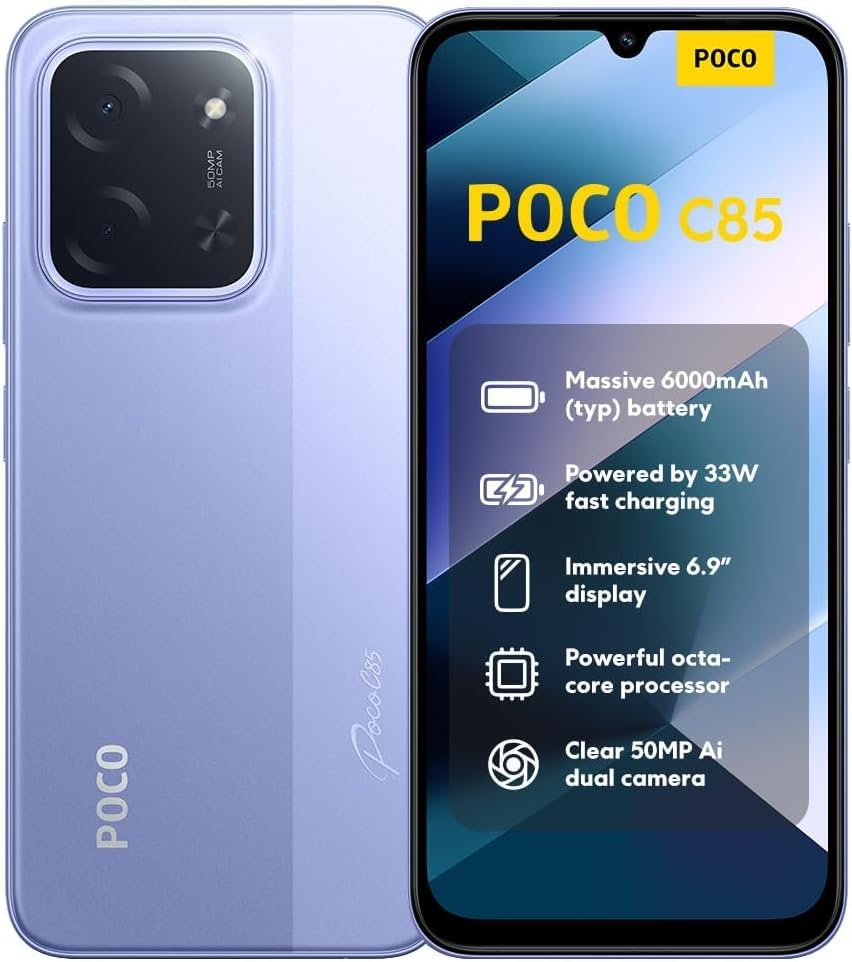
Image: Front and back view of the XIAOMI Poco C85, showcasing its design and highlighted features.
2. Initial Setup
2.1. Package Contents
Before starting, ensure all items are present in the box:
- XIAOMI Poco C85 Smartphone
- Phone Case
- USB Type-C Cable (Note: A wall charger is not included and must be purchased separately.)
2.2. SIM Card and Micro SD Card Installation
The Poco C85 supports Dual Nano SIM cards and one Micro SD card for expandable storage.
- Locate the SIM tray on the side of the device.
- Insert the SIM ejector tool (not included) into the small hole on the SIM tray to open it.
- Place your Nano SIM card(s) and/or Micro SD card into the designated slots on the tray. Ensure the gold contacts are facing down.
- Carefully reinsert the SIM tray into the phone until it clicks into place.
2.3. Charging the Device
The device comes with a 6000mAh battery. It supports 33W fast charging. A charger is not included in the box.
- Connect the USB Type-C cable to the charging port at the bottom of the phone.
- Connect the other end of the cable to a compatible USB wall adapter (sold separately).
- Allow the device to charge fully before initial use.
2.4. Network Compatibility (USA Users)
IMPORTANT: For users in the USA, the XIAOMI Poco C85 is primarily compatible with T-Mobile, Mint Mobile, Tello, and Ultra Mobile networks. It is NOT compatible with Verizon, AT&T, Xfinity, Boost, Virgin, Visible, Cricket, or other CDMA carriers.
Ensure your carrier is compatible before attempting to activate the device. Outside the USA, the phone supports 4G VoLTE worldwide unlocked dual Nano SIM.

Image: Network compatibility chart for the Poco C85, detailing supported and unsupported carriers in the USA and global compatibility.
3. Operating Your Device
3.1. Power On/Off
- To power on: Press and hold the Power button until the XIAOMI logo appears.
- To power off: Press and hold the Power button, then select "Power off" from the options.
- To restart: Press and hold the Power button, then select "Restart" from the options.
3.2. Display and Navigation
The Poco C85 features a 6.9-inch Dot Drop display with a resolution of 1600x720 and a refresh rate of up to 120Hz for smooth visuals. It includes TÜV Rheinland certifications for Low Blue Light, Circadian Friendly, and Flicker Free, enhancing eye comfort.
- Touchscreen: Navigate the interface by tapping, swiping, pinching, and spreading.
- Home Screen: Access your apps, widgets, and notifications.
- Settings: Customize your device by accessing the Settings app.
3.3. Camera Functions
The device is equipped with a 50MP AI dual main camera and an 8MP front camera.

Image: Close-up of the rear camera module on the Poco C85, showing the 50MP AI dual camera setup.
- Taking Photos: Open the Camera app, select your desired mode (e.g., Photo, Portrait, HDR), and tap the shutter button.
- Video Recording: The rear camera supports 1080p HD video recording at 30 fps and 720p HD video recording at 30 fps. The front camera also supports these resolutions.
- Special Features: Utilize features like Film Camera, HDR mode, Soft-light ring (for front camera), Portrait mode, and Time-lapse.
3.4. Security Features
- Rear Fingerprint Sensor: Register your fingerprints in Settings > Password & Security for quick and secure unlocking.
- AI Face Unlock: Set up face recognition for convenient unlocking.
3.5. Connectivity
- Wi-Fi: Connect to wireless networks via Settings > Wi-Fi. Supports 2.4GHz and 5GHz bands.
- Bluetooth: Pair with Bluetooth devices (e.g., headphones, speakers) via Settings > Bluetooth. Supports Bluetooth 5.1.
- GPS: Integrated GPS, AGPS, GLONASS, Beidou, and Galileo for accurate location services.
- Audio Jack: A 3.5mm headphone jack is available for wired audio accessories.
4. Maintenance and Care
- Cleaning: Use a soft, lint-free cloth to clean the screen and body of the device. Avoid harsh chemicals.
- Water and Dust Resistance: The device has an IP64 rating, meaning it is resistant to splash and dust under specific laboratory conditions. This is not permanent resistance and may decrease over time with normal wear. Do not immerse the device in water.
- Battery Care: To prolong battery life, avoid exposing the device to extreme temperatures. Charge the device regularly, but avoid overcharging for extended periods.
- Software Updates: Keep your device's operating system updated to ensure optimal performance and security. Check for updates in Settings > About phone > System updates.
5. Troubleshooting Common Issues
5.1. Device Not Powering On
- Ensure the battery is charged. Connect the device to a power source for at least 15 minutes.
- Press and hold the Power button for 10-15 seconds to force a restart.
5.2. Network Connectivity Issues
- Verify your SIM card is correctly inserted.
- Check if your carrier is compatible with the Poco C85 (refer to Section 2.4).
- Restart the device.
- Toggle Airplane Mode on and off.
- Check network settings in Settings > SIM cards & mobile networks.
5.3. Apps Crashing or Freezing
- Close and reopen the app.
- Clear the app's cache and data in Settings > Apps > [App Name] > Storage.
- Ensure the app is updated to the latest version.
- Restart the device.
5.4. Fingerprint Sensor Not Working
- Ensure your finger is clean and dry.
- Re-register your fingerprints in Settings > Password & Security.
- Ensure the sensor area is clean.
6. Product Specifications
The following table outlines the key technical specifications for the XIAOMI Poco C85 smartphone:
| Feature | Specification |
|---|---|
| Model Number | C85 (25078PC3EG) |
| Operating System | Xiaomi HyperOS based on Android 15 |
| Processor | MediaTek Helio G81-Ultra Octa-core (Max CPU frequency: 2.0GHz) |
| Display | 6.9-inch Dot Drop display, 1600x720 resolution, up to 120Hz refresh rate |
| RAM | 8 GB |
| Storage | 256 GB (expandable via Micro SD) |
| Rear Camera | 50MP AI dual camera (f/1.8) |
| Front Camera | 8MP (f/2) |
| Battery Capacity | 6000 mAh (typ) |
| Charging | 33W fast charging support (charger not included) |
| Connectivity | Wi-Fi (2.4GHz/5GHz), Bluetooth 5.1, GPS, AGPS, GLONASS, Beidou, Galileo |
| Ports | USB Type-C, 3.5mm headphone jack |
| Security | Rear fingerprint sensor, AI face unlock |
| Package Dimensions | 7.36 x 3.74 x 1.73 inches |
| Item Weight | 6 ounces |
| Water/Dust Resistance | IP64 rated |

Image: Certification screen on the Poco C85, showing regulatory compliance details.
7. Support and Warranty Information
For further assistance, please refer to the official XIAOMI support channels. You can visit the XIAOMI Store on Amazon for product information and support resources.
Warranty information is typically provided with your purchase documentation. Please retain your proof of purchase for warranty claims.


