
1. Introduction
This manual provides essential information for the safe and efficient operation of your MONSGA MS1 Robot Vacuum and Mop Combo. Please read this manual thoroughly before using the product and retain it for future reference.

Figure 1: MONSGA MS1 Robot Vacuum and Mop Combo
2. Package Contents
Verify that all items listed below are included in your package. If any items are missing or damaged, please contact customer support.
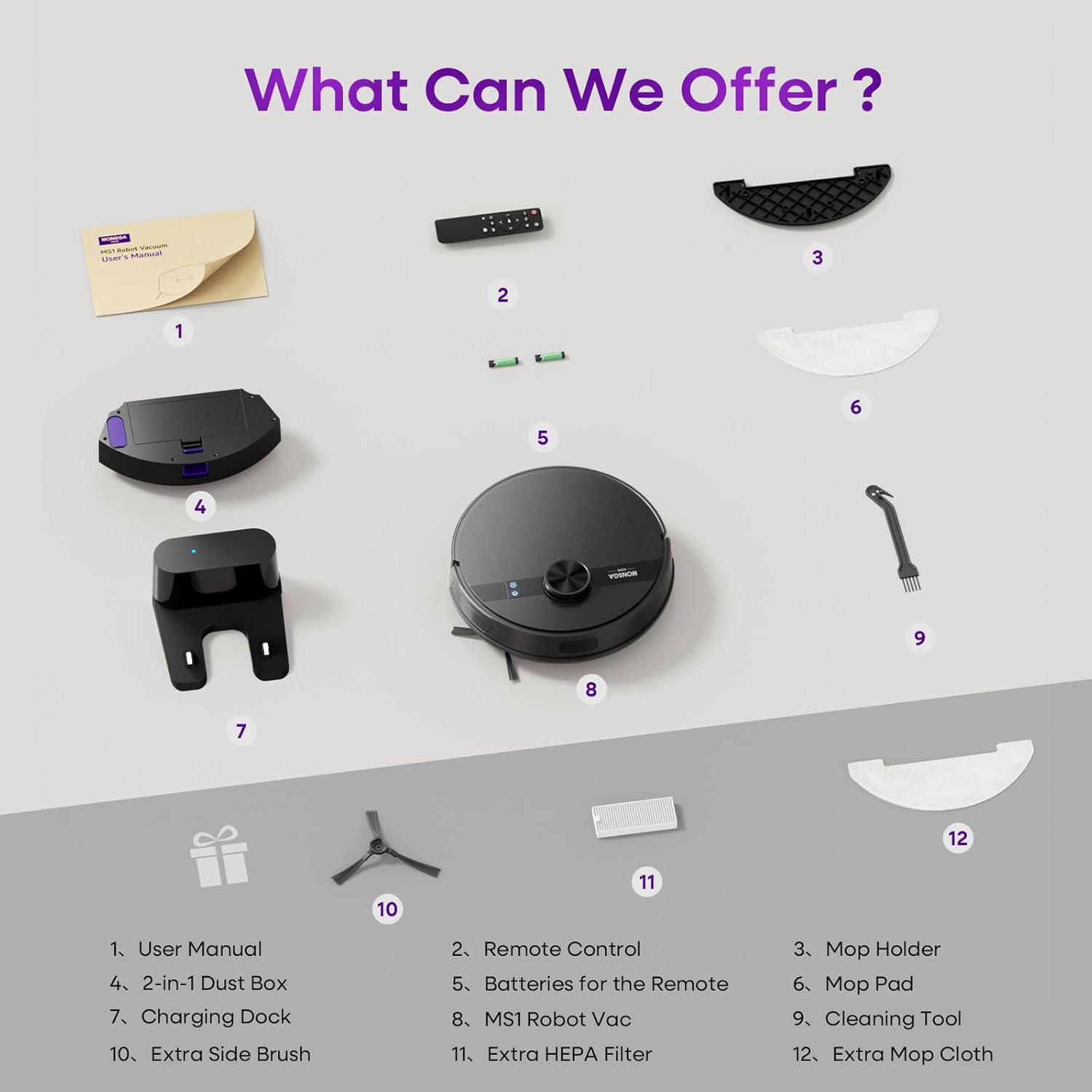
Figure 2: All components included in the MONSGA MS1 package.
- MS1 MAX Robot Vacuum (1)
- 2-in-1 Dustbox (1)
- Mop Holder (1)
- Mop Cloth (2) (One pre-installed, one extra)
- Remote Control (1)
- AAA Batteries (2)
- User Manual (1)
- Extra Accessories (HEPA Filter x1, Mop Cloth x1)
- Charging Dock (1)
- Cleaning Tool (1)
- Extra Side Brush (1)
3. Setup
3.1 Unpacking and Initial Preparation
- Remove the robot vacuum and all accessories from the packaging.
- Remove any protective films or stickers from the robot and charging dock.
- Install the side brushes by pressing them onto the posts until they click into place.
- Ensure the 2-in-1 dustbin/water tank is correctly inserted into the robot.
3.2 Placing the Charging Dock
Place the charging dock against a wall in an open area. Ensure there is at least 0.5 meters (1.6 feet) of clear space on both sides and 1.5 meters (4.9 feet) in front of the dock for optimal navigation.

Figure 3: Recommended charging dock placement.
3.3 Initial Charging
Place the robot onto the charging dock. The indicator lights on the robot will illuminate to show it is charging. Fully charge the robot before its first use (approximately 4-5 hours).
4. Operating Instructions
4.1 Powering On/Off
Press and hold the power button on the robot for a few seconds to power it on or off. The indicator lights will confirm the status.
4.2 Smart LiDAR Navigation and Mapping
The MS1 uses advanced LiDAR navigation to scan and map your home in real-time. During its first cleaning cycle, it will create a detailed floor plan. This map allows for efficient, straight-line cleaning paths and avoids missed spots.

Figure 4: LiDAR navigation creating a precise home map.
The robot can store up to 5 different floor maps, making it suitable for multi-level homes. You can easily switch between maps using the mobile application.

Figure 5: The MS1 memorizes up to 5 maps for multi-floor cleaning.
4.3 Cleaning Modes and Suction Power
The MS1 offers 3-in-1 cleaning: sweeping, vacuuming, and mopping. It features a powerful 7000Pa suction with a 550W brushless motor operating at 19,500 RPM, effectively removing dirt, debris, and pet hair.
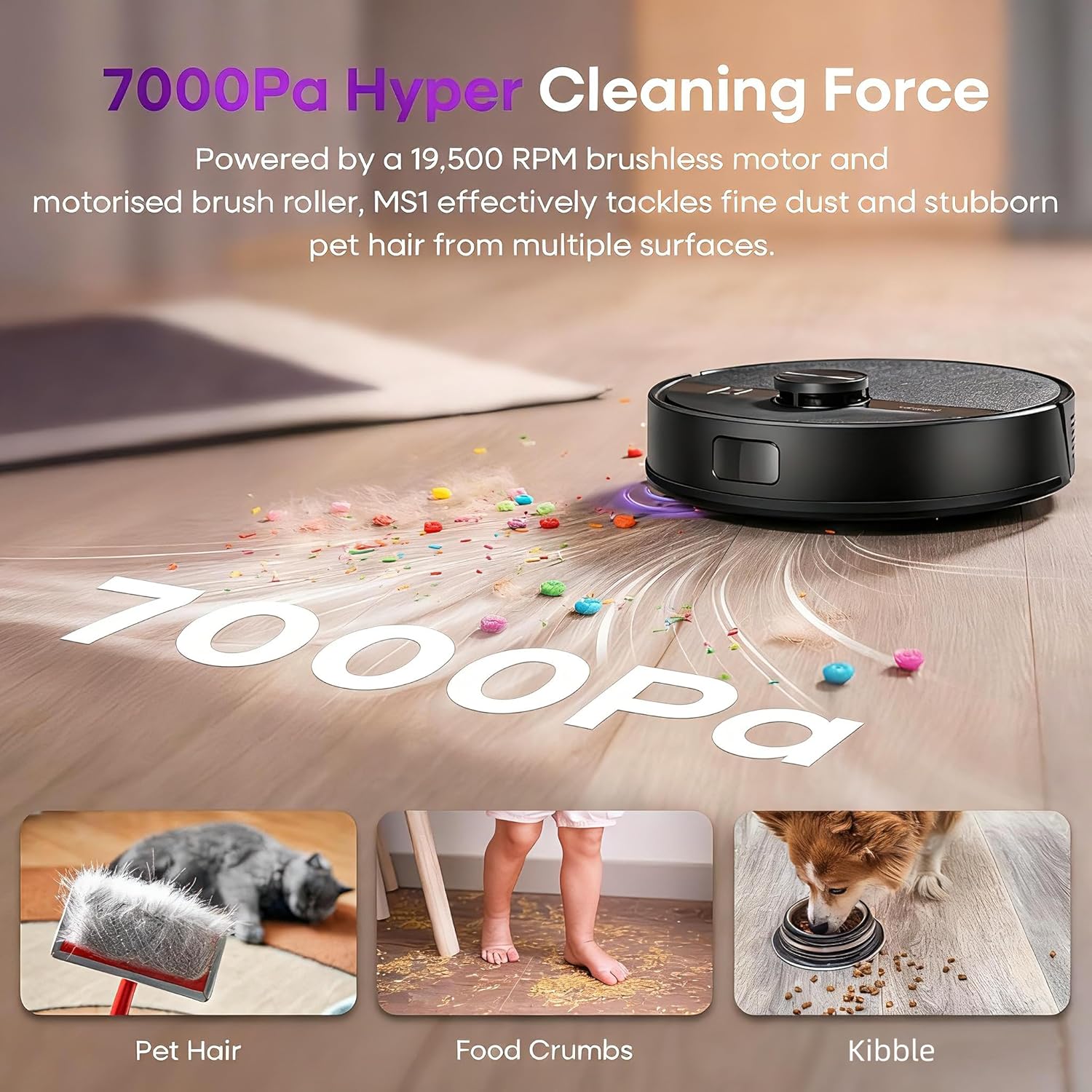
Figure 6: Powerful 7000Pa suction for effective cleaning.
Choose from 3 adjustable suction levels (ECO, Standard, MAX) and 3 water flow levels (Low, Medium, High) to customize cleaning for different floor types and messes. The V-shaped floating roller brush adapts to various surfaces and helps prevent tangles.

Figure 7: Adjustable suction and water flow settings.
Automatic Carpet Boost
The MS1 automatically detects carpets and increases suction power to maximum for a deeper clean, pulling embedded dirt, dust, and allergens from fibers. It can transition over obstacles up to 1 inch tall.

Figure 8: Automatic carpet boost for deep cleaning.
4.4 Control Methods
The MONSGA MS1 offers multiple convenient control options:
- Smart App: Schedule cleanings, select modes, track progress, and manage maps from anywhere.
- Voice Control: Connect to Amazon Alexa or Google Home for hands-free operation.
- Remote Control: Use the included physical remote for direct control without Wi-Fi.
- On-Device Button: A single tap on the top-mounted button initiates a quick clean.
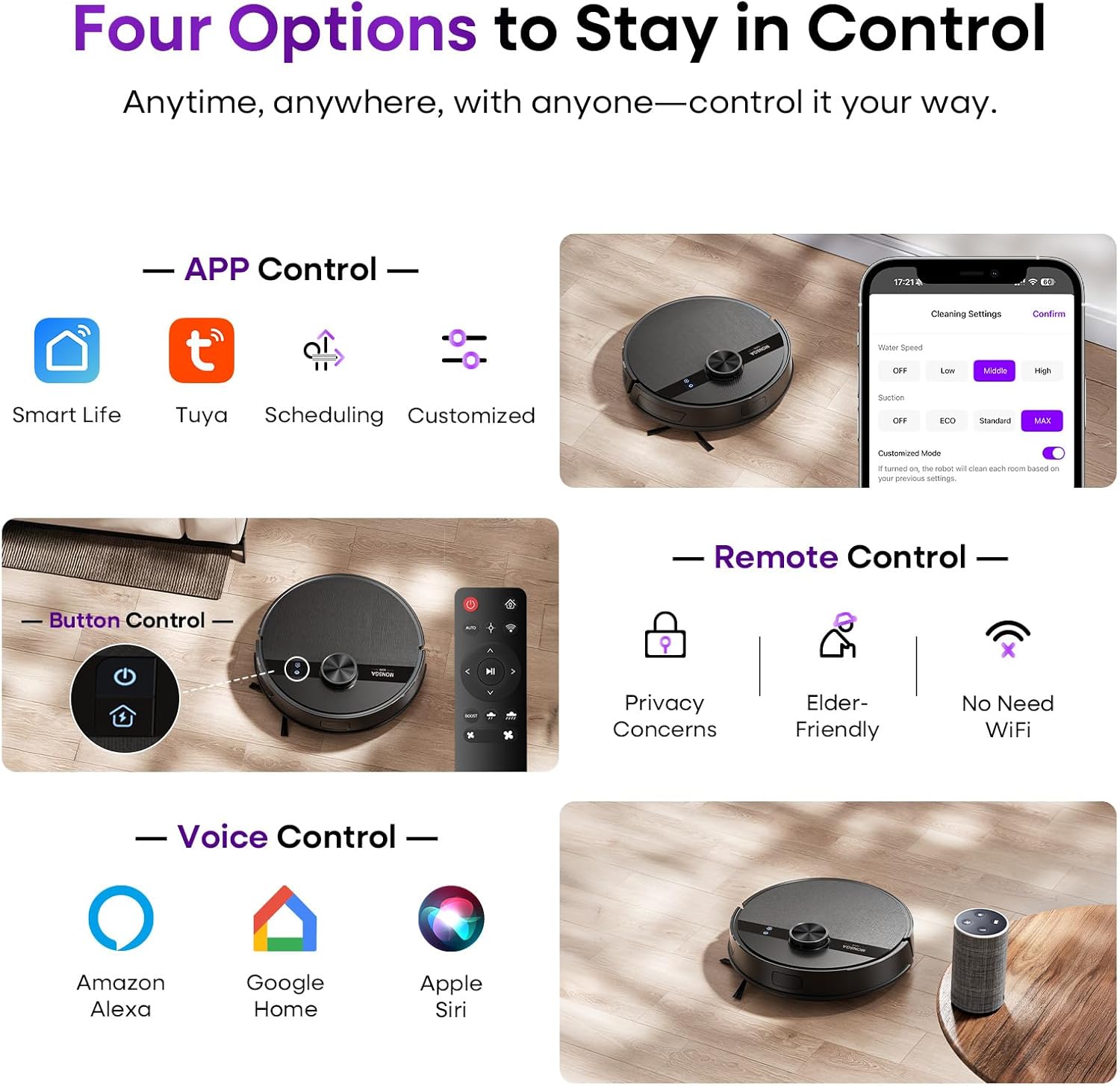
Figure 9: Multiple control options for user convenience.
4.5 Advanced App Features
The dedicated app (Smart Life or Tuya Smart) unlocks the full potential of your MS1:
- Customized Cleaning: Assign different cleaning modes (e.g., boost suction for kitchens, quiet mode for bedrooms) to individual rooms.
- No-Go Zones & Virtual Walls: Draw virtual boundaries on the map to prevent the robot from entering specific areas (e.g., pet bowls, delicate items, carpets during mopping).
- Scheduling: Set daily or weekly cleaning schedules.
- Real-Time Monitoring: Track the robot's cleaning path and status.

Figure 10: Customize cleaning modes for each room via the app.

Figure 11: Setting no-go zones to protect specific areas.
4.6 Battery and Auto-Recharge
The MS1 provides up to 180 minutes of continuous runtime, covering up to 2000 sqft on a single charge. When the battery level drops below 15%, the robot automatically returns to its charging dock. Once recharged, it resumes cleaning exactly where it left off.

Figure 12: Auto-recharge and resume functionality.
5. Maintenance
Regular maintenance ensures optimal performance and extends the lifespan of your robot vacuum.
5.1 Emptying the Dustbin and Cleaning Filters
The 340ml dustbin should be emptied after each cleaning cycle, especially if you have pets. The HEPA filters should be cleaned regularly and replaced every 3-6 months depending on usage.

Figure 13: Dustbin and filter maintenance.
5.2 Cleaning the Mop Cloth and Water Tank
The 270ml water tank should be refilled with clean water as needed. The mop cloth should be removed and cleaned after each mopping session. Replace the mop cloth when it shows signs of wear.

Figure 14: Water tank and mop cloth for mopping function.
5.3 Cleaning Brushes and Sensors
Regularly inspect and clean the main brush and side brushes to remove tangled hair or debris. Use the provided cleaning tool. Wipe the cliff sensors and charging contacts with a dry cloth to ensure proper function.
6. Troubleshooting
If you encounter any issues with your MONSGA MS1, please refer to the following common solutions:
| Problem | Possible Cause | Solution |
|---|---|---|
| Robot does not power on | Low battery; Power button not pressed long enough | Charge the robot; Press and hold the power button for 3-5 seconds |
| Robot gets stuck frequently | Obstacles (cables, small objects); Uneven surfaces | Clear the cleaning area; Use no-go zones in the app |
| Poor cleaning performance | Full dustbin; Clogged filters/brushes; Low suction setting | Empty dustbin; Clean/replace filters/brushes; Increase suction level |
| Robot does not mop effectively | Empty water tank; Dry mop cloth; Low water flow setting | Refill water tank; Wet mop cloth; Increase water flow level |
| App connection issues | Incorrect Wi-Fi password; Router too far; 5GHz Wi-Fi network | Ensure 2.4GHz Wi-Fi; Move robot closer to router; Re-pair device |
For further assistance, please contact MONSGA customer support.
7. Specifications
| Feature | Detail |
|---|---|
| Brand | MONSGA |
| Model Name | MS1 |
| Suction Power | 7000Pa |
| Navigation Type | 360° LiDAR Navigation |
| Runtime | Up to 180 minutes |
| Dustbin Capacity | 340ml |
| Water Tank Capacity | 270ml |
| Mapping Capability | Up to 5 editable maps |
| Control Methods | App (Smart Life/Tuya Smart), Push Button, Remote, Voice (Amazon Echo, Google Home) |
| Filter Type | HEPA Filters |
| Product Dimensions | 12.6"L x 12.6"W x 3.8"H |
| Item Weight | 9.64 pounds |
| Battery Type | 1 AAA batteries required (included for remote) |
8. Warranty and Support
Your MONSGA MS1 Robot Vacuum and Mop Combo is covered by a 2-year full warranty. MONSGA is committed to providing attentive after-sales service and professional technical support.
For any questions, troubleshooting, or warranty claims, please contact our customer support team. Real humans are available to assist you promptly.
Video 1: Official MONSGA MS1 LiDAR-Navi Robot Vacuum and Mop Combo overview. This video demonstrates the product's features and functionality.
You can also visit the MONSGA support page for additional resources and to activate your 2-year warranty.


