
Product Overview
The Polibi Full Size Platform Bed is a multi-functional furniture piece designed to maximize space and convenience in your bedroom. It features integrated storage, a built-in charging station, LED lighting, and an upholstered headboard, all within a sturdy frame that does not require a box spring.

Image: The Polibi Full Size Platform Bed in a bedroom setting, showcasing its integrated storage, desk, charging station, and LED headboard. A robot vacuum is visible on the rug in the foreground.
Safety Information
- Always follow assembly instructions carefully to ensure structural integrity.
- Do not exceed the maximum weight capacity of 550 lbs.
- Keep all electrical components (charging station, LED) away from liquids.
- Ensure all connections for the charging station are secure before use.
- Regularly check all bolts and screws to ensure they remain tight.
- Keep small parts out of reach of children during assembly.
Setup and Assembly
Assembly of the Polibi Platform Bed is required. It is recommended to have at least two people for assembly. All necessary parts and a step-by-step manual are included. Pre-drilled holes and labeled parts facilitate the process.
Before You Begin:
- Unpack all components and verify against the parts list provided in the included manual.
- Clear a spacious area for assembly.
- Gather necessary tools (usually a screwdriver and Allen wrench are included or required).
Assembly Steps:
- Begin by assembling the main bed frame components, ensuring all connections are secure.
- Attach the upholstered headboard to the main frame.
- Install the 10 reinforced bed slats evenly across the frame.
- Assemble and integrate the storage shelves and the built-in desk structure.
- Connect the charging station and LED lighting components according to the wiring diagram.
- Insert the two under-bed drawers into their designated slots.
- Once assembled, ensure the bed is stable and all parts are tightly fastened.

Image: An underside view of the Polibi bed frame, showing the wooden slats and the structure for the under-bed drawers, illustrating the robust construction.
Operating Instructions
Using the Charging Station:
The integrated charging station features 2 standard AC outlets and 2 USB ports. To use, simply plug the bed's power cord into a wall outlet. You can then plug in your electronic devices directly into the outlets or USB ports located within the storage shelves.

Image: A detailed view highlighting the charging station with two AC outlets and two USB ports, along with the LED light strip, integrated into the bed's headboard shelving.
LED Lighting Operation:
The LED lighting strip is located along the headboard. It provides ambient illumination. Refer to the specific controls (button or remote, if included in the physical manual) for turning the lights on/off and adjusting settings.
Utilizing Storage and Desk:
- Storage Shelves: The bed includes 8 built-in storage shelves around the headboard and side. These are ideal for books, decor, and personal items.
- Under-bed Drawers: Two large drawers are located under the bed, perfect for storing bedding, clothes, or toys. Pull them out gently using the integrated handles.
- Built-in Desk: A convenient desk/shelf is integrated at the end of the bed. This can be used for working, studying, or as an additional display area.
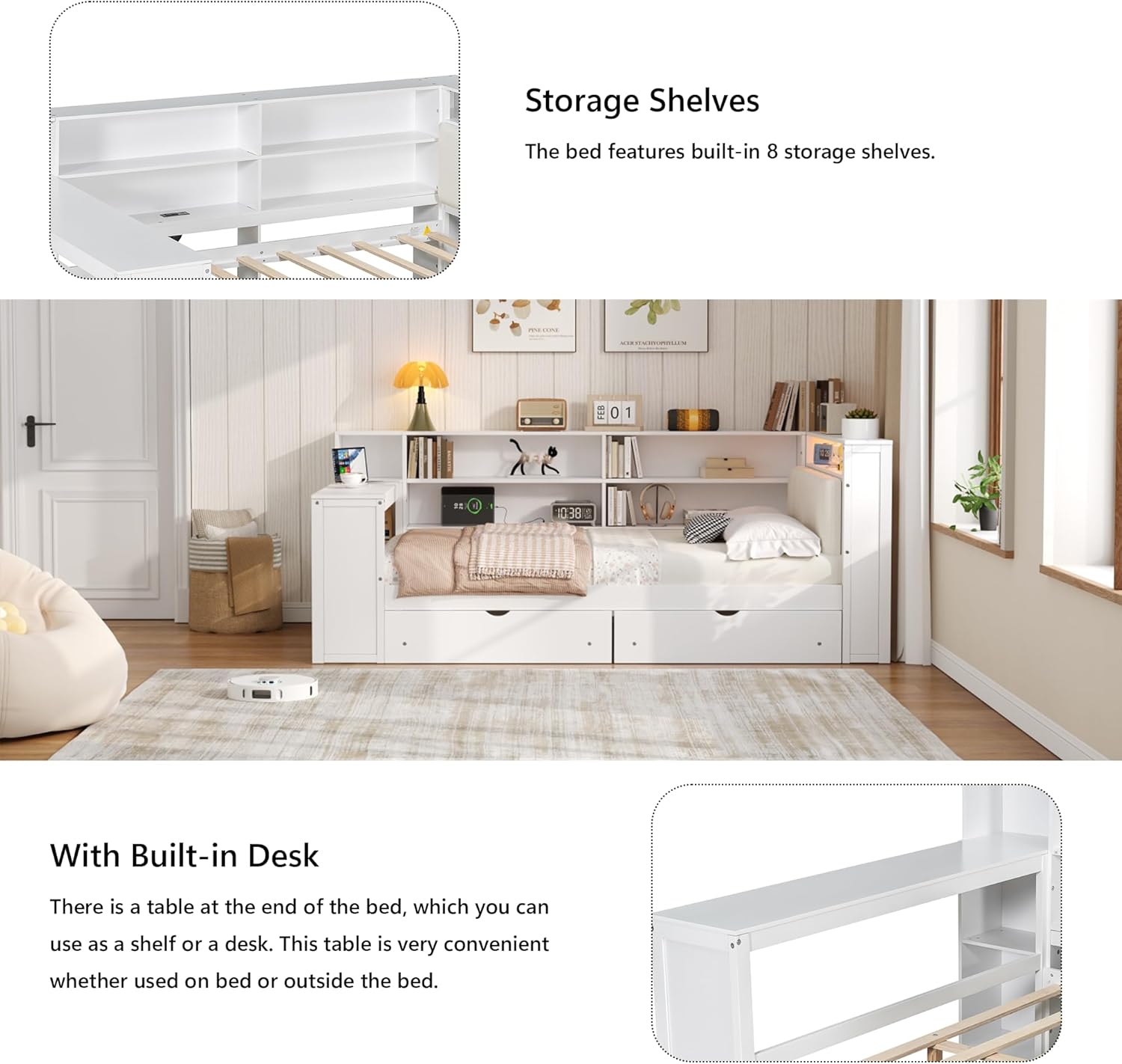
Image: A view of the Polibi bed from the side, clearly showing the multiple storage shelves integrated into the headboard and side structure, as well as the built-in desk at the foot of the bed.
Maintenance and Care
- Cleaning: Wipe down wooden and MDF surfaces with a soft, damp cloth. For the upholstered headboard, use a fabric cleaner suitable for the material, or a damp cloth with mild soap. Avoid harsh chemicals.
- Structural Integrity: Periodically check all screws, bolts, and connections to ensure they are tight. Re-tighten as necessary to maintain stability.
- Electrical Components: Ensure the charging station and LED wiring are free from damage. Do not attempt to repair electrical components yourself; contact qualified personnel if issues arise.
- Drawer Maintenance: Keep drawer glides clean and free of debris for smooth operation.
Troubleshooting
| Problem | Possible Cause | Solution |
|---|---|---|
| Bed feels wobbly or unstable. | Loose screws or bolts. | Inspect all connections and tighten any loose hardware. Ensure all parts are correctly aligned. |
| Charging station not working. | Not plugged into wall outlet; loose internal connection; power outage. | Ensure the bed's power cord is securely plugged into a functioning wall outlet. Check for any loose internal wiring connections (if accessible and safe). Test the outlet with another device. |
| LED lights not illuminating. | Power issue; faulty LED strip; control malfunction. | Verify the charging station is powered on. Check the LED strip's connection. If equipped with a remote, ensure batteries are functional. |
| Drawers are difficult to open/close. | Debris in glides; misaligned drawers; overloaded. | Clear any debris from the drawer glides. Ensure drawers are correctly seated on their tracks. Reduce the weight of contents if overloaded. |
Specifications
| Feature | Detail |
|---|---|
| Model Number | B0FHQDSDK7 |
| Size | Full |
| Product Dimensions | 98.4"L x 65.3"W x 40.4"H |
| Color | White+beige Cushion |
| Material | Solid Pine Wood + MDF frame |
| Weight Capacity | 550 lbs |
| Charging Station | 2 AC Outlets, 2 USB Ports |
| Storage | 8 Built-in Shelves, 2 Under-bed Drawers |
| Headboard | Upholstered, Padded with high-density foam, with LED lighting |
| Box Spring Required | No |
| Assembly Required | Yes |
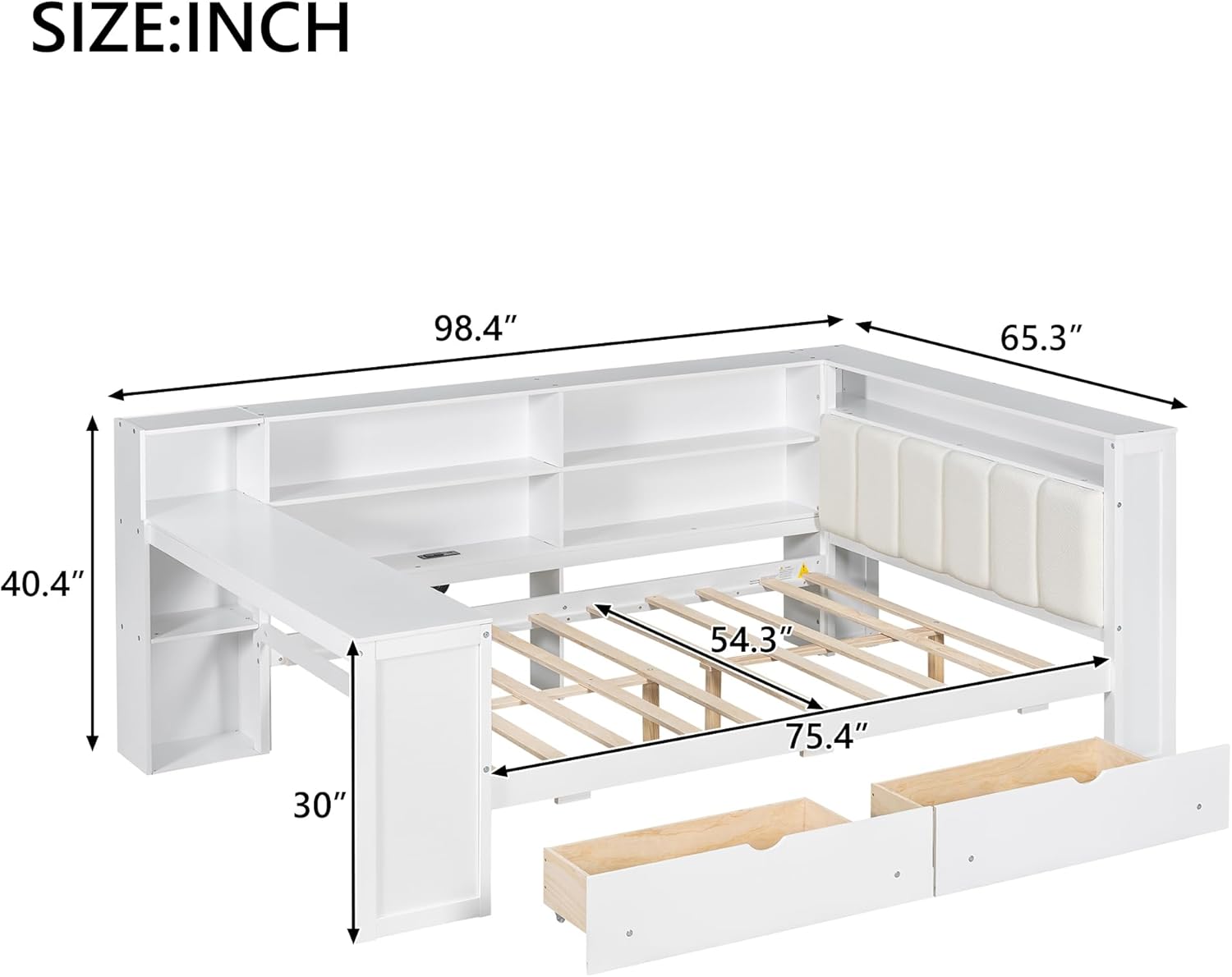
Image: A technical drawing illustrating the key dimensions of the Polibi Full Size Platform Bed, including length, width, height, and internal mattress dimensions.
Contact and Support
For any questions, missing parts, or assistance with assembly, please contact Polibi customer support. Refer to the contact information provided in your product packaging or visit the official Polibi store on Amazon:


