
1. Introduction
Thank you for choosing the Baseus Enercore 100W USB C Charger. This compact and versatile charging solution is designed to provide efficient and fast power delivery for a wide range of devices, including laptops, tablets, and smartphones. Its innovative retractable cable and foldable plug enhance portability and reduce cable clutter, making it an ideal companion for travel and daily use. This manual provides essential information on product features, setup, operation, maintenance, and troubleshooting to ensure optimal performance and safety.
2. Product Overview
Key Features
- 3-in-1 Retractable Charger: Features 1 USB-C and 1 USB-A port, with a built-in retractable 100W USB-C cable, and a foldable plug.
- 100W Ultra Fast Charging: Supports full-speed 100W fast charging for laptops such as MacBook Pro/Air, charging a MacBook Pro 14" M4 Pro up to 54% in just 30 minutes when single connected.
- Smart Power Allocation: Automatically detects connected devices and intelligently allocates power to ensure optimal performance without overheating.
- Durable Built-in USB-C Cable: The 2.6ft (80cm) retractable cable has been tested for 30,000 pulls and stretches, ensuring long-term durability.
- Universal Compatibility: Compatible with mainstream laptops, mobile phones, iPads, Switch, Steam Deck, Rog Ally, DJI, and more.
What's in the Box
- 100W USB C Charger with built-in retractable cable
- User Manual
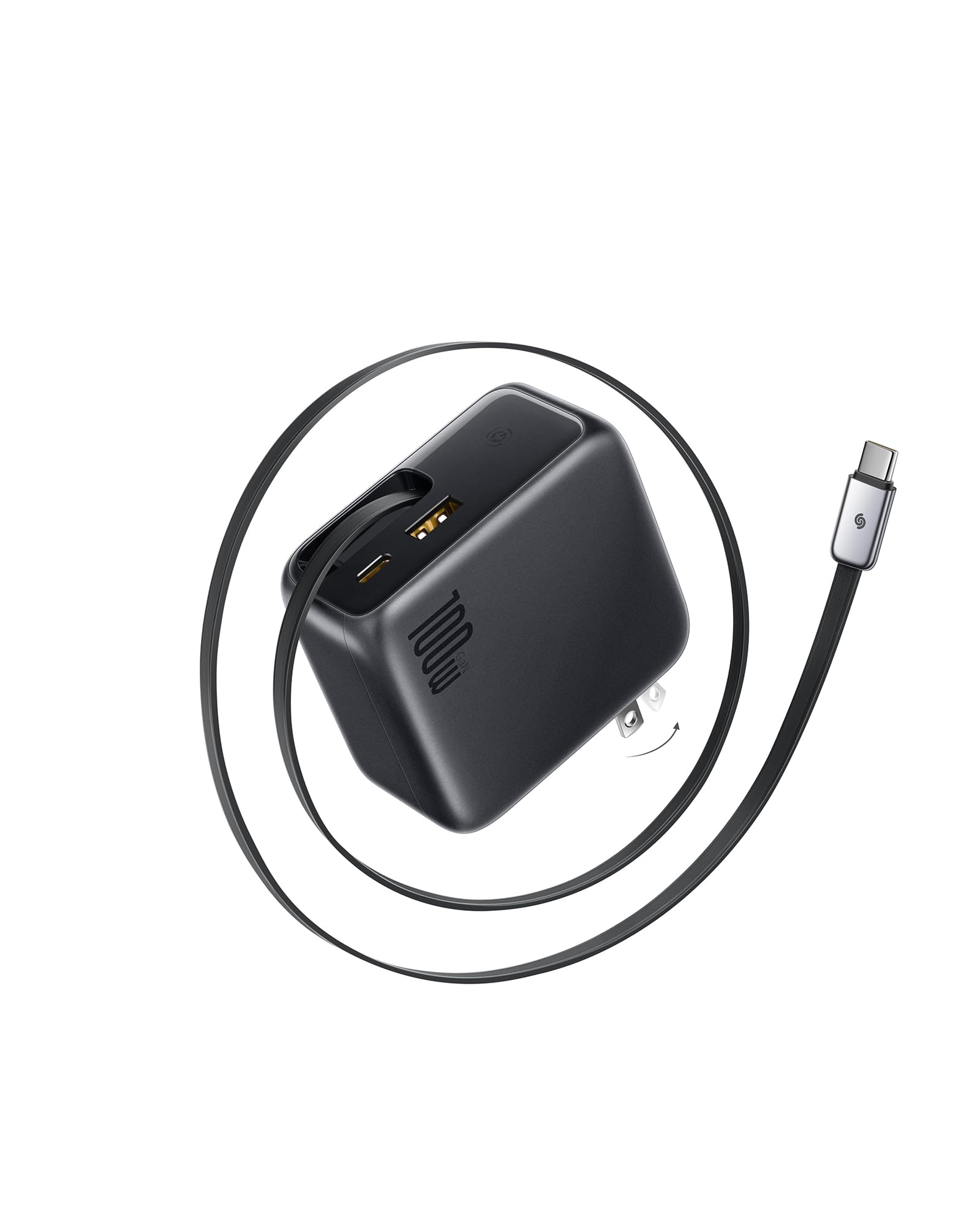
Image: Baseus Enercore 100W USB C Charger with its compact design and foldable plug.
3. Setup
Unfolding the Plug
- Locate the foldable prongs on the back of the charger.
- Gently pull the prongs outwards until they lock into place, ready to be inserted into a wall outlet.
Extending and Retracting the Built-in Cable
- To extend the built-in USB-C cable, gently pull the USB-C connector outwards from its housing. The cable will extend to your desired length (up to 2.6ft / 80cm).
- To retract the cable, pull the USB-C connector slightly further out, then release it. The cable will automatically retract back into the charger.

Image: Illustration of the retractable cable mechanism, showing how to pull and retract the cable.
Connecting to a Power Outlet
- Ensure the foldable plug is fully extended.
- Insert the charger firmly into a standard wall outlet.
4. Operating Instructions
Charging Devices
The Baseus Enercore 100W charger offers multiple ports for simultaneous charging:
- Built-in Retractable USB-C Cable: Provides up to 100W output for compatible devices.
- USB-C Port (USB-C1): Provides up to 100W output for compatible devices.
- USB-A Port (USB-A1): Provides up to 22.5W output for compatible devices.
The charger features Smart Power Allocation, which automatically detects connected devices and distributes power optimally. For maximum charging speed on a single device, use the built-in USB-C cable or the dedicated USB-C1 port.

Image: The Baseus Enercore 100W charger simultaneously charging two MacBook Air laptops.
Charging Scenarios
The charger intelligently adjusts power output based on the number and type of connected devices:
- Single Port Usage:
USB-C1 Output: 100W Max.
USB-C2 Output (built-in cable): 100W Max.
USB-A Output: 22.5W Max. - Two Ports Usage:
USB-C1 + USB-A Output: 87.5W Max.
USB-C1 + USB-C2 Output: 100W Max.
USB-A + USB-C2 Output: 87.5W Max. - Three Ports Usage:

USB-C1 + USB-C2 + USB-A Output: 97.5W Max.
Video: A user demonstrates the unboxing, foldable plug, and retractable cable functionality of the Baseus Enercore charger, showcasing its ease of use and compact design for travel.
5. Maintenance
- Cleaning: Use a soft, dry cloth to clean the charger. Avoid using liquid cleaners or aerosols.
- Storage: When not in use, ensure the foldable plug is retracted and the built-in cable is fully stored within the charger to prevent damage. Store in a cool, dry place.
- Cable Care: Avoid excessive force when extending or retracting the cable. Do not yank the cable or allow it to snap back forcefully, as this may damage the internal mechanism.
6. Troubleshooting
- Device Not Charging:
- Ensure the charger is securely plugged into a live power outlet.
- Verify that the charging cable is properly connected to both the charger and your device.
- Check if your device is compatible with the charger's output specifications.
- Try using a different port or cable to isolate the issue.
- Slow Charging:
- Ensure your device supports fast charging and that you are using a compatible cable.
- When multiple devices are connected, the power is allocated, which may result in slower charging for individual devices. Disconnect other devices for maximum speed.
- Check your device's charging requirements; some devices may require specific power delivery profiles.
- Charger Overheating:
- The charger has a triple-layer cooling system. If it feels excessively hot, disconnect it immediately.
- Ensure adequate ventilation around the charger. Do not cover it or use it in enclosed spaces.
- Reduce the number of devices being charged simultaneously.
7. Specifications
| Feature | Detail |
|---|---|
| Model Number | E0120N |
| Package Dimensions | 5.31 x 3.39 x 1.73 inches |
| Item Weight | 12.3 ounces |
| Connectivity Technologies | USB |
| Special Features | Built-in Retractable Cable, Fast Charging, Foldable Plug, Multi Device Charging, Travel |
| Color | Black |
| Connector Type | USB Type A, USB Type C |
| Input Voltage | 240 Volts |
| Amperage | 5 Amps |
| Total USB Ports | 3 |
8. Safety Information
- Do not expose the charger to liquids, extreme temperatures, or direct sunlight.
- Avoid dropping or subjecting the charger to strong impacts.
- Do not attempt to disassemble, repair, or modify the charger. This will void the warranty and may cause safety hazards.
- Keep out of reach of children.
- Use only with compatible devices and cables.
- Unplug the charger during lightning storms or when unused for long periods.
9. Warranty and Support
For warranty information and customer support, please refer to the official Baseus website or contact their customer service. The included User Manual also contains detailed warranty terms and contact information.


