1. Introduction
This manual provides detailed instructions for the installation, operation, and maintenance of your AWESAFE 1 DIN Car Radio. This universal car radio features a 6.86-inch touch screen, wireless Apple CarPlay, and Android Auto compatibility, Bluetooth, FM radio, USB connectivity, and includes a rear camera. Please read this manual thoroughly before use to ensure proper operation and to prevent damage.
2. Safety Information
- Professional Installation Recommended: Due to the complexity of car electrical systems, professional installation is highly recommended to avoid damage to the unit or your vehicle.
- Power Adapter: Always use the included power adapter to prevent issues such as vehicle battery drain.
- Wiring: Ensure all wiring connections are correct and secure. Incorrect wiring can cause short circuits, power consumption issues, or other problems.
- Driving Safety: Do not operate the device in a way that distracts you from driving. Always prioritize road safety.
- Temperature: Avoid exposing the unit to extreme temperatures or direct sunlight for extended periods.
- Cleaning: Use a soft, dry cloth for cleaning. Do not use abrasive cleaners or solvents.
3. Package Contents
Verify that all items are present in the package:

Image: A general view of the AWESAFE 1 DIN Car Radio unit, representing the product and its typical components.
- AWESAFE 1 DIN Car Radio Unit (6.86-inch touch screen)
- Rear Camera and Connection Cables
- Power Connector Harness
- Installation Tools (screws, brackets)
- External Microphone
- Radio Removal Tools
- User Manual
4. Setup and Installation
4.1. Pre-Installation Considerations
This 1 DIN radio is designed to fit standard 1 DIN openings (180 x 50mm). The 6.86-inch screen may extend beyond the standard 1 DIN opening. In some vehicles, this larger screen might partially block air conditioning vents. Please consider this before installation.
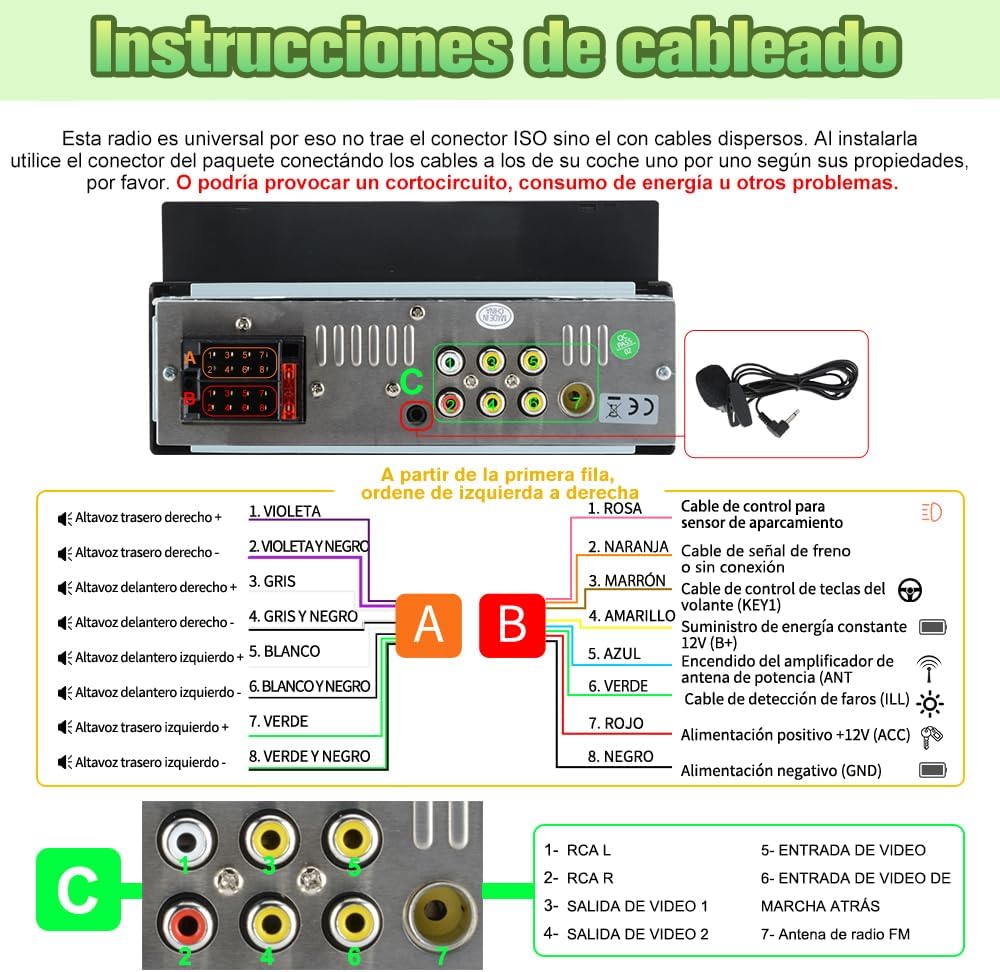
Image: Comparison showing a standard 1-DIN car radio slot before installation and the AWESAFE 6.86-inch touch screen unit installed. The image highlights the larger screen size compared to a traditional 1-DIN unit.
4.2. Wiring Instructions
The radio does not come with a pre-connected ISO connector. You must use the included connector and connect the wires one by one according to their properties. Incorrect wiring can lead to short circuits, excessive power consumption, or other malfunctions.

Image: Detailed wiring diagram for the AWESAFE car radio. It shows the rear panel connections, including speaker outputs (Violet, Violet/Black, Gray, Gray/Black, White, White/Black, Green, Green/Black), power and control wires (Red for ACC, Orange for Brake, Brown for Steering Wheel Control KEY1/KEY2, Yellow for Constant 12V, Blue for Power Antenna/Amplifier, Green for Reverse Detection, Red for ACC, Black for Ground), and RCA/Video inputs/outputs.
Key Wiring Connections:
- Power (Yellow): Constant 12V supply (B+).
- Ignition (Red): ACC (Accessory) power, switched with ignition.
- Ground (Black): Connect to vehicle chassis ground.
- Steering Wheel Control (Brown - KEY1/KEY2): Connect to your vehicle's steering wheel control wires. Manual configuration may be required.
- Reverse Detection (Green): Connect to the reverse light signal wire for automatic rear camera activation.
- Antenna/Amplifier (Blue): Power output for automatic antenna or external amplifier.
- Speaker Wires: Connect according to polarity (e.g., Violet/Violet-Black for Right Rear Speaker).
- Rear Camera Input: Connect the video output from the included rear camera.
Important: Ensure the included power adapter is used to prevent vehicle battery consumption issues.
5. Operating Instructions
5.1. Power On/Off and Basic Controls
Press the physical volume knob to power on or off the unit. Rotate the knob to adjust the volume. The touch screen provides intuitive access to all functions.
5.2. CarPlay and Android Auto
The unit supports both wireless and wired CarPlay and Android Auto. This allows for safe and connected driving by accessing navigation, music, calls, and messages via voice control (Siri or Google Assistant).

Image: Screenshots of the unit's display showing both Apple CarPlay and Android Auto interfaces. It illustrates how to connect via USB for wired connection and mentions wireless compatibility. Note that some Android phone brands may not be fully compatible with Android Auto.
- Wireless Connection: Connect your smartphone via Bluetooth for wireless CarPlay or Android Auto.
- Wired Connection: Use your phone's original USB data cable to connect for wired CarPlay or Android Auto.
- Note: Some Android phone models may have compatibility issues with Android Auto.
5.3. Bluetooth Connectivity
Connect your smartphone via Bluetooth for hands-free calling and audio streaming. The unit includes a built-in microphone and supports an external microphone for clear communication.

Image: The top part shows the Bluetooth music playback interface, displaying song title and artist. The bottom part illustrates the steering wheel control settings menu, where users can configure buttons for functions like volume, track skip, and mute. It also shows the KEY1 cable for connection.
- Pairing: Navigate to the Bluetooth settings on the unit and your phone to pair.
- Hands-free Calls: Make and receive calls directly from the unit.
- Audio Streaming: Play music from your phone through the car's speakers.
- Note: If CarPlay/Android Auto is connected via Bluetooth, the dedicated Bluetooth page may not be accessible.
5.4. Steering Wheel Controls
The radio supports steering wheel controls for convenient operation. Ensure the KEY1/KEY2 cables are correctly connected during installation. The steering wheel control function must be configured manually through the unit's settings. This feature is for cars with control cables, not those requiring a CANbus adapter.
5.5. FM Radio
Enjoy your favorite radio stations. The unit requires the vehicle's original radio antenna for stable signal reception. Currently, only station frequencies are displayed, not station names.

Image: The top section displays the FM radio interface with frequency tuning and preset options. The bottom section highlights the illuminated buttons, a Type-C port, and a USB port. The Type-C port is for charging only, while the USB port supports data transfer for media playback.
5.6. USB and Type-C Ports
- USB Port: Connect a USB flash drive to play audio or video files.
- Type-C Port: This port is for charging mobile phones only and does not support data transfer.
5.7. DSP Surround Sound
Utilize the Digital Sound Processing (DSP) technology to customize your audio experience. Choose from various preset modes such as Rock, Pop, Jazz, or Classic to match your listening preferences.
5.8. Rear Camera Functionality
The included rear camera automatically activates when the vehicle is put into reverse gear, providing a clear view for safer parking and maneuvering.
6. Maintenance
- Screen Cleaning: Use a soft, lint-free cloth to gently wipe the touch screen. For stubborn smudges, slightly dampen the cloth with water or a screen-safe cleaner. Avoid harsh chemicals.
- General Cleaning: Keep the unit free from dust and debris. Use a dry cloth to wipe the exterior.
- Software Updates: Check the manufacturer's website periodically for any available firmware updates to ensure optimal performance and new features.
- Avoid Liquids: Do not allow liquids to enter the unit, as this can cause severe damage.
7. Troubleshooting
| Problem | Possible Cause | Solution |
|---|---|---|
| Unit does not power on. |
|
|
| No sound or distorted audio. |
|
|
| CarPlay/Android Auto not connecting. |
|
|
| Rear camera not displaying. |
|
|
| Steering wheel controls not working. |
|
|
8. Specifications
| Brand | AWESAFE |
| Model Number | 759973261306 |
| Screen Size | 6.86 inches |
| DIN Size | 1 DIN (Standard chassis: 180 x 50mm) |
| Connectivity Technology | Bluetooth, USB, Wi-Fi (for CarPlay/Android Auto) |
| Special Features | Wireless CarPlay/Android Auto, DSP Sound, Rear Camera Support, Steering Wheel Control Support |
| Compatible Devices | Smartphone |
| Number of Channels | 6 (Audio Output) |
| Product Dimensions (Shipping) | 20.3 x 13.2 x 11.7 cm; 830 grams |
| UPC | 759973261306 |
9. Warranty and Support
AWESAFE products come with a standard manufacturer's warranty. For specific warranty terms and conditions, please refer to the warranty card included in your package or visit the official AWESAFE website.
For technical support, troubleshooting assistance, or inquiries regarding parts and service, please contact AWESAFE customer service through their official channels. Contact information can typically be found on the product packaging or the official website.
Please retain your proof of purchase for warranty claims.


