
1. Introduction
Thank you for choosing the SUNPOW Professional Metal Detector OT-MD14. This device is designed for precise metal detection, offering advanced features for both beginners and experienced treasure hunters. Please read this manual thoroughly before operating the detector to ensure proper use and optimal performance.
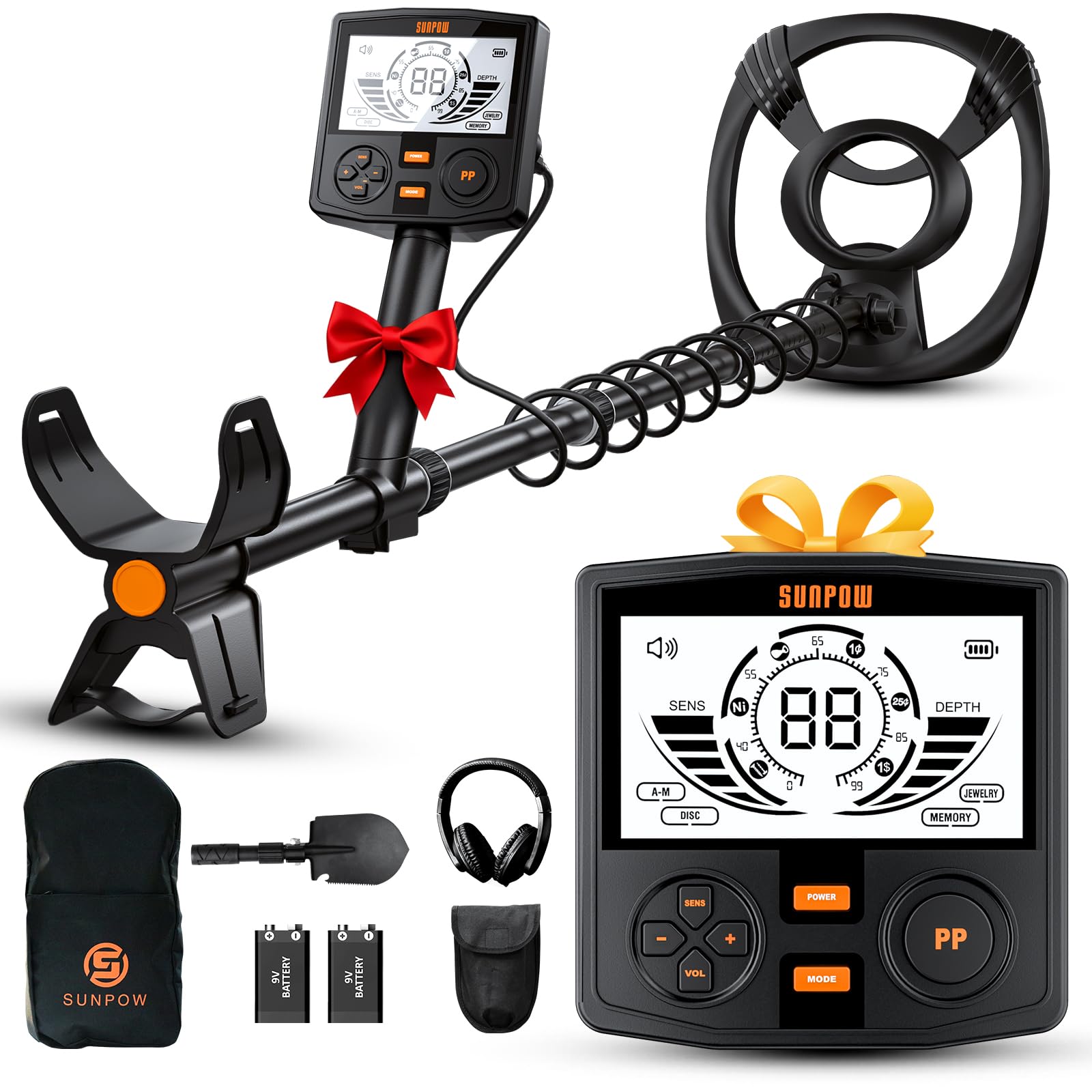
Image 1.1: The SUNPOW OT-MD14 Professional Metal Detector, showcasing its main components and design.
2. Product Overview
Key Features:
- High Precision Detection: Equipped with an advanced DSP chip for accurate target identification.
- Large Backlit LCD Screen: A 2X larger display enhances visibility and control, especially in low-light conditions.
- Waterproof Search Coil: The 30 cm (12-inch) IP68-rated search coil allows for detection in various weather conditions and shallow water. (Note: The control box is not waterproof.)
- 5 Detection Modes: Includes All Metal, Disc, Jewelry, Memory, and Pinpoint modes for versatile searching.
- Adjustable Length: The detector's shaft is adjustable from 48 cm to 150 cm (approximately 18.9 to 59 inches) for comfortable use by different individuals and compact portability.
- Durable Construction: Features a robust helical structure and anodized finish for enhanced stability and longevity.

Image 2.1: Close-up of the control panel, highlighting the backlit LCD screen and button layout for an ultimate control experience.
3. Setup and Assembly
The SUNPOW OT-MD14 metal detector is designed for quick and easy assembly. Follow these steps to set up your device:
- Attach the Search Coil: Secure the search coil to the lower stem using the provided bolt and nut. Ensure it is firmly attached but allows for slight angle adjustment.
- Connect the Lower and Middle Stems: Insert the lower stem into the middle stem. The robust helical structure ensures stability.
- Connect the Upper Stem and Control Box: Attach the middle stem to the upper stem, which houses the control box and armrest. Use the quick-lock design for secure fastening.
- Adjust Length: Adjust the overall length of the detector from 48 cm to 150 cm (18.9 to 59 inches) by extending or retracting the shaft sections. Lock the sections in place using the quick-lock mechanisms for a comfortable operating position.
- Install Batteries: The detector requires 1 Lithium-polymer battery (included). Ensure it is correctly installed in the battery compartment, typically located on the control box.
- Wrap Cable: Carefully wrap the search coil cable around the stem, ensuring it is not too tight or loose, and plug it into the control box.

Image 3.1: Diagram illustrating the assembly process with its durable helical structure and convenient locking design for quick setup.

Image 3.2: Details of the adjustable shaft, customizable grip, and control box position for ergonomic use.
4. Operating Instructions
4.1 Power On/Off
- To power on, press and hold the POWER button.
- To power off, press and hold the POWER button again until the display turns off.
4.2 LCD Display
The large backlit LCD screen provides essential information during detection:
- Target ID: Displays a numerical value (0-99) to indicate the probable type of metal detected.
- Depth Indicator: Estimates the depth of the detected target.
- Sensitivity Level: Shows the current sensitivity setting.
- Battery Indicator: Displays the remaining battery life.
- Mode Indicator: Shows the currently active detection mode.

Image 4.1: The LCD display showing numerical target value indications for different metal types (e.g., Iron, Nickel, Copper, Silver).
4.3 Detection Modes
Press the MODE button to cycle through the 5 available detection modes:
- All Metal Mode: Detects all types of metal. The detector will alert you whenever it detects any metal.
- Disc Mode (Discrimination): Allows you to eliminate unwanted metal targets sequentially. This mode helps filter out junk metals like iron.
- Jewelry Mode: Specifically tuned for finding jewelry, focusing on non-ferrous metals.
- Memory Mode: Allows you to explore only memorized metals, useful for repeatedly searching for specific target types.
- Pinpoint (PP) Mode: Press the PP button to activate. This mode helps you precisely locate the exact position of a detected target, making recovery easier.

Image 4.2: Visual representation of the five detection modes: All Metal, Disc, Jewelry, Memory, and Pinpoint.
4.4 Sensitivity and Volume Adjustment
- Use the SENS buttons (+/-) to adjust the detector's sensitivity. Higher sensitivity increases detection depth but may also increase false signals.
- Use the VOL buttons (+/-) to adjust the audio volume of the signals.
5. Maintenance
Proper maintenance ensures the longevity and performance of your metal detector.
- Cleaning the Search Coil: The 30 cm search coil is IP68 waterproof. After use, especially in wet or sandy conditions, rinse it with fresh water and wipe it dry.
- Control Box Care: The control box is NOT waterproof. Avoid exposing it to water, heavy rain, or excessive moisture. Clean it with a soft, damp cloth.
- Battery Care: Remove the battery if the detector will not be used for an extended period to prevent leakage. Store batteries in a cool, dry place.
- Storage: Store the metal detector in a clean, dry environment. If storing for a long time, consider disassembling it for compact storage.

Image 5.1: The 12-inch waterproof search coil (IP68 rated), suitable for use in various environments including shallow water.
6. Troubleshooting
| Problem | Possible Cause | Solution |
|---|---|---|
| Detector does not power on. | Low or dead battery; incorrectly installed battery. | Charge or replace the battery. Ensure battery is installed with correct polarity. |
| Constant false signals or chattering. | High sensitivity setting; electromagnetic interference; mineralized ground. | Reduce sensitivity. Move away from power lines or other electronic devices. Try using Disc mode. |
| No detection or weak signals. | Low sensitivity setting; search coil not properly connected; target too deep. | Increase sensitivity. Check search coil cable connection. Sweep slower and closer to the ground. |
| Inaccurate target identification. | Interference; target size/orientation; multiple targets. | Use Pinpoint mode for precise location. Try different sweep angles. Adjust discrimination settings. |
7. Specifications
| Feature | Specification |
|---|---|
| Model Number | OT-MD14 |
| Brand | SUNPOW |
| Power Source | Battery Powered (1 Lithium-polymer battery included) |
| Search Coil Size | 30.5 cm (12 inches) |
| Search Coil Waterproof Rating | IP68 |
| Display Type | LCD (Backlit) |
| Adjustable Length | 48 cm - 150 cm (approx. 18.9 - 59 inches) |
| Product Dimensions (L x W x H) | 44 x 28.5 x 17 cm |
| Item Weight | 1 Kilogram |
| Material | Metal |
| Recommended Uses | Treasure hunting, beach combing, outdoor use |
| UPC | 722891898848 |
8. Warranty and Support
For warranty information, technical support, or any questions regarding your SUNPOW Professional Metal Detector OT-MD14, please refer to the product packaging or contact the seller/manufacturer directly. Keep your purchase receipt as proof of purchase for warranty claims.


