
1. Introduction
Thank you for choosing the Deedlite Oryzom Battery Handheld Vacuum Cleaner. This manual provides essential information for the safe and efficient operation, maintenance, and troubleshooting of your device. Please read it thoroughly before first use and keep it for future reference.
2. Important Safety Instructions
To reduce the risk of fire, electric shock, or injury, please observe the following safety precautions:
- Read all instructions before using the appliance.
- Do not use outdoors or on wet surfaces.
- Do not allow to be used as a toy. Close attention is necessary when used by or near children.
- Use only as described in this manual. Use only manufacturer's recommended attachments.
- Do not use with damaged cord or plug. If appliance is not working as it should, has been dropped, damaged, left outdoors, or dropped into water, return it to a service center.
- Do not pull or carry by cord, use cord as a handle, close a door on cord, or pull cord around sharp edges or corners. Do not run appliance over cord. Keep cord away from heated surfaces.
- Do not unplug by pulling on cord. To unplug, grasp the plug, not the cord.
- Do not handle plug or appliance with wet hands.
- Do not put any object into openings. Do not use with any opening blocked; keep free of dust, lint, hair, and anything that may reduce air flow.
- Keep hair, loose clothing, fingers, and all parts of body away from openings and moving parts.
- Do not pick up anything that is burning or smoking, such as cigarettes, matches, or hot ashes.
- Do not use to pick up flammable or combustible liquids, such as gasoline, or use in areas where they may be present.
- Do not pick up toxic material, such as chlorine bleach, ammonia, or drain cleaner.
- Do not use without dust bag and/or filters in place.
- Turn off all controls before unplugging.
- Use extra care when cleaning on stairs.
- Do not charge the unit in humid or high-temperature places.
Warning: Please keep the product properly and do not use or store the product in humid or high temperature places.

Image: A label showing various compliance marks (Recycle, RoHS, UKCA, CE, FC) and a warning symbol with text in multiple languages advising against storing the product in humid or high-temperature environments.
3. Package Contents
Please check the package for the following items:
- Deedlite Oryzom Handheld Vacuum Cleaner
- Furniture Brush
- Crevice Nozzle
- Extension Hose
- Turbo Brush
- Washable HEPA Filter (pre-installed or separate)
- Type-C Charging Cable
- Wall Mount
- User Manual
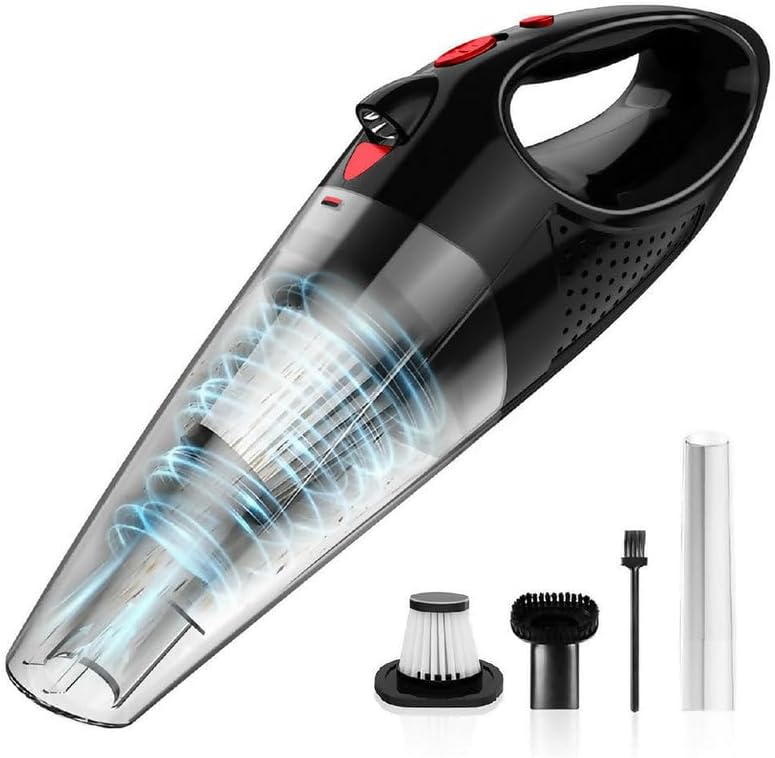
Image: The main product image showing the black handheld vacuum cleaner along with its included accessories: a brush attachment, a crevice tool, and a HEPA filter.
4. Product Overview
Familiarize yourself with the components of your Oryzom handheld vacuum cleaner.
4.1 Main Unit
- Power Button: Turns the vacuum on/off and switches between power modes.
- Dust Container: Collects dust and debris. Transparent for easy monitoring.
- HEPA Filter: Filters fine dust and allergens. Washable for reuse.
- Charging Port: Type-C port for battery charging.
- LED Lighting: Illuminates the cleaning area for improved visibility.

Image: A person's hand holding the black Deedlite Oryzom handheld vacuum cleaner, demonstrating its portable and ergonomic design. Text overlays indicate "Compact" and "Comfortable".
4.2 Accessories
- Furniture Brush: Ideal for cleaning upholstery, car seats, and delicate surfaces.
- Crevice Nozzle: Designed for reaching tight spaces, corners, and crevices.
- Extension Hose: Provides extended reach for difficult-to-access areas.
- Turbo Brush: Effective for removing stubborn dirt and pet hair from carpets and fabrics.

Image: A composite image showing the Deedlite Oryzom vacuum cleaner with different attachments. One panel shows the vacuum with a brush attachment cleaning coffee beans, another shows a brush cleaning a sofa, and a third shows a crevice nozzle cleaning a tight corner.
5. Setup
5.1 Initial Charge
Before first use, fully charge the vacuum cleaner. Refer to the "Charging the Battery" section for detailed instructions.
5.2 Attaching Accessories
Select the appropriate accessory for your cleaning task. Align the accessory with the vacuum's suction inlet and push firmly until it clicks into place. To remove, pull the accessory away from the inlet.
5.3 Wall Mount Installation
The included wall mount allows for convenient storage and charging. Choose a suitable location near a power outlet. Mark the drilling points, drill holes, insert wall plugs (if necessary), and secure the mount with screws. Ensure the mount is securely fastened before hanging the vacuum cleaner.
6. Charging the Battery
- Ensure the vacuum cleaner is turned off.
- Connect the Type-C charging cable to the charging port on the vacuum cleaner.
- Plug the other end of the charging cable into a suitable USB power adapter (not included) or a powered USB port.
- The charging indicator light will illuminate to show that the device is charging.
- A full charge typically takes 3-5 hours. The indicator light will change or turn off once charging is complete.
- Disconnect the charging cable once fully charged.
Note: Do not charge the unit in humid or high-temperature environments.
7. Operating Instructions
7.1 Powering On/Off and Mode Selection
- Press the Power button once to turn on the vacuum cleaner in Eco mode.
- Press the Power button a second time to switch to Power mode for increased suction.
- Press the Power button a third time to turn off the vacuum cleaner.
The integrated LED lighting will activate automatically when the vacuum is turned on, providing illumination for the cleaning area.

Image: The Deedlite Oryzom handheld vacuum cleaner in action, showing its powerful suction cleaning debris from a flat surface. The image emphasizes its effective cleaning system.
7.2 Dry Vacuuming
Attach the desired accessory (e.g., crevice nozzle for tight spots, brush for upholstery, turbo brush for pet hair on carpets). Turn on the vacuum and move it slowly over the surface to be cleaned. The vacuum is effective on various surfaces including car seats, carpets, and stairs.
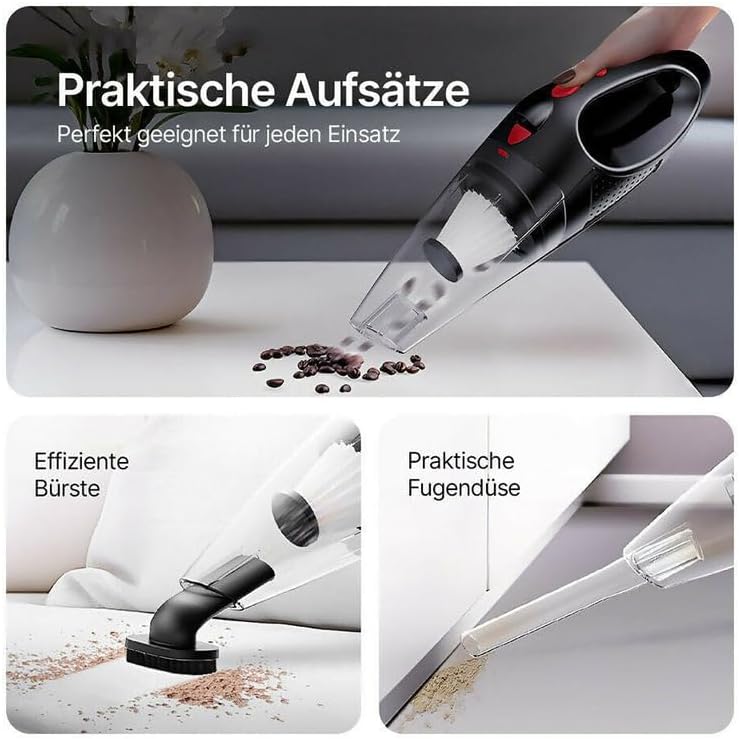
Image: The Deedlite Oryzom handheld vacuum cleaner with a brush attachment effectively cleaning up spilled coffee beans from a surface, demonstrating its dry vacuuming capability.
7.3 Wet Vacuuming
The Oryzom vacuum cleaner can pick up small amounts of liquid (up to 150 ml). Use caution when wet vacuuming. Do not immerse the vacuum in water. After wet vacuuming, immediately empty the dust container and clean the filter to prevent odors and mold growth.
Important: Ensure the dust container is emptied and cleaned after each wet use.
7.4 Noise Level
The vacuum operates at a noise level below 75 dB, designed for minimal disturbance during use.

Image: The Deedlite Oryzom handheld vacuum cleaner is shown operating near a small, sleeping puppy, with a graphic indicating a noise level of less than 75 dB, highlighting its quiet operation.
8. Maintenance
8.1 Emptying the Dust Container
For optimal suction performance, empty the 550ml dust container regularly, especially after each use or when it appears full. The one-button emptying mechanism simplifies this process.
- Ensure the vacuum cleaner is turned off.
- Locate the dust container release button (usually near the nozzle).
- Press the button to detach the dust container.
- Hold the container over a waste bin and open its lid to empty the contents.
- Reattach the dust container securely to the main unit.
8.2 Cleaning the HEPA Filter
The washable HEPA filter should be cleaned regularly to maintain suction power and filter efficiency. For pet owners and allergy sufferers, more frequent cleaning is recommended.
- Remove the dust container as described above.
- Carefully remove the HEPA filter from the dust container.
- Tap the filter gently over a waste bin to remove loose dust.
- Rinse the filter under cool, running water until the water runs clear. Do not use detergents.
- Allow the filter to air dry completely for at least 24 hours before reinserting it. Do not use a dryer or direct heat.
- Once completely dry, place the HEPA filter back into the dust container and reattach the container to the vacuum.
Caution: Do not operate the vacuum cleaner without the HEPA filter properly installed and completely dry.
8.3 Cleaning Accessories
Wipe accessories with a damp cloth as needed. Ensure they are dry before storage.
9. Troubleshooting
| Problem | Possible Cause | Solution |
|---|---|---|
| Vacuum does not turn on. | Battery is depleted. | Charge the battery fully (3-5 hours). |
| Power button malfunction. | Contact customer support. | |
| Low suction power. | Dust container is full. | Empty the dust container. |
| HEPA filter is clogged or wet. | Clean and thoroughly dry the HEPA filter. | |
| Nozzle or hose is blocked. | Remove any obstructions from the nozzle or hose. | |
| Battery not charging. | Charging cable or adapter is faulty. | Try a different Type-C cable and USB power adapter. |
| Charging port is damaged. | Contact customer support. | |
| Water leakage during wet vacuuming. | Dust container is overfilled with liquid. | Do not exceed 150 ml liquid capacity. Empty immediately. |
10. Specifications
| Feature | Detail |
|---|---|
| Brand | Deedlite |
| Model | Oryzom |
| Form Factor | Handheld, Cordless |
| Suction Power | Up to 9500Pa |
| Battery Run Time | Up to 30 minutes (Eco Mode), 20 minutes (Power Mode) |
| Charging Time | 3-5 hours (via Type-C) |
| Dust Container Capacity | 550 ml |
| Liquid Capacity | Up to 150 ml |
| Filter Type | Washable HEPA Filter |
| Special Features | Wet/Dry Functionality, LED Lighting, Lightweight, Wall Mount |
| Weight | 0.72 kg |
| Noise Level | Below 75 dB |
| Dimensions (Approx.) | 36 cm (Length) x 12 cm (Height) |

Image: A close-up of the high-efficiency motor of the Deedlite Oryzom vacuum cleaner, with text indicating 33,000 revolutions per minute (U/min) and sustained suction power.
11. Warranty and Support
For warranty information or technical support, please refer to the contact details provided with your purchase documentation or visit the official Deedlite website. Please retain your proof of purchase for warranty claims.
Manufacturer Email: amazon@liu002@163.com
12. Disposal Information
This product contains a built-in rechargeable battery. Do not dispose of the product with general household waste. Please follow local regulations for the separate collection of electrical and electronic products and batteries. Correct disposal helps prevent potential negative consequences for the environment and human health.
Image: A label showing various compliance marks, including a crossed-out wheeled bin symbol, indicating that the product should not be disposed of with general waste but through separate collection.