
1. Product Overview
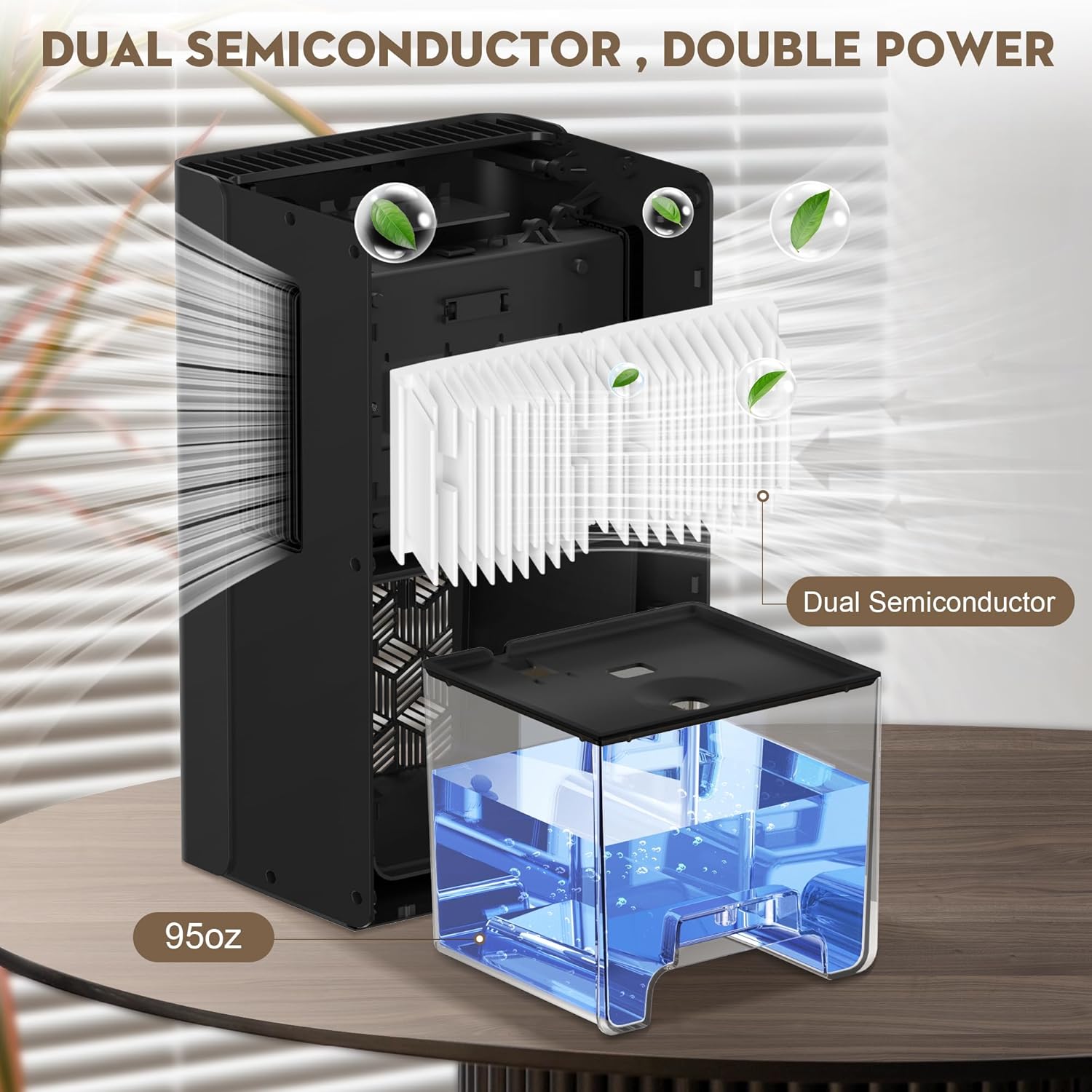
The ToLife TZ-C2 Dehumidifier is designed to efficiently reduce humidity in various indoor spaces, including homes, bedrooms, bathrooms, and basements. Utilizing semiconductor condensation technology, it operates quietly while effectively extracting moisture from the air. This unit features two operating modes, seven ambient LED light colors, and an automatic shut-off function for safety and convenience.
Key Features:
- High-Efficiency Dehumidification: Employs semiconductor condensation technology to maintain humidity levels below 45%.
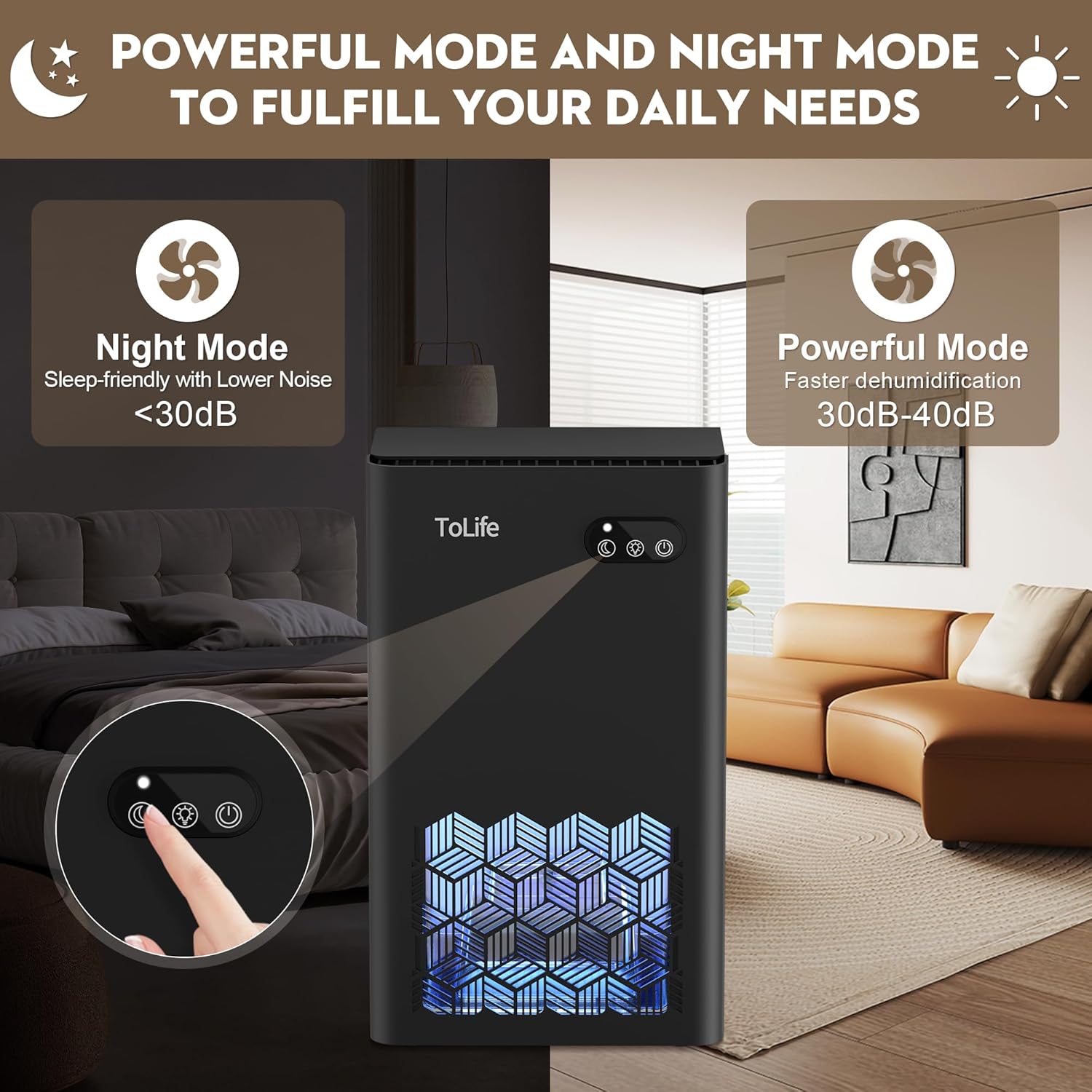
- Dual Operating Modes: Includes a powerful mode for rapid moisture removal and a low-speed sleep mode for quiet operation (below 30 dB).
- 7-Color LED Ambient Lighting: Offers a choice of seven colors, which can be set to cycle, locked to a preferred color, or turned off.
- Automatic Shut-Off: Automatically powers off when the 95 oz water tank is full or incorrectly placed, preventing overflow.
- Portable Design: Compact dimensions (8.27"L x 5.55"W x 13.78"H) and integrated handles allow for easy relocation.
- Coverage Area: Effective for spaces up to 1000 square feet.

2. Safety Instructions
Please read all safety instructions carefully before operating the dehumidifier to ensure safe and proper use. Keep this manual for future reference.
- Always place the dehumidifier on a stable, level surface to prevent tipping and water spillage.
- Ensure the power cord is not damaged, pinched, or placed under heavy objects. Do not operate with a damaged cord or plug.
- Do not block the air inlet or outlet. Maintain at least 8 inches (20 cm) of clear space around the unit for proper airflow.
- Unplug the unit before cleaning, performing maintenance, or when not in use for extended periods.
- Do not immerse the dehumidifier, power cord, or plug in water or other liquids.
- This appliance is not intended for use by persons (including children) with reduced physical, sensory, or mental capabilities, or lack of experience and knowledge, unless they have been given supervision or instruction concerning use of the appliance by a person responsible for their safety.
- Do not use the appliance in areas where flammable liquids or gases are stored.
- Operate the unit within the specified temperature range (Upper Temperature Rating: 109 Degrees Fahrenheit).
3. Package Contents
Verify that all items are present and in good condition upon unpacking.
- ToLife TZ-C2 Dehumidifier Unit
- Water Tank (95 oz capacity)
- Power Adapter
- User Manual (this document)
4. Product Components and Diagram
Familiarize yourself with the main parts of your ToLife dehumidifier.
- Control Panel (Power, Mode, Light buttons)
- Air Inlet (Rear/Side)
- Air Outlet (Top/Side)
- Water Tank
- Power Port
- Ambient LED Light Panel
5. Setup
5.1 Unpacking
- Carefully remove the dehumidifier and all accessories from the packaging.
- Remove any protective films or packaging materials from the unit.
- Inspect the unit for any signs of damage. If damaged, contact customer support.
5.2 Placement
- Place the dehumidifier on a firm, level surface.
- Ensure there is at least 8 inches (20 cm) of space around the air inlet and outlet for optimal performance.
- For best results, place the unit in the center of the room or area requiring dehumidification.
- Close doors and windows in the room where the dehumidifier is operating to maximize efficiency.
- Recommended for use in bedrooms, bathrooms, basements, closets, RVs, and other small to medium-sized rooms up to 1000 sq.ft.

5.3 Power Connection
- Insert the power adapter into the power port on the back of the dehumidifier.
- Plug the power adapter into a suitable electrical outlet (100-240V AC, 50/60Hz).
- The unit will enter standby mode, and the power indicator light may illuminate.
6. Operating Instructions
The control panel on top of the unit features three buttons: Power, Mode, and Light.
6.1 Power On/Off
- Press the Power button (
 ) to turn the dehumidifier on or off.
 - When powered on, the unit will typically start in Powerful Mode.
6.2 Mode Selection
- Press the Mode button (
 ) to switch between operating modes.
 - Powerful Mode: Provides faster dehumidification with a noise level between 30dB-40dB. Ideal for quickly reducing high humidity.
- Sleep Mode: Operates at a lower speed for quieter performance (below 30 dB). The ambient lights will turn off automatically in this mode. Suitable for use during sleep or in quiet environments.
6.3 Ambient LED Light Control
- Press the Light button (
 ) to cycle through the 7 available colors.
 - Pressing the button repeatedly will change the color. You can lock your favorite color.
- Press and hold the Light button to turn the ambient lights off.
- In Sleep Mode, the ambient lights are automatically turned off.

6.4 Water Tank Management and Auto Shut-Off
- The dehumidifier is equipped with a 95 oz (approximately 2.8 liter) water tank.
- When the water tank is full, the unit will automatically stop operating, and a red warning light will flash to indicate that the tank needs emptying.
- To empty the tank: Gently pull out the water tank from the front of the unit.
- Carefully pour out the collected water.
- Slide the empty water tank back into the unit until it clicks securely into place. Ensure it is correctly seated to resume operation.

7. Maintenance
Regular maintenance ensures optimal performance and extends the lifespan of your dehumidifier.
7.1 Cleaning the Water Tank
- Empty the water tank as described in Section 6.4.
- Rinse the water tank with clean water. For thorough cleaning, use a mild detergent and a soft brush, then rinse thoroughly.
- Do not use abrasive cleaners, gasoline, alcohol, or other corrosive solvents, as these may damage the tank.
- Dry the tank completely before reinserting it into the unit.
7.2 Cleaning the Dehumidifier Exterior
- Wipe the exterior of the unit with a soft, damp cloth.
- Do not use harsh chemicals or abrasive materials.
7.3 Cleaning Air Inlets and Outlets
- Periodically check the air inlets and outlets for dust or debris accumulation.
- Use a soft brush or a vacuum cleaner with a brush attachment to gently remove any blockages.
- Ensure clear airflow for efficient operation.
7.4 Storage
- If storing the dehumidifier for an extended period, ensure the water tank is empty and clean.
- Clean the exterior and air vents.
- Store the unit in a cool, dry place, away from direct sunlight and extreme temperatures.
8. Troubleshooting
Refer to the following table for common issues and their solutions. If the problem persists, contact customer support.
| Problem | Possible Cause | Solution |
|---|---|---|
| Dehumidifier not turning on. | No power supply; Power cord not properly connected; Unit damaged. | Check power outlet; Ensure power cord is securely plugged in; Contact customer support if unit is damaged. |
| Dehumidification effect not obvious. | Doors/windows not closed; Air inlet/outlet blocked; Ambient humidity below 42%RH; Room size too large. | Close doors and windows; Clear any obstructions from air vents; Dehumidifier is most effective above 42%RH; Consider using multiple units for larger spaces. |
| Dehumidifier stops working after a period. | Water tank is full; Water tank not correctly placed; Unit automatically stops after 48 hours of continuous operation (to prolong lifespan). | Empty and reinsert water tank correctly; This is normal operation, restart if needed. |
| Unusual noise during operation. | Unit not on a level surface; Obstruction in fan; Internal component issue. | Place on a stable, level surface; Check for and remove any obstructions; Contact customer support. |
| Water leakage. | Water tank not properly seated; Unit tilted. | Ensure water tank is securely in place; Place unit on a level surface. |
9. Specifications
| Specification | Detail |
|---|---|
| Brand | ToLife |
| Model Name | TZ-C2 |
| Floor Area Coverage | Up to 1000 Square Feet |
| Color | Black |
| Water Tank Capacity | 95 Fluid Ounces (approx. 2.8 Liters) |
| Product Dimensions (L x W x H) | 8.27" x 5.55" x 13.78" |
| Number of Speeds | 2 (Powerful, Sleep) |
| Wattage | 93 watts |
| Operation Mode | Comfort |
| Air Flow Capacity | 95 Liters Per Minute |
| Upper Temperature Rating | 109 Degrees Fahrenheit |
| Item Weight | 5.84 pounds |
| Special Features | Automatic Shutoff, Portable, Quiet Operation, Removable Tank, Sleep Mode, 7-Color LED Light |
10. Warranty and Customer Support
ToLife products are manufactured to high-quality standards. For any questions, technical assistance, or warranty claims, please contact ToLife customer support.
- Please refer to your purchase documentation for specific warranty terms and conditions.
- When contacting support, please have your model number (TZ-C2) and purchase date available.
- You can typically find contact information on the ToLife official website or through your retailer.
