
DOAO A3
DOAO Electric Shaver A3 User Manual
Model: A3
1. Product Overview
The DOAO Electric Shaver A3 is a versatile 2-in-1 grooming tool designed for men, offering both wet and dry shaving capabilities. It features advanced rotary blades and a flexible head system for a close and comfortable shave. This manual provides essential information for the proper setup, operation, and maintenance of your new electric shaver.

Image 1.1: The DOAO Electric Shaver A3, its packaging, and included accessories.
1.1 Key Features
- 3D Floating Heads: Ergonomically designed heads that glide smoothly over facial contours for a close shave.
- Powerful Dual-Track Blades: High-speed motor and blades cutting up to 56,000 times per minute for efficient shaving.
- Long-Lasting & Waterproof: Up to a month of use on a single charge and 100% waterproof for wet/dry use and easy cleaning.
- Pop-Up Trimmer: Integrated trimmer for precise grooming of sideburns, mustaches, and beard edges.
- Travel-Friendly: Compact design with included travel pouch for portability.
1.2 Package Contents
- DOAO Electric Shaver
- Protective Lid
- Cleaning Brush
- Travel Bag
- Power Cable (USB-C)
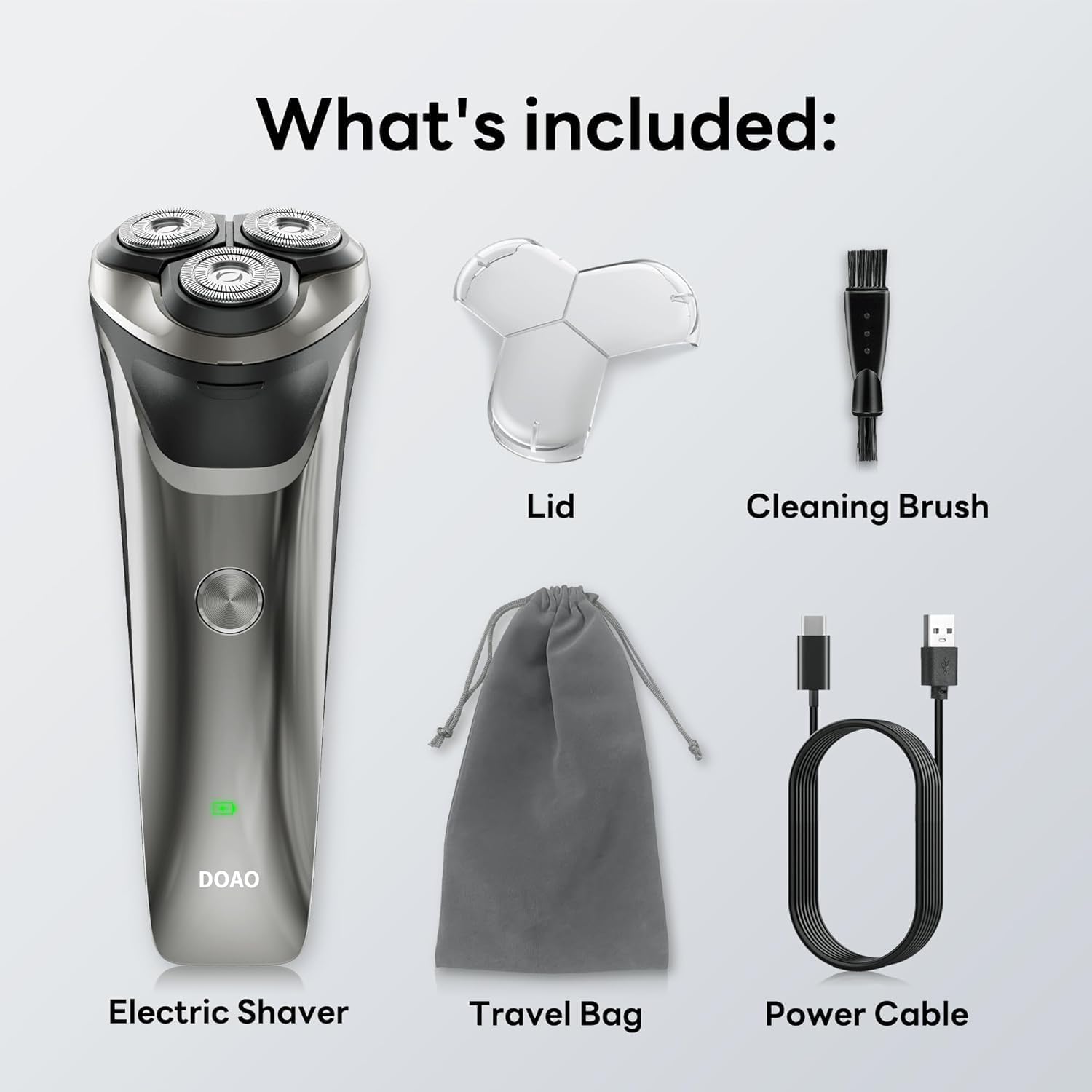
Image 1.2: All items included in the DOAO Electric Shaver package.
2. Setup
2.1 Charging the Shaver
Before first use, fully charge the shaver. The shaver is equipped with a Lithium-ion battery and charges via a USB-C cable.
- Connect the USB-C end of the power cable to the shaver's charging port.
- Connect the other end of the power cable to a compatible USB power adapter (not included) or a USB port.
- The battery indicator light on the shaver will illuminate to show charging status. A full charge takes approximately 1.5 hours.
- Once fully charged, the shaver provides up to 120 minutes of continuous use, or approximately 60 days of daily use.

Image 2.1: Charging the shaver and its battery performance.
2.2 Initial Cleaning
It is recommended to clean the shaver head before its first use to ensure optimal hygiene and performance. Refer to the "Maintenance" section for detailed cleaning instructions.
3. Operating Instructions
The DOAO Electric Shaver can be used for both wet and dry shaving. Choose the method that best suits your preference and skin type.
- Dry Shaving: For a quick shave, ensure your face is clean and dry.
- Wet Shaving: For a more comfortable shave, especially for sensitive skin, apply shaving foam or gel to your face before shaving. The shaver is 100% waterproof and safe for use in the shower.

Image 3.1: The shaver is suitable for both wet and dry use.
3.2 Using the 3D Floating Heads
The shaver's 3D floating heads are designed to adapt to the contours of your face, ensuring maximum skin contact and a smooth shave.
- Press the power button to turn on the shaver.
- Gently press the shaver against your skin and move it in small, circular motions.
- Allow the floating heads to adjust to the curves of your face and neck.
- For best results, shave against the direction of hair growth.

Image 3.2: The 3D flexing heads ensure a close shave by adapting to facial contours.
3.3 Using the Pop-Up Trimmer
The integrated pop-up trimmer is ideal for detailing and shaping your beard, mustache, or sideburns.
- Locate the pop-up trimmer switch on the back of the shaver.
- Slide the switch upwards to activate the trimmer.
- Use the trimmer to define lines and edges with precision.
- Slide the switch back down to retract the trimmer when finished.

Image 3.3: The pop-up trimmer allows for precise grooming.
3.4 Product Demonstration Video
Video 3.4: An official product video demonstrating the key features and usage of the DOAO Electric Shaver, including its flexible heads, powerful motor, waterproof design, long-lasting battery, and built-in trimmer.
4. Maintenance
4.1 Cleaning the Shaver
Regular cleaning ensures optimal performance and extends the lifespan of your shaver. The DOAO Electric Shaver features a 100% waterproof design for easy cleaning.
- After each use, turn off the shaver.
- Press the one-touch pop-up button to open the shaver head.
- Rinse the shaver head thoroughly under running water to remove hair clippings and residue.
- You may use the included cleaning brush to remove stubborn debris from the blades.
- Allow the shaver head to air dry completely before closing it and storing the shaver.

Image 4.1: Cleaning the shaver under running water.
4.2 Blade Replacement
For continued optimal performance, it is recommended to replace the shaver heads every 12-18 months, depending on usage. Replacement heads can be purchased from authorized DOAO retailers or the official website.
5. Troubleshooting
If you encounter any issues with your DOAO Electric Shaver, please refer to the following common solutions. If the problem persists, contact customer support.
5.1 Shaver Not Turning On
- Ensure the shaver is fully charged. Connect it to the power cable and allow it to charge for at least 1.5 hours.
- Check if the power button is being pressed firmly.
5.2 Poor Shaving Performance
- Ensure the shaver heads are clean and free of hair clippings. Rinse them thoroughly.
- The blades may be dull. Consider replacing the shaver heads if they have been in use for an extended period (e.g., over 12 months).
- Ensure the shaver is fully charged, as low battery can affect motor speed.
5.3 Excessive Noise During Operation
- Clean the shaver heads thoroughly. Hair or debris caught in the blades can cause increased noise.
- Ensure the shaver head is properly closed and secured.
6. Specifications
| Brand | DOAO |
| Model Number | A3 (Internal Model: 22) |
| Power Source | Battery Powered |
| Battery Type | 1 A Lithium-ion battery (included) |
| Charging Time | Approx. 1.5 hours |
| Continuous Use Time | Approx. 120 minutes |
| Waterproof Rating | 100% Waterproof (Wet & Dry Use) |
| Special Feature | Cordless, Pop-Up Trimmer, 3D Floating Heads |
| Recommended Use | Face |
| Package Dimensions | 6.89 x 3.46 x 3.15 inches |
| Item Weight | 9.88 ounces |
7. Warranty and Support
DOAO is committed to providing high-quality products and excellent customer service.
7.1 Product Warranty
Your DOAO Electric Shaver A3 comes with a lifetime warranty, ensuring peace of mind. This includes a 365-day warranty for initial issues, with refund or replacement options available.
7.2 Customer Support
For any questions, technical assistance, or warranty claims, please contact our responsive customer support team. We offer lifetime technical help and aim to provide support within 12 hours.
- Lifetime Technical Help
- Free Return & 100% Refund (within applicable return periods)
- 24/7 Fast Support (Contact us via Amazon for prompt assistance)
Please retain your proof of purchase for warranty purposes.
Related documentsA3

Ask a question about this manual
Ask about setup, troubleshooting, compatibility, parts, safety, or missing instructions. Manuals+ will review the question and use this page’s manual context to help answer it.