Introduction
The Hisense E6 Series brings the magic of the movies home. With Hi-QLED Color delivering vivid color, every scene feels richer, deeper, and more lifelike—whether you're watching a late-night drama or a weekend blockbuster. Dolby Vision HDR and Dolby Atmos combine stunning visuals with immersive sound, so you don’t just watch the story—you feel it. And when it’s time to switch to gameplay, Game Mode Plus with VRR keeps the action smooth.
What's in the Box
Verify that all components are present in the packaging:
- TV Unit
- Power Cable
- Remote Control
- TV Stand (2 pieces)
- Quick Setup Guide
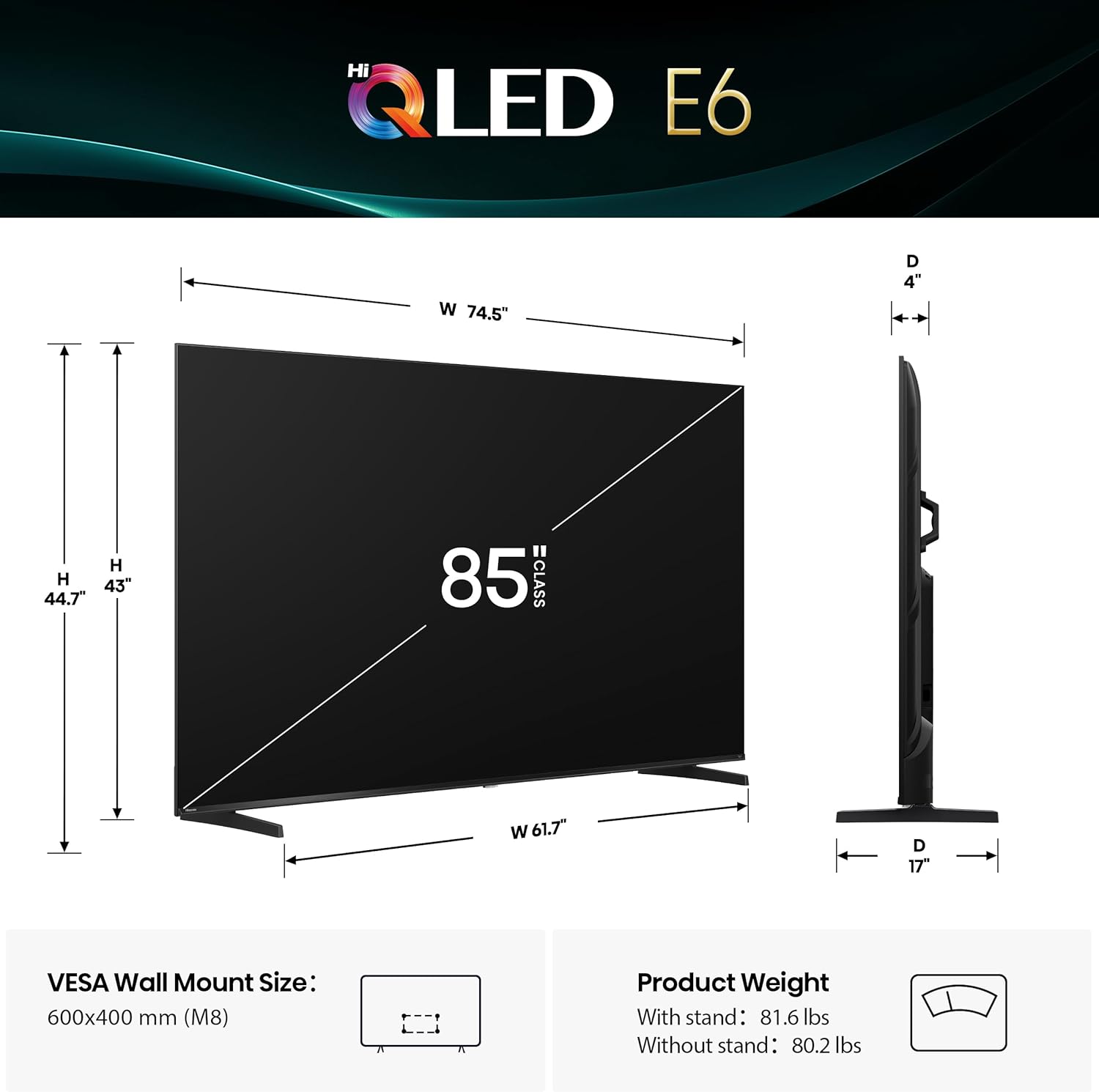
Image: Hisense 85E6QF TV with its stand components laid out.
Setup Instructions
- Unpack the TV: Carefully remove the TV from its packaging. It is recommended to have two people for this step due to the size and weight of the 85-inch model.
- Attach the Stand (Optional): If using the included stand, align the stand pieces with the designated slots on the bottom of the TV. Secure them with the provided screws. Ensure the stand is stable before proceeding.
- Mounting (Optional): If wall-mounting, follow the instructions provided with your wall-mount kit. Ensure the wall can support the TV's weight (approximately 80.2 lbs without stand).
- Connect Power: Plug the power cable into the TV's power input and then into a wall outlet.
- Connect Devices: Connect your external devices (e.g., cable box, gaming console, soundbar) to the appropriate HDMI or other input ports on the TV. Refer to the "Connectivity" section for port details.
- Initial Power On: Press the power button on the remote control or the TV itself. Follow the on-screen instructions to complete the initial setup, including network connection and Fire TV account login.

Image: Front view of the Hisense 85E6QF TV on its stand, ready for setup.
Key Features
- Hi-QLED Color: Experience vivid and authentic color reproduction. Every frame is rich, vibrant, and true-to-life, ensuring that every shade stands out in stunning clarity.

Image: The Hisense E6 Series TV showcasing its Hi-QLED Color technology with a vibrant floral image.
- Total HDR Solution: Distinguishes between colors on screen for ink-black blacks and brighter, more vibrant colors. Supports Dolby Vision, HDR 10+ Adaptive, HDR 10, and HLG.

Image: A scenic view of a waterfall on the Hisense E6 Series TV, highlighting the enhanced details and brightness provided by Total HDR Solution.
- Dolby Vision and Dolby Atmos: Combines HDR imaging with immersive sound for a realistic audio-visual experience.

Image: An overhead view of people watching the Hisense E6 Series TV, which displays a submarine scene, emphasizing the immersive experience of Dolby Vision and Dolby Atmos.
- Fire TV: Integrates live channels and apps on the home screen. Browse the Channel Guide in Live.

Image: The Fire TV home screen on the Hisense E6 Series TV, displaying various streaming applications and content recommendations.
- Press & Ask | Alexa: Use voice commands to find, launch, and control content, check scores, set timers, and more.

Image: A close-up of the Hisense remote control, highlighting the blue Alexa voice button for easy voice command access.
- Filmmaker Mode: Automatically adjusts settings to preserve the original cinematic intent of content.

Image: The Hisense E6 Series TV showing a dramatic ship scene, with the Filmmaker Mode logo indicating optimized picture settings.
- AI Light Sensor: Detects and adjusts screen brightness automatically based on ambient light to save electricity and optimize viewing.

Image: A split-screen view on the Hisense E6 Series TV illustrating how the AI Light Sensor adjusts screen brightness in response to ambient room light.
- AI 4K Upscaler: Uses machine learning to enhance low-resolution content to near 4K quality, improving sharpness and detail.

Image: A visual representation on the Hisense E6 Series TV demonstrating the AI 4K Upscaler's ability to improve the clarity and detail of lower-resolution images to near 4K quality.
- AI Smooth Motion with MEMC: Powered by MEMC and AI Noise Reduction, it creates an ultra-crisp, blur-free picture for fast-moving scenes.

Image: A dynamic sports scene on the Hisense E6 Series TV, illustrating the blur-free clarity provided by AI Smooth Motion with MEMC technology.
- WiFi 6: Offers faster speeds, greater stability, and improved capacity for seamless streaming and smart home use.
Operating Instructions
Remote Control Functions
The included remote control provides full functionality for your Hisense Fire TV. Ensure batteries are inserted correctly.
- Power Button: Turns the TV on or off.
- Navigation Pad (Circle): Use the directional buttons to navigate menus and select items. The center button confirms selections.
- Alexa Voice Button (Blue Microphone): Press and hold to activate Alexa voice commands. Speak clearly into the remote.
- Home Button: Returns to the Fire TV home screen.
- Back Button: Returns to the previous screen or menu.
- Volume Up/Down: Adjusts the TV volume.
- Mute Button: Mutes or unmutes the TV audio.
- App Shortcut Buttons: Dedicated buttons for popular streaming services (e.g., Netflix, Prime Video, Disney+).
Image: The remote control for the Hisense E6 Series TV, showing its layout and dedicated buttons.
Fire TV Interface
The Fire TV interface provides access to a wide range of streaming content, live TV, and smart features.
- Home Screen: Displays recommended content, recently used apps, and quick access to inputs.
- Live TV: Access integrated live channels and a channel guide.
- Apps: Download and manage your favorite streaming applications from the Appstore.
- Settings: Customize picture, sound, network, and device preferences.
Image: The Fire TV home screen on the Hisense E6 Series TV, displaying various streaming applications and content recommendations.
Connectivity
The Hisense E6 Series TV offers multiple connectivity options for your devices.
- HDMI Ports: Connect high-definition devices such as gaming consoles, Blu-ray players, and cable boxes.
- USB Ports: Connect USB flash drives for media playback or external storage.
- Ethernet (LAN) Port: For a wired internet connection.
- Digital Audio Out (Optical): For connecting to external audio systems.
- AV Input: For connecting older devices using composite cables (adapter may be required).
- Antenna/Cable Input: For connecting an antenna or cable TV.
- Wi-Fi 6: Built-in wireless connectivity for internet access.
- Bluetooth: For connecting wireless headphones, speakers, or other compatible devices.

Image: A detailed view of the input and output ports located on the back panel of the Hisense E6 Series TV.
Picture and Sound Settings
Picture Modes
Adjust picture settings to optimize viewing for different content types:
- Vivid: Enhances brightness and color saturation for a dynamic picture.
- Standard: Default settings suitable for most content.
- Movie: Optimizes picture for film content, often with warmer colors and reduced motion smoothing.
- Sport: Enhances motion clarity and brightness for sports broadcasts.
- Game: Reduces input lag for a more responsive gaming experience.
- Filmmaker Mode: Preserves the original cinematic intent of content.
- Dolby Vision Modes: Specific modes (IQ, Dark, Vivid, Standard, Sport, Game) for content encoded with Dolby Vision HDR.
Sound Modes
Select sound modes to match your audio preferences:
- Standard: General audio settings.
- Movie: Enhances dialogue and cinematic effects.
- Music: Optimizes audio for music playback.
- Sport: Enhances commentary and crowd noise.
- Custom: Allows manual adjustment of equalizer settings.
- Dolby Atmos: Provides immersive, multi-dimensional audio.
Gaming Features
The Hisense E6 Series is designed to enhance your gaming experience:
- Motion Rate 120: Provides smoother motion handling for fast-paced games.
- Game Mode Plus: Automatically optimizes settings for gaming, reducing input lag and improving responsiveness.
- Variable Refresh Rate (VRR): Synchronizes the TV's refresh rate with your console's frame rate to eliminate screen tearing and stuttering.
Maintenance
Proper maintenance ensures the longevity and optimal performance of your TV.
- Screen Cleaning: Gently wipe the screen with a soft, dry microfiber cloth. For stubborn smudges, lightly dampen the cloth with water or a TV-specific screen cleaner. Avoid harsh chemicals or abrasive materials.
- Cabinet Cleaning: Use a soft, dry cloth to clean the TV cabinet.
- Ventilation: Ensure the TV's ventilation openings are not blocked to prevent overheating.
- Power Cord: Regularly check the power cord for any damage.
Troubleshooting
If you encounter issues, try these common troubleshooting steps:
- No Power: Check if the power cord is securely plugged into both the TV and the wall outlet. Try a different outlet.
- No Picture/Sound: Ensure the correct input source is selected. Check all cable connections to external devices.
- Remote Not Working: Replace the batteries in the remote control. Ensure there are no obstructions between the remote and the TV.
- Network Connection Issues: Restart your router and modem. Check the Wi-Fi settings on the TV to ensure it's connected to the correct network.
- Picture Quality Issues: Adjust picture settings (brightness, contrast, color) or try different picture modes.
- Sound Quality Issues: Adjust sound settings or try different sound modes. If using external audio, check connections and settings on the external device.
For further assistance, refer to the full user manual or contact Hisense customer support.
Specifications
| Feature | Detail |
|---|---|
| Brand | Hisense |
| Model Number | 85E6QF |
| Screen Size | 85 Inches |
| Display Technology | LCD, LED, QLED, WCG-Wide Color Gamut |
| Resolution | 4K UHD (3840 x 2160) |
| Refresh Rate | 60 Hz (Motion Rate 120) |
| Special Features | Alexa Built-In, Dolby Vision Atmos, Game Mode Plus, HDR 10+, Works with Apple HomeKit / Airplay, AI Light Sensor, AI 4K Upscaler, AI Smooth Motion with MEMC, WiFi 6 |
| Connectivity Technology | Bluetooth, HDMI, USB, Wi-Fi, Ethernet |
| Product Dimensions | 4"D x 74.5"W x 43"H |
| Item Weight | 80.2 Pounds (without stand) |
| Voltage | 120 Volts |
| Wattage | 330 watts |
Warranty and Support
Your Hisense E6 Cinema Series TV comes with a manufacturer's warranty. Please refer to the warranty card included in your packaging for specific terms and conditions.
For technical support, service, or warranty claims, please visit the official Hisense support website or contact their customer service hotline. Contact information can typically be found in the Quick Setup Guide or on the Hisense website.


