
Introduction
This manual provides essential instructions for the safe assembly, operation, and maintenance of your UPPAbaby Cruz V3 Stroller. Please read all instructions carefully before use and retain this manual for future reference.
The UPPAbaby Cruz V3 Stroller is designed for versatile functionality, offering effortless maneuverability for children from birth up to 50 lbs. It features a full-size, lay-flat reversible seat, making it suitable for newborns and growing toddlers.

Image: The UPPAbaby Cruz V3 Stroller, showcasing its sleek design and Greyson (charcoal mélange) fabric with a carbon frame and saddle leather accents.
Setup Instructions
Before first use, ensure all components are present and undamaged. Refer to the 'What's Included' section below for a list of standard items.
Unpacking and Initial Assembly
- Carefully remove all components from the packaging.
- Unfold the stroller frame according to the quick-start guide included in the box. Ensure all locking mechanisms engage securely.
- Attach the wheels. Listen for a click to confirm they are properly secured.
- Install the toddler seat onto the frame. The seat can be installed facing forward or backward. Ensure it clicks into place.
- Attach the bumper bar to the toddler seat.
What's Included
Your UPPAbaby Cruz V3 Stroller package typically includes the following items:
- Stroller Frame
- Toddler Seat
- Bumper Bar
- Infant Insert (for carriage mode)
- Toddler Seat Bug Shield
- Toddler Seat Rain Shield

Image: A visual representation of the UPPAbaby Cruz V3 Stroller components, including the frame, toddler seat, bumper bar, infant insert, bug shield, and rain shield.
From Birth Ready Configuration (Carriage Mode)
The Cruz V3 can be configured for newborns using the integrated foot barrier and infant insert to create a carriage mode. This allows for a lay-flat position suitable from day one.

Image: The UPPAbaby Cruz V3 Stroller configured in carriage mode, demonstrating the lay-flat position suitable for newborns with the infant insert.
Operating Instructions
Toddler Seat Features
The toddler seat offers several adjustable features for your child's comfort and safety:
- UPF 50+ Canopy & Sun Shield: Extend the canopy for sun protection. The integrated sun shield provides additional coverage.
- Magnetic Buckle Harness System: Secure your child using the optimized infant-to-toddler tapered harness with a magnetic buckle. The no-rethread design simplifies adjustments.
- Enhanced FlexRide Suspension: The all-wheel suspension system provides a smooth ride across various surfaces.
- One-Hand Adjustable Leg Rest and Recline: Adjust the leg rest and seat recline with a single hand to find the most comfortable position for your child.

Image: An annotated image of the UPPAbaby Cruz V3 toddler seat, pointing out the UPF 50+ canopy, magnetic harness system, FlexRide Suspension, and one-hand adjustable leg rest and recline.
Folding the Stroller
The Cruz V3 features a one-step, ultra-compact fold. Ensure the handlebar is in its lowest position and the seat is aligned with the handle. Pull the fold triggers on each side, then fold the footrest down and the handlebar down separately. The stroller stands independently when folded.
Travel System Compatibility
The UPPAbaby Cruz V3 is designed to integrate seamlessly with UPPAbaby infant car seats (Mesa, Aria) without the need for additional adapters, creating a convenient travel system from birth.

Image: Illustrations demonstrating various configurations and accessories for the UPPAbaby Cruz V3, including single stroller mode, double with PiggyBack accessory, and bassinet accessory for use from birth.
Maintenance
Cleaning Instructions
- Fabric: Spot clean fabric with a mild detergent and cold water. Air dry completely. Do not bleach or machine wash.
- Frame: Wipe the frame with a soft, damp cloth. Dry thoroughly.
- Wheels: Regularly clean wheels and axles to remove dirt and debris. Lubricate moving parts with a silicone-based lubricant as needed.
Storage
Store the stroller in a dry, well-ventilated area away from direct sunlight and extreme temperatures. Ensure the stroller is clean and dry before storing.
Troubleshooting
- Stroller does not fold smoothly: Ensure the handlebar is in its lowest position and the seat is correctly aligned. Check for any obstructions in the folding mechanism.
- Wheels squeak or are stiff: Clean the wheels and axles thoroughly. Apply a small amount of silicone lubricant to the moving parts of the wheels.
- Harness is difficult to adjust: Ensure the harness straps are not twisted. The no-rethread harness system should allow for smooth adjustment once the magnetic buckle is disengaged.
- Stroller feels unstable: Verify that all locking mechanisms are fully engaged after unfolding. Ensure the wheels are securely attached.
If you encounter issues not covered here, please contact UPPAbaby customer support.
Specifications
| Feature | Detail |
|---|---|
| Brand | UPPAbaby |
| Model | Cruz V3 |
| Color | Greyson (Charcoal Mélange) |
| Frame Material | Carbon Steel |
| Age Range (Description) | Baby (Suitable from birth to 50 lbs) |
| Harness Type | 5 Point, Adjustable, Magnetic Buckle |
| Fabric Type | 100% Polyester |
| Seat Material | Fabric |
| Item Weight | 26.5 Pounds |
| Maximum Weight Recommendation | 50 Pounds |
| Unfolded Dimensions (L x W x H) | 37.5"L x 22.5"W x 41.8"H |
| Folded Dimensions (L x W x H) | 17"L x 22.5"W x 32.4"H |
| Car Seat Compatible | Yes |
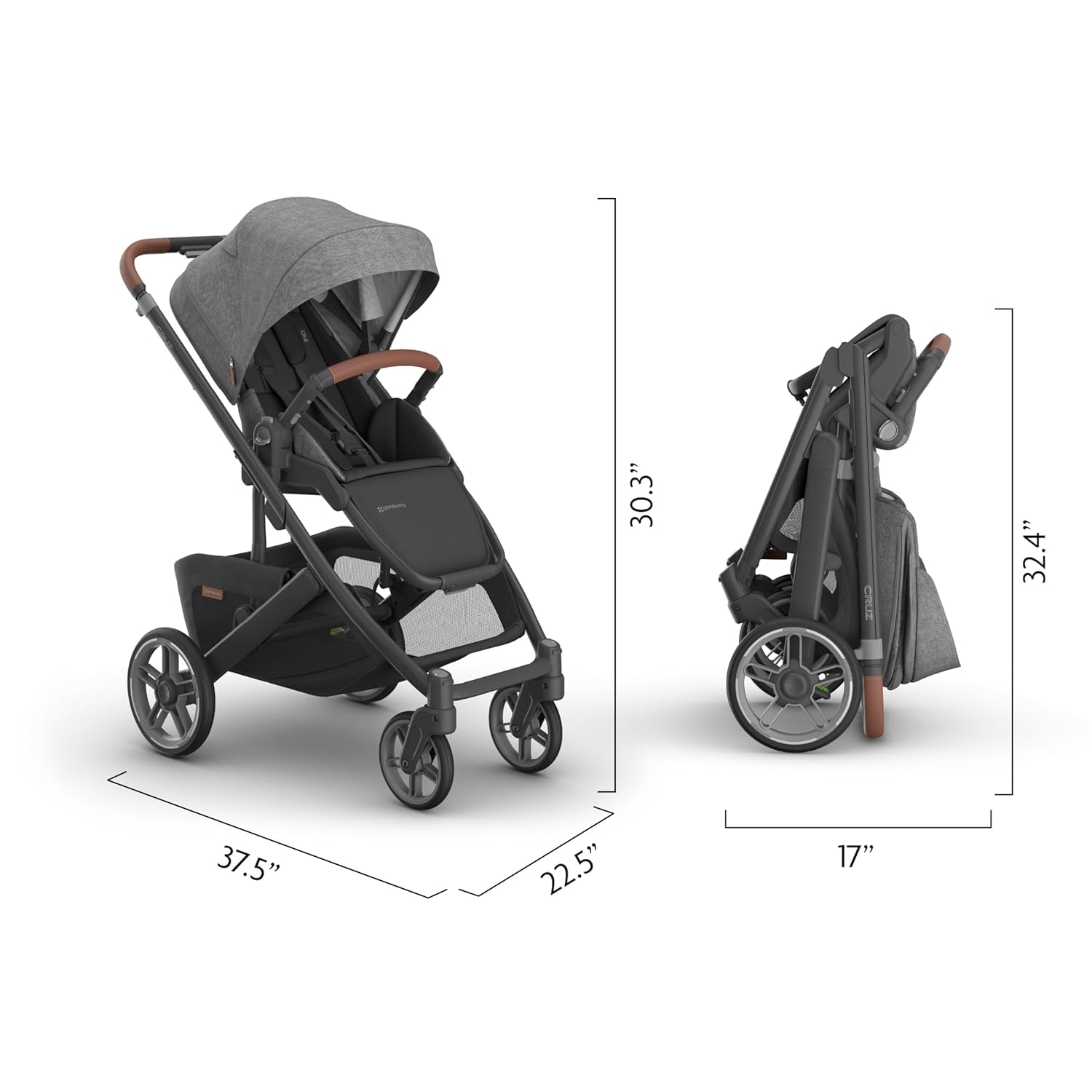
Image: A visual guide to the UPPAbaby Cruz V3 Stroller's dimensions when unfolded and folded, showing length, width, and height measurements.
Warranty and Support
Warranty Information
UPPAbaby products are covered by a limited warranty against manufacturing defects. For specific warranty terms, registration, and claims, please refer to the official UPPAbaby website or the warranty card included with your product.
Customer Support
For further assistance, spare parts, or to report any issues, please contact UPPAbaby customer service. You can find contact information and additional resources on the official UPPAbaby website: Visit the UPPAbaby Store


