
Introduction
The Beats Solo 4 are wireless Bluetooth on-ear headphones designed for a premium audio experience. They offer compatibility with both Apple and Android devices, extended battery life, and advanced audio features like Personalized Spatial Audio. This manual provides detailed instructions for setting up, operating, maintaining, and troubleshooting your Beats Solo 4 headphones.
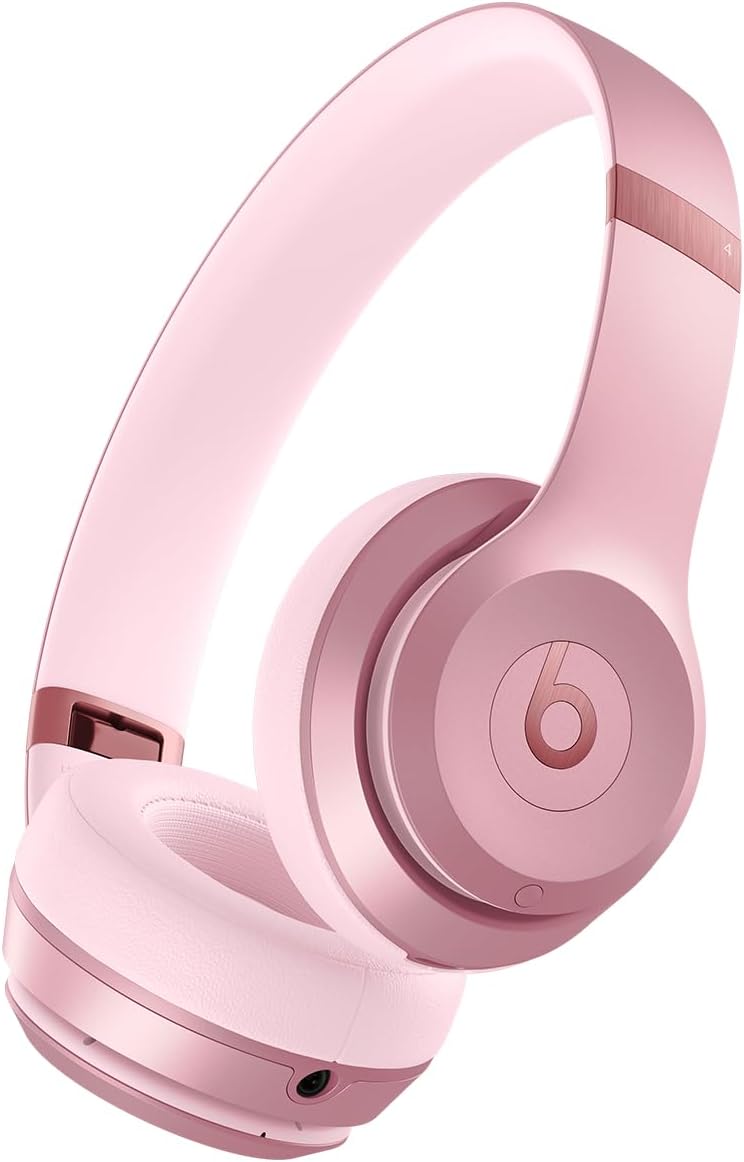
Image: Front view of the Beats Solo 4 Wireless Headphones in Metallic Pink.
What's in the Box
Upon unboxing your Beats Solo 4 headphones, verify that all the following components are included:
- Beats Solo 4 headphones
- Protective Case
- USB-C to USB-C cable for charging and audio (USB-C power adapter sold separately)
- 3.5 mm analog audio cable
- Quick Start Guide and Warranty Card
Setup
1. Charging Your Headphones
Before initial use, ensure your Beats Solo 4 headphones are fully charged. Connect the provided USB-C to USB-C cable to the charging port on the headphones and to a compatible USB-C power adapter (sold separately) or a USB-C port on a computer.
- A 10-minute charge provides up to 5 hours of playback (Fast Fuel feature).
- A full charge provides up to 50 hours of battery life.

Image: Visual representation of the 50-hour battery life capability of the Beats Solo 4 headphones.
2. Pairing with Your Device (Bluetooth)
The Beats Solo 4 headphones offer dual compatibility for one-touch pairing with both iOS and Android devices.
For iOS Devices (Apple):
- Ensure Bluetooth is enabled on your iOS device.
- Power on your Beats Solo 4 headphones.
- Hold your Beats Solo 4 near your unlocked iOS device.
- Follow the on-screen prompts to connect. This will automatically set up your headphones with all devices signed into your iCloud account.
For Android Devices:
- Download the Beats app from the Google Play Store (optional, but recommended for full features).
- Ensure Bluetooth is enabled on your Android device.
- Power on your Beats Solo 4 headphones.
- Open the Beats app or go to your device's Bluetooth settings.
- Select "Beats Solo 4" from the list of available devices to pair.

Image: The Beats Solo 4 headphones demonstrating Apple and Android compatibility with a smartphone.
Operating Your Headphones
Controls
The Beats Solo 4 headphones feature intuitive on-ear controls for managing audio playback, calls, and voice assistant interaction.
- Volume Control: Use the dedicated volume buttons on the ear cup.
- Playback Control: Press the 'b' button for play/pause, double-press for next track, triple-press for previous track.
- Call Management: Press the 'b' button to answer/end calls.
- Voice Assistant: Press and hold the 'b' button to activate Siri or your device's voice assistant.
Audio Features
Personalized Spatial Audio
Experience immersive sound with dynamic head tracking. This feature creates a theater-like experience, making it sound as if audio is coming from all around you. Compatible hardware and software are required. For Apple devices, an iPhone with TrueDepth camera is needed to create a personal profile for Spatial Audio.

Image: Visual representation of Personalized Spatial Audio, showing sound emanating from multiple directions around the headphones.
Lossless Audio
The Beats Solo 4 supports lossless audio playback via the included USB-C or 3.5 mm audio cables. This allows for high-fidelity audio transmission without compression, providing a richer listening experience. Compatible lossless content from supported apps/services is required.

Image: A user wearing Beats Solo 4 headphones, highlighting the lossless audio capability via wired connection.
Maintenance
Proper care and maintenance will extend the lifespan of your Beats Solo 4 headphones.
- Cleaning: Use a soft, dry, lint-free cloth to clean the headphones. Do not use abrasive cleaners or sprays.
- Storage: When not in use, store the headphones in the provided protective case to prevent scratches and damage. The foldable design makes them compact for storage.
- Moisture: The Beats Solo 4 are not water resistant. Avoid exposure to liquids, moisture, or extreme humidity.
- Temperature: Do not expose the headphones to extreme temperatures.

Image: The Beats Solo 4 headphones in their folded, compact state, suitable for storage in the protective case.
Troubleshooting
If you encounter issues with your Beats Solo 4 headphones, try the following solutions:
| Problem | Possible Solution |
|---|---|
| Headphones not powering on | Ensure the headphones are fully charged. Connect to a power source using the USB-C cable. |
| Cannot pair with device |
|
| No sound or low volume |
|
| Poor call quality |
|
| Headphones not responding | Perform a factory reset (refer to the Quick Start Guide for specific instructions on how to reset your Beats Solo 4). |
Specifications
| Feature | Detail |
|---|---|
| Model Name | Beats Solo 4 |
| Connectivity Technology | Wireless (Bluetooth Class 1) |
| Bluetooth Version | 5.3 |
| Bluetooth Range | Up to 100 Meters |
| Battery Life | Up to 50 Hours |
| Fast Fuel Charging | 10-minute charge provides up to 5 hours of playback |
| Audio Input | USB-C audio, 3.5 mm analog input |
| Ear Placement | On Ear |
| Weight | 7.65 oz / 217 g |
| Dimensions (L x W x H) | 6.9 in x 6.2 in x 2.7 in (17.7 cm x 15.8 cm x 6.8 cm) |
| Control Type | Volume Control, App Control, Button Control, Siri, Touch Control, Voice Control |
| Water Resistance Level | Not Water Resistant |
| Included Components | Headphones, Protective Case, USB-C to USB-C cable, 3.5 mm audio cable, Quick Start Guide, Warranty Card |
Warranty and Support
Your Beats Solo 4 headphones come with a limited warranty. Please refer to the included Warranty Card for detailed terms and conditions, including coverage period and how to make a claim.
For additional support, frequently asked questions, or to contact customer service, please visit the official Beats support website. You can also find more information on the Beats Store on Amazon.
Note: This manual does not include information on AppleCare+ protection plans, which are separate service agreements.
Important Safety Information
Read all safety information before using your Beats Solo 4 headphones to avoid injury. Do not listen at high volume levels for long periods to prevent hearing damage. Do not use headphones while driving or cycling, or in situations where inability to hear ambient sounds could be dangerous.


