
1. Introduction
Thank you for purchasing the WLIVE Modern TV Stand. This entertainment center is designed to accommodate TVs up to 65 inches and features adjustable open shelves and integrated LED lighting. This manual provides detailed instructions for assembly, operation, maintenance, and troubleshooting to ensure safe and optimal use of your product.

Image 1.1: The WLIVE Modern TV Stand, showcasing its design and storage capabilities.
2. Safety Information
- Always follow assembly instructions carefully.
- Ensure all hardware is securely tightened before use.
- Do not exceed the maximum weight capacity of 110 pounds (50 kg) for the top surface.
- Place the TV stand on a level and stable surface to prevent tipping.
- Keep small parts and hardware away from children to prevent choking hazards.
- Utilize the widened anti-tip base feature for enhanced stability.
3. Package Contents
Before beginning assembly, verify that all components are present and undamaged. The package includes:
- All necessary engineered wood panels.
- Hardware kit (screws, dowels, cam locks, etc.).
- LED light strip and remote control.
- Adjustable glass shelves.
- Assembly tools (e.g., Allen wrench).
Refer to the included parts list in your physical manual for specific component identification and quantities.
4. Assembly Instructions
Assembly of the WLIVE Modern TV Stand requires two people and typically takes 2-3 hours. All parts are labeled, and necessary tools are included. Follow the step-by-step diagrams provided in your physical assembly guide.
- Unpack and Identify: Carefully unpack all components and lay them out. Match each part to the corresponding label in the assembly guide.
- Assemble Frame: Begin by connecting the main frame pieces according to the diagrams. Ensure all connections are snug but do not overtighten until instructed.
- Install Shelves: Insert the fixed and adjustable shelves into their designated positions. The adjustable shelves offer three height levels for flexible storage.
- Attach Back Panels: Secure any back panels as indicated in the instructions.
- Install LED Lights: Carefully attach the LED light strip to the designated area, typically within the central compartment. Ensure the wiring is neatly routed.
- Final Tightening: Once all components are in place, systematically tighten all hardware to ensure structural integrity.
- Positioning: Move the assembled TV stand to its desired location.

Image 4.1: Illustration of the 3-level adjustable shelves for customized storage.
5. Operating Instructions
5.1. LED Lights Operation
The integrated RGB LED lights are controlled by the included RF wireless remote. Ensure the LED strip is properly connected to a power source.
- Power On/Off: Press the power button on the remote.
- Color Selection: Choose from 7 static hues (e.g., warm white, cool blue, red, green, blue, yellow, purple) using the dedicated color buttons.
- Dynamic Modes: Select from 22 dynamic modes (e.g., fade, flash, jump) using the 'MODE' buttons.
- Speed Adjustment: Adjust the speed of dynamic modes using the 'SPEED +' and 'SPEED -' buttons (10 speed levels).
- Brightness Adjustment: Adjust the brightness of static colors and dynamic modes using the 'BRIGHT +' and 'BRIGHT -' buttons (5 brightness levels).
- DEMO Mode: Press 'DEMO' to cycle through various light effects.

Image 5.1: Remote control and features of the multifunctional RGB LED lights.
5.2. Adjustable Shelves
The TV stand features six adjustable shelves, allowing you to customize storage space for various media devices, books, or decorative items. To adjust a shelf:
- Remove any items from the shelf.
- Carefully lift the shelf and remove the shelf pins from their current holes.
- Reinsert the shelf pins into the desired new holes, ensuring they are level.
- Place the shelf back onto the pins.
Video 5.1: An overview of the WLIVE TV Stand, demonstrating its features including adjustable shelves and LED lights.
6. Maintenance and Care
- Cleaning: The TV stand is made from waterproof wood, making it easy to clean. Wipe surfaces with a soft, damp cloth. Avoid harsh chemicals or abrasive cleaners.
- Spills: Promptly wipe up any spills to prevent damage to the finish.
- Inspection: Periodically check all hardware connections and tighten if necessary to maintain stability.
- Placement: Avoid placing the TV stand in direct sunlight or near heat sources to prevent material degradation.

Image 6.1: Key features of the TV stand, including its easy-to-clean surface.
7. Troubleshooting
- Assembly Difficulties: If you encounter issues during assembly, double-check the instruction diagrams and ensure all parts are correctly oriented. Verify that all hardware is present.
- Wobbling Stand: Ensure the TV stand is placed on a level surface. Check that all screws and fasteners are fully tightened.
- LED Lights Not Working: Verify that the LED strip is securely connected to the power adapter and that the adapter is plugged into a working outlet. Check the remote control battery.
- Remote Control Not Responding: Ensure there are no obstructions between the remote and the LED receiver. Replace the remote control battery if necessary.
8. Specifications
| Feature | Detail |
|---|---|
| Brand | WLIVE |
| Model Number | B0FHKC2S46 |
| Color | White |
| Product Dimensions (L x W x H) | 58.3'' x 15.4'' x 24.8'' (148cm x 39cm x 63cm) |
| Maximum TV Size Supported | Up to 65 inches |
| Weight Limit (Top Surface) | 110.01 Pounds (50 kg) |
| Material | Engineered Wood |
| Special Features | RGB LED lights, Adjustable Open Shelves |
| Number of Shelves | 9 (including 6 adjustable) |
| Assembly Required | Yes |
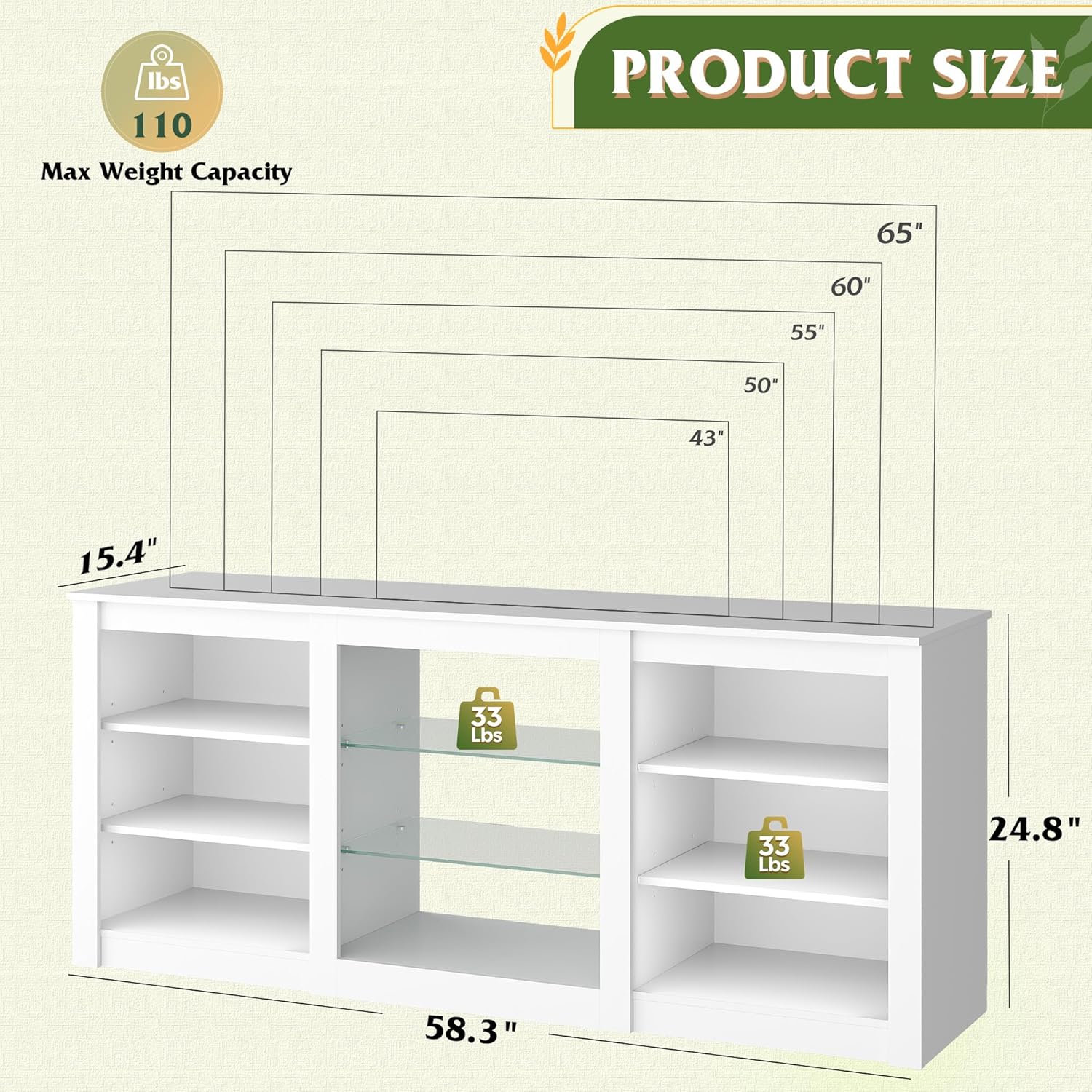
Image 8.1: Product dimensions and maximum weight capacity.
9. Warranty and Support
For any questions, concerns, or assistance with your WLIVE Modern TV Stand, please contact our customer support team. We are committed to providing support and ensuring your satisfaction.
Please refer to your purchase documentation or the seller's contact information for specific warranty details and support channels.


